
Scrolling/Mouse issue

GreenGiraffe

New member
Local time
7:42 PM
Messages
1
Hello, I don't know if it is possible to fix this, but I figured I would try since it's driving me insane.

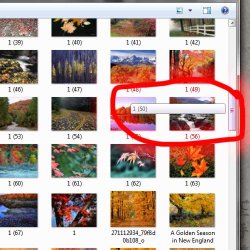
When I am scrolling through a folder with the scroll bar, a line of text pops up telling me what the icon names are, this covers the icons, and gets distracting. I have been googleing the issue for two hours now and cannot find a way to stop this. I have been through all of the mouse settings and nothing works.

Is there a way I can change it to where the text doesn't come up?
 

Attachments
  • Untitled-1.jpg
    Untitled-1.jpg
    43 KB · Views: 6

My Computer

OS
Windows 7
They're called tool tips... Here's a registry tweak:

   Warning
Do not edit the registry unless you've backed it up


Open regedit (Start > Search "regedit" > Enter)

Navigate to the following registry entry

[HKEY_CURRENT_USER\Software\Microsoft\Windows\CurrentVersion\Explorer\Advanced]

HKEY_CURRENT_USER
\Software
\Microsoft
\Windows
\CurrentVersion
\Explorer
\Advanced

Right Column > "ShowInfoTip"

Right click "ShowInfoTip", Modify, Change Value to 0 to disable.
 
Last edited:

My Computer

Computer Manufacturer/Model Number
Apple Macbook Pro (April 2009)
OS
W7 Ult. x64 | OS X
CPU
Intel Mobile Core 2 Duo 2.93Ghz [T9800 Penryn]
Motherboard
NVIDIA nForce 730i Rev. B1 [Mac-F2268EC8 (U2E1)]
Memory
4096MB Samsung DDR3 Dual Channel [PC3-8500F 1066Mhz]
Graphics Card(s)
NVIDIA GeForce 9600M GT 512MB [G96M Rev. C1]
Sound Card
SB X-Fi Surround 5.1 USB | Onboard Realtek (Disabled)
Monitor(s) Displays
Acer x223wbd 22" | Apple Anti-Glare 17" (Disabled)
Screen Resolution
{Current} 1440x900 {Acer} 1680x1050 {Apple} 1920x1200
Hard Drives
{Internal}
Seagate Momentus 320GB 2.5" 7200RPM [ST9320421AS]

{Externals}
LaCie 320GB USB 2.0 HDD [301284UR]
LaCie 750GB USB 2.0 FW400 eSATA HDD [301314U]
LaCie 1TB USB 2.0 HDD [301304UR]
PSU
Magsafe
Case
Aluminum/Unibody (MBP52)
Cooling
2 x 6000 RPM Fans
Keyboard
Logitech G-15v2 [PN 920-000379]
Mouse
Logitech G-9 [PN 910-000338]
Internet Speed
12Mbps/2.5Mbps w/ 24Mbps Speed Boost [Comcast]
Other Info
Logitech X-540 Speakers [PN 970223-0122]
Sennheiser PC-151 Headset
Hello, I don't know if it is possible to fix this, but I figured I would try since it's driving me insane.

When I am scrolling through a folder with the scroll bar, a line of text pops up telling me what the icon names are, this covers the icons, and gets distracting. I have been googleing the issue for two hours now and cannot find a way to stop this. I have been through all of the mouse settings and nothing works.

Is there a way I can change it to where the text doesn't come up?

Been all over looking for a user setting to turn that off... there doesn't appear to be one.

However... it doesn't do that when you use the mouse wheel and it doesn't do it if you use the arrows at the top and bottom of the scroll bar... It's only when you drag the scrollbar's rail that it pops up.

You might not be able to fix it... but at least you can avoid it.
 

My Computer

Computer Manufacturer/Model Number
Homebrew
OS
XP Pro SP3 X86 / Win7 Pro X86
CPU
Amd 64 x2 4200 (2.4ghz)
Motherboard
Asus M2N-MX SE Plus
Memory
Kingston DDR2 800 2gb
Graphics Card(s)
Nvidia GF-8400
Sound Card
Realtek on Motherboard
Monitor(s) Displays
Acer x-193bw
Screen Resolution
1440 x 900
Hard Drives
Western Digital 500g
PSU
350watt In-Win
Case
In-Win
Cooling
Air
Keyboard
yes
Mouse
yes
Internet Speed
5mpbs
Other Info
Also ASRock ION 330 as HTPC (on XP).
Acer Aspire as GP netbook (on XP).
Back
Top