Solved Seagate 13032 in win7 opens incorrectly

t3rmt3rm

New member
Local time
9:03 PM
Messages
4
Hi, the issue goes like this:
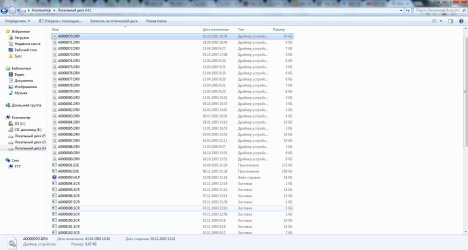
I've connected my Seagate HDD (FAT32) to my laptop via USB, Windows lets me access the HDD, but all i get is a list of .DRV files.
What should i do?
 

Attachments

  • wot.jpg
    wot.jpg
    114.7 KB · Views: 8

My Computer My Computer

Computer type
PC/Desktop
OS
Windows 7 Ultimate x64
Where did you get the HDD? Why is it formatted as FAT32?
As your files are from 1993 it seems that this is a HDD from a very old computer. In this case I would just do a default format.
 

My Computers My Computers

System One System Two

  • Computer type
    PC/Desktop
    Computer Manufacturer/Model Number
    custom build
    OS
    Windows 7 HP 64
    CPU
    i5 6600K - 800MHz to 4200MHz
    Motherboard
    GA-Z170-HD3P
    Memory
    4+4G GSkill DDR4 3000
    Graphics Card(s)
    IG - Intel 530
    Monitor(s) Displays
    Samsung 226BW
    Screen Resolution
    1680x1050
    Hard Drives
    (1) -1 SM951 – 128GB M.2 AHCI PCIe SSD drive for Windows 7 and Lubuntu
    (2) -1 WD SATA 3 - 1T for Data
    (3) -1 WD SATA 3 - 1T for backup
    PSU
    Thermaltake 450W TR2 gold
    Keyboard
    Old and good Chicony mechanical keyboard
    Mouse
    Logitech mX performance - 9 buttons (had to disable some)
    Internet Speed
    500Mb/s
    Browser
    Firefox 64
    Other Info
    TinyWall firewall
  • Computer type
    Laptop
    System Manufacturer/Model Number
    Asus Q550LF
    OS
    Windows 7 Pro
    CPU
    i7-4500U 800MHz to 3.0GHz
    Motherboard
    Asus Q550LF
    Memory
    (4+4)G DDR3 1600
    Graphics Card(s)
    IG intel 4400 + NVIDIA GeForce GT 745M
    Sound Card
    Realtek
    Monitor(s) Displays
    LG Display LP156WF4-SPH1
    Screen Resolution
    1920 x 1080
    Hard Drives
    BX500 120G SSD for Windows and programs +
    1T HDD for data
    Internet Speed
    500 Mb/s
    Browser
    Firefox
    Other Info
    TinyWall firewall
This is the HDD from my very first PC :). I've found it, and decided to dump data from it, i don't get, why it says 1993, it should be 1999, around that date. If I format it, the data would be lost, right? I would like to retrieve it, is there a way to do so?
 

My Computer My Computer

Computer type
PC/Desktop
OS
Windows 7 Ultimate x64
As you have access to the drive you can copy to any other drive.
*.Drv files are driver files. As they are very old I would say that they are useless.
I would also say that a 20 year old drive is also useless.
It's up to you, but I would discard it.
 

My Computers My Computers

System One System Two

  • Computer type
    PC/Desktop
    Computer Manufacturer/Model Number
    custom build
    OS
    Windows 7 HP 64
    CPU
    i5 6600K - 800MHz to 4200MHz
    Motherboard
    GA-Z170-HD3P
    Memory
    4+4G GSkill DDR4 3000
    Graphics Card(s)
    IG - Intel 530
    Monitor(s) Displays
    Samsung 226BW
    Screen Resolution
    1680x1050
    Hard Drives
    (1) -1 SM951 – 128GB M.2 AHCI PCIe SSD drive for Windows 7 and Lubuntu
    (2) -1 WD SATA 3 - 1T for Data
    (3) -1 WD SATA 3 - 1T for backup
    PSU
    Thermaltake 450W TR2 gold
    Keyboard
    Old and good Chicony mechanical keyboard
    Mouse
    Logitech mX performance - 9 buttons (had to disable some)
    Internet Speed
    500Mb/s
    Browser
    Firefox 64
    Other Info
    TinyWall firewall
  • Computer type
    Laptop
    System Manufacturer/Model Number
    Asus Q550LF
    OS
    Windows 7 Pro
    CPU
    i7-4500U 800MHz to 3.0GHz
    Motherboard
    Asus Q550LF
    Memory
    (4+4)G DDR3 1600
    Graphics Card(s)
    IG intel 4400 + NVIDIA GeForce GT 745M
    Sound Card
    Realtek
    Monitor(s) Displays
    LG Display LP156WF4-SPH1
    Screen Resolution
    1920 x 1080
    Hard Drives
    BX500 120G SSD for Windows and programs +
    1T HDD for data
    Internet Speed
    500 Mb/s
    Browser
    Firefox
    Other Info
    TinyWall firewall
The problem is that i don't see any other files, except these ones (drv, scr), but drive info shows, that it is almost full, so is there a way to get my old files? Not these drv scr and others?
 

My Computer My Computer

Computer type
PC/Desktop
OS
Windows 7 Ultimate x64
OK, let us see whether there are any recoverable files at all.

Download, install and run the free trial version of GetDadaBack - Oops - GetDataBack Simple and scan your FAT 32 drive. Check whether it shows your files. If it shows your files, we can recover the files using some other freeware.

https://www.runtime.org/data-recovery-software.htm Please read the documentation on that page too. It is very simple to use.
 

My Computer My Computer

OS
Windows 7 Home Premium 32 bit
jumanji, yes, that's what i needed! You've made my evening. Thank you! Now i am able to see and access my files!
 

My Computer My Computer

Computer type
PC/Desktop
OS
Windows 7 Ultimate x64
What did you do? I haven't done any magic.I am just wondering what happened?
 

My Computer My Computer

OS
Windows 7 Home Premium 32 bit
Back
Top