Solved Seagate 500gb External Harddrive, Windows 7 Will Not Read?

Custardx

New member
Local time
3:02 PM
Messages
3
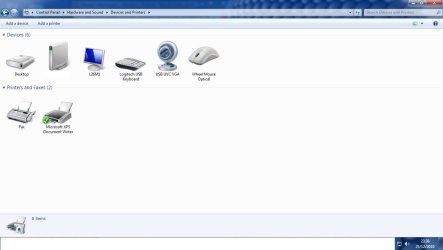
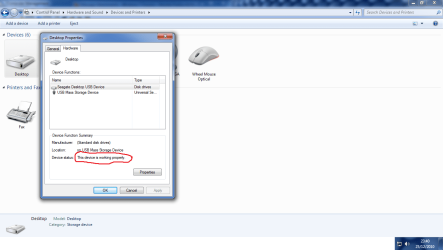
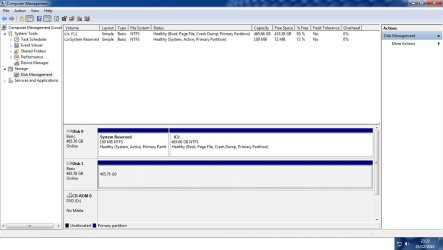
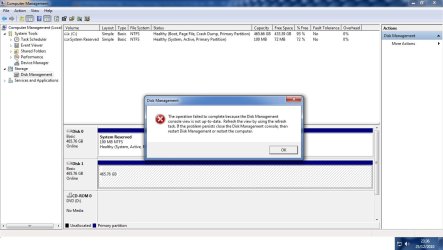
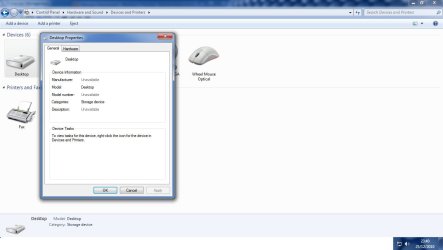
I have Windows 7 Home premium 64bit as I recently got a new computer, and to my surprise my seagate external Harddisk did not work. If I go to the Devices section, it is listed as Desktop. I have tried many things such as, rebooting, trying different USB, Assigning A letter to the Expansion and a few others as you will see in my screenshots. Just before I forget my old PC 32bit Windows 7 Ultimate, automatically detected my 500gb Seagate 500gb External Harddisk so I cannot see a problem with the Harddrive or with my computer as it is brand new and fully functioning. Below are my screenshots.
Untitled.jpg

Untitled1.jpg

Untitled2.jpg

Untitled4.png


As you can see from these images non of the fixes on the fourm, or on seagate work. If you have any fix please reply to this post as soon as you can, or on the other hand any questions. I will be very grateful.

Sorry about the thumbnail, Not sure what happened there.


Attachments
  • Untitled3.jpg
    Untitled3.jpg
    55.1 KB · Views: 139

My Computer My Computer

At a glance

Windows 7 Home Premium x64
OS
Windows 7 Home Premium x64
Cheers m8
SATA or PATA????

Have you tried to remove it from the ext case and installed it into the computer...to check if any of the electronics in the external case failed.
could be something with the usb drivers in the new machine... might try unstalling from the device manager the usb controllers, maybe the composite device then turn the machine off and let windows reinstall 'em again and see if the drive is picked up.
At this point I'd be asking just how important is the data on this HD... I'd even go so far as see if I could put the HD into a friends machine,(or old 'puter), to see if it could be picked up???? Be sure and copy the data off the HD while you continue to trouble shoot the drive.
From experience..... the only drive I've not been able to finally detect ended up as a dead drive, "bfh"
luk to you.....
 

My Computer My Computer

At a glance

windows 7 Ultimate x64Intel i5 OC to 3.4GHz @31 degrees C8gb Corsair XMS3 Dual Channel DDR3 RAMAMD Radeon HD 4890 CrossFire
Computer Manufacturer/Model Number
My own build
OS
windows 7 Ultimate x64
CPU
Intel i5 OC to 3.4GHz @31 degrees C
Motherboard
MSI P55-GD85 LGA 1156 Intel Motherboard
Memory
8gb Corsair XMS3 Dual Channel DDR3 RAM
Graphics Card(s)
AMD Radeon HD 4890 CrossFire
Sound Card
MSI on board w/Logitech Z-5500 speakers
Monitor(s) Displays
Two HP 2509s
Hard Drives
Two WD Black terabyte
and 1 Segate terabyte...and lotza loose external drives.
PSU
OCZ Z Series 850W Modular PSU
Case
coolerMaster 932 HAF
Cooling
Noctua NH-U12P SE2
Internet Speed
10mb down and 10mb up
Cheers m8
SATA or PATA????

Have you tried to remove it from the ext case and installed it into the computer...to check if any of the electronics in the external case failed.
could be something with the usb drivers in the new machine... might try unstalling from the device manager the usb controllers, maybe the composite device then turn the machine off and let windows reinstall 'em again and see if the drive is picked up.
At this point I'd be asking just how important is the data on this HD... I'd even go so far as see if I could put the HD into a friends machine,(or old 'puter), to see if it could be picked up???? Be sure and copy the data off the HD while you continue to trouble shoot the drive.
From experience..... the only drive I've not been able to finally detect ended up as a dead drive, "bfh"
luk to you.....
I think it is SATA as its a pretty new drive no older then 1 year old, and i cant be seeing the electrioncs failing as they worked just before i swapped the EHDD to my new computer. The data on the EHDD is moderately important theres a few things that i wouldn't like to lose but nothing life threatening. The EHDD can be picked up on any 3 machines in my house. Windows XP Professional, Windows 7 32bit PC, Windows 7 32bit laptop. There was no drivers for it as it was built it. They advertised it as "plug nd go".

How do I reset the USB drives?
 

My Computer My Computer

At a glance

Windows 7 Home Premium x64
OS
Windows 7 Home Premium x64
Resetting usb fixed thank you
 

My Computer My Computer

At a glance

Windows 7 Home Premium x64
OS
Windows 7 Home Premium x64
Back
Top