Search box in start menu does not work

iinlane

New member
Local time
9:21 PM
Messages
5
The search box in start menu stopped working. The search from windows explorer works fine, just the start menu does not work. All it returns is:
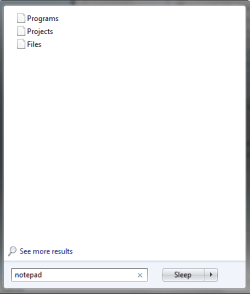
search result.png

When I click an item in result a security warning will appear:
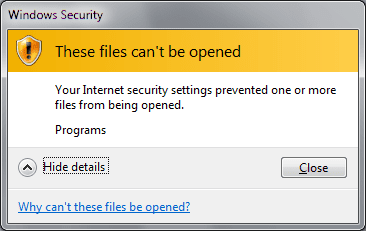
search result2.png

The "See more results" link in the results list works fine. It opens an explorer window with list of results.

Please help. It's driving me mad.
 

My Computer

OS
Windows 7
Does the search indexer have anything actually indexed?

Enzo.
 

My Computer

Computer Manufacturer/Model Number
Custom Build
OS
W7 RTM Ultimate x64
CPU
Intel Q8400 @ 2.66GHZ
Motherboard
Gigabyte GA-EG45M-UD2H
Memory
4GB DDR2-800
Graphics Card(s)
Gainward GTS 450 GLH 1GB Edition
Sound Card
Integrated 8 Channel
Monitor(s) Displays
AOC 23.6 Inch Widescreen LCD
Screen Resolution
1920x1080
Hard Drives
Seagate 500GB Internal
Western Digital 1TB Internal

Hitachi 1TB External
PSU
Apevia Java Power 500W
Case
Cooler Master HAF 922 Black
Cooling
Stock Intel CPU Fan
Keyboard
HP SK-2960 Multimedia Keyboard
Mouse
Logitech M350 Wireless Gaming Mouse
Internet Speed
1.5MB
Hi iinlane, welcome to the forums.

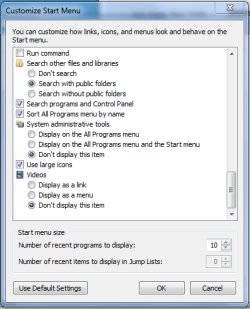
Check your start menu settings (right-click taskbar-Properties-Start Menu-Customize)
Capture.PNG

You might also want to reset your advanced internet settings (Control Panel-Network and Internet-Internet Settings-Advanced-Restore advanced setting).

Hope this helps :)


Jeff
 

My Computer

Computer Manufacturer/Model Number
Compaq Desktop
OS
Windows 7 Ultimate x64
CPU
AMD Sempron Dual Core
Memory
3GB
Graphics Card(s)
NVIDIA GeForce 6150SE nForce 430
Screen Resolution
1024x768
Hard Drives
150GB Sata
Hi iinlane, welcome to the forums.

Check your start menu settings (right-click taskbar-Properties-Start Menu-Customize)

You might also want to reset your advanced internet settings (Control Panel-Network and Internet-Internet Settings-Advanced-Restore advanced setting).

Hope this helps :)

Jeff

Thanks for great reply but it didn't help.
 

My Computer

OS
Windows 7
Just an idea, try rebuilding the index. Control panel\index options, click advanced then on rebuild.
 

My Computer

Computer Manufacturer/Model Number
POS
OS
OS3.5
CPU
celery
Motherboard
Good Question ...Unknown
Memory
memory never forgets
Graphics Card(s)
OB
Sound Card
OB
Monitor(s) Displays
HUGE
Screen Resolution
168000000x105000000
Hard Drives
full
PSU
OEM 65watt
Case
N/A
Cooling
OB
Keyboard
OB
Mouse
mouse
Internet Speed
1 Trillion MBps
Other Info
Still An Awesome Forum!
Just an idea, try rebuilding the index. Control panel\index options, click advanced then on rebuild.

Already tried. Did not help.

An interesting note. Under another user account the search box works normally. So the problem must be somewhere in user profile.
 

My Computer

OS
Windows 7
On another thread, it was brought to my attention that you can uninstall /reinstall the search service.

Try going to:

Control Panel\Programs\Programs and Features

and in the left plane, click on "Turn Windows features on or off". In the new window scroll down to "windows search", un-check it, click OK and restart.
After restart, go back and re-check "windows search", restart and see if that does the trick. Good Luck
View attachment 12096
 
Last edited:

My Computer

Computer Manufacturer/Model Number
POS
OS
OS3.5
CPU
celery
Motherboard
Good Question ...Unknown
Memory
memory never forgets
Graphics Card(s)
OB
Sound Card
OB
Monitor(s) Displays
HUGE
Screen Resolution
168000000x105000000
Hard Drives
full
PSU
OEM 65watt
Case
N/A
Cooling
OB
Keyboard
OB
Mouse
mouse
Internet Speed
1 Trillion MBps
Other Info
Still An Awesome Forum!
On another thread, it was brought to my attention that you can uninstall /reinstall the search service.

Try going to:

Control Panel\Programs\Programs and Features

and in the left plane, click on "Turn Windows features on or off". In the new window scroll down to "windows search", un-check it, click OK and restart.
After restart, go back and re-check "windows search", restart and see if that does the trick. Good Luck

Already tried that but it didn't help.

Just got it working, the problem was somewhere in registry. Butchered big part of current_user/software/microsoft/windows before I got it working. I localized the problem by renaming NTUSER.dat by using a temporary account; it helped.

It's the dirtiest fix I have ever done to my computer.:D

Br, Robert.
 

My Computer

OS
Windows 7
hahha, surprising, good you picked up on that, not sure how many average users would trek into the pits of the registry, good call ;)

Enzo.
 

My Computer

Computer Manufacturer/Model Number
Custom Build
OS
W7 RTM Ultimate x64
CPU
Intel Q8400 @ 2.66GHZ
Motherboard
Gigabyte GA-EG45M-UD2H
Memory
4GB DDR2-800
Graphics Card(s)
Gainward GTS 450 GLH 1GB Edition
Sound Card
Integrated 8 Channel
Monitor(s) Displays
AOC 23.6 Inch Widescreen LCD
Screen Resolution
1920x1080
Hard Drives
Seagate 500GB Internal
Western Digital 1TB Internal

Hitachi 1TB External
PSU
Apevia Java Power 500W
Case
Cooler Master HAF 922 Black
Cooling
Stock Intel CPU Fan
Keyboard
HP SK-2960 Multimedia Keyboard
Mouse
Logitech M350 Wireless Gaming Mouse
Internet Speed
1.5MB
Hey i too am having the same problems......... could you also tell me the fix...... :)..... i've been going mad for the solution.....the only workaround i had till now was creating a new account and copying your files and settings to it...... but that also didnt work well....... (this problem is only found with ppl who have upgraded from 70** to rc)......
 

My Computer

OS
Windows 7 RC
I'm currently facing the same problem. I use windows 7 and i have recently modify the registry to optimize the shutdown speed. And now the search box is not working. Can you please tell me exactly what you change in the registry for it to work?
 

My Computer

OS
Windows 7
Same problem

I am having the same problem, and would love to know what you did in the registry for a solution.
 

My Computer

OS
Windows 7
On another thread, it was brought to my attention that you can uninstall /reinstall the search service.

Try going to:

Control Panel\Programs\Programs and Features

and in the left plane, click on "Turn Windows features on or off". In the new window scroll down to "windows search", un-check it, click OK and restart.
After restart, go back and re-check "windows search", restart and see if that does the trick. Good Luck

Already tried that but it didn't help.

Just got it working, the problem was somewhere in registry. Butchered big part of current_user/software/microsoft/windows before I got it working. I localized the problem by renaming NTUSER.dat by using a temporary account; it helped.

It's the dirtiest fix I have ever done to my computer.:D

Br, Robert.

Can you, or anyone else explain this? I have this exact problem and have no idea what to do. I took some screenshots to show my problem but the shots in the OP here are exactly the same. Thanks
 

My Computer

Computer Manufacturer/Model Number
Custom Ankerrman Desktop + Asus Eee PC 1005HA
OS
Windows 7 32bit + Ubuntu (Dual Boot on both platforms)
CPU
AMD Athlon II x4 630 4x 2.80 GHz + Intel Atom N280 1.66 GHz
Memory
4GB desktop + 1 GB netbook
Graphics Card(s)
nVIDIA GEFORCE 9800GT 1GB
Monitor(s) Displays
Benq 21.5" HD TFT + 10.1" LED WSVGA 1024x600
Hard Drives
500GB desktop + 160GB netbook
1TB External
Internet Speed
Very very very slow
On another thread, it was brought to my attention that you can uninstall /reinstall the search service.

Try going to:

Control Panel\Programs\Programs and Features

and in the left plane, click on "Turn Windows features on or off". In the new window scroll down to "windows search", un-check it, click OK and restart.
After restart, go back and re-check "windows search", restart and see if that does the trick. Good Luck

Already tried that but it didn't help.

Just got it working, the problem was somewhere in registry. Butchered big part of current_user/software/microsoft/windows before I got it working. I localized the problem by renaming NTUSER.dat by using a temporary account; it helped.

It's the dirtiest fix I have ever done to my computer.:D

Br, Robert.

Can you, or anyone else explain this? I have this exact problem and have no idea what to do. I took some screenshots to show my problem but the shots in the OP here are exactly the same. Thanks

See if this helps you out,
http://www.sevenforums.com/tutorials/25343-windows-search-turn-off.html
 

My Computer

Computer type
PC/Desktop
Computer Manufacturer/Model Number
Self Built
OS
Win 10 Pro x64
CPU
Intel I5-2500K @3.3GHz
Motherboard
Asrock P67 Extreme4
Memory
16GB G.Skill Ripjaws X (4x4GB)
Graphics Card(s)
EVGA GeForce 750 Ti SC 2GB
Sound Card
ASUS Xonar DG 5.1 Channels 24-bit 96KHz PCI Interface Sound
Monitor(s) Displays
auria eq2367
Screen Resolution
1920 x 1080
Hard Drives
250GB Samsung 850 EVO SSD
1TB WD Blue
1TB Hitachi
PSU
SeaSonic X 650W 80 Plus Gold
Case
Corsair Obsidian 750D
Cooling
Corsair H60, Three 140mm case fans
Keyboard
Logitech Wireless Keyboard K520
Mouse
Logitech Wireless Mouse M310
Internet Speed
Wave Broadband ~ 100 dn 5 up
Antivirus
Windows Defender, Malwarebytes Premium
Browser
Edge, IE11, Chrome
Other Info
Laptop specs: HP g7-1365dx /
CPU: AMD A6-3420M APU with Radeon(tm) HD Graphics /
RAM: Crucial 8Gb (2x4Gb) /
SSD: Crucial M4-CT128M4SSD2 ATA Device/ FW 000F /
GFX: AMD Radeon HD 6520G /
OS: Windows 10 Pro x64
I tried that :S
No result, I'm attempting to look through the registry but I have no idea what to do in it. I also have another user account to test stuff out

I found this answer on a similar thread

I ran into the same problem over the past couple days with Windows 7 RC and finally dug into it some more.


1. End Task on EXPLORER.EXE from Task Manager.

2. Start the Registry Editor

3. Look for the following key:

HKEY_CURRENT_USER\Software\Microsoft\Windows\CurrentVersion\Explorer\FolderTypes\{EF87B4CB-F2CE-4785-8658-4CA6C63E38C6}\TopViews\{00000000-0000-0000-0000-000000000000}

4. Rename the key so it looks like the following:

HKEY_CURRENT_USER\Software\Microsoft\Windows\CurrentVersion\Explorer\FolderTypes\{EF87B4CB-F2CE-4785-8658-4CA6C63E38C6}\TopViews\{00000000-0000-0000-0000-000000000000}.BACKUP

5. From Task Manager click on File | New Task (Run) and type EXPLORER.EXE and hit return.

6. Now try your search from the Start Menu again.

If the above process doesn't work for you, you can always put it back the way it was by reversing the process above.
It worked for me :D
 
Last edited:

My Computer

Computer Manufacturer/Model Number
Custom Ankerrman Desktop + Asus Eee PC 1005HA
OS
Windows 7 32bit + Ubuntu (Dual Boot on both platforms)
CPU
AMD Athlon II x4 630 4x 2.80 GHz + Intel Atom N280 1.66 GHz
Memory
4GB desktop + 1 GB netbook
Graphics Card(s)
nVIDIA GEFORCE 9800GT 1GB
Monitor(s) Displays
Benq 21.5" HD TFT + 10.1" LED WSVGA 1024x600
Hard Drives
500GB desktop + 160GB netbook
1TB External
Internet Speed
Very very very slow
Glad to hear that jonny163,:)
And thanks for posting your solution, that will help someone else.
Derek
 

My Computer

Computer type
PC/Desktop
Computer Manufacturer/Model Number
Self Built
OS
Win 10 Pro x64
CPU
Intel I5-2500K @3.3GHz
Motherboard
Asrock P67 Extreme4
Memory
16GB G.Skill Ripjaws X (4x4GB)
Graphics Card(s)
EVGA GeForce 750 Ti SC 2GB
Sound Card
ASUS Xonar DG 5.1 Channels 24-bit 96KHz PCI Interface Sound
Monitor(s) Displays
auria eq2367
Screen Resolution
1920 x 1080
Hard Drives
250GB Samsung 850 EVO SSD
1TB WD Blue
1TB Hitachi
PSU
SeaSonic X 650W 80 Plus Gold
Case
Corsair Obsidian 750D
Cooling
Corsair H60, Three 140mm case fans
Keyboard
Logitech Wireless Keyboard K520
Mouse
Logitech Wireless Mouse M310
Internet Speed
Wave Broadband ~ 100 dn 5 up
Antivirus
Windows Defender, Malwarebytes Premium
Browser
Edge, IE11, Chrome
Other Info
Laptop specs: HP g7-1365dx /
CPU: AMD A6-3420M APU with Radeon(tm) HD Graphics /
RAM: Crucial 8Gb (2x4Gb) /
SSD: Crucial M4-CT128M4SSD2 ATA Device/ FW 000F /
GFX: AMD Radeon HD 6520G /
OS: Windows 10 Pro x64
jonny,
Have you any idea as to what you did to cause the problem in the first place?
 

My Computer

Computer Manufacturer/Model Number
Toshiba Satellite S875D-S7239 laptop
OS
MS Windows 7 Ultimate SP1 64-bit
CPU
AMD A10-4600M
Motherboard
AMD Pumori (Socket FT1)
Memory
6.00 GB Dual-Channel DDR3 @ 798MHz (11-11-12-28)
Graphics Card(s)
AMD Radeon HD 7660G
Sound Card
High Definition Audio Device
Monitor(s) Displays
Generic PnP Monitor (1600x900@60Hz)
Screen Resolution
1600x900@60Hz
Hard Drives
SSD 119GB Corsair CSSD-V128GB2 ATA Device
Keyboard
Standard PS/2 Keyboard
Mouse
HP Wireless Optical Mobile Mouse Model FHA-3410
Internet Speed
What the local pub, local coffee shop offers.
Other Info
Optical Drive:MATSHITA BD-CMB UJ160B ATA Device


Also have an Asus ha1002xp netbook with Win 7 Ultimate installed.
No idea what caused the problem, but then I has n00b skillz when it comes to computers :P

I was making some alterations to my netbook though, I don't think they are related.
I was installing wubi to see if I liked Ubuntu and it said that the metalink couldn't be downloaded and therefore neither could the .ISO
 

My Computer

Computer Manufacturer/Model Number
Custom Ankerrman Desktop + Asus Eee PC 1005HA
OS
Windows 7 32bit + Ubuntu (Dual Boot on both platforms)
CPU
AMD Athlon II x4 630 4x 2.80 GHz + Intel Atom N280 1.66 GHz
Memory
4GB desktop + 1 GB netbook
Graphics Card(s)
nVIDIA GEFORCE 9800GT 1GB
Monitor(s) Displays
Benq 21.5" HD TFT + 10.1" LED WSVGA 1024x600
Hard Drives
500GB desktop + 160GB netbook
1TB External
Internet Speed
Very very very slow
Back
Top