Search feature in Windows 7 = No Search!

zYx

Member of Mayday
Member
Local time
1:22 PM
Messages
71
Location
EU
Hi there,

I know it has been discussed, i followed everything I could, but maybe I missed something?

The search feature in windows 7 is not working properly. It seems like there is NO search functionality in windows 7 (x64).

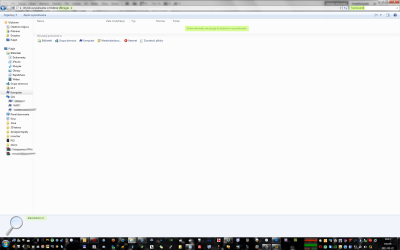
Just take a look at the screenshots below. The first screenshot on the left just shows few files with a Translucent word in it. On the screenshot there is 8 visible, but there is more of them inside this folder.

So I want to see all files with Translucent word only. You would expect that by typing Translucent word in the search box would do the job, but no, not this time.

I don't want to be rude, but since vista was released the search functionality is just pathetic. Yes I have all indexing options correct, I've been studying it since the day one, but then gave up until last night when I couldn't perform a very simple task. This is very frustrating.

I really don't understand this indexing thing. In win xp I could find EVERYTHING. Literally. I'm not bothered about searching through my emails and contents of the files since it doesn't even find what I want.

Summarizing, the search feature works, but only when it wants too. In this particular folder it doesn't and in my opinion "you're as strong as you weakest link" which in this case makes my search features useless. I know I can turn the indexing off, but that didn't fix it. I still can't find files with a "Translucent" word in it.

What's that about?

Or am I missing something?

Kind regards,

M.
 

Attachments

  • s1.png
    s1.png
    165.1 KB · Views: 83
  • s2.png
    s2.png
    87.3 KB · Views: 48
Last edited:

My Computer My Computer

At a glance

7 64-bit Ultimatei7-2600KCorsair 1866MHz 8GBSapphire ATI HD6990
Computer Manufacturer/Model Number
zYxMa Computers, Inc. iFixYourPC.co
OS
7 64-bit Ultimate
CPU
i7-2600K
Motherboard
ASUS Maximus IV Extreme
Memory
Corsair 1866MHz 8GB
Graphics Card(s)
Sapphire ATI HD6990
Sound Card
HD6990 + Yamaha RX-V467
Monitor(s) Displays
Dell U3011 | Panasonic P50VT20 3D
Screen Resolution
30" 2560x1600 | 50" 1920x1080 3D
Hard Drives
OCZ HybridDrive 1TB | OCZ Agility 3 - OS | Hitachi 250GB - Random | WD 1TB - Files | Seagate 1TB - Files | WD 1.5TB - Files
PSU
Cooler Master Silent Pro Gold 1200W
Case
CoolerMaster Cosmos-II
Cooling
Liquid-cooled
Keyboard
Logitech Illuminated K800 + diNovo Mini
Mouse
RAT9 + MX Revolution + MX Air + Harmony One
Internet Speed
18mbps
Other Info
iPhone 4S 64GB
Try to search with this pattern:
Code:
*translucent*
 

My Computer My Computer

At a glance

Windows 7 Ultimate x64 SP1 clean installAMD Athlon 64 X2 6400+4 GB2 x NVidia Geforce 8600 GTS
Computer Manufacturer/Model Number
Custom Build
OS
Windows 7 Ultimate x64 SP1 clean install
CPU
AMD Athlon 64 X2 6400+
Motherboard
Asus M2N-E SLI
Memory
4 GB
Graphics Card(s)
2 x NVidia Geforce 8600 GTS
Sound Card
Trust 5.1 Surround USB
Monitor(s) Displays
Benq FP931 19"
Screen Resolution
1280x1024@32bit@75MHz
Hard Drives
1 x Western Digital 500GB SATA (OS installation), 2 x Seagate 320GB SATA, 1 x Seagate 250GB IDE (in external USB box), 1 x TrekStor 750GB USB
PSU
650W
Keyboard
Logitech Cordless Desktop EX 100
Mouse
Logitech Cordless Optical
Internet Speed
8192 kbps / 640 kbps
Try this search and come back to tell if it worked: filename:*Translucent

The wild card * replaces any amount of preceding characters, so this search should find all files where string Translucent is included in filename. The wildcard is not needed at the end of the filename.

Kari
 

My Computer My Computer

At a glance

Windows 10 Pro x64 EN-GB1.6 GHz Intel Core i7-720QM Processor6 GBATI Mobility Radeon HD 5850 Graphics
Computer type
Laptop
Computer Manufacturer/Model Number
HP ENVY 17-1150eg
OS
Windows 10 Pro x64 EN-GB
CPU
1.6 GHz Intel Core i7-720QM Processor
Memory
6 GB
Graphics Card(s)
ATI Mobility Radeon HD 5850 Graphics
Sound Card
Beats sound system with integrated subwoofer
Monitor(s) Displays
17" laptop display, 22" LED and 32" Full HD TV through HDMI
Screen Resolution
1600*900 (1), 1920*1080 (2&3)
Hard Drives
Internal: 2 x 500 GB SATA Hard Disk Drive 7200 rpm
External: 2TB for backups, 3TB USB3 network drive for media
Cooling
As Envy runs a bit warm, I have it on a Cooler Master pad
Keyboard
Logitech diNovo Media Desktop Laser (bluetooth)
Mouse
Logitech Performance Mouse MX
Internet Speed
50/10 Mbps VDSL
Antivirus
Windows Defender 4.3.9431.0
Browser
Maxthon 3.5.2., IE11
*translucent* does work and shows me all the files I want, but since when I have to type stars in order to find something? Thank you.

filename:*Translucent doesn't work at all, but *translucent does as well. Thank you too.

So basically when I'm looking for a file anywhere on my system I need to type stars? Interesting, but why is that? Why can't windows be more clever? :>
 

My Computer My Computer

At a glance

7 64-bit Ultimatei7-2600KCorsair 1866MHz 8GBSapphire ATI HD6990
Computer Manufacturer/Model Number
zYxMa Computers, Inc. iFixYourPC.co
OS
7 64-bit Ultimate
CPU
i7-2600K
Motherboard
ASUS Maximus IV Extreme
Memory
Corsair 1866MHz 8GB
Graphics Card(s)
Sapphire ATI HD6990
Sound Card
HD6990 + Yamaha RX-V467
Monitor(s) Displays
Dell U3011 | Panasonic P50VT20 3D
Screen Resolution
30" 2560x1600 | 50" 1920x1080 3D
Hard Drives
OCZ HybridDrive 1TB | OCZ Agility 3 - OS | Hitachi 250GB - Random | WD 1TB - Files | Seagate 1TB - Files | WD 1.5TB - Files
PSU
Cooler Master Silent Pro Gold 1200W
Case
CoolerMaster Cosmos-II
Cooling
Liquid-cooled
Keyboard
Logitech Illuminated K800 + diNovo Mini
Mouse
RAT9 + MX Revolution + MX Air + Harmony One
Internet Speed
18mbps
Other Info
iPhone 4S 64GB
Star means "any character".
So to search for file thaat has "translucent" INSIDE the name you have to type "*translucent".
At the end there is no need for the star
 

My Computer My Computer

At a glance

Windows 7 Ultimate x64 SP1 clean installAMD Athlon 64 X2 6400+4 GB2 x NVidia Geforce 8600 GTS
Computer Manufacturer/Model Number
Custom Build
OS
Windows 7 Ultimate x64 SP1 clean install
CPU
AMD Athlon 64 X2 6400+
Motherboard
Asus M2N-E SLI
Memory
4 GB
Graphics Card(s)
2 x NVidia Geforce 8600 GTS
Sound Card
Trust 5.1 Surround USB
Monitor(s) Displays
Benq FP931 19"
Screen Resolution
1280x1024@32bit@75MHz
Hard Drives
1 x Western Digital 500GB SATA (OS installation), 2 x Seagate 320GB SATA, 1 x Seagate 250GB IDE (in external USB box), 1 x TrekStor 750GB USB
PSU
650W
Keyboard
Logitech Cordless Desktop EX 100
Mouse
Logitech Cordless Optical
Internet Speed
8192 kbps / 640 kbps
*translucent* does work and shows me all the files I want, but since when I have to type stars in order to find something? Thank you.

filename:*Translucent doesn't work at all, but *translucent does as well. Thank you too.

So basically when I'm looking for a file anywhere on my system I need to type stars? Interesting, but why is that? Why can't windows be more clever? :>
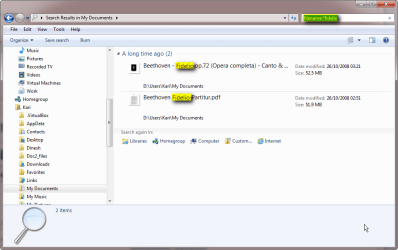
Strange. That is the correct syntax to search files where a certain string is included in the filename. There's a huge difference searching with or without filename parameter; if you search *Translucent it finds not only files containing that string in filename but also files where the string is to be found anywhere in the file contents. Searching filename:*Translucent restricts the search for filenames only.

Just two examples to show it works:

Filename_search_1.png
Filename_search_2.png

Here's an excellent tutorial about Windows Search: http://www.sevenforums.com/tutorials/129437-windows-search-configure-use.html

Kari
 

My Computer My Computer

At a glance

Windows 10 Pro x64 EN-GB1.6 GHz Intel Core i7-720QM Processor6 GBATI Mobility Radeon HD 5850 Graphics
Computer type
Laptop
Computer Manufacturer/Model Number
HP ENVY 17-1150eg
OS
Windows 10 Pro x64 EN-GB
CPU
1.6 GHz Intel Core i7-720QM Processor
Memory
6 GB
Graphics Card(s)
ATI Mobility Radeon HD 5850 Graphics
Sound Card
Beats sound system with integrated subwoofer
Monitor(s) Displays
17" laptop display, 22" LED and 32" Full HD TV through HDMI
Screen Resolution
1600*900 (1), 1920*1080 (2&3)
Hard Drives
Internal: 2 x 500 GB SATA Hard Disk Drive 7200 rpm
External: 2TB for backups, 3TB USB3 network drive for media
Cooling
As Envy runs a bit warm, I have it on a Cooler Master pad
Keyboard
Logitech diNovo Media Desktop Laser (bluetooth)
Mouse
Logitech Performance Mouse MX
Internet Speed
50/10 Mbps VDSL
Antivirus
Windows Defender 4.3.9431.0
Browser
Maxthon 3.5.2., IE11

My Computer My Computer

At a glance

Several, including Windows 7 x64 Ultimate
OS
Several, including Windows 7 x64 Ultimate
Do the search from the "F" drive not from "Computer". Where you do your search is important. Doing it from "Computer" will only ever use the Index.
 

My Computer My Computer

At a glance

Windows 10 Pro (x64)Intel Core i7-3930K (3.2GHz - 4.5GHz)4x Samsung 4GB PC3-12800 DDR3 (16GB 1600MHz)Nvidia Geforce GTX 690
Computer type
PC/Desktop
Computer Manufacturer/Model Number
Alienware Aurora ALX R4
OS
Windows 10 Pro (x64)
CPU
Intel Core i7-3930K (3.2GHz - 4.5GHz)
Motherboard
Alienware Aurora-R4 x79
Memory
4x Samsung 4GB PC3-12800 DDR3 (16GB 1600MHz)
Graphics Card(s)
Nvidia Geforce GTX 690
Sound Card
SteelSeries Siberia Elite
Monitor(s) Displays
Dell UltraSharp U3011
Screen Resolution
2560x1600
Hard Drives
Samsung 850 Pro 256 GB, Seagate 1TB Desktop Hybrid HDD, 2x Western Digital 4TB Green HDD
PSU
875W Some Dell PSU <.<
Case
Alienware Aurora ALX
Cooling
Custom Liquid Cooling (EK CPU & GPU blocks) dual EK 480RAD
Keyboard
Logitech G710+ Mechanical
Mouse
Logitech G700s
Internet Speed
Verizon Fios (50 mbps average)
Other Info
Server: Intel NUC D54250WYK: i5-4250U, 16GB, 256 GB mSATA, Windows Server 2012 R2
Try this;

Everything Search Engine

<http://www.voidtools.com/>

Regards....Mike Connor

I will ;)

*translucent* does work and shows me all the files I want, but since when I have to type stars in order to find something? Thank you.

filename:*Translucent doesn't work at all, but *translucent does as well. Thank you too.

So basically when I'm looking for a file anywhere on my system I need to type stars? Interesting, but why is that? Why can't windows be more clever? :>
Strange. That is the correct syntax to search files where a certain string is included in the filename. There's a huge difference searching with or without filename parameter; if you search *Translucent it finds not only files containing that string in filename but also files where the string is to be found anywhere in the file contents. Searching filename:*Translucent restricts the search for filenames only.

Just two examples to show it works:

View attachment 144896
View attachment 144895

Here's an excellent tutorial about Windows Search: http://www.sevenforums.com/tutorials/129437-windows-search-configure-use.html

Kari

It's very good, but I got stuck as soon as step 2) "Type "index" (without quotes) in the search box". In Vista, when I typed appdata in start-search, it took me to the right place. Here, in 7 I have to type %appdata%.. Now, typing "index" doesn't find what it supposed to find, Indexing Options. (I know how to open it manually ;p so I can skip this step, but you can see already that there is something not right). Windows can't even find its own programs :]
edit: That's weird, I typed Index, not index and it was found straight away. Does the case matters then? Edit: No, the case doesn't matter now, because now I can just type index with lower or upper case and it finds Indexing Options...

Star means "any character".
So to search for file thaat has "translucent" INSIDE the name you have to type "*translucent".
At the end there is no need for the star

I used stars before, on the net, on one particular search-site. I didn't even think of doing the same in windows

Do the search from the "F" drive not from "Computer". Where you do your search is important. Doing it from "Computer" will only ever use the Index.

I was in this location: F:\Downloads\Mobile\iPhone\Themes\_Black_test\_Black_test__\_Black_test.themes\UIImages, in UIImages folder, with 14 files containing Translucent in their names.

All is amazing, but I just can't understand, why, when typing in the search box word Translucent, windows is telling me Nothing Found..

I'll check the settings again.

Thanks :cool:

edit: I checked the settings and I have all drives selected and indexed. Over 480 000 files indexed.
So when a new file is created, say a simple text file with some text inside and it's saved somewhere on one of these drives. Is it indexed straight away..? ..or when?

I just used this program called Search Everything. It finds things instantly! Obviously only filenames, not their contents. I created a text file with a certain name and a certain content on one of my drives. I opened two new windows by pressing Win+F. In one of these windows search box, I typed the filename:file.ext or file.ext I've just created and in the other window I typed the content of the text file. The first window found the file, but it took at least 5 minutes and a massive CPU load! It's been 15 minutes now and the second window did not find anything yet, though it consumes 33% of my 4 core CPU!

edit: It took 45 minutes! to find the content of the text file saved on F:\Folder\Folder\file.txt. Really? What's so advanced about this? Terrible.
 
Last edited:

My Computer My Computer

At a glance

7 64-bit Ultimatei7-2600KCorsair 1866MHz 8GBSapphire ATI HD6990
Computer Manufacturer/Model Number
zYxMa Computers, Inc. iFixYourPC.co
OS
7 64-bit Ultimate
CPU
i7-2600K
Motherboard
ASUS Maximus IV Extreme
Memory
Corsair 1866MHz 8GB
Graphics Card(s)
Sapphire ATI HD6990
Sound Card
HD6990 + Yamaha RX-V467
Monitor(s) Displays
Dell U3011 | Panasonic P50VT20 3D
Screen Resolution
30" 2560x1600 | 50" 1920x1080 3D
Hard Drives
OCZ HybridDrive 1TB | OCZ Agility 3 - OS | Hitachi 250GB - Random | WD 1TB - Files | Seagate 1TB - Files | WD 1.5TB - Files
PSU
Cooler Master Silent Pro Gold 1200W
Case
CoolerMaster Cosmos-II
Cooling
Liquid-cooled
Keyboard
Logitech Illuminated K800 + diNovo Mini
Mouse
RAT9 + MX Revolution + MX Air + Harmony One
Internet Speed
18mbps
Other Info
iPhone 4S 64GB
Star means "any character".

Technically, "?" means any character. "*" means any number of characters. If you typed something like "?.*" in the box, you would get an assortment of files with names like a.out(Lol, UNIX reference) and z.image. Though why you would make files with one letter in the label is beyond me.
 

My Computer My Computer

At a glance

Windows 7 Home Premium x64
OS
Windows 7 Home Premium x64
Star means "any character".

Technically, "?" means any character. "*" means any number of characters. If you typed something like "?.*" in the box, you would get an assortment of files with names like a.out(Lol, UNIX reference) and z.image. Though why you would make files with one letter in the label is beyond me.
Because it can be used to replace ANY character ANYWHERE in a search string, and as opposite to "*" which as you said replaces any number of characters, with "?" you can narrow search to include only strings with certain length.

Examples:

  • Search filename:?ally.* > finds files with a 5 character long name characters 2 to 5 being ally, followed by a period and any number of characters
    • Finds Wally.doc, Sally.jpg but not Totally_awesome_video.avi or Rally_Monte_Carlo.pdf
  • Search filename:Image_?0.* > finds files with an 8 character long name characters 1 to 6 being Image_, followed by one character, 0 and any extension
    • Finds Image_10.png, Image_60.jpg but not Image_13.gif or Image_67.jpg
  • Search filename:*.??? > finds any file with a three character extension
    • Finds Pic.jpg or This_Pic_Is_from_Our_Holiday.bmp, but not Video.mpg4, Image.jpeg or Stupid_Filename.zz
  • Search filename:Memo_???_John.doc > finds any file with a 13 character long name characters 1 to 5 being Memo_ and characters 9 to 13 _John, with extension doc
    • Finds Memo_JAN_John.doc, Memo_123_John. doc, but not Memo_to_John.doc, Memo_from_John.doc or Memo_1234_John.doc

Kari
 

My Computer My Computer

At a glance

Windows 10 Pro x64 EN-GB1.6 GHz Intel Core i7-720QM Processor6 GBATI Mobility Radeon HD 5850 Graphics
Computer type
Laptop
Computer Manufacturer/Model Number
HP ENVY 17-1150eg
OS
Windows 10 Pro x64 EN-GB
CPU
1.6 GHz Intel Core i7-720QM Processor
Memory
6 GB
Graphics Card(s)
ATI Mobility Radeon HD 5850 Graphics
Sound Card
Beats sound system with integrated subwoofer
Monitor(s) Displays
17" laptop display, 22" LED and 32" Full HD TV through HDMI
Screen Resolution
1600*900 (1), 1920*1080 (2&3)
Hard Drives
Internal: 2 x 500 GB SATA Hard Disk Drive 7200 rpm
External: 2TB for backups, 3TB USB3 network drive for media
Cooling
As Envy runs a bit warm, I have it on a Cooler Master pad
Keyboard
Logitech diNovo Media Desktop Laser (bluetooth)
Mouse
Logitech Performance Mouse MX
Internet Speed
50/10 Mbps VDSL
Antivirus
Windows Defender 4.3.9431.0
Browser
Maxthon 3.5.2., IE11
Nice. It seems that I can find files with several different words in their names. Say UI*Bar*Translucent :D

Ok. So how about indexing brand spanking new files? I found a random text file on one of my drives, edited it and added "password" so I can presumably find it later ;]. Last attempt took over 45 minutes and consumed a lot of electricity :P due to heavy CPU load.

Let's see how long will this take this time.

Thanks for your tips :)
 

My Computer My Computer

At a glance

7 64-bit Ultimatei7-2600KCorsair 1866MHz 8GBSapphire ATI HD6990
Computer Manufacturer/Model Number
zYxMa Computers, Inc. iFixYourPC.co
OS
7 64-bit Ultimate
CPU
i7-2600K
Motherboard
ASUS Maximus IV Extreme
Memory
Corsair 1866MHz 8GB
Graphics Card(s)
Sapphire ATI HD6990
Sound Card
HD6990 + Yamaha RX-V467
Monitor(s) Displays
Dell U3011 | Panasonic P50VT20 3D
Screen Resolution
30" 2560x1600 | 50" 1920x1080 3D
Hard Drives
OCZ HybridDrive 1TB | OCZ Agility 3 - OS | Hitachi 250GB - Random | WD 1TB - Files | Seagate 1TB - Files | WD 1.5TB - Files
PSU
Cooler Master Silent Pro Gold 1200W
Case
CoolerMaster Cosmos-II
Cooling
Liquid-cooled
Keyboard
Logitech Illuminated K800 + diNovo Mini
Mouse
RAT9 + MX Revolution + MX Air + Harmony One
Internet Speed
18mbps
Other Info
iPhone 4S 64GB
Star means "any character".

Technically, "?" means any character. "*" means any number of characters. If you typed something like "?.*" in the box, you would get an assortment of files with names like a.out(Lol, UNIX reference) and z.image. Though why you would make files with one letter in the label is beyond me.
Please don't be fussy. I tried to give very very simple explanation...
 

My Computer My Computer

At a glance

Windows 7 Ultimate x64 SP1 clean installAMD Athlon 64 X2 6400+4 GB2 x NVidia Geforce 8600 GTS
Computer Manufacturer/Model Number
Custom Build
OS
Windows 7 Ultimate x64 SP1 clean install
CPU
AMD Athlon 64 X2 6400+
Motherboard
Asus M2N-E SLI
Memory
4 GB
Graphics Card(s)
2 x NVidia Geforce 8600 GTS
Sound Card
Trust 5.1 Surround USB
Monitor(s) Displays
Benq FP931 19"
Screen Resolution
1280x1024@32bit@75MHz
Hard Drives
1 x Western Digital 500GB SATA (OS installation), 2 x Seagate 320GB SATA, 1 x Seagate 250GB IDE (in external USB box), 1 x TrekStor 750GB USB
PSU
650W
Keyboard
Logitech Cordless Desktop EX 100
Mouse
Logitech Cordless Optical
Internet Speed
8192 kbps / 640 kbps
Hi,
have you tried pressing the Start Windows Key + F, it is a much better Search Function!
 

My Computer My Computer

At a glance

Win 7 64 bit Ultimate
OS
Win 7 64 bit Ultimate
Mouse
Logitech
Hi,
have you tried pressing the Start Windows Key + F, it is a much better Search Function!

Much better than what exactly? :sarc:
 

My Computer My Computer

At a glance

7 64-bit Ultimatei7-2600KCorsair 1866MHz 8GBSapphire ATI HD6990
Computer Manufacturer/Model Number
zYxMa Computers, Inc. iFixYourPC.co
OS
7 64-bit Ultimate
CPU
i7-2600K
Motherboard
ASUS Maximus IV Extreme
Memory
Corsair 1866MHz 8GB
Graphics Card(s)
Sapphire ATI HD6990
Sound Card
HD6990 + Yamaha RX-V467
Monitor(s) Displays
Dell U3011 | Panasonic P50VT20 3D
Screen Resolution
30" 2560x1600 | 50" 1920x1080 3D
Hard Drives
OCZ HybridDrive 1TB | OCZ Agility 3 - OS | Hitachi 250GB - Random | WD 1TB - Files | Seagate 1TB - Files | WD 1.5TB - Files
PSU
Cooler Master Silent Pro Gold 1200W
Case
CoolerMaster Cosmos-II
Cooling
Liquid-cooled
Keyboard
Logitech Illuminated K800 + diNovo Mini
Mouse
RAT9 + MX Revolution + MX Air + Harmony One
Internet Speed
18mbps
Other Info
iPhone 4S 64GB
Hi,
have you tried pressing the Start Windows Key + F, it is a much better Search Function!

Much better than what exactly? :sarc:

Then the Search Option in Start Option

The difference is that searching form Start menu > Search only searches indexed locations, whereas searching from any Explorer window's search field (inclusive Win + F window) also searches non-indexed locations.

Kari
 

My Computer My Computer

At a glance

Windows 10 Pro x64 EN-GB1.6 GHz Intel Core i7-720QM Processor6 GBATI Mobility Radeon HD 5850 Graphics
Computer type
Laptop
Computer Manufacturer/Model Number
HP ENVY 17-1150eg
OS
Windows 10 Pro x64 EN-GB
CPU
1.6 GHz Intel Core i7-720QM Processor
Memory
6 GB
Graphics Card(s)
ATI Mobility Radeon HD 5850 Graphics
Sound Card
Beats sound system with integrated subwoofer
Monitor(s) Displays
17" laptop display, 22" LED and 32" Full HD TV through HDMI
Screen Resolution
1600*900 (1), 1920*1080 (2&3)
Hard Drives
Internal: 2 x 500 GB SATA Hard Disk Drive 7200 rpm
External: 2TB for backups, 3TB USB3 network drive for media
Cooling
As Envy runs a bit warm, I have it on a Cooler Master pad
Keyboard
Logitech diNovo Media Desktop Laser (bluetooth)
Mouse
Logitech Performance Mouse MX
Internet Speed
50/10 Mbps VDSL
Antivirus
Windows Defender 4.3.9431.0
Browser
Maxthon 3.5.2., IE11
Back
Top