Solved Search for environment variables return no results

herman

New member
Local time
1:23 PM
Messages
4
Hi all,

I am a new guy on this forum.
I have been using this forum as a resource for many years (going back to the XP and Vista days), there are tons of useful information here.
In all these years I never had a question for which I had to register and ask it to you guys.
Until now......

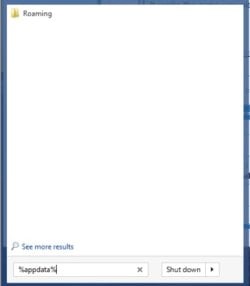
When I click the START button and type the name of an environment variable, e.g. %appdata%, there are no results displayed.
BUT when I just type %appdata% and hit RETURN the proper roaming folder is opened.
The same for %temp% and other environment variables.

It used to work on this machine, i.e. typing %appdata% showed the Roaming folder as a result.
It seems to me that the variables are still OK, they are just not displayed in the search window.

When I check the properties of the Roaming folder the Hidden flag is not set.

Any idea what can cause this?

Thanks for any pointers!
 

My Computer My Computer

Computer type
PC/Desktop
Computer Manufacturer/Model Number
Custom build
OS
Windows 7 Ultimate x64
CPU
i7-2600
Motherboard
MSI P67A-GD65
Memory
16 GB
Graphics Card(s)
NVIDIA GTX 460
Hard Drives
2 x SSD 128 GB
2 x WD Caviar Blue 1 TB in RAID 1
Antivirus
MSSE, Malwarebytes
Browser
FireFox

My Computer My Computer

Computer type
PC/Desktop
Computer Manufacturer/Model Number
Custom Built
OS
Windows 10 Pro
CPU
AMD Ryzen 5 2400G Processor with Radeon RX Vega 11 Graphics
Motherboard
ASRock X470 Master SLI/AC AM4 AMD Promontory X470 SATA 6Gb/s
Memory
G.SKILL Ripjaws V Series 16GB (2 x 8GB) 288-Pin DDR4 SDRAM D
Graphics Card(s)
2047MB NVIDIA GeForce GTX 1060 6GB (EVGA)
Sound Card
Motherboard Built in
Monitor(s) Displays
Acer R240HY bidx 23.8-Inch IPS HDMI DVI VGA (1920 x 1080) Wi
Screen Resolution
1920 x 1080
Hard Drives
1TB Sandisk SSD PLUS (Main drive)
500 GB Seagate 7200 RPM (Games)
500 GB Western Digital 7200 RPM (Virtual Machines)
PSU
CORSAIR TX Series TX650M 650W 80+ Gold Modular Power Supply
Case
CORSAIR CARBIDE SPEC-02 Mid-Tower Gaming Case, Red LED Fan
Cooling
220mm, two 120mm, and four 60mm fans
Keyboard
Wired Dell keyboard
Mouse
Wireless Logitech mouse
Internet Speed
250mb down, 30mb up
Antivirus
Panda Cloud Antivirus
Browser
Chrome-ish x64
Other Info
Your awesome for reading this.
I think it's a matter of substitution. Until %appdata% is substituted with it's definition, it's not going to be found. Pressing Enter tells the system to process the entry, it sees %appdata%, checks to see if it's a defined variable, substitutes the value C:\Users\<username>\AppData\Roaming then passes it on. Search is not involved at that point, I think Explorer.exe is which is why the folder is opened.
 

My Computer My Computer

Computer type
PC/Desktop
Computer Manufacturer/Model Number
Lenovo IdeaCenter 450
OS
Windows 10 Pro X64
CPU
Intel Quad Core i7-4770 @ 3.4Ghz
Memory
16.0GB PC3-12800 DDR3 SDRAM 1600 MHz
Graphics Card(s)
Intel Integrated HD Graphics
Sound Card
Realtek HD Audio
Monitor(s) Displays
HP 22" LCD
Screen Resolution
1680 x 1050
Hard Drives
250GB Samsung EVO SATA-3 SSD
2TB Seagate ST2000DM001 SATA-2
1.5TB Seagate ST3150041AS SATA
Keyboard
Dell USB
Mouse
Lenovo USB
Internet Speed
Cable via Road Runner 3MB Upload, 30MB Download
Antivirus
Windows Defender, MBAM Pro, MBAE
Browser
Seamonkey
Other Info
UEFI/GPT
PLDS DVD-RW DH16AERSH
Thanks for the suggestions so far.

Rebuilding the search index did not help.
Search locations and file types are OK, I could compare these to my laptop (same OS, same file structure) and the settings are similar.
On my laptop the environment variables do show up in the search results, so the problem is apparently not in the settings.
 

My Computer My Computer

Computer type
PC/Desktop
Computer Manufacturer/Model Number
Custom build
OS
Windows 7 Ultimate x64
CPU
i7-2600
Motherboard
MSI P67A-GD65
Memory
16 GB
Graphics Card(s)
NVIDIA GTX 460
Hard Drives
2 x SSD 128 GB
2 x WD Caviar Blue 1 TB in RAID 1
Antivirus
MSSE, Malwarebytes
Browser
FireFox
It works the same way with XP, Vista, 7 and 8.

Just discoverd this:

SearchW8.jpg

After you type the variable name, with % at each end, click on See more results right above it. That works as you want I think.
 

My Computer My Computer

Computer type
PC/Desktop
Computer Manufacturer/Model Number
Lenovo IdeaCenter 450
OS
Windows 10 Pro X64
CPU
Intel Quad Core i7-4770 @ 3.4Ghz
Memory
16.0GB PC3-12800 DDR3 SDRAM 1600 MHz
Graphics Card(s)
Intel Integrated HD Graphics
Sound Card
Realtek HD Audio
Monitor(s) Displays
HP 22" LCD
Screen Resolution
1680 x 1050
Hard Drives
250GB Samsung EVO SATA-3 SSD
2TB Seagate ST2000DM001 SATA-2
1.5TB Seagate ST3150041AS SATA
Keyboard
Dell USB
Mouse
Lenovo USB
Internet Speed
Cable via Road Runner 3MB Upload, 30MB Download
Antivirus
Windows Defender, MBAM Pro, MBAE
Browser
Seamonkey
Other Info
UEFI/GPT
PLDS DVD-RW DH16AERSH
I wish it did ....

The image you show is what I used to get on my main PC (and what I still get on my laptop) when I just type %appdata%. The search produces results with every character you type and when the trailing % is typed it should show just the environment variable.
There should be no need to click "See more results".
Anyway, on my main PC the search results blank when I type the final %.
When I click "See more results" it returns a number of files which contain appdata in the body, but the Roaming folder is not returned.
 

My Computer My Computer

Computer type
PC/Desktop
Computer Manufacturer/Model Number
Custom build
OS
Windows 7 Ultimate x64
CPU
i7-2600
Motherboard
MSI P67A-GD65
Memory
16 GB
Graphics Card(s)
NVIDIA GTX 460
Hard Drives
2 x SSD 128 GB
2 x WD Caviar Blue 1 TB in RAID 1
Antivirus
MSSE, Malwarebytes
Browser
FireFox
Not returned for me either. I don't understand why it returns what it returns.

I never use the search in Win 8 or previously in win 7. I install Everything search and use that to find files or folders. It doesn't know anything about variables but is very good at finding files or folders.
 

My Computer My Computer

Computer type
PC/Desktop
Computer Manufacturer/Model Number
Lenovo IdeaCenter 450
OS
Windows 10 Pro X64
CPU
Intel Quad Core i7-4770 @ 3.4Ghz
Memory
16.0GB PC3-12800 DDR3 SDRAM 1600 MHz
Graphics Card(s)
Intel Integrated HD Graphics
Sound Card
Realtek HD Audio
Monitor(s) Displays
HP 22" LCD
Screen Resolution
1680 x 1050
Hard Drives
250GB Samsung EVO SATA-3 SSD
2TB Seagate ST2000DM001 SATA-2
1.5TB Seagate ST3150041AS SATA
Keyboard
Dell USB
Mouse
Lenovo USB
Internet Speed
Cable via Road Runner 3MB Upload, 30MB Download
Antivirus
Windows Defender, MBAM Pro, MBAE
Browser
Seamonkey
Other Info
UEFI/GPT
PLDS DVD-RW DH16AERSH
You wouldn't have deleted your Libraries by any chance?

Regardless of the answer, try rebuilding the Libraries
Right click on Libraries on an Explorer navigation pane
Select..... Restore default Libraries.​
 

My Computer My Computer

Computer type
Laptop
Computer Manufacturer/Model Number
HP Pavilion dv6-6c10us
OS
x64 (6.3.9600) Win8.1 Pro & soon dual boot x64 (6.1.7601) Win7_SP1 HomePrem
CPU
AMD A6-3420M APU with Radeon(tm) HD Graphics
Motherboard
Hewlett-Packard 1805
Memory
6.00 GB
Graphics Card(s)
AMD Radeon(TM) HD 6520G
Sound Card
(1) AMD High Definition Audio Device (2) IDT High Definiti
Monitor(s) Displays
HP W2072a 20" LCD (1600 x 900) @ 60 Hz
Screen Resolution
1366 x 768 x 32 bits (4294967296 colors) @ 60 Hz
Hard Drives
ST640LM0 00 HM641JI SATA Disk Device
Keyboard
Logitech k520 wireless KB
Mouse
Logitech m320 wireless mouse (bundled with KB)
Internet Speed
15/5 | 54 MB Wireless 'n'
Antivirus
Realtime: Defender or Avast | On-demand: Malwarebytes, ESET
Browser
IE 11 on Win8, IE 10 on win 7
Other Info
Media: [Gimp, Audacity, VLC] || Comm: [WEmail 2012, Skype] || Productivity: [OpenOffice,| Textpad] || Utils: [Sysinternals, cCleaner, Speccy, Defraggler]
I use this %appdata% and get roaming. Tick on it and I get all kinds of programs.
 

My Computer My Computer

Computer type
PC/Desktop
Computer Manufacturer/Model Number
Home made Desktop
OS
Windows 10 Pro. 64/ version 1709 Windows 7 Pro/64
CPU
Intel i7-6800K @ 4.3
Motherboard
ASUS X-99 Deluxe II
Memory
Corsair Platinum 16 gig @2400
Graphics Card(s)
EVGA GTX 1070 OC
Monitor(s) Displays
Asus 27" LED LCD/VE278Q
Screen Resolution
1920-1080 or 1280-720 HDMI
Hard Drives
INTEL SSD 730-240 Gb Sata 3.0/
PSU
EVGA Platium 1200W
Case
Phanteks Luxe Tempered Glass 8 fans/ one radiator
Cooling
XSPC/ Water Cooled CPU
Keyboard
Das 4 Professional
Mouse
Logitech M705/MX Anywhere 2-S
Internet Speed
100 mbits
Antivirus
Microsoft Security Essentials/ Malwarebytes Premium 3.0/ SAS
Browser
I.E. 11 default/Firefox/ ISP Time Warner Cable/Spectrum
Other Info
LG BluRay Burner/
Sound system-KLipsch-THX/
Icy Dock ssd Hot Swap bays.
Is this only on the Start menu search or does it also behave that way if you type %appdata% in an Explorer search box?


Could you post a screen shot of the search properties
Explorer > Organize (upper left) > Folders and Search > Search tab

I think there's also a search properties tab on the taskbar, but I'm currently taking Win8 for a test drive and can't refresh my memory. If there is and it's different - please post both.

Bill
.
 

My Computer My Computer

Computer type
Laptop
Computer Manufacturer/Model Number
HP Pavilion dv6-6c10us
OS
x64 (6.3.9600) Win8.1 Pro & soon dual boot x64 (6.1.7601) Win7_SP1 HomePrem
CPU
AMD A6-3420M APU with Radeon(tm) HD Graphics
Motherboard
Hewlett-Packard 1805
Memory
6.00 GB
Graphics Card(s)
AMD Radeon(TM) HD 6520G
Sound Card
(1) AMD High Definition Audio Device (2) IDT High Definiti
Monitor(s) Displays
HP W2072a 20" LCD (1600 x 900) @ 60 Hz
Screen Resolution
1366 x 768 x 32 bits (4294967296 colors) @ 60 Hz
Hard Drives
ST640LM0 00 HM641JI SATA Disk Device
Keyboard
Logitech k520 wireless KB
Mouse
Logitech m320 wireless mouse (bundled with KB)
Internet Speed
15/5 | 54 MB Wireless 'n'
Antivirus
Realtime: Defender or Avast | On-demand: Malwarebytes, ESET
Browser
IE 11 on Win8, IE 10 on win 7
Other Info
Media: [Gimp, Audacity, VLC] || Comm: [WEmail 2012, Skype] || Productivity: [OpenOffice,| Textpad] || Utils: [Sysinternals, cCleaner, Speccy, Defraggler]
Here's is mine for Explorer (in Windows 7):

Explorer Search Opts.jpg

I don't see one for Task bar.

I just realized I was posting results before from my Win 8 system, not Win 7. Just tried entering %appdata% in Start of Win 7 and pressing Enter and C:\Users\myaccount\AppData\Roaming does open.
 

My Computer My Computer

Computer type
PC/Desktop
Computer Manufacturer/Model Number
Lenovo IdeaCenter 450
OS
Windows 10 Pro X64
CPU
Intel Quad Core i7-4770 @ 3.4Ghz
Memory
16.0GB PC3-12800 DDR3 SDRAM 1600 MHz
Graphics Card(s)
Intel Integrated HD Graphics
Sound Card
Realtek HD Audio
Monitor(s) Displays
HP 22" LCD
Screen Resolution
1680 x 1050
Hard Drives
250GB Samsung EVO SATA-3 SSD
2TB Seagate ST2000DM001 SATA-2
1.5TB Seagate ST3150041AS SATA
Keyboard
Dell USB
Mouse
Lenovo USB
Internet Speed
Cable via Road Runner 3MB Upload, 30MB Download
Antivirus
Windows Defender, MBAM Pro, MBAE
Browser
Seamonkey
Other Info
UEFI/GPT
PLDS DVD-RW DH16AERSH
Thank you Ztruker

I thought there were search options on the taskbar property page, perhaps not a tab. I dunno, my eyes and memory seem to get worse by the minute.

@herman, we didn't forget about you. :)
Could you update this side of your monitor with what you have already tried?

rebuild the index - did not change the issue
review the index locations - seem ok

Libraries deleted???? Restored ????

Screen shot of Search properties ????

Ztuker's screen shot provides another option. You could do it in an Explorer window, but I suggest it be done in Control Panel (CPL).

Open Folder options in CPL,
go to the Search tab,
make note of the current settings (screen cap?)
and then hit Restore Defaults.

In another thread, after chasing all of the possible causes, I suggested a System File Checker (SFC) scan - there were errors, but not related to Search, when they were fixed so was search.

Please follow the instructions in
OPTION TWO of http://www.sevenforums.com/tutorials/1538-sfc-scannow-command-system-file-checker.html
you can skip step 3: verifyonly. You should run the SCANNOW option

Attach the entire CBS.log to a post if errors are reported. Copy it to your desktop first - you might have to zip it, depending on the size.

Thanks
 

My Computer My Computer

Computer type
Laptop
Computer Manufacturer/Model Number
HP Pavilion dv6-6c10us
OS
x64 (6.3.9600) Win8.1 Pro & soon dual boot x64 (6.1.7601) Win7_SP1 HomePrem
CPU
AMD A6-3420M APU with Radeon(tm) HD Graphics
Motherboard
Hewlett-Packard 1805
Memory
6.00 GB
Graphics Card(s)
AMD Radeon(TM) HD 6520G
Sound Card
(1) AMD High Definition Audio Device (2) IDT High Definiti
Monitor(s) Displays
HP W2072a 20" LCD (1600 x 900) @ 60 Hz
Screen Resolution
1366 x 768 x 32 bits (4294967296 colors) @ 60 Hz
Hard Drives
ST640LM0 00 HM641JI SATA Disk Device
Keyboard
Logitech k520 wireless KB
Mouse
Logitech m320 wireless mouse (bundled with KB)
Internet Speed
15/5 | 54 MB Wireless 'n'
Antivirus
Realtime: Defender or Avast | On-demand: Malwarebytes, ESET
Browser
IE 11 on Win8, IE 10 on win 7
Other Info
Media: [Gimp, Audacity, VLC] || Comm: [WEmail 2012, Skype] || Productivity: [OpenOffice,| Textpad] || Utils: [Sysinternals, cCleaner, Speccy, Defraggler]
Hi guys,

Thank you for all your suggestions.
I am really glad you are thinking with me! :grouphug:

To answer your questions:
I did not change anything to my libraries in the last half year or so.
I did a sfc.exe /scannow way before I hollered here for help, sorry, forgot to mention that....:o
Search options are exactly identical to the search options on my laptop.
Yet the search results for environment variables are different between the two machines.

Anyway, I have got it "fixed" over the weekend, although I still don't know what caused this.
To repair things I let Windows roll back to an earlier point in time using a system restore point.
Following that %appdata% in the start menu search functions again as it should.
Now if I only knew what happened under the hood......

Thanks again for all your help and suggestions.
 

My Computer My Computer

Computer type
PC/Desktop
Computer Manufacturer/Model Number
Custom build
OS
Windows 7 Ultimate x64
CPU
i7-2600
Motherboard
MSI P67A-GD65
Memory
16 GB
Graphics Card(s)
NVIDIA GTX 460
Hard Drives
2 x SSD 128 GB
2 x WD Caviar Blue 1 TB in RAID 1
Antivirus
MSSE, Malwarebytes
Browser
FireFox
.....
Anyway, I have got it "fixed" over the weekend, although I still don't know what caused this.
To repair things I let Windows roll back to an earlier point in time using a system restore point.
Following that %appdata% in the start menu search functions again as it should.
Now if I only knew what happened under the hood......

Thanks again for all your help and suggestions.

Brilliant! I always forget a Restore Point roll back as an early solution. I need to correct that because it is by far the easiest.

Glad you thought of it :) and I'm glad it resolved the issue. Sometimes, I just take the solution found as a win and don't worry about the underlying cause.

If you get the chance, can you mark this thread as solved. That might make it faster for another member to resolve a similar issue on their machine.

Thanks,

Bill
.
 

My Computer My Computer

Computer type
Laptop
Computer Manufacturer/Model Number
HP Pavilion dv6-6c10us
OS
x64 (6.3.9600) Win8.1 Pro & soon dual boot x64 (6.1.7601) Win7_SP1 HomePrem
CPU
AMD A6-3420M APU with Radeon(tm) HD Graphics
Motherboard
Hewlett-Packard 1805
Memory
6.00 GB
Graphics Card(s)
AMD Radeon(TM) HD 6520G
Sound Card
(1) AMD High Definition Audio Device (2) IDT High Definiti
Monitor(s) Displays
HP W2072a 20" LCD (1600 x 900) @ 60 Hz
Screen Resolution
1366 x 768 x 32 bits (4294967296 colors) @ 60 Hz
Hard Drives
ST640LM0 00 HM641JI SATA Disk Device
Keyboard
Logitech k520 wireless KB
Mouse
Logitech m320 wireless mouse (bundled with KB)
Internet Speed
15/5 | 54 MB Wireless 'n'
Antivirus
Realtime: Defender or Avast | On-demand: Malwarebytes, ESET
Browser
IE 11 on Win8, IE 10 on win 7
Other Info
Media: [Gimp, Audacity, VLC] || Comm: [WEmail 2012, Skype] || Productivity: [OpenOffice,| Textpad] || Utils: [Sysinternals, cCleaner, Speccy, Defraggler]
Back
Top