
Search not showing all results

gogreen

New member
Power User
VIP
Local time
8:16 AM
Messages
544
Location
Florida
The other day I was looking for a .dll file in the Firefox plugin folder. I entered the file name correctly in Start > Search programs and files, but the file and location did not appear. I navigated to the file manually in Windows Explorer anyway. I already had ticked Windows Explorer > Tools > Folder Options > View > Show hidden files, folders and drives, and I had unticked Hide Protected Operating System Files. So why didn't the file appear on my search? Thanks.
 

My Computer My Computer

At a glance

Windows 10 Home, 64 bitIntel Core i7 860 @ 2.8 GHz8.0 GB Dual Channel DDR3 @ 664 MHz (9-9-9-24)nVidia GeForce GTS 240
Computer type
PC/Desktop
Computer Manufacturer/Model Number
Dell Studio XPS 8100, Dell XPS 15 laptop
OS
Windows 10 Home, 64 bit
CPU
Intel Core i7 860 @ 2.8 GHz
Motherboard
Dell 0T568R (CPU1)
Memory
8.0 GB Dual Channel DDR3 @ 664 MHz (9-9-9-24)
Graphics Card(s)
nVidia GeForce GTS 240
Sound Card
M-Audio Delta Audiophile 2496
Monitor(s) Displays
Dell 2407WFP
Screen Resolution
1920x1200
Hard Drives
977 GB Western Digital WDC WD1001FAES-75W7A0 (SCSI)
Antivirus
Windows Defender, MalwareBytes Anti-Malware, AdwCleaner
Browser
Firefox, occasionally IE and Edge
Other Info
Mozilla Firefox, Mozilla Thunderbird. Western Digital Passport 250 GB external HD, two Mushkin Enhanced Mulholland 32GB USB flash drives, AKG K240 Studio headphones, Asus AC-1900 dual band wireless router.
A search of this forum will reveal that Win 7 search produces inconsistent results. This issue is a bit controversial, as there are those who believe that it's always user error and others who believe that Win search is defective, I believe the reality lies somewhere in the middle.

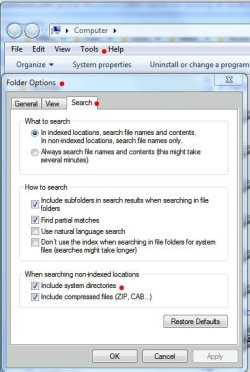
That said, Win 7 search is an AQS search engine, which, to obtain the best results, requires AQS syntax. Also, search, being integrated throughout windows, functions differently in different areas. For example, Start Menu searches include only indexed locations. By default, system files are not indexed. Viewing the screenshot, taking note of the red dots will point the way (via Folder Options\Tools|Search tab). Also, I've included some links that will give good info on win search.

Mastering Windows Search using Advanced Query Syntax

Windows Search Advanced Query Syntax

Advanced Query Syntax (Windows)

You can also do a google search on AQS. In the meantime, you can try your search from Windows Explorer, which will search non-indexed locations.

James
 

Attachments

  • Search Properties.JPG
    Search Properties.JPG
    46.5 KB · Views: 76

My Computer My Computer

At a glance

Win7U 64 RTMQ95508GB GskillASUS|EAH4850/HTDI/1GD3/A
OS
Win7U 64 RTM
CPU
Q9550
Motherboard
GA-EP45-UD3R
Memory
8GB Gskill
Graphics Card(s)
ASUS|EAH4850/HTDI/1GD3/A
Sound Card
xfi Plat
Monitor(s) Displays
Dell 2405fpw
Screen Resolution
1920x1200
Hard Drives
Seagate & WD sata Drives
PSU
Antec
Case
Antec
Keyboard
MS Natural Ergonomic 4000
Mouse
Logitech MX610 USB Cordless
James Colbert is correct, it has been a controversial issue. There seems to be a great misunderstanding regarding search and a lack of knowledge from many new users of Windows 7. Simply, Windows would not locate your file because hidden/system files are not indexed. You will find that if you indexed the folder, your file would show up instantly in Windows/Search. Or, you could navigate to the folder where you know the file is and search from within the folder.
 

My Computer My Computer

At a glance

Windows 7 Pro/32 Academic. Build 7600Intel 2.3 Duo core4 GB DDRNvidia GeForce 9500 GT
Computer Manufacturer/Model Number
Custom Build
OS
Windows 7 Pro/32 Academic. Build 7600
CPU
Intel 2.3 Duo core
Motherboard
EliteGroup G31T-M
Memory
4 GB DDR
Graphics Card(s)
Nvidia GeForce 9500 GT
Sound Card
Built in
Monitor(s) Displays
Viewsonic 15" 4:3
Screen Resolution
1280 x 1024
Hard Drives
WD Caviar Black 750 GB
WD 250 GB External
PSU
Antec 450w
Keyboard
Standard windows
Mouse
Logitech USB
Internet Speed
Bellsouth DSL 6.0
Thanks, James mborner. I think the issue is that the folder was not indexed. Thanks again.
 

My Computer My Computer

At a glance

Windows 10 Home, 64 bitIntel Core i7 860 @ 2.8 GHz8.0 GB Dual Channel DDR3 @ 664 MHz (9-9-9-24)nVidia GeForce GTS 240
Computer type
PC/Desktop
Computer Manufacturer/Model Number
Dell Studio XPS 8100, Dell XPS 15 laptop
OS
Windows 10 Home, 64 bit
CPU
Intel Core i7 860 @ 2.8 GHz
Motherboard
Dell 0T568R (CPU1)
Memory
8.0 GB Dual Channel DDR3 @ 664 MHz (9-9-9-24)
Graphics Card(s)
nVidia GeForce GTS 240
Sound Card
M-Audio Delta Audiophile 2496
Monitor(s) Displays
Dell 2407WFP
Screen Resolution
1920x1200
Hard Drives
977 GB Western Digital WDC WD1001FAES-75W7A0 (SCSI)
Antivirus
Windows Defender, MalwareBytes Anti-Malware, AdwCleaner
Browser
Firefox, occasionally IE and Edge
Other Info
Mozilla Firefox, Mozilla Thunderbird. Western Digital Passport 250 GB external HD, two Mushkin Enhanced Mulholland 32GB USB flash drives, AKG K240 Studio headphones, Asus AC-1900 dual band wireless router.
Back
Top