Search Shortcut - Create

How to Create a Search Shortcut in Windows 7

   Information
This will show you how to create or download a Search shortcut that opens the Search window. You can also Pin to Taskbar or Pin to Start Menu this shortcut, or move where you like for easy use.
   Note
Credit belongs to our member MoinMoin for this tip.
   Tip
Before doing a search in Windows 7, you should make sure that you have set your Search Options for the What to search, How to search, and When searching non-indexed locations settings. If you have the index enabled (it is by default), then you should also have any locations and file types added to be indexed so they will be included in the search results when doing a search.

EXAMPLE: Search
NOTE: Normally you can press F3 or Windows Key + F to open the Search window. For more on how to use search, see How to Search in Windows 7.
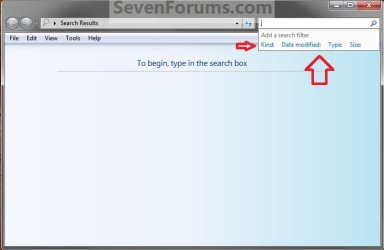
Search.jpg


OPTION ONE

To Download the "Search" Shortcut


1. Click on the Download button below to download the Search.zip file.

Download


2. Click on Save, and save the .zip file to the desktop.

3. Open the .zip file and extract the Search shortcut to the desktop.

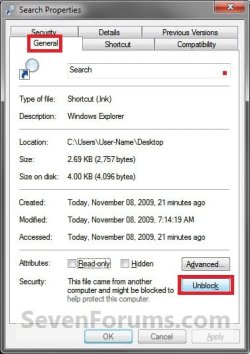
4. Right click on the Search shortcut, and click on Properties, General tab, and on the Unblock button. (See screenshot below)
NOTE: If you do not have a Unblock button under the General tab, then the shortcut is already unblocked and you can continue on to step 5.
Unblock.jpg
5. Move the shortcut to where you like for easy use.

6. When done, you can delete the downloaded .zip file on the desktop if you like, or save it to use again.


OPTION TWO

To Manually Create the "Search" Shortcut


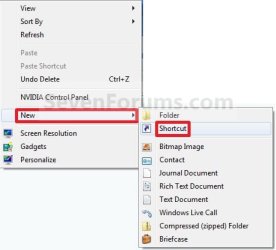
1. Right click on a empty area on desktop, and click on New and Shortcut.

2. Copy and Paste either location below into the location area, and click on the Next button. (See screenshot below)
%SystemRoot%\explorer.exe search-ms:

OR

%windir%\explorer.exe shell:::{9343812e-1c37-4a49-a12e-4b2d810d956b}
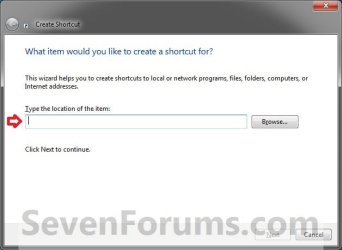
Step1.jpg
3. Type Search for the name, and click on the Finish button. (See screenshot below)
NOTE: You can name this anything you would like though.
Step2.jpg
4. Right click on the new Search shortcut on the Desktop and click on Properties.

5. Click on the Shortcut tab, then click on the Change Icon button. (See screenshot below)
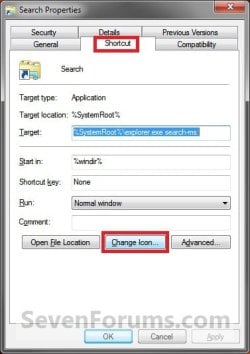
Step3.jpg
6. In the line under "Look for icons in this file", Copy and Paste the location below and press Enter. (See screenshot below)
C:\Windows\System32\imageres.dll
Step4.jpg
7. Select the icon highlighted in blue above and click on OK. (See screenshot above)
NOTE: You can use any icon that you would like instead though.

8. Click on OK. (See screenshot below)
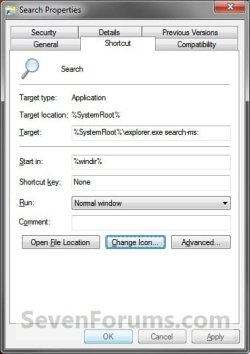
Step5.jpg
9. Move the shortcut to where you like for easy use.
That's it,
Shawn


Attachments

  • Search.zip
    Search.zip
    852 bytes · Views: 3,733
  • Right_Click.jpg
    Right_Click.jpg
    19.5 KB · Views: 157
Last edited:
Option Three:
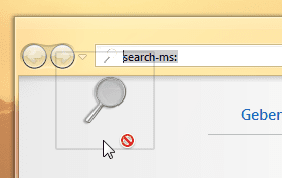
Open the Search and drag the magnifying glass to the desktop or startmenu.

Moinmon, those were some great tips. And I'm now laughing becuase I didn't think about drag-and-drop before :D
Why is this so great? Well, simple, create your own search folder in 4 easy steps:
1) Win+F to open search
2) do your search (like file:mp3)
3) drag & drop the little magnifying glass icon in addressbar to your desktop
4) and rename it (to MP3 for example)

And now whenever you click that icon a search will be run automatically :) Saved search - fast and easy :) Just pinned search for *.sql to my desktop and I like it a lot! ;)

Thanks!
 

My Computer

OS
Windows 7 Enterprise, 64bit
Hello LuxZg, and welcome to Seven Forums.

That method will work just fine, but you just will not be able to "Pin to taskbar" with it. Only the one in the tutorial will instead.

You might also look at the tutorial below to save a search to see if that may be something you would want to use for your frequent searches of the same items.

http://www.sevenforums.com/tutorials/37717-save-search.html

Hope this helps,
Shawn
 

My Computer

Computer type
PC/Desktop
Computer Manufacturer/Model Number
Self built custom
OS
64-bit Windows 11 Pro for Workstations
CPU
Intel i7-8700K OC'd to 5 GHz
Motherboard
ASUS ROG Maximus XI Formula Z390
Memory
64 GB (4x16GB) G.SKILL TridentZ RGB DDR4 3600 MHz
Graphics Card(s)
ASUS ROG-STRIX-GTX1080TI-O11G-GAMING
Sound Card
Integrated
Monitor(s) Displays
2 x Samsung Odyssey G7 27"
Screen Resolution
2560x1440
Hard Drives
1TB Samsung 990 PRO M.2,
4TB Samsung 990 PRO PRO M.2,
TerraMaster F8 SSD Plus NAS
PSU
Seasonic Prime Titanium 850W
Case
Thermaltake Core P3
Cooling
Corsair Hydro H115i
Keyboard
Logitech wireless K800
Mouse
Logitech MX Master 4
Internet Speed
2 Gb/s Download and 100 Mb/s Upload
Antivirus
Malwarebyte Anti-Malware Premium
Browser
Google Chrome
Other Info
Logitech Z625 speaker system,
Logitech BRIO 4K Pro webcam,
HP Color LaserJet Pro MFP M477fdn,
APC SMART-UPS RT 1000 XL - SURT1000XLI,
Galaxy S23 Plus phone
Hi Brink, thanks for a warm welcome :)

The shortcut pointing to search can be pinned to Windows Explorer in taskbar, so it's almost as easily accessible as if it was a standalone icon, so I don't mind.

But the saved search is really a better solution, it can be pinned to Windows Explorer in taskbar as well, but can be "browsed" easily.. I can't believe I never noticed that link in the Explorer menu. I guess that's what you get when menus lose all the icons and are left with text that...just looks the same. So thanks for the link and the tutorial, seems I'll have to browse through the tutorials a bit more to find all the not-so-obvious features :)
 

My Computer

OS
Windows 7 Enterprise, 64bit
You're welcome LuxZg. :)
 

My Computer

Computer type
PC/Desktop
Computer Manufacturer/Model Number
Self built custom
OS
64-bit Windows 11 Pro for Workstations
CPU
Intel i7-8700K OC'd to 5 GHz
Motherboard
ASUS ROG Maximus XI Formula Z390
Memory
64 GB (4x16GB) G.SKILL TridentZ RGB DDR4 3600 MHz
Graphics Card(s)
ASUS ROG-STRIX-GTX1080TI-O11G-GAMING
Sound Card
Integrated
Monitor(s) Displays
2 x Samsung Odyssey G7 27"
Screen Resolution
2560x1440
Hard Drives
1TB Samsung 990 PRO M.2,
4TB Samsung 990 PRO PRO M.2,
TerraMaster F8 SSD Plus NAS
PSU
Seasonic Prime Titanium 850W
Case
Thermaltake Core P3
Cooling
Corsair Hydro H115i
Keyboard
Logitech wireless K800
Mouse
Logitech MX Master 4
Internet Speed
2 Gb/s Download and 100 Mb/s Upload
Antivirus
Malwarebyte Anti-Malware Premium
Browser
Google Chrome
Other Info
Logitech Z625 speaker system,
Logitech BRIO 4K Pro webcam,
HP Color LaserJet Pro MFP M477fdn,
APC SMART-UPS RT 1000 XL - SURT1000XLI,
Galaxy S23 Plus phone
Hi! I was Looking for an [ Alternative to Avafind (a search utility) ] ... and I found this thread. Thanks for the useful tutorial. I would be trying this method tomorrow on my pc, as I'm on a XP computer right now.

Just wanted to ask you if this shortcut can be pinned as an address utility like the google desktop to the taskbar?? Cause just clicking on the shortcut might just bring the search window, Was just hoping it could be searched directly from the taskbar.
 

My Computer

Computer Manufacturer/Model Number
DELL
OS
Windows 7
CPU
Intel i5
Motherboard
Dell
Graphics Card(s)
Nvidia
Sound Card
Realtek
Screen Resolution
1366 x 768
Hard Drives
500 GB.
Hello Qfunk, and welcome to Seven Forums.

You could use Pin to Taskbar for this shortcut to make it easier to use from the taskbar. :)
 

My Computer

Computer type
PC/Desktop
Computer Manufacturer/Model Number
Self built custom
OS
64-bit Windows 11 Pro for Workstations
CPU
Intel i7-8700K OC'd to 5 GHz
Motherboard
ASUS ROG Maximus XI Formula Z390
Memory
64 GB (4x16GB) G.SKILL TridentZ RGB DDR4 3600 MHz
Graphics Card(s)
ASUS ROG-STRIX-GTX1080TI-O11G-GAMING
Sound Card
Integrated
Monitor(s) Displays
2 x Samsung Odyssey G7 27"
Screen Resolution
2560x1440
Hard Drives
1TB Samsung 990 PRO M.2,
4TB Samsung 990 PRO PRO M.2,
TerraMaster F8 SSD Plus NAS
PSU
Seasonic Prime Titanium 850W
Case
Thermaltake Core P3
Cooling
Corsair Hydro H115i
Keyboard
Logitech wireless K800
Mouse
Logitech MX Master 4
Internet Speed
2 Gb/s Download and 100 Mb/s Upload
Antivirus
Malwarebyte Anti-Malware Premium
Browser
Google Chrome
Other Info
Logitech Z625 speaker system,
Logitech BRIO 4K Pro webcam,
HP Color LaserJet Pro MFP M477fdn,
APC SMART-UPS RT 1000 XL - SURT1000XLI,
Galaxy S23 Plus phone
thanks!! ++!
 

My Computer

Computer Manufacturer/Model Number
DELL
OS
Windows 7
CPU
Intel i5
Motherboard
Dell
Graphics Card(s)
Nvidia
Sound Card
Realtek
Screen Resolution
1366 x 768
Hard Drives
500 GB.
You're most welcome Qfunk. :)
 

My Computer

Computer type
PC/Desktop
Computer Manufacturer/Model Number
Self built custom
OS
64-bit Windows 11 Pro for Workstations
CPU
Intel i7-8700K OC'd to 5 GHz
Motherboard
ASUS ROG Maximus XI Formula Z390
Memory
64 GB (4x16GB) G.SKILL TridentZ RGB DDR4 3600 MHz
Graphics Card(s)
ASUS ROG-STRIX-GTX1080TI-O11G-GAMING
Sound Card
Integrated
Monitor(s) Displays
2 x Samsung Odyssey G7 27"
Screen Resolution
2560x1440
Hard Drives
1TB Samsung 990 PRO M.2,
4TB Samsung 990 PRO PRO M.2,
TerraMaster F8 SSD Plus NAS
PSU
Seasonic Prime Titanium 850W
Case
Thermaltake Core P3
Cooling
Corsair Hydro H115i
Keyboard
Logitech wireless K800
Mouse
Logitech MX Master 4
Internet Speed
2 Gb/s Download and 100 Mb/s Upload
Antivirus
Malwarebyte Anti-Malware Premium
Browser
Google Chrome
Other Info
Logitech Z625 speaker system,
Logitech BRIO 4K Pro webcam,
HP Color LaserJet Pro MFP M477fdn,
APC SMART-UPS RT 1000 XL - SURT1000XLI,
Galaxy S23 Plus phone
try "search-ms:" in the shortcut box
 

My Computer

Computer Manufacturer/Model Number
Amilo M3438g
OS
Windows 7 Home Premium 32bit
CPU
?
Motherboard
?
Memory
2GB Ram
Graphics Card(s)
nVidia GeForce 6800
Sound Card
Realtek
Monitor(s) Displays
Laptop Screen
Screen Resolution
1440x900
Hard Drives
2 - HDD
PSU
?
Case
Laptop
Cooling
?
Keyboard
UK Layout - into laptop
Mouse
Microsoft Wireless Mobile Mouse 1000
Internet Speed
30mbps (VirginMedia)
Other Info
Fujitsu Siemens Computers Amilo M3438G with 2GHz Processor
Hello Thomas,

Yep, that's basically what the first command option is, but with the full path instead. ;)
 

My Computer

Computer type
PC/Desktop
Computer Manufacturer/Model Number
Self built custom
OS
64-bit Windows 11 Pro for Workstations
CPU
Intel i7-8700K OC'd to 5 GHz
Motherboard
ASUS ROG Maximus XI Formula Z390
Memory
64 GB (4x16GB) G.SKILL TridentZ RGB DDR4 3600 MHz
Graphics Card(s)
ASUS ROG-STRIX-GTX1080TI-O11G-GAMING
Sound Card
Integrated
Monitor(s) Displays
2 x Samsung Odyssey G7 27"
Screen Resolution
2560x1440
Hard Drives
1TB Samsung 990 PRO M.2,
4TB Samsung 990 PRO PRO M.2,
TerraMaster F8 SSD Plus NAS
PSU
Seasonic Prime Titanium 850W
Case
Thermaltake Core P3
Cooling
Corsair Hydro H115i
Keyboard
Logitech wireless K800
Mouse
Logitech MX Master 4
Internet Speed
2 Gb/s Download and 100 Mb/s Upload
Antivirus
Malwarebyte Anti-Malware Premium
Browser
Google Chrome
Other Info
Logitech Z625 speaker system,
Logitech BRIO 4K Pro webcam,
HP Color LaserJet Pro MFP M477fdn,
APC SMART-UPS RT 1000 XL - SURT1000XLI,
Galaxy S23 Plus phone
Oh

Oh, Thanks.

PS: Do you know how to change the font colour on the log on screen. I have searched everywhere but cant find the answer!

Thanks

Thomas:geek:
 

My Computer

Computer Manufacturer/Model Number
Amilo M3438g
OS
Windows 7 Home Premium 32bit
CPU
?
Motherboard
?
Memory
2GB Ram
Graphics Card(s)
nVidia GeForce 6800
Sound Card
Realtek
Monitor(s) Displays
Laptop Screen
Screen Resolution
1440x900
Hard Drives
2 - HDD
PSU
?
Case
Laptop
Cooling
?
Keyboard
UK Layout - into laptop
Mouse
Microsoft Wireless Mobile Mouse 1000
Internet Speed
30mbps (VirginMedia)
Other Info
Fujitsu Siemens Computers Amilo M3438G with 2GHz Processor
Thomas,

Sorry, but I have no idea. I would recommend to create a new thread for it in the Customization forum to see if someone may know though. Hopefully so, and soon for you. :)
 

My Computer

Computer type
PC/Desktop
Computer Manufacturer/Model Number
Self built custom
OS
64-bit Windows 11 Pro for Workstations
CPU
Intel i7-8700K OC'd to 5 GHz
Motherboard
ASUS ROG Maximus XI Formula Z390
Memory
64 GB (4x16GB) G.SKILL TridentZ RGB DDR4 3600 MHz
Graphics Card(s)
ASUS ROG-STRIX-GTX1080TI-O11G-GAMING
Sound Card
Integrated
Monitor(s) Displays
2 x Samsung Odyssey G7 27"
Screen Resolution
2560x1440
Hard Drives
1TB Samsung 990 PRO M.2,
4TB Samsung 990 PRO PRO M.2,
TerraMaster F8 SSD Plus NAS
PSU
Seasonic Prime Titanium 850W
Case
Thermaltake Core P3
Cooling
Corsair Hydro H115i
Keyboard
Logitech wireless K800
Mouse
Logitech MX Master 4
Internet Speed
2 Gb/s Download and 100 Mb/s Upload
Antivirus
Malwarebyte Anti-Malware Premium
Browser
Google Chrome
Other Info
Logitech Z625 speaker system,
Logitech BRIO 4K Pro webcam,
HP Color LaserJet Pro MFP M477fdn,
APC SMART-UPS RT 1000 XL - SURT1000XLI,
Galaxy S23 Plus phone
Ok. Thanks again!
 

My Computer

Computer Manufacturer/Model Number
Amilo M3438g
OS
Windows 7 Home Premium 32bit
CPU
?
Motherboard
?
Memory
2GB Ram
Graphics Card(s)
nVidia GeForce 6800
Sound Card
Realtek
Monitor(s) Displays
Laptop Screen
Screen Resolution
1440x900
Hard Drives
2 - HDD
PSU
?
Case
Laptop
Cooling
?
Keyboard
UK Layout - into laptop
Mouse
Microsoft Wireless Mobile Mouse 1000
Internet Speed
30mbps (VirginMedia)
Other Info
Fujitsu Siemens Computers Amilo M3438G with 2GHz Processor
Back
Top