Searched folder ../ up one directory?

nickdclements

New member
Local time
1:23 AM
Messages
3
So the "Up One Level" button has been gone for quite some time now, replaced by the "Smart Address Bar" [:info: > Computer > Users > Admin > Documents > etc.] we have all gotten use to it more or less (or the keyboard junkies just resorted to the 'Up One Level" shortcut; [Alt]+[UP]) and conceded to some of it's advantages. But where this system fails completely is with Search.

Windows 7 search is riddled with problems, issues and fuzzy-logic, but the greatest nuisance for me is that if you simply 'Click' a folder that is located in search, thats it, you're stuck there. If you want to go up a level to the containing directory, fo'getaboutit. If you want to even know where the hell the folder you are currently in is located... good luck. All the address bar tells you is [search-ms:displayname=Search%20Results%20in%20root&crumb=location:C%3A%5Croot\sub4] wow, so helpful. (crumb? is that there to feed my "mouse" with? ;)

As far as I have found the only way to get it to work "properly" (in my opinion) is to 'Right Click' the folder you want to access from your search and choose "Open Folder/File Location" from the menu. Now it performs just as good ol' 3gig limited XP did; when you clicked a search located folder, it took you to the folder showing you the full folder path in the address bar. If you clicked "Back" it took you back to the search, if you clicked the "Up One Level" button, it, um, took you up one level.

Please for the loves of jebus, correct me if I'm wrong.
 

My Computer My Computer

At a glance

Windows 7 Ultimate x64
OS
Windows 7 Ultimate x64
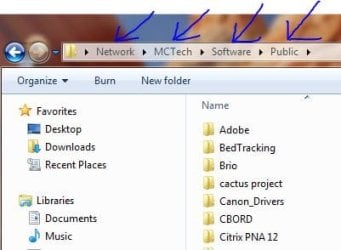
I'm sorry, but you are mistaken. Take a look at my screen capture. I am in the directory "Public". If I want to go up one level (../ in DOS parlence) I can click on "Software". Or go up two, or three. Instead of just seeing the directory above, I see the branch of the tree. It is much easier than XP.

If you want to search, make sure your drive is indexed. Then you can put your search at the start button. Even use wildcards.

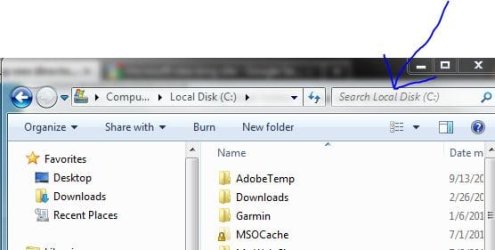
Using Explorer really makes it simple. Just find the area you would like to search. Put the file or folder name in the upper right to find it. See second attachment.
 

Attachments

  • Capture.JPG
    Capture.JPG
    24.8 KB · Views: 8
  • Capture2.JPG
    Capture2.JPG
    26.5 KB · Views: 9

My Computer My Computer

At a glance

Systems 1 and 2: Windows 7 Enterprise x64, Wi...System 1: i7 [email protected], System 2: AMD FX-41...System 1: 8GB System 2: 8GBSystem 1: ATI FirePro V4800 System 2: Radeon ...
Computer Manufacturer/Model Number
Dell and Custom
OS
Systems 1 and 2: Windows 7 Enterprise x64, Win 8 Developer
CPU
System 1: i7 [email protected], System 2: AMD FX-4100 Zambezi 3.6G
Motherboard
System 1:Dell 06NWYK System 2: ASUS M5A97 AM3+
Memory
System 1: 8GB System 2: 8GB
Graphics Card(s)
System 1: ATI FirePro V4800 System 2: Radeon HD 6850
Sound Card
System 1: onboard System 2: onboard
Monitor(s) Displays
System1: Viewsonic HDMI 24"
Screen Resolution
System 1: 1920x1080 System 2: 1920x1080
Hard Drives
System 1: Mirrored .5B drives System 2: Seagate Barracuda ST1000DM003 1TB 7200 RPM 64MB Cache SATA 6.0Gb/s
Case
System 1: Dell System 2: Cooler Master
Internet Speed
10 MBPS
Specifically After a Search...

What I am referring to is what happens After you Perform a search.

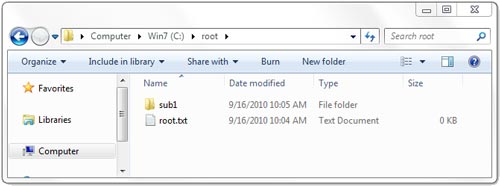
root.jpg

^^ here i have my "root" folder. if i want to go up one level, yes, simply Click the 'Win 7 (C)' text in the address bar and it will take me up one directory, (the directory containing the folder i am currently in) excellent.


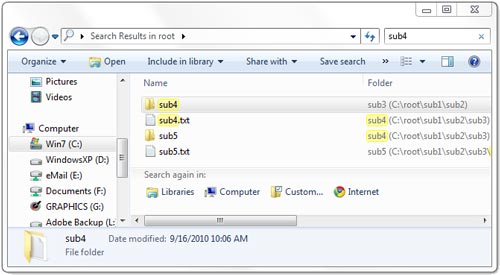
search.jpg

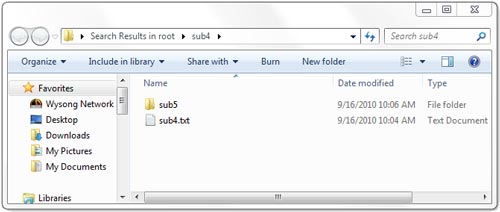
^^ say i perform a search in this 'root' directory. I search for 'sub4' and it finds my 'sub for folder... (as well as 'sub5'? huh? oh, it's inside of sub4... that's, um... useless) but anyway, i click my 'sub4' folder to access it.

sub.jpg

^^ i am now inside of my 'sub4' folder. great. now i want to go 'up on level' to the directory that this 'sub4' folder is in. there is no way to do it. you cant even tell what name of the folder you are currently in is called.... (because you aren't actually in that folder... and that is where the problem lies...)

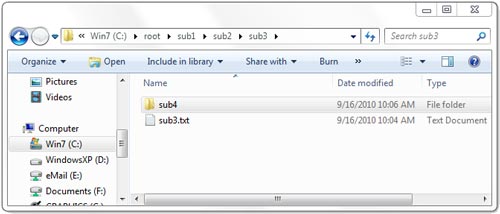
sub3.jpg

^^ Right Click "Open folder location"
 

My Computer My Computer

At a glance

Windows 7 Ultimate x64
OS
Windows 7 Ultimate x64
I see and I understand what you are saying.
 

My Computer My Computer

At a glance

Systems 1 and 2: Windows 7 Enterprise x64, Wi...System 1: i7 [email protected], System 2: AMD FX-41...System 1: 8GB System 2: 8GBSystem 1: ATI FirePro V4800 System 2: Radeon ...
Computer Manufacturer/Model Number
Dell and Custom
OS
Systems 1 and 2: Windows 7 Enterprise x64, Win 8 Developer
CPU
System 1: i7 [email protected], System 2: AMD FX-4100 Zambezi 3.6G
Motherboard
System 1:Dell 06NWYK System 2: ASUS M5A97 AM3+
Memory
System 1: 8GB System 2: 8GB
Graphics Card(s)
System 1: ATI FirePro V4800 System 2: Radeon HD 6850
Sound Card
System 1: onboard System 2: onboard
Monitor(s) Displays
System1: Viewsonic HDMI 24"
Screen Resolution
System 1: 1920x1080 System 2: 1920x1080
Hard Drives
System 1: Mirrored .5B drives System 2: Seagate Barracuda ST1000DM003 1TB 7200 RPM 64MB Cache SATA 6.0Gb/s
Case
System 1: Dell System 2: Cooler Master
Internet Speed
10 MBPS
yes this is annoying... had to install classicshell to add the folder up icon How to add a
 

My Computer My Computer

At a glance

Windows 7 Ultimate x64INTEL CORE I7 2820QM8GBAMD FIREPRO M8900
Computer Manufacturer/Model Number
DELL PRECISION M6600
OS
Windows 7 Ultimate x64
CPU
INTEL CORE I7 2820QM
Memory
8GB
Graphics Card(s)
AMD FIREPRO M8900
Monitor(s) Displays
17" FULL HD
Hard Drives
128GB SSD
250GB 7200RPM
Back
Top