Searching for a new email client

tonyvella

New member
Member
VIP
Local time
6:06 PM
Messages
161
Currently I am using Thunderbird, previously I used WLM. As far as WLM is concerned, I disliked it from the word go. Thunderbird, on the other hand, I liked from the start excepting for the fact that it seems to take forever (by today's computer standards) to load.

My question is: Is there a happy medium? Something like Thunderbird that loads quickly? I did the usual googling and came up with a number of names to programs that promise you the moon and sixpence: each one is the best ever and will never be eclipsed, ya, ya!

So I ask the experts here what opinions they hold of the various email clients. I don't care if it is free or I have to pay for it as long as it works like TB but loads quickly.

Thanks in advance.
 

My Computer My Computer

OS
windows 7 Home Premium
I've been trying Thunderbird as I need a replacement for Outlook 2003, which has had Microsoft support dropped when they dropped Windows XP. I don't see any difference in speed between Outlook 2003 and Thunderbird. They both load equally fast.

I'm using my ISP's "POP" e-mail server. If you are using Yahoo, gmail, etc that may take longer??
 

My Computer My Computer

Computer type
PC/Desktop
Computer Manufacturer/Model Number
My Own Build
OS
Windows 10 64 bit
CPU
Intel i7 6700K
Motherboard
ASUS ROG Maximus VIII Hero
Memory
16GB Corsair Dominator
Graphics Card(s)
Intel CPU Graphics
Sound Card
RealTek
Monitor(s) Displays
27" Dell S2719dgf
Screen Resolution
2560X1440
Hard Drives
1 TB Samsung 850 EVO SSD for Win 10 Pro
500GB Samsung 850 EVO SSD for Win 10 Insider
2 TB drive for backup
PSU
EVGA Supernova 750G2
Case
BeQuiet Silent Base 600
Cooling
Deepcool Captain 120EX
Keyboard
Microsoft Wireless 2000
Mouse
Microsoft wireless
Internet Speed
100 MB/sec (Cable)
Antivirus
Microsoft Defender and Malwarebytes
Browser
Edge/Firefox
Other Info
Cakewalk (Sonar) by BandLab and Studio One 4.1 Pro recording studio software. MOTU 896Mk3 Hybrid recording interface, Frontier Tranzport wireless control unit, Behringer X-Touch Control Surface.
Five USB connected optical drives for CD Audio production using Nero BurningROM
Thunderbird loads in one second flat on my 4 year old PC.

If it loads slow on your machine, you've either got a problem of some kind or a very weak CPU or hard drive.

I use an SSD, but even with my old traditional hard drive, Thunderbird was never slow to load--2 or 3 seconds at worst.

I haven't kept up with email clients in the last few years, but they have gotten harder to find over the years as more and more people are using web-based email such as Gmail and Yahoo--which I can't stand. So I continue to ride with Thunderbird. I'd consider changing if I had heard of anything superior, but I haven't.
 

My Computer My Computer

Computer type
PC/Desktop
Computer Manufacturer/Model Number
Ignatz Special; 4 speed manual gearbox; factory air conditioning; one of one
OS
Windows 7 Home Premium SP1, 64-bit
CPU
Intel Skylake i5-6600K, not overclocked
Motherboard
AsRock Z170M Extreme 4, micro ATX
Memory
8 GB HyperX DDR4-2666 (2 x 4 GB)
Graphics Card(s)
none; graphics are integrated on CPU
Sound Card
onboard: Realtek ALC1150; external: USB Behringer UF0-202
Monitor(s) Displays
Dell S2340M 23 inch IPS
Screen Resolution
1600 x 900
Hard Drives
System: Crucial MX100 series SSD, 128 GB;
Data: Samsung Spinpoint 103SJ, 1 TB;
Backup: WD Caviar Green WD30EZRX-00D8PB0, 3 TB
PSU
Rosewill SilentNight 500 watt fanless, semi-modular
Case
Antec Solo II
Cooling
Noctua NH-U12S; Noctua F12 intake, Noctua S12A exhaust
Keyboard
Microsoft 200 6JH-00001 USB
Mouse
Dell or Microsoft optical wired; USB
Antivirus
Microsoft Security Essentials and Malwarebytes Premium
Browser
Pale Moon
Other Info
All fans PWM; speeds at idle: CPU circa 500 rpm; intake circa 600 rpm; exhaust circa 600 rpm; CPU temps 27 idle and 47 C load in a warm room (27 C/81 F) when running Intel Extreme Tuning Utility stress test.
eMail clients are a personal choice. It would be hard for me to tell you the "best"

I don't know what version of WLM you ran previously, but the current release is very stable. You might consider taking another look.

Basically the top two eMail clients are Windows Essentials Mail (aka WLM) and Thunderbird. You'll have to try a few others (lists of the "best" email clients are abundant) to see what suits your fancy.

I'd focus on Thunderbird since you're happy with it and try to resolve the load times issue.


Please add your SF Systems Specs by following this tutorial: http://www.sevenforums.com/tutorials/180324-system-info-see-your-system-specs.html
  • In the System Manufacturer/Model Number field, manually type Desktop or Laptop adding it to the information already in the field.
  • Specify Custom Build as the manufacturer if it is not an OEM machine.
  • The tool does not fill in this information but it is very important if someone has to research drivers or hardware for your machine.
Log on to Sevenforums (SF) and let the tool fill in you System specs on your SF profile.

Full instructions are in the tutorial. It's a simple process and it makes that information readily available on your posts. You don't have to retype the information in any thread.

Click here to view your system specs on SevenForums.

Click on My System Specs in the lower left of any post by any member to see what is presented about their machine.

Thanks, that will help members help you work through the Thunderbird load times
 
Last edited:

My Computer My Computer

Computer type
Laptop
Computer Manufacturer/Model Number
HP Pavilion dv6-6c10us
OS
x64 (6.3.9600) Win8.1 Pro & soon dual boot x64 (6.1.7601) Win7_SP1 HomePrem
CPU
AMD A6-3420M APU with Radeon(tm) HD Graphics
Motherboard
Hewlett-Packard 1805
Memory
6.00 GB
Graphics Card(s)
AMD Radeon(TM) HD 6520G
Sound Card
(1) AMD High Definition Audio Device (2) IDT High Definiti
Monitor(s) Displays
HP W2072a 20" LCD (1600 x 900) @ 60 Hz
Screen Resolution
1366 x 768 x 32 bits (4294967296 colors) @ 60 Hz
Hard Drives
ST640LM0 00 HM641JI SATA Disk Device
Keyboard
Logitech k520 wireless KB
Mouse
Logitech m320 wireless mouse (bundled with KB)
Internet Speed
15/5 | 54 MB Wireless 'n'
Antivirus
Realtime: Defender or Avast | On-demand: Malwarebytes, ESET
Browser
IE 11 on Win8, IE 10 on win 7
Other Info
Media: [Gimp, Audacity, VLC] || Comm: [WEmail 2012, Skype] || Productivity: [OpenOffice,| Textpad] || Utils: [Sysinternals, cCleaner, Speccy, Defraggler]
I've been using Thunderbird on my test box lately, so I've been checking their forum.
Thunderbird has a lot of configuration possibilities imho.
Here is one thread that might help with some configuration changes to try ...
Prevent Thunderbird to download IMAP folders ? mozillaZine Forums

I'm sure there are a lot more options ... could ask on their forum if performance is an issue ...
 

My Computer My Computer

Computer type
PC/Desktop
Computer Manufacturer/Model Number
home built
OS
Multi-Boot W7_Pro_x64 W8.1_Pro_x64 W10_Pro_x64 +Linux_VMs +Chromium_VM
CPU
AMD Athlon II x4 620
Motherboard
Gigabyte GA-MA785G-UD3H
Memory
6GB GSkill DDR2 800
Graphics Card(s)
AMD 4670 GPU + AMD 4200 IGP
Sound Card
on board Realtek ALC889A
Monitor(s) Displays
RCA 40" LCD TV, Insignia 32" LCD TV, HP 15" LCD monitor
Screen Resolution
1680 x 1050
Hard Drives
OCZ Vertex 3 120GB,
Samsung F3 1TB (3),
Several others - WD, Seagate, Hitachi, ...
PSU
Corsair 500 W
Case
Rosewill mid tower
Cooling
CM 90mm rifle
Keyboard
Gyration wireless, Logitech wireless, Dell USB wired
Mouse
Gyration wireless, Logitech wireless, V7 USB wired
Internet Speed
Spectrum - 100Mbps D / 10Mbps U
Antivirus
Avast, MBAM3, EMET, WinPatrol
Browser
Pale Moon, Firefox, IE
Other Info
2 multi-boot PC's
Mainly HTPC/Office/Gen purpose (no gaming).
Trendnet USB KVM.
LG DVD burner/Blue Ray Player.
Tray system for removable SATA backup drives.

Not currently OCd, under-volted.
I use Hybrid sleep, rarely re-boot or shutdown.

Hauppauge HD-PVR, Avermedia PCIe TV Tuner, Hauppauge PCI TV Tuner.
Thunderbird Slow

Well here's a couple of ideas based on my own experience of Thunderbird.

Thunderbird is free so there's absolutely no harm in going down the full uninstall, reboot then reinstall route.

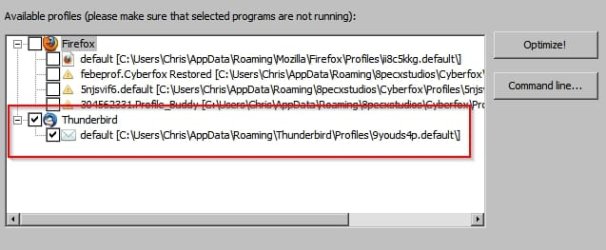
It also uses sqlite databases that can grow in size and become fragmented. It's best to use some sort of utility to compact and optimize them on a regular basis.

This is the software that I tend to use:

SpeedyFox - Boost Firefox,Skype,Chrome,Thunderbird in a Single Click! | CRYSTALIDEA Software

Note: It also works with software other than Thunderbird.

Thunderbird.jpg

I have a few other programs installed where part of their functionality achieves the same results but as they're not specifically aimed at dealing with Thunderbird it's probably best not to go into detail.

Also consider compacting Thunderbird folders:

Open Thunderbird, select a folder, then click on “File>Compact folder”. Repeat for each folder. This process can take some time. You should notice that hundreds MB have been freed if you are lucky. This re-indexes the Thunderbird email database. I usually do this on a monthly basis.

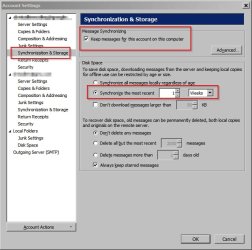
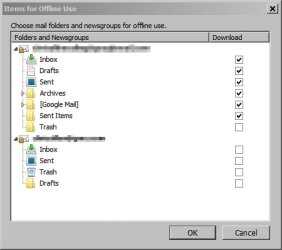
Also take a look at your Synchronization & Storage Settings and adjust them on a timescale/ per folder basis according to your needs.


Thunderbird 2.jpg

Thunderbird 3.jpg
 

My Computer My Computer

Computer type
Laptop
Computer Manufacturer/Model Number
ASUS
OS
Microsoft Windows 7 Home Premium 64-bit 7601 Multiprocessor Free Service Pack 1
CPU
AMD C-60 APU with Radeon(tm) HD Graphics
Motherboard
ASUSTeK COMPUTER INC. X501U
Memory
4.00 GB
Graphics Card(s)
AMD Radeon HD 6290 Graphics
Sound Card
(1) AMD High Definition Audio Device (2) Realtek High Defi
Screen Resolution
1366 x 768 x 32 bits (4294967296 colors) @ 60 Hz
Hard Drives
Hitachi HTS545050A7E380 SATA Disk Device
Antivirus
Comodo CIS & FW, SecureAplus App Whitelisting, Threatfire
Browser
Cyberfox 64bit, Opera 64bit, Airfox
Other Info
Spy-The-Spy, HitmanPro.Alert, Norton Connect Safe, MJRegWatcher, BitDefender TrafficLight, Voodoo Shield, Zemana AntiMalware

My Computer My Computer

Computer type
PC/Desktop
Computer Manufacturer/Model Number
self build
OS
Windows 7 Ultimate 64 bit
CPU
Intel Core i7 4770K overclocked to 4.7GHz Quad Core Haswell
Motherboard
Asus Z87 Pro (Socket 1150) ATX Motherboard
Memory
16GB Team Group Vulcan Gold 2133MHz
Graphics Card(s)
ATI Radeon HD 7880 Series Display adapter
Monitor(s) Displays
NEC LCD2690WUXi2
Screen Resolution
26" 1920 x 1200
Hard Drives
Samsung 500GB SSD 840 EVO SATA 6Gb/s
Samsung 250GB SSD 840 EVO SATA 6Gb/s
PSU
Corsair AX760 Platinum
Case
Cooler Master HAF X Gaming Tower
Cooling
XSPC RayStorm 750 RS360 Water cooling
Mouse
Razer Death Adder left handed
Internet Speed
126Mb download 11.5Mb up
Antivirus
Avast free
Browser
Opera
Other Info
Main Browser is Opera
Favorite software Adobe Lightroom & Photoshop
best plugins Nik software
Firewall : Private firewall 7
Back
Top