Second Drive Has Me Locked Out After Re-installing Win7

ndmuscutt

New member
Local time
8:39 AM
Messages
15
Had Win7 on my system before, but did a fresh re-install due to some glitches. I have two hard drives. The first is for software and the OS. The second is strictly for files like documents, pictures, etc.

The install of Win7 came off without a hitch except for one major problem. When I go to access my D drive, I can see all of the folders, but I cannot access any of the files. How can I get permission to access my files without going through each file one-by-one and changing permissions?

Thanks.
 

My Computer My Computer

At a glance

Windows 7 64 ProIntel E6850 Core 2 Duo @ 3.00GHz4GB DDR2-800 OCZGeForce 9600GT
Computer Manufacturer/Model Number
Home Grown Desktop
OS
Windows 7 64 Pro
CPU
Intel E6850 Core 2 Duo @ 3.00GHz
Motherboard
Asus P5K-E Wifi AP
Memory
4GB DDR2-800 OCZ
Graphics Card(s)
GeForce 9600GT
Monitor(s) Displays
Samsung SyncMaster 226BW
Screen Resolution
1600x1050
Hard Drives
WD 500GB Caviar Black
WD 1TB Caviar Black
PSU
450 Watt
Keyboard
Logitech MK300
Mouse
Logitech MK300
Other Info
HP Deskjet Pro 8500, Asus 802.11n WLAN card; Klipsch ProMedia 2.1 speakers
1. Fluff out the system specs,
2. Post the disk management display using procedure given.

==========================================
Update your SevenForums System Specs
User CP (3rd item in the top menu bar) |
Your Profile | Edit System Spec
(left-hand column)

To gather info, use SIW or Speccy or System Info

Add the word laptop or desktop or netbook to the
“system manufacturer” block, for example,
Toshiba Satellite L305D notebook.

Provide full windows version info, for example:
MS Windows 7 Ultimate SP1 64-bit

Use the “Other Info” block for Optical Reader,
Mouse, touchpad, wifi adapter, speakers, monitor, etc

Scroll down and click on the SAVE CHANGES button.
======================================
======================================

HOW TO POST A SNAPSHOT OF DISK MANAGEMENT DISPLAY
Run disk management:
WIN | type DISKMGMT.MSC | ENTER
WIN
is the key with the wavy flag.

Maximize the output of Disk Management:
ALT-Spacebar key combo (this pops up a menu) followed by X key (selects Maximize) |
Drag the field separators (such as between Status and Capacity) to show entire field. This is very important, otherwise, needed info is not visible.

Make a snapshot:
WIN | type SNIPPING | ENTER | New
Drag the cursor around the area you want to snip.
File | Save as | select save location and name | Save

Post the snapshot:
Upload a File or Screenshot in Seven Forums


My Computer My Computer

At a glance

MS Windows 7 Ultimate SP1 64-bitAMD A10-4600M6.00 GB Dual-Channel DDR3 @ 798MHz (11-11-12-28)AMD Radeon HD 7660G
Computer Manufacturer/Model Number
Toshiba Satellite S875D-S7239 laptop
OS
MS Windows 7 Ultimate SP1 64-bit
CPU
AMD A10-4600M
Motherboard
AMD Pumori (Socket FT1)
Memory
6.00 GB Dual-Channel DDR3 @ 798MHz (11-11-12-28)
Graphics Card(s)
AMD Radeon HD 7660G
Sound Card
High Definition Audio Device
Monitor(s) Displays
Generic PnP Monitor (1600x900@60Hz)
Screen Resolution
1600x900@60Hz
Hard Drives
SSD 119GB Corsair CSSD-V128GB2 ATA Device
Keyboard
Standard PS/2 Keyboard
Mouse
HP Wireless Optical Mobile Mouse Model FHA-3410
Internet Speed
What the local pub, local coffee shop offers.
Other Info
Optical Drive:MATSHITA BD-CMB UJ160B ATA Device


Also have an Asus ha1002xp netbook with Win 7 Ultimate installed.
Change the security for the complete drive by right clicking on drive letter and picking security and see if the current user has full access to the drives contents. Plus posting the system specs would also help.
 

My Computer My Computer

At a glance

Window's 7 Ultimate 64bitE8400 LappedKingston 4 gig2=ATI 5670Video Crossfire / HVR2250 TV Tuner ...
Computer Manufacturer/Model Number
Custom Build
OS
Window's 7 Ultimate 64bit
CPU
E8400 Lapped
Motherboard
P5Q Pro Turbo Asus
Memory
Kingston 4 gig
Graphics Card(s)
2=ATI 5670Video Crossfire / HVR2250 TV Tuner Card
Sound Card
HDMI sound
Monitor(s) Displays
Sony 46"
Screen Resolution
1280x720
Hard Drives
1 WD 160gig YS, 1 Black Edition 320gig and one 250gig WD YS Model plus external Caviar Black 640gig Drives
PSU
Antec 550 Modular
Case
Antec Custom 180B
Cooling
X-1283 Lapped Artic Silver 5
Keyboard
Wave Combo Logitech
Mouse
Logitech LX-8
Internet Speed
5mb down 768 up
Other Info
Custom side fan in case, plus moved middle lower fan to the front of hard drives , also installed a second intake fan in lower two optical drive slots. Rear fans are controlled by Fan mate controllers. temps inside case are monitored by probe and temps coming out the top exhaust are also monitored, temps as of right now 20c inside and 22.7 out the exhaust. Front intake fans are controlled by Asu
Taking Ownership is not always sufficient and is not always reversible, dependent upon current owner, etc.

Taking Ownership used blindly can cause many problems and, in fact, result in a reinstall of win 7 being necessary.
 

My Computer My Computer

At a glance

MS Windows 7 Ultimate SP1 64-bitAMD A10-4600M6.00 GB Dual-Channel DDR3 @ 798MHz (11-11-12-28)AMD Radeon HD 7660G
Computer Manufacturer/Model Number
Toshiba Satellite S875D-S7239 laptop
OS
MS Windows 7 Ultimate SP1 64-bit
CPU
AMD A10-4600M
Motherboard
AMD Pumori (Socket FT1)
Memory
6.00 GB Dual-Channel DDR3 @ 798MHz (11-11-12-28)
Graphics Card(s)
AMD Radeon HD 7660G
Sound Card
High Definition Audio Device
Monitor(s) Displays
Generic PnP Monitor (1600x900@60Hz)
Screen Resolution
1600x900@60Hz
Hard Drives
SSD 119GB Corsair CSSD-V128GB2 ATA Device
Keyboard
Standard PS/2 Keyboard
Mouse
HP Wireless Optical Mobile Mouse Model FHA-3410
Internet Speed
What the local pub, local coffee shop offers.
Other Info
Optical Drive:MATSHITA BD-CMB UJ160B ATA Device


Also have an Asus ha1002xp netbook with Win 7 Ultimate installed.
I downloaded SIW but I have no idea what you mean by adding "laptop" or "desktop" to the "system manufacturer" block or "other info" block. I didn't see those categories anywhere.

I can give you a basic rundown of my system:

Windows 7 64-bit Pro on Intel E6850 desktop. Motherboard Asus P5K-E; Nvidia 9600GT; 4GB DDR2

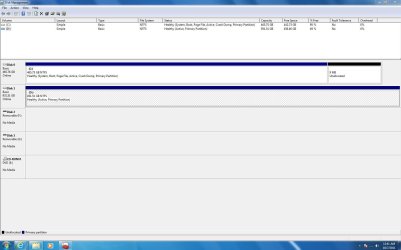
I did attach a jpg of the Disk Managament display.
 

Attachments

  • DiskMan Pic.JPG
    DiskMan Pic.JPG
    125.5 KB · Views: 14

My Computer My Computer

At a glance

Windows 7 64 ProIntel E6850 Core 2 Duo @ 3.00GHz4GB DDR2-800 OCZGeForce 9600GT
Computer Manufacturer/Model Number
Home Grown Desktop
OS
Windows 7 64 Pro
CPU
Intel E6850 Core 2 Duo @ 3.00GHz
Motherboard
Asus P5K-E Wifi AP
Memory
4GB DDR2-800 OCZ
Graphics Card(s)
GeForce 9600GT
Monitor(s) Displays
Samsung SyncMaster 226BW
Screen Resolution
1600x1050
Hard Drives
WD 500GB Caviar Black
WD 1TB Caviar Black
PSU
450 Watt
Keyboard
Logitech MK300
Mouse
Logitech MK300
Other Info
HP Deskjet Pro 8500, Asus 802.11n WLAN card; Klipsch ProMedia 2.1 speakers
Re-read the procedure for filling out your system specs.

Your cooperation is appreciated.
 

My Computer My Computer

At a glance

MS Windows 7 Ultimate SP1 64-bitAMD A10-4600M6.00 GB Dual-Channel DDR3 @ 798MHz (11-11-12-28)AMD Radeon HD 7660G
Computer Manufacturer/Model Number
Toshiba Satellite S875D-S7239 laptop
OS
MS Windows 7 Ultimate SP1 64-bit
CPU
AMD A10-4600M
Motherboard
AMD Pumori (Socket FT1)
Memory
6.00 GB Dual-Channel DDR3 @ 798MHz (11-11-12-28)
Graphics Card(s)
AMD Radeon HD 7660G
Sound Card
High Definition Audio Device
Monitor(s) Displays
Generic PnP Monitor (1600x900@60Hz)
Screen Resolution
1600x900@60Hz
Hard Drives
SSD 119GB Corsair CSSD-V128GB2 ATA Device
Keyboard
Standard PS/2 Keyboard
Mouse
HP Wireless Optical Mobile Mouse Model FHA-3410
Internet Speed
What the local pub, local coffee shop offers.
Other Info
Optical Drive:MATSHITA BD-CMB UJ160B ATA Device


Also have an Asus ha1002xp netbook with Win 7 Ultimate installed.
Okay, karlsnooks. Filled things out. Thanks.
 

My Computer My Computer

At a glance

Windows 7 64 ProIntel E6850 Core 2 Duo @ 3.00GHz4GB DDR2-800 OCZGeForce 9600GT
Computer Manufacturer/Model Number
Home Grown Desktop
OS
Windows 7 64 Pro
CPU
Intel E6850 Core 2 Duo @ 3.00GHz
Motherboard
Asus P5K-E Wifi AP
Memory
4GB DDR2-800 OCZ
Graphics Card(s)
GeForce 9600GT
Monitor(s) Displays
Samsung SyncMaster 226BW
Screen Resolution
1600x1050
Hard Drives
WD 500GB Caviar Black
WD 1TB Caviar Black
PSU
450 Watt
Keyboard
Logitech MK300
Mouse
Logitech MK300
Other Info
HP Deskjet Pro 8500, Asus 802.11n WLAN card; Klipsch ProMedia 2.1 speakers
Thanks,

Now the sophisticated way of solving your problem is to determine who is the owner of you 2nd drive, take ownership, give yourself all permissions being sure that you've selected to propogate peremissions form the top all of the way down, then to make Everyone Owner, once again propogarting all off the way down.

But here's what I'd do:
Boot from a System Repair Disc,
Go go a command prompt.
copy everything you want to keep from the ""d" over to the "c" (quotes are there because drive letters might be different when working from the disc).
Format the "d"
exit from the system repair disc command shell and reboot.

Now you will find that D has the permissions you want and you will be able to move things back.

CREATE A SYSTEM REPAIR DISC

START | type System Repair | Enter key | Create Disc button

====================================
GO TO A COMMAND PROMPT USING A SYSTEM REPAIR DISC

1) Insert System Repair Disc into optical reader.
2) Shutdown computer.
3) Boot up computer from the System Repair Disc
If your computer doesn’t boot from the optical drive, then
Immediately after pushing your Power ON button,
start tapping the F2 key to get to the BIOS to change the boot order

On some computers, Immediately after pushing the Power ON button, start tapping the F12 key and choose CD/DVD to change the boot order only for this time.
4) Wait while a mini-version of Windows is loaded and finally the SYSTEM RECOVERY OPTIONS dialog appears.
5) NEXT | SYSTEM RECOVERY OPTIONS dialog
will search your system for installed versions of Windows.
6) select the Use recovery tools that can help fix problems starting Windows radio button |
7) NEXT | Choose Command Prompt

Run desired commands and type EXIT when finished.
Remove the System Repair Disc.
Shutdown computer.
Power on computer.
 

My Computer My Computer

At a glance

MS Windows 7 Ultimate SP1 64-bitAMD A10-4600M6.00 GB Dual-Channel DDR3 @ 798MHz (11-11-12-28)AMD Radeon HD 7660G
Computer Manufacturer/Model Number
Toshiba Satellite S875D-S7239 laptop
OS
MS Windows 7 Ultimate SP1 64-bit
CPU
AMD A10-4600M
Motherboard
AMD Pumori (Socket FT1)
Memory
6.00 GB Dual-Channel DDR3 @ 798MHz (11-11-12-28)
Graphics Card(s)
AMD Radeon HD 7660G
Sound Card
High Definition Audio Device
Monitor(s) Displays
Generic PnP Monitor (1600x900@60Hz)
Screen Resolution
1600x900@60Hz
Hard Drives
SSD 119GB Corsair CSSD-V128GB2 ATA Device
Keyboard
Standard PS/2 Keyboard
Mouse
HP Wireless Optical Mobile Mouse Model FHA-3410
Internet Speed
What the local pub, local coffee shop offers.
Other Info
Optical Drive:MATSHITA BD-CMB UJ160B ATA Device


Also have an Asus ha1002xp netbook with Win 7 Ultimate installed.

My Computer My Computer

At a glance

Windows 7 Home Premium 32 bit
OS
Windows 7 Home Premium 32 bit
I repeat-taking ownership is not always a cure-all.
 

My Computer My Computer

At a glance

MS Windows 7 Ultimate SP1 64-bitAMD A10-4600M6.00 GB Dual-Channel DDR3 @ 798MHz (11-11-12-28)AMD Radeon HD 7660G
Computer Manufacturer/Model Number
Toshiba Satellite S875D-S7239 laptop
OS
MS Windows 7 Ultimate SP1 64-bit
CPU
AMD A10-4600M
Motherboard
AMD Pumori (Socket FT1)
Memory
6.00 GB Dual-Channel DDR3 @ 798MHz (11-11-12-28)
Graphics Card(s)
AMD Radeon HD 7660G
Sound Card
High Definition Audio Device
Monitor(s) Displays
Generic PnP Monitor (1600x900@60Hz)
Screen Resolution
1600x900@60Hz
Hard Drives
SSD 119GB Corsair CSSD-V128GB2 ATA Device
Keyboard
Standard PS/2 Keyboard
Mouse
HP Wireless Optical Mobile Mouse Model FHA-3410
Internet Speed
What the local pub, local coffee shop offers.
Other Info
Optical Drive:MATSHITA BD-CMB UJ160B ATA Device


Also have an Asus ha1002xp netbook with Win 7 Ultimate installed.
I thought the problem was he can't read (and for that matter copy) the old files on D: to begin with.

And in this case, taking ownership of the complete drive should be harmless since it's not the running Windows system. It's worth a try before going off in any other direction.
 

My Computer My Computer

At a glance

Windows 7 Professional SP1 32-bitIntel Core 2 Duo E6600 2.4GHz4GB DDR2-667 (4x1GB in dual-channel config)nVidia GeForce 9800 GT
Computer type
PC/Desktop
Computer Manufacturer/Model Number
Custom-built
OS
Windows 7 Professional SP1 32-bit
CPU
Intel Core 2 Duo E6600 2.4GHz
Motherboard
Asus PL5D2
Memory
4GB DDR2-667 (4x1GB in dual-channel config)
Graphics Card(s)
nVidia GeForce 9800 GT
Sound Card
Creative X-Fi XtremeMusic
Monitor(s) Displays
Acer P236H
Screen Resolution
1920x1200 (DVI)
Hard Drives
OCZ SSD Vertex Plus 60GB SATA (Firmware 3.55), 64MB cache
Hitachi HD321KJ SATA, 320GB, 7200rpm, 16MB cache
PSU
Antec TruePower 2.0
Case
Cooler Master Centurion
Cooling
Too many fans
Keyboard
Standard
Mouse
Microsoft wireless optical mouse
Internet Speed
AT&T U-verse (18mbit/sec)
Antivirus
Microsoft Security Essentials
Browser
Firefox
Other Info
Other devices:
Compaq CQ-60 laptop
Google Nexus 7 (2012) tablet
Nvidia SHIELD tablet (US/LTE)
Hardkernel ODROID-XU single-board computer (Samsung Exynos 5420)
Karl,

I would do the second option that you recommended, but the items I want to keep are more than the free space that I have on drive C. Therefore, how do you go about taking ownership of items of drive D and then getting permissions for those items as well (folders and subfolders)?

Thanks.
 

My Computer My Computer

At a glance

Windows 7 64 ProIntel E6850 Core 2 Duo @ 3.00GHz4GB DDR2-800 OCZGeForce 9600GT
Computer Manufacturer/Model Number
Home Grown Desktop
OS
Windows 7 64 Pro
CPU
Intel E6850 Core 2 Duo @ 3.00GHz
Motherboard
Asus P5K-E Wifi AP
Memory
4GB DDR2-800 OCZ
Graphics Card(s)
GeForce 9600GT
Monitor(s) Displays
Samsung SyncMaster 226BW
Screen Resolution
1600x1050
Hard Drives
WD 500GB Caviar Black
WD 1TB Caviar Black
PSU
450 Watt
Keyboard
Logitech MK300
Mouse
Logitech MK300
Other Info
HP Deskjet Pro 8500, Asus 802.11n WLAN card; Klipsch ProMedia 2.1 speakers
You are not going to like mey answer, but under the circumstances and planning for the future, buy a larger external USB drive. I think I saw a 1TB for $100 at Fry's. My largest external usb is 320 GB.
 

My Computer My Computer

At a glance

MS Windows 7 Ultimate SP1 64-bitAMD A10-4600M6.00 GB Dual-Channel DDR3 @ 798MHz (11-11-12-28)AMD Radeon HD 7660G
Computer Manufacturer/Model Number
Toshiba Satellite S875D-S7239 laptop
OS
MS Windows 7 Ultimate SP1 64-bit
CPU
AMD A10-4600M
Motherboard
AMD Pumori (Socket FT1)
Memory
6.00 GB Dual-Channel DDR3 @ 798MHz (11-11-12-28)
Graphics Card(s)
AMD Radeon HD 7660G
Sound Card
High Definition Audio Device
Monitor(s) Displays
Generic PnP Monitor (1600x900@60Hz)
Screen Resolution
1600x900@60Hz
Hard Drives
SSD 119GB Corsair CSSD-V128GB2 ATA Device
Keyboard
Standard PS/2 Keyboard
Mouse
HP Wireless Optical Mobile Mouse Model FHA-3410
Internet Speed
What the local pub, local coffee shop offers.
Other Info
Optical Drive:MATSHITA BD-CMB UJ160B ATA Device


Also have an Asus ha1002xp netbook with Win 7 Ultimate installed.
Try rightclick>take ownership of D first after installing the shortcut as already given here: Take Ownership Shortcut

I don't think it will present a problem and may be a quick solution. If not, rightclick D>Properties>Security and add Everyone as owner with full permissions.
 
Back
Top