Bitlocked Drive Shows As Empty After Re-installing Windows 7?

iDShaDoW

New member
Local time
6:42 PM
Messages
3
Hope someone can help me.

I'm going through to search through all the threads pertaining to Bitlocker to see if anyone had a similar issue but no luck yet.

Anyhow:

1) Windows 7 x64 was on C:
2) G: was Bitlocker encrypted

Got a new GPU and went through a bunch of stuff before determining that it was bad and needed to be RMA'd. One step included doing a fresh install of Windows 7.

After re-installation, drive G: just showed as being a "New Volume" that was completely empty when I viewed its contents.

Seems like something went funky after I reformatted so that the drive isn't being viewed as an encrypted drive (at least I hope that's the case).

Is it possible to re-associate the drive somehow so I can try to unlock it with my passphrase? I don't have one of those key files that you're asked to create when encrypting the drive. I do know the passphrase that was used to unlock it and didn't bother with the key file because I know I'd never forget the passphrase.

Possible to get my data back or am I hosed? Tried asking on the Microsoft Social TechNet forum but no help there after 100+ views.

Thanks for any help.
 

My Computer My Computer

OS
Windows 7 Ultimate x64
Hello Shadow, and welcome to Seven Forums.

I hate to say this, but is sounds like you may have also formatted the G: drive as well since it now shows as a "New Volume" and no longer encrypted by BitLocker. If this was the case, then you are out of luck, and lost all data that was on the G: drive. :(

If you had only formatted the C: drive and reinstalled Windows on the C: drive, the G: drive would have still showed as being encrypted by BitLocker.

I sure hope that you had a backup or a system image backup of the G: drive.

Could you post a screenshot of your Disk Management (diskmgmt.msc) window showing all of youe HDD's layout to be certain if this may be the case?
 

My Computer My Computer

Computer type
PC/Desktop
Computer Manufacturer/Model Number
Self built custom
OS
64-bit Windows 11 Pro for Workstations
CPU
Intel i7-8700K OC'd to 5 GHz
Motherboard
ASUS ROG Maximus XI Formula Z390
Memory
64 GB (4x16GB) G.SKILL TridentZ RGB DDR4 3600 MHz
Graphics Card(s)
ASUS ROG-STRIX-GTX1080TI-O11G-GAMING
Sound Card
Integrated
Monitor(s) Displays
2 x Samsung Odyssey G7 27"
Screen Resolution
2560x1440
Hard Drives
1TB Samsung 990 PRO M.2,
4TB Samsung 990 PRO PRO M.2,
TerraMaster F8 SSD Plus NAS
PSU
Seasonic Prime Titanium 850W
Case
Thermaltake Core P3
Cooling
Corsair Hydro H115i
Keyboard
Logitech wireless K800
Mouse
Logitech MX Master 4
Internet Speed
2 Gb/s Download and 100 Mb/s Upload
Antivirus
Malwarebyte Anti-Malware Premium
Browser
Google Chrome
Other Info
Logitech Z625 speaker system,
Logitech BRIO 4K Pro webcam,
HP Color LaserJet Pro MFP M477fdn,
APC SMART-UPS RT 1000 XL - SURT1000XLI,
Galaxy S23 Plus phone
Thanks for the response. The drive letters got shuffled around and is now the H drive shown in Disk Management. And just add in there, I'm highly confident that I wouldn't make a simple mistake like formatting the wrong/an extra drive while formatting my OS drive for a re-installation.

Guess something went funky somewhere and I'm hosed though since no one else chimed in. And from searching the Internet I haven't come across anyone that experienced something similar.


TXZo1.png
 

My Computer My Computer

OS
Windows 7 Ultimate x64
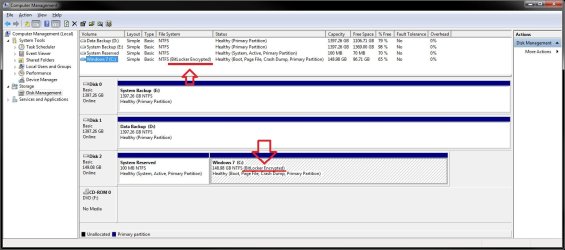
It wouldn't matter if the drive letter was changed or not. If the drive was still encrypted with BitLocker, it would show it as so in Disk Management like in my screenshot below of my C drive.

From what you described, it appears that you either formatted it or deleted it and formatted it by mistake. :(

encrypted.jpg
 

My Computer My Computer

Computer type
PC/Desktop
Computer Manufacturer/Model Number
Self built custom
OS
64-bit Windows 11 Pro for Workstations
CPU
Intel i7-8700K OC'd to 5 GHz
Motherboard
ASUS ROG Maximus XI Formula Z390
Memory
64 GB (4x16GB) G.SKILL TridentZ RGB DDR4 3600 MHz
Graphics Card(s)
ASUS ROG-STRIX-GTX1080TI-O11G-GAMING
Sound Card
Integrated
Monitor(s) Displays
2 x Samsung Odyssey G7 27"
Screen Resolution
2560x1440
Hard Drives
1TB Samsung 990 PRO M.2,
4TB Samsung 990 PRO PRO M.2,
TerraMaster F8 SSD Plus NAS
PSU
Seasonic Prime Titanium 850W
Case
Thermaltake Core P3
Cooling
Corsair Hydro H115i
Keyboard
Logitech wireless K800
Mouse
Logitech MX Master 4
Internet Speed
2 Gb/s Download and 100 Mb/s Upload
Antivirus
Malwarebyte Anti-Malware Premium
Browser
Google Chrome
Other Info
Logitech Z625 speaker system,
Logitech BRIO 4K Pro webcam,
HP Color LaserJet Pro MFP M477fdn,
APC SMART-UPS RT 1000 XL - SURT1000XLI,
Galaxy S23 Plus phone
I see. Thanks for the advice. Guess my last option is to try the bit-de tool or something someone linked on TechNet.

If that doesn't work guess I'm out of luck and won't bother with Bitlocker. Will probably use Truecrypt in the future instead.

My OS drive is a 60GB SSD and I always double-check the drive capacity when re-formatting. Been working with computers for over a decade and thought built-in encryption might be nice to toy around with.

Thanks for taking the time to look at my problems and getting back to me. :)
 

My Computer My Computer

OS
Windows 7 Ultimate x64
Back
Top