Najushua
New member
I'm at a loss for words describing the issue but I will try my best.
This just started happening with no apparent cause.
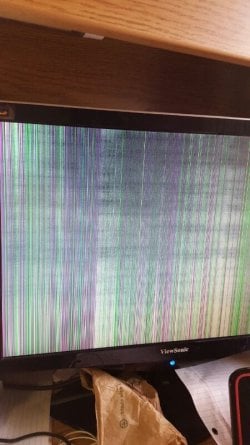
When using my second monitor moving windows over is very choppy and freezes the screen until I drop the window, the mouse moves fine but if I use a drag select it goes choppy into freezing. I have had two monitors for a long time and never had any problems I usually watch a video on my main monitor and play runescape on the second monitor however it is now too choppy to do anything.
So here is the weird part, its only laggy in the middle of the monitor i can use the top bottom and sides fine but if I move anything to far into the center its choppy and laggy
I tried to do some reading but couldn't really find a solution, it might be an frame rate issue but no settings seem out of whack and the issue just randomly popped up.
I can try to make a .gif or webm of what the monitor looks like when I try to use it if my description isn't helpful enough.
Main monitor: Asus VE248 (Asus VE248H Black 24" 2ms Full HD LCD Monitor w/Speakers - Newegg.com)
Secondary: Viewsonic VX1962wm (ViewSonic X Series VX1962wm Black 19" 5ms, 2ms (GTG) Widescreen LCD Monitor 300 cd/m2 DC 6000:1(1000:1) Built-in Speakers - Newegg.com)
Both are connected via Dvi-D cables
Thank you for your help,
Najushua
Edit: This is ONLY on the second monitor
This just started happening with no apparent cause.
When using my second monitor moving windows over is very choppy and freezes the screen until I drop the window, the mouse moves fine but if I use a drag select it goes choppy into freezing. I have had two monitors for a long time and never had any problems I usually watch a video on my main monitor and play runescape on the second monitor however it is now too choppy to do anything.
So here is the weird part, its only laggy in the middle of the monitor i can use the top bottom and sides fine but if I move anything to far into the center its choppy and laggy
I tried to do some reading but couldn't really find a solution, it might be an frame rate issue but no settings seem out of whack and the issue just randomly popped up.
I can try to make a .gif or webm of what the monitor looks like when I try to use it if my description isn't helpful enough.
Main monitor: Asus VE248 (Asus VE248H Black 24" 2ms Full HD LCD Monitor w/Speakers - Newegg.com)
Secondary: Viewsonic VX1962wm (ViewSonic X Series VX1962wm Black 19" 5ms, 2ms (GTG) Widescreen LCD Monitor 300 cd/m2 DC 6000:1(1000:1) Built-in Speakers - Newegg.com)
Both are connected via Dvi-D cables
Thank you for your help,
Najushua
Edit: This is ONLY on the second monitor
Last edited:
My Computer
At a glance
Windows 7 Home premium 64-bitIntel(R) Core(TM) i5-2500 CPU @ 3.30 GHz16.oo GB RAMGeForce GTX 650 Ti BOOST
- Computer type
- PC/Desktop
- Computer Manufacturer/Model Number
- Custom build
- OS
- Windows 7 Home premium 64-bit
- CPU
- Intel(R) Core(TM) i5-2500 CPU @ 3.30 GHz
- Motherboard
- Gigabyte Technology Co. Model Z68AP-D3
- Memory
- 16.oo GB RAM
- Graphics Card(s)
- GeForce GTX 650 Ti BOOST
- Hard Drives
- 1 TB
- Keyboard
- Logitech G710+
- Mouse
- Logitech G502 Proteus
- Internet Speed
- 94.95 down 95.53 up
- Antivirus
- Defender + Malwarebytes pro
- Browser
- Chrome