Second monitor remains black

DGtheAlmighty

New member
Local time
10:35 PM
Messages
3
I just upgraded my graphics card from the AMD Radeon 6670 up to the AMD Radeon 7850 (by XFX), and since then, my second monitor is remaining black. It is detected and I can drag windows over into the screen, but I cannot see them. The 7850 does not have a VGA port so I got a VGA to DVI converter and I believe that that may be the issue. Any help is appreciated, thanks in advance.
 

My Computer My Computer

At a glance

Windows 7 Home Premium x64
OS
Windows 7 Home Premium x64
Which outputs do you have each plugged into, the DL-DVI-I and the HDMI, or the SL-DVI-D and the HDMI? Do they have to be the same for dual monitors? Like using both the mini Display Ports, instead? Does the 7850 manual mention anything?
 

My Computer My Computer

At a glance

Windows 7 Home Premium x64AMD FX-8150Corsair Vengeance Dual-Channel 1866MHz 8GB (2...x2 Galaxy GeForce GTX 560 2GB in SLI
Computer Manufacturer/Model Number
Mine
OS
Windows 7 Home Premium x64
CPU
AMD FX-8150
Motherboard
ASUS Sabertooth 990FX
Memory
Corsair Vengeance Dual-Channel 1866MHz 8GB (2x4GB)
Graphics Card(s)
x2 Galaxy GeForce GTX 560 2GB in SLI
Sound Card
(Onboard) Realtek ALC892
Monitor(s) Displays
Dynex 42 inch HDTV
Screen Resolution
1920x1080
Hard Drives
Seagate Barracuda 2TB (SATA);
My Book 300GB (USB);
My Book 3TB (USB)
PSU
Kingwin KX-1000
Case
Corsair Carbide 500R
Cooling
Corsair H100
Keyboard
Logitech Wireless Solar K750
Mouse
Logitech Wireless M305
Internet Speed
DSL (unsure of details)
Other Info
LiteOn iHBS212 Blu-Ray Writer (SATA)
If you can drag things into the other monitor then I'm not so sure it's the converter. I would check how your display is set up within Windows by Right-Mouse clicking on your desktop and clicking on Screen Resolution. If you can try out another monitor to see if it's an issue with the GPU or the monitor itself. It could be that your monitor went bad when you swapped it (you're not supposed to swap monitors while the computer is turned on).
 

My Computer My Computer

At a glance

Windows 7 Pro x64Intel Core i7 920Corsair XMS3 12GB (3x2GB) DDR3 1333EVGA GTX 470 1280MB GDDR5 DX11
Computer Manufacturer/Model Number
Me
OS
Windows 7 Pro x64
CPU
Intel Core i7 920
Motherboard
ASUS P6T Deluxe V2
Memory
Corsair XMS3 12GB (3x2GB) DDR3 1333
Graphics Card(s)
EVGA GTX 470 1280MB GDDR5 DX11
Monitor(s) Displays
ASUS VW246H | ACER AL2216W
Screen Resolution
3600x1080
Hard Drives
1x Corsair Vertex 3 SSD (120GB)
1x Corsair Vertex 2 SSD (60GB)
2x Western Digital Black (500GB/1TB)
1x External WD Green eSATA (1TB)
PSU
Corsair 850HX
Case
Velocity Micro FullTower
Keyboard
Logitech G110
Mouse
Logitech G500
Internet Speed
http://www.speedtest.net/result/1226664359.png
Antivirus
MSE
Browser
Chrome
Other Info
Logitech Z-5500 5.1 Surround Sound
Logitech C260 Webcam
Creative Fatal1ty Headset
@IIllytch321: I'm not sure what you mean. I have my main monitor connected to the HDMI and the second monitor connected to the DVI, but the DVI cable is connected to the VGA to DVI adapter.
@bulletng: I have tried two different monitors, and different resolutions, but neither worked. I swapped monitors while my computer was off.
 

My Computer My Computer

At a glance

Windows 7 Home Premium x64
OS
Windows 7 Home Premium x64
It may be a driver issue. You can try uninstalling the drivers and reinstalling them.
 

My Computer My Computer

At a glance

Windows 7 Home Premium 64 bitIntel Core i7-4790G.SKILL 8GB (2 x 4GB) DDR3 F3-10666CL9D-8GBNTAMD Radeon R7 250
Computer type
PC/Desktop
Computer Manufacturer/Model Number
Custom Build
OS
Windows 7 Home Premium 64 bit
CPU
Intel Core i7-4790
Motherboard
GA-Z87X-D3H
Memory
G.SKILL 8GB (2 x 4GB) DDR3 F3-10666CL9D-8GBNT
Graphics Card(s)
AMD Radeon R7 250
Sound Card
Realtek ALC892
Monitor(s) Displays
Samsung UN32EH5000, Dell 1703FPT
Screen Resolution
1920 x 1080, 1280 x 1024
Hard Drives
WD5003AZEX
WD10EZEX
Samsung HD103SJ
Samsung 128 GB 840 PRO
PSU
SeaSonic M12II SS-500GM
Case
Fractal Design Define R4
Cooling
Zalman CNPS9900ALED
Keyboard
Logitech K800
Mouse
Logitech M705
Internet Speed
16 Mbps
Antivirus
Avast
Browser
Firefox
Other Info
Bose Companion 2 Multimedia Speakers
Sardonicus, I tried that, and still a no-go
 

My Computer My Computer

At a glance

Windows 7 Home Premium x64
OS
Windows 7 Home Premium x64
Stupid question, but have you got it connected to the correct DVI port? Only one of the DVI ports on the card supports VGA via adapter, the other won't work at all.
 

My Computer My Computer

At a glance

Win 7 Ultimate x64FX-8350 @ 4.6 GHz so farADATA XPG V1 Series Black 8GB DDR3 1600Sapphire R9 270x Dual-X
Computer type
PC/Desktop
Computer Manufacturer/Model Number
Me
OS
Win 7 Ultimate x64
CPU
FX-8350 @ 4.6 GHz so far
Motherboard
Asus M5A97 EVO
Memory
ADATA XPG V1 Series Black 8GB DDR3 1600
Graphics Card(s)
Sapphire R9 270x Dual-X
Sound Card
Xonar DGX w/ Corsair Vengence 1300
Monitor(s) Displays
Acer S232HL Abid
Screen Resolution
1920x1080
Hard Drives
120 GB OCZ Vertex 3
500 GB Seagate 7200.12
PSU
Antec Earthwatts 650W Green
Case
Antec Three Hundred
Cooling
Cooler Master 212 EVO
Keyboard
Logitech G510
Mouse
Logitech G500s
Internet Speed
35000/3000
That's what I'm talkin' 'bout.
 

My Computer My Computer

At a glance

Windows 7 Home Premium x64AMD FX-8150Corsair Vengeance Dual-Channel 1866MHz 8GB (2...x2 Galaxy GeForce GTX 560 2GB in SLI
Computer Manufacturer/Model Number
Mine
OS
Windows 7 Home Premium x64
CPU
AMD FX-8150
Motherboard
ASUS Sabertooth 990FX
Memory
Corsair Vengeance Dual-Channel 1866MHz 8GB (2x4GB)
Graphics Card(s)
x2 Galaxy GeForce GTX 560 2GB in SLI
Sound Card
(Onboard) Realtek ALC892
Monitor(s) Displays
Dynex 42 inch HDTV
Screen Resolution
1920x1080
Hard Drives
Seagate Barracuda 2TB (SATA);
My Book 300GB (USB);
My Book 3TB (USB)
PSU
Kingwin KX-1000
Case
Corsair Carbide 500R
Cooling
Corsair H100
Keyboard
Logitech Wireless Solar K750
Mouse
Logitech Wireless M305
Internet Speed
DSL (unsure of details)
Other Info
LiteOn iHBS212 Blu-Ray Writer (SATA)
Yeah, a DVI to VGA adapter will only work if the DVI port is a DVI-I, Analog and Digital. If it's DVI-D, Digital only, there is no analog VGA signal to go to the monitor. A lot of cards with two DVI ports will have one DVI-I and one DVI-D. If you put the adapter on the wrong one you get no picture.
 

My Computer My Computer

At a glance

Windows 10 Education 64 bitAMD Phenom II X4 980 Black Edition Deneb 3.7GHz8GB 4GBx2 Kingston PC10600 DDR3 1333 MemoryZotac NVIDIA Geforce GT640 2 Gig DDR3 PCIe
Computer type
PC/Desktop
Computer Manufacturer/Model Number
Home Built
OS
Windows 10 Education 64 bit
CPU
AMD Phenom II X4 980 Black Edition Deneb 3.7GHz
Motherboard
Asus M4N68T-M V2 µATX Motherboard
Memory
8GB 4GBx2 Kingston PC10600 DDR3 1333 Memory
Graphics Card(s)
Zotac NVIDIA Geforce GT640 2 Gig DDR3 PCIe
Sound Card
VIA VT1708s High Definition Audio 8-channel Onboard
Monitor(s) Displays
22" LG E2242 1080p and 2 19" I-INC AG191D
Screen Resolution
1280x1024 - 1920x1080 - 1280x1024
Hard Drives
Crucial M100 256 GB SSD and 500 GB WD Blue SATA
PSU
Thermaltake TR 620
Case
Power Up Black ATX Mid-Tower Case
Cooling
Stock heatsink and fan
Keyboard
Logitech Wireless K350 Wave
Mouse
Logitech Wireless M570 Trackman Wheel
Internet Speed
80 Mbps Down 30 Mbps Up
Antivirus
Windows Defender
Browser
Internet Explorer 11
Other Info
HP DVD1040e Lightscribe - External USB2
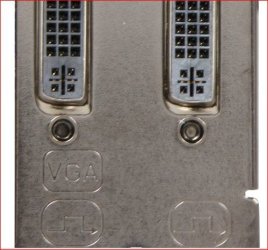
XFX are one of the few that take the guesswork out of that though, as they are one of the only ones that actually marks the backplate as to which port does what,

xfxvga.JPG
 

My Computer My Computer

At a glance

Win 7 Ultimate x64FX-8350 @ 4.6 GHz so farADATA XPG V1 Series Black 8GB DDR3 1600Sapphire R9 270x Dual-X
Computer type
PC/Desktop
Computer Manufacturer/Model Number
Me
OS
Win 7 Ultimate x64
CPU
FX-8350 @ 4.6 GHz so far
Motherboard
Asus M5A97 EVO
Memory
ADATA XPG V1 Series Black 8GB DDR3 1600
Graphics Card(s)
Sapphire R9 270x Dual-X
Sound Card
Xonar DGX w/ Corsair Vengence 1300
Monitor(s) Displays
Acer S232HL Abid
Screen Resolution
1920x1080
Hard Drives
120 GB OCZ Vertex 3
500 GB Seagate 7200.12
PSU
Antec Earthwatts 650W Green
Case
Antec Three Hundred
Cooling
Cooler Master 212 EVO
Keyboard
Logitech G510
Mouse
Logitech G500s
Internet Speed
35000/3000
Yeah that's a nice extra touch. Assuming you know what it means and actually see it. ;)
Where my tower is I'd have to have a flashlight to actually see that and even then it wouldn't be easy to see.
 

My Computer My Computer

At a glance

Windows 10 Education 64 bitAMD Phenom II X4 980 Black Edition Deneb 3.7GHz8GB 4GBx2 Kingston PC10600 DDR3 1333 MemoryZotac NVIDIA Geforce GT640 2 Gig DDR3 PCIe
Computer type
PC/Desktop
Computer Manufacturer/Model Number
Home Built
OS
Windows 10 Education 64 bit
CPU
AMD Phenom II X4 980 Black Edition Deneb 3.7GHz
Motherboard
Asus M4N68T-M V2 µATX Motherboard
Memory
8GB 4GBx2 Kingston PC10600 DDR3 1333 Memory
Graphics Card(s)
Zotac NVIDIA Geforce GT640 2 Gig DDR3 PCIe
Sound Card
VIA VT1708s High Definition Audio 8-channel Onboard
Monitor(s) Displays
22" LG E2242 1080p and 2 19" I-INC AG191D
Screen Resolution
1280x1024 - 1920x1080 - 1280x1024
Hard Drives
Crucial M100 256 GB SSD and 500 GB WD Blue SATA
PSU
Thermaltake TR 620
Case
Power Up Black ATX Mid-Tower Case
Cooling
Stock heatsink and fan
Keyboard
Logitech Wireless K350 Wave
Mouse
Logitech Wireless M570 Trackman Wheel
Internet Speed
80 Mbps Down 30 Mbps Up
Antivirus
Windows Defender
Browser
Internet Explorer 11
Other Info
HP DVD1040e Lightscribe - External USB2
I had the very same problem, except : at boot time both monitors go on, I see the BIOS on both screens and I see the animated Windows 7 boot logo ''Starting Windows'', then a monitor goes off...... :confused:

Needless to say, I tried any possible combination with VGA, DVI, and HDMI. Any connection in single monitor mode works. This is the second time I have this kind of problem with an XFX card. Both monitors are good as I removed the video card and uses the integrated one on the mobo.

Any ideas ?
 

My Computer My Computer

At a glance

Windows 7 Professional x64
Computer type
PC/Desktop
Computer Manufacturer/Model Number
custom built
OS
Windows 7 Professional x64
Did you select Extend mode?
 

My Computer My Computer

At a glance

Windows 10 Education 64 bitAMD Phenom II X4 980 Black Edition Deneb 3.7GHz8GB 4GBx2 Kingston PC10600 DDR3 1333 MemoryZotac NVIDIA Geforce GT640 2 Gig DDR3 PCIe
Computer type
PC/Desktop
Computer Manufacturer/Model Number
Home Built
OS
Windows 10 Education 64 bit
CPU
AMD Phenom II X4 980 Black Edition Deneb 3.7GHz
Motherboard
Asus M4N68T-M V2 µATX Motherboard
Memory
8GB 4GBx2 Kingston PC10600 DDR3 1333 Memory
Graphics Card(s)
Zotac NVIDIA Geforce GT640 2 Gig DDR3 PCIe
Sound Card
VIA VT1708s High Definition Audio 8-channel Onboard
Monitor(s) Displays
22" LG E2242 1080p and 2 19" I-INC AG191D
Screen Resolution
1280x1024 - 1920x1080 - 1280x1024
Hard Drives
Crucial M100 256 GB SSD and 500 GB WD Blue SATA
PSU
Thermaltake TR 620
Case
Power Up Black ATX Mid-Tower Case
Cooling
Stock heatsink and fan
Keyboard
Logitech Wireless K350 Wave
Mouse
Logitech Wireless M570 Trackman Wheel
Internet Speed
80 Mbps Down 30 Mbps Up
Antivirus
Windows Defender
Browser
Internet Explorer 11
Other Info
HP DVD1040e Lightscribe - External USB2
Back
Top