Secondary SATA drive not recognised

Pyrus

New member
Local time
12:41 AM
Messages
15
Location
Wirral
I bought a Seagate 2Tb internal 3.5 inch drive intending to install it in my desktop as a secondary drive. The desktop currently has two 500Gb disks in a Raid 0 (striped) array. One SATA port is free and I connected the new disk to this. The system did not recognise the disk so I put it in a caddy to check it. The disk was recognised over the Caddy's USB connection and I took the opportunity to format it NTFS.

I put the newly formatted (and empty) disk back into the desktop for a second attempt.

Results as follows.

Disk Management does not show the new disk:
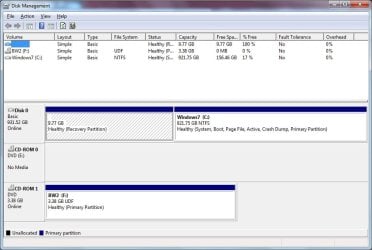
DiskMan.jpg

But Device Manager shows the new disk as ST2000M001-1CH164:
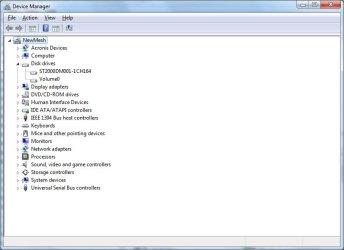
DevMan01.jpg

The ST2000M001-1CH164 entry disappears and reappears when I detach and reattach the SATA cable, proving the disk is powering up and the SATA connection is OK.

Although ST2000M001-1CH164 shows up in Device Manager all is not well. First, here is the detail for the (working) C drive:
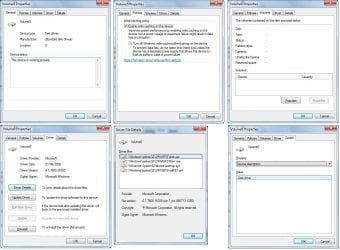
DevManA.jpg

And here are the details for the new drive:
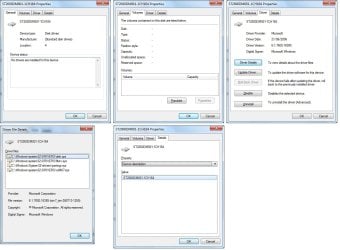
DevManB.jpg

- Notice one panel says no drivers are installed, another says the disk has the same drivers as the working disk. I tried clicking Update Drivers but it comes back and says they are already up to date. I tried Disable/Enable but that didn’t do anything.

I tried Seagate’s Seatools utility but couldn’t get anything meaningful from it:
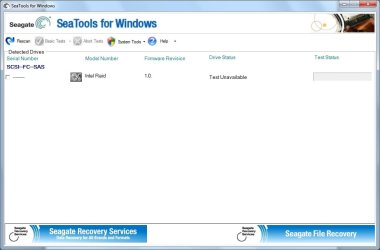
Seatools.jpg

I tried the BIOS next. The new disc shows under the Boot tab:

Hard Disk Drives
1st Drive [RAID: Intel Volume 0]
2nd Drive [RAID: ST2000DM001-1]


I don’t like the way it has ‘RAID’ against the new disk, but when I cntl-i to show the RAID settings the new disk correctly shows as non-RAID:

RAID_A.jpg

Any advice where to go from here? If I can’t get the disk working internally I’ll run it from a caddy under USB but that’s not really what I want!
 

My Computer My Computer

Computer type
PC/Desktop
Computer Manufacturer/Model Number
Mesh
OS
7 Home Premium x64
CPU
Intel Core i7 920
Motherboard
Asus P6T SE
Memory
6GB DDR3
Graphics Card(s)
Radeon HD 5850
Hard Drives
2 * 500 GB in RAID 0
It shows it as RAID because the whole contoller is in RAID mode, however non member disks are supported normally in this mode. Have you installed the latest ICH10R driver for your version of windows from the intel website? This may iron out compatibility issue with mixed mode drives on the controler. It's not quite the same as the F6 setup driver or the built in windows driver.
 

My Computer My Computer

Computer type
PC/Desktop
Computer Manufacturer/Model Number
Self Build
OS
Windows 7 Ultimate x64
CPU
Intel Core2 Quad Q8300 2.5Ghz
Motherboard
Asus P5QD Turbo
Memory
Kingston HyperX 4x1GB DDR2 1066Mhz
Graphics Card(s)
Asus/Nvidia 9500GT 1GB
Sound Card
On-Board HD
Monitor(s) Displays
22" Widescreen TFT
Screen Resolution
1920x1080
Hard Drives
2x 320Gb Seagate SATAII RAID 0
2x 80Gb Seagate SATAII RAID 0
1x 1tb hybrid (8gb ssd)
PSU
650w
Case
ATX
Cooling
140mm front, 120mm Rear, 80mm Chipset + stock CPU and GPU
Keyboard
Plastic one
Mouse
Plastic one
Internet Speed
4Mbps
Other Info
Laptop: HP Elitebook 2560p
i5 @2.7Ghz 4GB DDR3
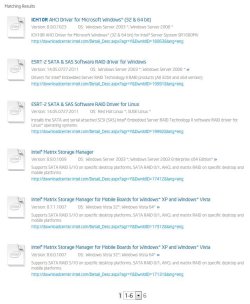
Thanks for the explanation why BIOS shows RAID on a non-RAID disk Sub Styler. I'm not sure about ICH10R though. intel.co.uk has six entries for ICH10R download and none of them mention Windows 7:

Capture_ICH10R.JPG

Also, a search for ICH10R on the computer brings back nothing.
 

My Computer My Computer

Computer type
PC/Desktop
Computer Manufacturer/Model Number
Mesh
OS
7 Home Premium x64
CPU
Intel Core i7 920
Motherboard
Asus P6T SE
Memory
6GB DDR3
Graphics Card(s)
Radeon HD 5850
Hard Drives
2 * 500 GB in RAID 0
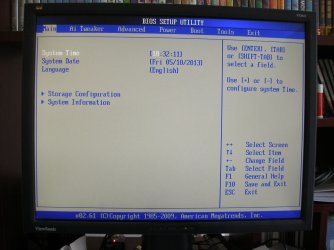
Something else I should mention: the BIOS has stopped listing the SATA ports. They should appear on the Main screen between Language and Storage Configuration, as six lines Sata1 thru 6. They were there a couple of days ago but they have disappeared. I have been in and out of the BIOS numerous times but I can't restore them.

BIOS_Main.jpg
 

My Computer My Computer

Computer type
PC/Desktop
Computer Manufacturer/Model Number
Mesh
OS
7 Home Premium x64
CPU
Intel Core i7 920
Motherboard
Asus P6T SE
Memory
6GB DDR3
Graphics Card(s)
Radeon HD 5850
Hard Drives
2 * 500 GB in RAID 0
I dont have them listed when in RAID mode, only in IDE or AHCI mode. The vista version of the driver will work just fine.
 

My Computer My Computer

Computer type
PC/Desktop
Computer Manufacturer/Model Number
Self Build
OS
Windows 7 Ultimate x64
CPU
Intel Core2 Quad Q8300 2.5Ghz
Motherboard
Asus P5QD Turbo
Memory
Kingston HyperX 4x1GB DDR2 1066Mhz
Graphics Card(s)
Asus/Nvidia 9500GT 1GB
Sound Card
On-Board HD
Monitor(s) Displays
22" Widescreen TFT
Screen Resolution
1920x1080
Hard Drives
2x 320Gb Seagate SATAII RAID 0
2x 80Gb Seagate SATAII RAID 0
1x 1tb hybrid (8gb ssd)
PSU
650w
Case
ATX
Cooling
140mm front, 120mm Rear, 80mm Chipset + stock CPU and GPU
Keyboard
Plastic one
Mouse
Plastic one
Internet Speed
4Mbps
Other Info
Laptop: HP Elitebook 2560p
i5 @2.7Ghz 4GB DDR3
I'm still nervous about ICH10R. I've just noticed that of the items returned from a search on intel.co.uk only one is a download of ICH10R itself, all the others are returned because ICH10R is mentioned somewhere in the description. And the one and only purely ICH10R download is only intended for server versions of Windows.

But I have had another idea. I found some roughly comparable threads on Tom's Hardware, and on one or two of them people were advised to set up the secondary disk as a 'single disk RAID (0) array'. Example:

New hdd shows up in bios but not in disk management - Hard Drives - Storage

This sounds odd. Like going into a bike shop and asking for a one-man tandem. But if someone can confirm it makes sense I'll give it a go. I presume it's something I'd do under cntl-i at startup.
 

My Computer My Computer

Computer type
PC/Desktop
Computer Manufacturer/Model Number
Mesh
OS
7 Home Premium x64
CPU
Intel Core i7 920
Motherboard
Asus P6T SE
Memory
6GB DDR3
Graphics Card(s)
Radeon HD 5850
Hard Drives
2 * 500 GB in RAID 0
I dont think the onboard intel controller will allow a single disk array. But you are welcome to try it. Have you got an alternative controller to connect it to? eg, into a different sata port onboard.
 

My Computer My Computer

Computer type
PC/Desktop
Computer Manufacturer/Model Number
Self Build
OS
Windows 7 Ultimate x64
CPU
Intel Core2 Quad Q8300 2.5Ghz
Motherboard
Asus P5QD Turbo
Memory
Kingston HyperX 4x1GB DDR2 1066Mhz
Graphics Card(s)
Asus/Nvidia 9500GT 1GB
Sound Card
On-Board HD
Monitor(s) Displays
22" Widescreen TFT
Screen Resolution
1920x1080
Hard Drives
2x 320Gb Seagate SATAII RAID 0
2x 80Gb Seagate SATAII RAID 0
1x 1tb hybrid (8gb ssd)
PSU
650w
Case
ATX
Cooling
140mm front, 120mm Rear, 80mm Chipset + stock CPU and GPU
Keyboard
Plastic one
Mouse
Plastic one
Internet Speed
4Mbps
Other Info
Laptop: HP Elitebook 2560p
i5 @2.7Ghz 4GB DDR3
Apologies for delayed reply. I attempted setting up the new disk as a one-disk RAID array and as predicted by Sub Styler it wouldn't let me. It came up with a message something like 'Error: insufficient space available to create RAID volume'. As for using another SATA port, the only free one is somewhere behind the graphics card and removing (and replacing :eek: ) graphics cards is beyond my skill level. So I'm abandoning the attempt to get this disk working as a secondary drive and falling back on the USB enclosure option.
 

My Computer My Computer

Computer type
PC/Desktop
Computer Manufacturer/Model Number
Mesh
OS
7 Home Premium x64
CPU
Intel Core i7 920
Motherboard
Asus P6T SE
Memory
6GB DDR3
Graphics Card(s)
Radeon HD 5850
Hard Drives
2 * 500 GB in RAID 0
Back
Top