Secunia PSI 2.0 BETA

A Guy

Righteous Dude
Secunia has a new Beta out with some changed features. If you install it, it will ask require any older version be uninstalled, and will do it for you. Make note of this new feature available during installation:

AutoUpdate.jpg

These settings can also be changed in the programs settings screen:
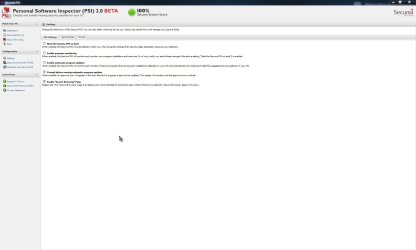
Settings.jpg

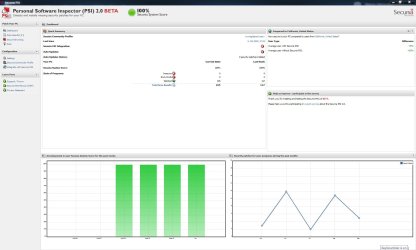
Here is the new interface:

Dashboard.jpg

And the expanded Secure Browsing display:
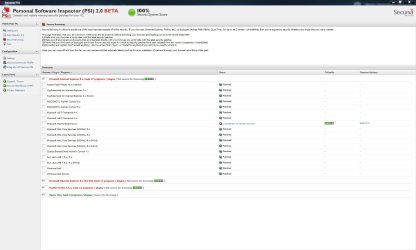
SecureBrowsing.jpg

If you are familiar/already use PSI, you will like this new version. It's working great on my Home Premuim x64. If you are unfamiliar with PSI it is a great program to scan and inform you of insecure, or end of life programs. It can be set to run at startup and constantly monitor programs (and now even auto update same). Or you can choose to run it manually and manually update, as I do. Insecure programs will usually list a direct download link for the new, secure version. there will also be links to the Secunia bulletin on the insecure program, and link to PSI community discussions on that program.

I highly recommend this free program to everyone. I have been using it since it was just a web based program. I consider it a must have program on my system.

The homepage:

PSI - Consumer - Products

Direct download of the Beta:

http://secunia.com/PSI2SetupBeta.exe

Blog post:

Auto Update your Programs - Secunia PSI 2.0 Public Beta - Blog - Blog & News - Company

A Guy
 

My Computer

Computer type
PC/Desktop
OS
Windows 10 Home x64
CPU
INTEL Core i5-750 Quad-Core 3.37GHz
Motherboard
ASUS P7P55D
Memory
HyperX Fury Black Series 8GB (2 x 4GB) 1866Mhz
Graphics Card(s)
EVGA GeForce GTX 750 Superclocked 1GB 128-Bit GDDR5
Monitor(s) Displays
LG 32MA68HY 32" IPS
Screen Resolution
1920 x 1080
Hard Drives
Samsung 840 Evo 120GB, SEAGATE 500GB Barracuda® 7200.12, SATA 3 Gb/s, 7200 RPM, 16MB cache
PSU
ANTEC TruePower New TP-550, 80 PLUS, 550W
Case
ANTEC Three Hundred Illusion
Cooling
COOLER MASTER Hyper 212 Plus, 4 x 120mm 1 x 140mm Noctua's
Internet Speed
85 + Mbps
Antivirus
Avast
Browser
Vivaldi
Does it just alert you to security patches, or installs them?
 

My Computer

Computer Manufacturer/Model Number
Dell and Custom
OS
Systems 1 and 2: Windows 7 Enterprise x64, Win 8 Developer
CPU
System 1: i7 [email protected], System 2: AMD FX-4100 Zambezi 3.6G
Motherboard
System 1:Dell 06NWYK System 2: ASUS M5A97 AM3+
Memory
System 1: 8GB System 2: 8GB
Graphics Card(s)
System 1: ATI FirePro V4800 System 2: Radeon HD 6850
Sound Card
System 1: onboard System 2: onboard
Monitor(s) Displays
System1: Viewsonic HDMI 24"
Screen Resolution
System 1: 1920x1080 System 2: 1920x1080
Hard Drives
System 1: Mirrored .5B drives System 2: Seagate Barracuda ST1000DM003 1TB 7200 RPM 64MB Cache SATA 6.0Gb/s
Case
System 1: Dell System 2: Cooler Master
Internet Speed
10 MBPS
Does it just alert you to security patches, or installs them?

take a look at the first image...
also read the text below the images...

"It can be set to run at startup and constantly monitor programs (and now even auto update same). Or you can choose to run it manually and manually update, as I do"

yes, it auto-updates.
 

My Computer

Computer Manufacturer/Model Number
Dell
OS
W7-Enterprise + WS-2008 (Converted to Workstation)
CPU
P4 2,4GHz (at 1,8GHz, "slow" RDRAM, only 400MHz FSB...)
Motherboard
Intel 850E
Memory
2GB
Graphics Card(s)
NVIDIA QUADRO2 PRO 64MB
Sound Card
Yes
Monitor(s) Displays
Dell 1702FP
Screen Resolution
1280x1024
Hard Drives
Yes
PSU
Yes
Case
Yes
Cooling
Yes
Keyboard
Yes
Mouse
Yes, and i also have Cats...
Internet Speed
University: 100 MBit/s, Home: UMTS 7,2 MBit/s
Other Info
W7 on a DINOSAUR: P2 with 266MHz CPU & 160MB RAM
thanks A Guy, going to install it later, when it´s been released.
 

My Computer

Computer Manufacturer/Model Number
Dell
OS
W7-Enterprise + WS-2008 (Converted to Workstation)
CPU
P4 2,4GHz (at 1,8GHz, "slow" RDRAM, only 400MHz FSB...)
Motherboard
Intel 850E
Memory
2GB
Graphics Card(s)
NVIDIA QUADRO2 PRO 64MB
Sound Card
Yes
Monitor(s) Displays
Dell 1702FP
Screen Resolution
1280x1024
Hard Drives
Yes
PSU
Yes
Case
Yes
Cooling
Yes
Keyboard
Yes
Mouse
Yes, and i also have Cats...
Internet Speed
University: 100 MBit/s, Home: UMTS 7,2 MBit/s
Other Info
W7 on a DINOSAUR: P2 with 266MHz CPU & 160MB RAM
I recommend never letting one program make updates for another. I think it's a great tip by A Guy, and very helpful to know which program can use patches.
 

My Computer

Computer Manufacturer/Model Number
Dell and Custom
OS
Systems 1 and 2: Windows 7 Enterprise x64, Win 8 Developer
CPU
System 1: i7 [email protected], System 2: AMD FX-4100 Zambezi 3.6G
Motherboard
System 1:Dell 06NWYK System 2: ASUS M5A97 AM3+
Memory
System 1: 8GB System 2: 8GB
Graphics Card(s)
System 1: ATI FirePro V4800 System 2: Radeon HD 6850
Sound Card
System 1: onboard System 2: onboard
Monitor(s) Displays
System1: Viewsonic HDMI 24"
Screen Resolution
System 1: 1920x1080 System 2: 1920x1080
Hard Drives
System 1: Mirrored .5B drives System 2: Seagate Barracuda ST1000DM003 1TB 7200 RPM 64MB Cache SATA 6.0Gb/s
Case
System 1: Dell System 2: Cooler Master
Internet Speed
10 MBPS
I recommend never letting one program make updates for another. I think it's a great tip by A Guy, and very helpful to know which program can use patches.

I personally want to do any and all updates myself. I run PSI once a week or so. I also like as few startup items as possible, so don't start it with windows or have it monitor.

Some may want it to monitor and advise of updates, but not automatically update.

Some don't know when things are insecure, or ever check, so have insecure Java, Flash, Adobe, etc. These are the same ones who need Auto Updates for Windows turned on, and installed automatically. This new setting will be good for this type of user, as it will protect them.

I personally run Windows updates manually. I update most of my programs manually (certainly not my AV).

The new autoupdate feature of PSI is new, hence I made a point to highlight that difference for those, like me, who won't want it to auto update their programs.

A Guy
 

My Computer

Computer type
PC/Desktop
OS
Windows 10 Home x64
CPU
INTEL Core i5-750 Quad-Core 3.37GHz
Motherboard
ASUS P7P55D
Memory
HyperX Fury Black Series 8GB (2 x 4GB) 1866Mhz
Graphics Card(s)
EVGA GeForce GTX 750 Superclocked 1GB 128-Bit GDDR5
Monitor(s) Displays
LG 32MA68HY 32" IPS
Screen Resolution
1920 x 1080
Hard Drives
Samsung 840 Evo 120GB, SEAGATE 500GB Barracuda® 7200.12, SATA 3 Gb/s, 7200 RPM, 16MB cache
PSU
ANTEC TruePower New TP-550, 80 PLUS, 550W
Case
ANTEC Three Hundred Illusion
Cooling
COOLER MASTER Hyper 212 Plus, 4 x 120mm 1 x 140mm Noctua's
Internet Speed
85 + Mbps
Antivirus
Avast
Browser
Vivaldi
I'm currently using PSI 2 Beta. Thank you Bill for posting this! :D
 
Last edited:

My Computer

Computer type
PC/Desktop
Computer Manufacturer/Model Number
Custom Built
OS
Windows 7 Ultimate x64
CPU
Intel(R) Core(TM) 2 Quad Q8200 @ 2.33 GHz
Motherboard
Asus P5KPL-AM SE Motherboard
Memory
2x2GB Kingston DDR2
Graphics Card(s)
1GB AMD Radeon HD 5450
Sound Card
VIA Technologies High Definition Audio Device
Monitor(s) Displays
Samsung SyncMaster 733NW
Screen Resolution
1440x900
Hard Drives
SEAGATE 320GB Barracuda® 7200.12, SATA 3 Gb/s, 7200 RPM, 16MB cache x 2
Case
Custom Casing
Cooling
Ice cubes from the freezer ;)
Keyboard
Generic Plug & Play Keyboard
Mouse
Optical Mouse
Internet Speed
Very slow
Just a note about missing graphics in the dashboard, in case you are also using IE9 ;)
 

My Computer

OS
Windows 7 Ultimate x64 SP1 | OSX Lion 10.7 x64
CPU
Intel Core i5 750
Motherboard
Asus P7P55D LE
Memory
4x Corsair Value DDR-3 1333MHz 2Gb
Graphics Card(s)
Sapphire HD4850 512Mb HDMI+DVI+VGA
Sound Card
Sound Blaster Audigy 2 ZS Platinum
Monitor(s) Displays
Samsung Syncmaster 245BW
Screen Resolution
1920x1200
Hard Drives
Samsung Spinpoint 160Gb
Seagate Barracuda 200Gb
PSU
Seventeam 650W ATX 2.3
Case
Coolermaster Centurion 532
Cooling
Stock cooling system
Keyboard
Logitech G15 Gaming Keyboard
Mouse
Razer Deathadder
Internet Speed
10Mbit Down / 1Mbit Up ADSL2+M
Other Info
Apple AirPort Extreme 802.11n (single band)
1Tb External USB HDD (AEBS volume)
Linksys WAG120N ADSL2+ Modem/Router
Back
Top