
Secure Logon - Press CTRL + ALT + DELETE to log on

How to Enable or Disable Secure Log On CTRL+ALT+DELETE in Windows 7

   Information
This will show you how to enable or disable having to press CTRL+ALT+DELETE before being able to enter your log on credentials in the Windows 7 log on screen.

   Note
Using secure logon provides an additional layer of security for your computer by ensuring that the authentic Windows logon screen appears. When secure logon is enabled, no other program (such as a virus or spyware) can intercept your user name and password credentials as you enter them.


EXAMPLE: Secured Log On CTRL+ALT+DELETE screen
NOTE: If you have a tablet connected to your computer with it's drivers installed, then you may see Press CTRL + Alt + Delete or use the Windows Security Button to log on instead.

Log-On_Screen.jpg


OPTION ONE

Through Advanced User Accounts


1. Open the Start Menu.

2. In the search line, type netplwiz and press Enter. (See screenshot below)
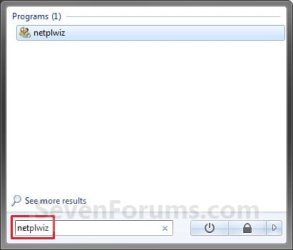
Search_Box.jpg
3. Click on the Advanced tab. (See screenshot below)
User_Accounts.jpg
4. To Enable Secure Log On
A) Check the Require users to press Ctrl+Alt+Delete box. (See screenshot above)
NOTE: If the setting is grayed out, then see OPTION THREE or OPTION TWO below.

B) Go to step 6.
5. To Disable Secure Log On
A) Uncheck the Requires users to press Ctrl+Alt+Delete box. (See screenshot below step 3)
NOTE: If the setting is grayed out, then see OPTION THREE or OPTION TWO below.
6. Click on OK. (See screenshot below step 3)


OPTION TWO

Using a REG File Download


NOTE: This option will also set OPTION THREE below back to it's default setting of Not Defined.
1. To Enable Secure Log On
A) Click on the Download button below to download the file below.
Enable_Secure_Logon.reg

Download


B) Go to step 3.
2. To Disable Secure Log On
A) Click on the Download button below to download the file below.
Disable_Secure_Logon.reg

Download


3. Click on Save, and save the .zip file to the desktop.

4. Right click on the downloaded .reg file and click on Merge.

5. Click on Run, Yes, Yes, and OK when prompted.

6. When done, you can delete the downloaded .reg file if you like.


OPTION THREE

Through Local Security Policy


   Note
When this option is set to Disabled or Enabled, it will override and gray out the settings in OPTION ONE above.

When this option is set to it's default Not Defined, then the settings in OPTION ONE above are no longer grayed out and can be set to how you like. Using a REG file in OPTION TWO above will set this option back to Not Defined.


1. Open the Local Security Policy editor.

2. In the left pane, expand Local Policies, and click on Security Options. (see screenshot below)
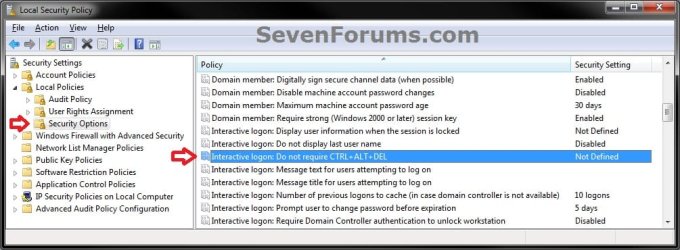
Secpol-1.jpg
3. In the right pane, right click on Interactive Logon: Do not required CTRL+ALT+DEL and click on Properties. (see screenshot above)

4. To Enable Secure Log On
A) Select (dot) Disabled, and click on OK. (see screeshot below)
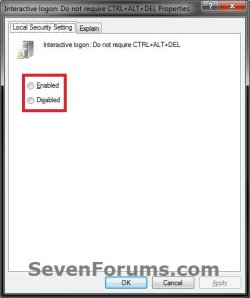
Secpol-2.jpg
B) Go to step 6.
5. To Disable Secure Log On
A) Select (dot) Enabled, and click on OK. (see screeshot above)
6. Close the Local Security Policy window.
That's it,
Shawn


Attachments

Last edited:
I have a problem with the secure logon function on my wife's laptop.. Her lock screen is asking to press CTRL+ALT+DEL, and she would like to disable it.

I of course went into the settings and tried what was explained in Option 1, but toggling the setting in netplwiz is blocked (the check box is checked, but grey so not possible to uncheck). Not sure what this means, I tried running netplwiz as administrator and same thing.

I tried to change this in Registry editor, and to my surprise the value in DisableCAD was 0, which would mean that the function is turned off as shown in Option 3, but secure logon still seems to be on.

This is a Home Premium system, so I am unable to use Local Security Policy as outlined in Option 4.

any ideas?
 

My Computer My Computer

Computer Manufacturer/Model Number
HP
OS
7 32bit
Hello theshoemaker,

I have updated the REG files in Option Two to see if they may help. Please try them again. You may need to restart to fully apply.

I have also read that someone else reported that their built-in fingerprint reader software was the cause of Option One being grayed out. They said that uninstalling it allowed them to change the setting afterwards.

Hope this helps,
Shawn
 

My Computer My Computer

Computer type
PC/Desktop
Computer Manufacturer/Model Number
Self built custom
OS
64-bit Windows 11 Pro for Workstations
CPU
Intel i7-8700K OC'd to 5 GHz
Motherboard
ASUS ROG Maximus XI Formula Z390
Memory
64 GB (4x16GB) G.SKILL TridentZ RGB DDR4 3600 MHz
Graphics Card(s)
ASUS ROG-STRIX-GTX1080TI-O11G-GAMING
Sound Card
Integrated
Monitor(s) Displays
2 x Samsung Odyssey G7 27"
Screen Resolution
2560x1440
Hard Drives
1TB Samsung 990 PRO M.2,
4TB Samsung 990 PRO PRO M.2,
TerraMaster F8 SSD Plus NAS
PSU
Seasonic Prime Titanium 850W
Case
Thermaltake Core P3
Cooling
Corsair Hydro H115i
Keyboard
Logitech wireless K800
Mouse
Logitech MX Master 4
Internet Speed
2 Gb/s Download and 100 Mb/s Upload
Antivirus
Malwarebyte Anti-Malware Premium
Browser
Google Chrome
Other Info
Logitech Z625 speaker system,
Logitech BRIO 4K Pro webcam,
HP Color LaserJet Pro MFP M477fdn,
APC SMART-UPS RT 1000 XL - SURT1000XLI,
Galaxy S23 Plus phone
Thanks 4 ur help Brink! The Secure Log On CTRL+ALT+DELETE was a bit bothersome 2 me. I am the Ad user. I enabled yhe options a year ago... Okay for awhile... Great tutorial & thorough. ;)
 

My Computer My Computer

OS
Windows Vista, 64 bit
You're welcome Gigi, and welcome to Seven Forums. :)
 

My Computer My Computer

Computer type
PC/Desktop
Computer Manufacturer/Model Number
Self built custom
OS
64-bit Windows 11 Pro for Workstations
CPU
Intel i7-8700K OC'd to 5 GHz
Motherboard
ASUS ROG Maximus XI Formula Z390
Memory
64 GB (4x16GB) G.SKILL TridentZ RGB DDR4 3600 MHz
Graphics Card(s)
ASUS ROG-STRIX-GTX1080TI-O11G-GAMING
Sound Card
Integrated
Monitor(s) Displays
2 x Samsung Odyssey G7 27"
Screen Resolution
2560x1440
Hard Drives
1TB Samsung 990 PRO M.2,
4TB Samsung 990 PRO PRO M.2,
TerraMaster F8 SSD Plus NAS
PSU
Seasonic Prime Titanium 850W
Case
Thermaltake Core P3
Cooling
Corsair Hydro H115i
Keyboard
Logitech wireless K800
Mouse
Logitech MX Master 4
Internet Speed
2 Gb/s Download and 100 Mb/s Upload
Antivirus
Malwarebyte Anti-Malware Premium
Browser
Google Chrome
Other Info
Logitech Z625 speaker system,
Logitech BRIO 4K Pro webcam,
HP Color LaserJet Pro MFP M477fdn,
APC SMART-UPS RT 1000 XL - SURT1000XLI,
Galaxy S23 Plus phone
Hi Brink,

well made tutorial, thanks. However on my machine (W7 Pro 64bit) options two and three (registry entry variants) didn't work at all. I finally changed the settings using secpol.msc and then diffed the registry dumps of before and after the modification. In my case "DisableCAD" had to be changed in
Code:
[HKLM\SOFTWARE\Microsoft\Windows\CurrentVersion\Policies\System]
Automagically also "DisableCAD" in
Code:
[HKLM\SOFTWARE\WOW6432Node\Microsoft\Windows\CurrentVersion\Policies\System]
was changed to the same value. Changing the registry entries that you mentioned didn't have any effect.

Has the location of the setting in the registry maybe changed with some MS update?

Cheers

frank
 

My Computer My Computer

OS
Windows 7 Pro 64bit
Hello Frank, and welcome to Seven Forums.

The registry location below is for the Local Security Policy setting. By default it is set to Not Defined. If this is set to either Enabled or Disabled, then it will override the setting in Advanced User Accounts. I believe this is what happened with you, and why it did not work for you manually set the registry location for the Advanced User Accounts setting.
(Local Security Policy)
HKEY_LOCAL_MACHINE\SOFTWARE\Microsoft\Windows\CurrentVersion\Policies\System


(Advanced User Accounts - netplwiz)
HKEY_LOCAL_MACHINE\SOFTWARE\Microsoft\Windows NT\CurrentVersion\Winlogon

I have updated the tutorial and REG files to help people avoid this from now on. :)

 
Last edited:

My Computer My Computer

Computer type
PC/Desktop
Computer Manufacturer/Model Number
Self built custom
OS
64-bit Windows 11 Pro for Workstations
CPU
Intel i7-8700K OC'd to 5 GHz
Motherboard
ASUS ROG Maximus XI Formula Z390
Memory
64 GB (4x16GB) G.SKILL TridentZ RGB DDR4 3600 MHz
Graphics Card(s)
ASUS ROG-STRIX-GTX1080TI-O11G-GAMING
Sound Card
Integrated
Monitor(s) Displays
2 x Samsung Odyssey G7 27"
Screen Resolution
2560x1440
Hard Drives
1TB Samsung 990 PRO M.2,
4TB Samsung 990 PRO PRO M.2,
TerraMaster F8 SSD Plus NAS
PSU
Seasonic Prime Titanium 850W
Case
Thermaltake Core P3
Cooling
Corsair Hydro H115i
Keyboard
Logitech wireless K800
Mouse
Logitech MX Master 4
Internet Speed
2 Gb/s Download and 100 Mb/s Upload
Antivirus
Malwarebyte Anti-Malware Premium
Browser
Google Chrome
Other Info
Logitech Z625 speaker system,
Logitech BRIO 4K Pro webcam,
HP Color LaserJet Pro MFP M477fdn,
APC SMART-UPS RT 1000 XL - SURT1000XLI,
Galaxy S23 Plus phone
The registry location below is for the Local Security Policy setting. By default it is set to Not Defined. If this is set to either Enabled or Disabled, then it will override the setting in Advanced User Accounts. I believe this is what happened with you, and why it did not work for you manually set the registry location for the Advanced User Accounts setting. [...]
Right. these registry settings were defined on the host itself. Could this be a consequence of some domain policy? All our hosts are part of an ActiveDirectory domain, but I have no access to these policies.

frank
 
Last edited by a moderator:

My Computer My Computer

OS
Windows 7 Pro 64bit
Yes, that would be why. :)
 

My Computer My Computer

Computer type
PC/Desktop
Computer Manufacturer/Model Number
Self built custom
OS
64-bit Windows 11 Pro for Workstations
CPU
Intel i7-8700K OC'd to 5 GHz
Motherboard
ASUS ROG Maximus XI Formula Z390
Memory
64 GB (4x16GB) G.SKILL TridentZ RGB DDR4 3600 MHz
Graphics Card(s)
ASUS ROG-STRIX-GTX1080TI-O11G-GAMING
Sound Card
Integrated
Monitor(s) Displays
2 x Samsung Odyssey G7 27"
Screen Resolution
2560x1440
Hard Drives
1TB Samsung 990 PRO M.2,
4TB Samsung 990 PRO PRO M.2,
TerraMaster F8 SSD Plus NAS
PSU
Seasonic Prime Titanium 850W
Case
Thermaltake Core P3
Cooling
Corsair Hydro H115i
Keyboard
Logitech wireless K800
Mouse
Logitech MX Master 4
Internet Speed
2 Gb/s Download and 100 Mb/s Upload
Antivirus
Malwarebyte Anti-Malware Premium
Browser
Google Chrome
Other Info
Logitech Z625 speaker system,
Logitech BRIO 4K Pro webcam,
HP Color LaserJet Pro MFP M477fdn,
APC SMART-UPS RT 1000 XL - SURT1000XLI,
Galaxy S23 Plus phone
Thanks so much Brink! I'm all for making my computer more secure. I have found all your tutorials to be helpful in some way. Thank you again, Brink! :-)
 

My Computer My Computer

Computer Manufacturer/Model Number
xxxxxxx
OS
xxxxxxxxxxxxxxxxxxxxxxx
CPU
xxxxxxxxxxxxxxxxxx
Motherboard
xxxxxxxxxxx
Memory
xxxxxxxxxxx
You're most welcome TD7BA, and thank you. :)
 

My Computer My Computer

Computer type
PC/Desktop
Computer Manufacturer/Model Number
Self built custom
OS
64-bit Windows 11 Pro for Workstations
CPU
Intel i7-8700K OC'd to 5 GHz
Motherboard
ASUS ROG Maximus XI Formula Z390
Memory
64 GB (4x16GB) G.SKILL TridentZ RGB DDR4 3600 MHz
Graphics Card(s)
ASUS ROG-STRIX-GTX1080TI-O11G-GAMING
Sound Card
Integrated
Monitor(s) Displays
2 x Samsung Odyssey G7 27"
Screen Resolution
2560x1440
Hard Drives
1TB Samsung 990 PRO M.2,
4TB Samsung 990 PRO PRO M.2,
TerraMaster F8 SSD Plus NAS
PSU
Seasonic Prime Titanium 850W
Case
Thermaltake Core P3
Cooling
Corsair Hydro H115i
Keyboard
Logitech wireless K800
Mouse
Logitech MX Master 4
Internet Speed
2 Gb/s Download and 100 Mb/s Upload
Antivirus
Malwarebyte Anti-Malware Premium
Browser
Google Chrome
Other Info
Logitech Z625 speaker system,
Logitech BRIO 4K Pro webcam,
HP Color LaserJet Pro MFP M477fdn,
APC SMART-UPS RT 1000 XL - SURT1000XLI,
Galaxy S23 Plus phone
CAD Logon has de-Elevated me?

Hi Brink,

First of all, let me just say that I'm an MCTS...and even I could not find how to do this...so thank you very muchly :D

However, when I did this through netplwiz, all seemed fine until I restarted, logged on, and found that as a result, my account (the only account on the PC) had been de-elevated to 'Guest' :-S.

Naturally, I created a restore-point before hand, but of course I cannot access system restore through Windows because of my now near-0 privileges, and cannot use the repair disk for the same reason!


Any ideas? There's a lot of important stuff on here for work and I'm kinda...stuffed...

Cheers! :)
 

My Computer My Computer

Computer Manufacturer/Model Number
Sony VAIO VGN-FW41E
OS
Windows 7 Ultimate x86
CPU
Intel Core2 Duo T6400 @ 2.00GHz
Memory
4GB
Graphics Card(s)
ATi Mobility Radeon HD4650
Hard Drives
500GB

My Computer My Computer

Computer type
PC/Desktop
Computer Manufacturer/Model Number
Self built custom
OS
64-bit Windows 11 Pro for Workstations
CPU
Intel i7-8700K OC'd to 5 GHz
Motherboard
ASUS ROG Maximus XI Formula Z390
Memory
64 GB (4x16GB) G.SKILL TridentZ RGB DDR4 3600 MHz
Graphics Card(s)
ASUS ROG-STRIX-GTX1080TI-O11G-GAMING
Sound Card
Integrated
Monitor(s) Displays
2 x Samsung Odyssey G7 27"
Screen Resolution
2560x1440
Hard Drives
1TB Samsung 990 PRO M.2,
4TB Samsung 990 PRO PRO M.2,
TerraMaster F8 SSD Plus NAS
PSU
Seasonic Prime Titanium 850W
Case
Thermaltake Core P3
Cooling
Corsair Hydro H115i
Keyboard
Logitech wireless K800
Mouse
Logitech MX Master 4
Internet Speed
2 Gb/s Download and 100 Mb/s Upload
Antivirus
Malwarebyte Anti-Malware Premium
Browser
Google Chrome
Other Info
Logitech Z625 speaker system,
Logitech BRIO 4K Pro webcam,
HP Color LaserJet Pro MFP M477fdn,
APC SMART-UPS RT 1000 XL - SURT1000XLI,
Galaxy S23 Plus phone
hey, this is awesome:) thanks for the tutorial. Question, is there any way to make it so it doesnt tell you to press ctrl alt del? its just the background, and you have to know to press it?
 

My Computer My Computer

OS
Windows 7 Professional x64
Hello Shawn mate I have recently cloned an old drive to a new hybrid drive in my partners laptop and it is starting with the Cont Alt Del - disk read error message.

Now I have tried the download file and gpedit.msc and secpol.msc options after doing the Option one bit with the netplwiz - the box is unticked.

The gpedit and secpol type in do not throw up a box for Run as Admin.
So I am at a loss as where to go from here. The machine is acting rather strangely in that it keeps throwing up updates for install but it is not even doing that now.

Any ideas as I am knocking on Hells door here:shock:
 

My Computer My Computer

Computer type
PC/Desktop
Computer Manufacturer/Model Number
Own build (new) Desk1 / Asus ROG Win 7 / Desk2 1st build
OS
Desk1 7 Home Prem / Desk2 10 Pro / Main lap Asus ROG 10 Pro 2 laptop Toshiba 7 Pro Asus P2520 7 & 10
CPU
Desk1 i5 3750K / Laptop i7 GTX 860M / Desk2 i5 2500
Motherboard
Desk1 Asus P877-V / Desk2 Gigabyte H67 UD3H / Laptop ?
Memory
Desk1 8GB (1866) / Desk2 16GB (1333) / Laptop 8Gb DDR3
Graphics Card(s)
Desk 1& 2NVidia GTX 650 & Laptops on board Intel
Sound Card
Desk 1 & 2 -XONAR DG Realtek High Def audio Laptop
Monitor(s) Displays
Desk 1 Benq HD 2450 / Desk2 Philips 24" / Laptop 17.5"
Screen Resolution
1920x1080 D1 & D2 & Laptop 1
Hard Drives
Desk1 Samsung 120GB 830 SSD
Asus ROG 256GB 850 Pro SSD
Desk2 Samsung 840 256 SSD
Toshiba 120GB EVO
PSU
Desk 1 Corsair HX 1050/ Laptop ? / Desk 2 Corsair HX 650
Case
Desk 1 Cooler HAF XM ? Toshiba laptop / Desk2 Coolermaster
Cooling
Fans on all Desk1 -2 Desk2 - all Coolermasters 5 Laptop ?
Keyboard
Desk 1 MS Sidewinder X6 Desk 2 MS Sidewinder X 4
Mouse
Desk 1&2 - Gigabyte MS 900 gamer - laptop - Logitec wireless
Internet Speed
ADSL2+
Other Info
One other Desktop (tester) and spare Toshba laptop both with SSD's
Running Kaspersky 2016 ISS on all machines config'd identically
Logitec audio stereo systems on each machine (x3)
Canon MG5250MFC
Router/modem TP-Link running WPA2SK
Hey John,

Ah, you got the ole "A disk read error occurred. Press Ctrl + Alt + Del to restart." error message at startup.

This wouldn't have anything to do with what this tutorial is for, but usually that indicates a corrupted or dead hard drive. I would lean towards it being corrupted since it's a new drive, and that you may need to reinstall Windows. Possibly something gone bad during the clone.
 

My Computer My Computer

Computer type
PC/Desktop
Computer Manufacturer/Model Number
Self built custom
OS
64-bit Windows 11 Pro for Workstations
CPU
Intel i7-8700K OC'd to 5 GHz
Motherboard
ASUS ROG Maximus XI Formula Z390
Memory
64 GB (4x16GB) G.SKILL TridentZ RGB DDR4 3600 MHz
Graphics Card(s)
ASUS ROG-STRIX-GTX1080TI-O11G-GAMING
Sound Card
Integrated
Monitor(s) Displays
2 x Samsung Odyssey G7 27"
Screen Resolution
2560x1440
Hard Drives
1TB Samsung 990 PRO M.2,
4TB Samsung 990 PRO PRO M.2,
TerraMaster F8 SSD Plus NAS
PSU
Seasonic Prime Titanium 850W
Case
Thermaltake Core P3
Cooling
Corsair Hydro H115i
Keyboard
Logitech wireless K800
Mouse
Logitech MX Master 4
Internet Speed
2 Gb/s Download and 100 Mb/s Upload
Antivirus
Malwarebyte Anti-Malware Premium
Browser
Google Chrome
Other Info
Logitech Z625 speaker system,
Logitech BRIO 4K Pro webcam,
HP Color LaserJet Pro MFP M477fdn,
APC SMART-UPS RT 1000 XL - SURT1000XLI,
Galaxy S23 Plus phone
Ok Shawn I was rather thinking you might be saying that as those type items didn't show.

I might just retry the clone - a clean install of course is what I would do if the machine was mine would be better - but she has an enormous amount of data in the way of pictures and all sorts of Apple stuff I don't know if I am competent enough to put back onto that new drive / clean install.

Pity really as this only just started in the last two weeks.

Am wondering about a chkdsk /f /r run if that could repair it??
 

My Computer My Computer

Computer type
PC/Desktop
Computer Manufacturer/Model Number
Own build (new) Desk1 / Asus ROG Win 7 / Desk2 1st build
OS
Desk1 7 Home Prem / Desk2 10 Pro / Main lap Asus ROG 10 Pro 2 laptop Toshiba 7 Pro Asus P2520 7 & 10
CPU
Desk1 i5 3750K / Laptop i7 GTX 860M / Desk2 i5 2500
Motherboard
Desk1 Asus P877-V / Desk2 Gigabyte H67 UD3H / Laptop ?
Memory
Desk1 8GB (1866) / Desk2 16GB (1333) / Laptop 8Gb DDR3
Graphics Card(s)
Desk 1& 2NVidia GTX 650 & Laptops on board Intel
Sound Card
Desk 1 & 2 -XONAR DG Realtek High Def audio Laptop
Monitor(s) Displays
Desk 1 Benq HD 2450 / Desk2 Philips 24" / Laptop 17.5"
Screen Resolution
1920x1080 D1 & D2 & Laptop 1
Hard Drives
Desk1 Samsung 120GB 830 SSD
Asus ROG 256GB 850 Pro SSD
Desk2 Samsung 840 256 SSD
Toshiba 120GB EVO
PSU
Desk 1 Corsair HX 1050/ Laptop ? / Desk 2 Corsair HX 650
Case
Desk 1 Cooler HAF XM ? Toshiba laptop / Desk2 Coolermaster
Cooling
Fans on all Desk1 -2 Desk2 - all Coolermasters 5 Laptop ?
Keyboard
Desk 1 MS Sidewinder X6 Desk 2 MS Sidewinder X 4
Mouse
Desk 1&2 - Gigabyte MS 900 gamer - laptop - Logitec wireless
Internet Speed
ADSL2+
Other Info
One other Desktop (tester) and spare Toshba laptop both with SSD's
Running Kaspersky 2016 ISS on all machines config'd identically
Logitec audio stereo systems on each machine (x3)
Canon MG5250MFC
Router/modem TP-Link running WPA2SK
It wouldn't hurt anything to try chhdsk, but I wouldn't count on it.
 

My Computer My Computer

Computer type
PC/Desktop
Computer Manufacturer/Model Number
Self built custom
OS
64-bit Windows 11 Pro for Workstations
CPU
Intel i7-8700K OC'd to 5 GHz
Motherboard
ASUS ROG Maximus XI Formula Z390
Memory
64 GB (4x16GB) G.SKILL TridentZ RGB DDR4 3600 MHz
Graphics Card(s)
ASUS ROG-STRIX-GTX1080TI-O11G-GAMING
Sound Card
Integrated
Monitor(s) Displays
2 x Samsung Odyssey G7 27"
Screen Resolution
2560x1440
Hard Drives
1TB Samsung 990 PRO M.2,
4TB Samsung 990 PRO PRO M.2,
TerraMaster F8 SSD Plus NAS
PSU
Seasonic Prime Titanium 850W
Case
Thermaltake Core P3
Cooling
Corsair Hydro H115i
Keyboard
Logitech wireless K800
Mouse
Logitech MX Master 4
Internet Speed
2 Gb/s Download and 100 Mb/s Upload
Antivirus
Malwarebyte Anti-Malware Premium
Browser
Google Chrome
Other Info
Logitech Z625 speaker system,
Logitech BRIO 4K Pro webcam,
HP Color LaserJet Pro MFP M477fdn,
APC SMART-UPS RT 1000 XL - SURT1000XLI,
Galaxy S23 Plus phone
No Shawn I won't because this Ivy machine of mine has the same issue only I do not get that
C-A-D stuff at start. But what I have got is no gpedit.msc or specpol.msc either.

I ran a chkdsk on this machine as for a change I am at home and it made no difference those two .msc type ins are not available.
I think this machine needs a clean install and I have it backed up with images so hopefully I don't have to go through sad and sorry procedure again if I go that route.

A bit OT mate but if I use an ISO from Greg's tutorial will that have the latest updates on it and might save all the updates?
 

My Computer My Computer

Computer type
PC/Desktop
Computer Manufacturer/Model Number
Own build (new) Desk1 / Asus ROG Win 7 / Desk2 1st build
OS
Desk1 7 Home Prem / Desk2 10 Pro / Main lap Asus ROG 10 Pro 2 laptop Toshiba 7 Pro Asus P2520 7 & 10
CPU
Desk1 i5 3750K / Laptop i7 GTX 860M / Desk2 i5 2500
Motherboard
Desk1 Asus P877-V / Desk2 Gigabyte H67 UD3H / Laptop ?
Memory
Desk1 8GB (1866) / Desk2 16GB (1333) / Laptop 8Gb DDR3
Graphics Card(s)
Desk 1& 2NVidia GTX 650 & Laptops on board Intel
Sound Card
Desk 1 & 2 -XONAR DG Realtek High Def audio Laptop
Monitor(s) Displays
Desk 1 Benq HD 2450 / Desk2 Philips 24" / Laptop 17.5"
Screen Resolution
1920x1080 D1 & D2 & Laptop 1
Hard Drives
Desk1 Samsung 120GB 830 SSD
Asus ROG 256GB 850 Pro SSD
Desk2 Samsung 840 256 SSD
Toshiba 120GB EVO
PSU
Desk 1 Corsair HX 1050/ Laptop ? / Desk 2 Corsair HX 650
Case
Desk 1 Cooler HAF XM ? Toshiba laptop / Desk2 Coolermaster
Cooling
Fans on all Desk1 -2 Desk2 - all Coolermasters 5 Laptop ?
Keyboard
Desk 1 MS Sidewinder X6 Desk 2 MS Sidewinder X 4
Mouse
Desk 1&2 - Gigabyte MS 900 gamer - laptop - Logitec wireless
Internet Speed
ADSL2+
Other Info
One other Desktop (tester) and spare Toshba laptop both with SSD's
Running Kaspersky 2016 ISS on all machines config'd identically
Logitec audio stereo systems on each machine (x3)
Canon MG5250MFC
Router/modem TP-Link running WPA2SK
Sure, the latest ISO will help save you a from having to download quite few Windows Updates, but I'm sure you'll still only have only a few hundred more afterwards. ;)
 

My Computer My Computer

Computer type
PC/Desktop
Computer Manufacturer/Model Number
Self built custom
OS
64-bit Windows 11 Pro for Workstations
CPU
Intel i7-8700K OC'd to 5 GHz
Motherboard
ASUS ROG Maximus XI Formula Z390
Memory
64 GB (4x16GB) G.SKILL TridentZ RGB DDR4 3600 MHz
Graphics Card(s)
ASUS ROG-STRIX-GTX1080TI-O11G-GAMING
Sound Card
Integrated
Monitor(s) Displays
2 x Samsung Odyssey G7 27"
Screen Resolution
2560x1440
Hard Drives
1TB Samsung 990 PRO M.2,
4TB Samsung 990 PRO PRO M.2,
TerraMaster F8 SSD Plus NAS
PSU
Seasonic Prime Titanium 850W
Case
Thermaltake Core P3
Cooling
Corsair Hydro H115i
Keyboard
Logitech wireless K800
Mouse
Logitech MX Master 4
Internet Speed
2 Gb/s Download and 100 Mb/s Upload
Antivirus
Malwarebyte Anti-Malware Premium
Browser
Google Chrome
Other Info
Logitech Z625 speaker system,
Logitech BRIO 4K Pro webcam,
HP Color LaserJet Pro MFP M477fdn,
APC SMART-UPS RT 1000 XL - SURT1000XLI,
Galaxy S23 Plus phone
Sure, the latest ISO will help save you a from having to download quite few Windows Updates, but I'm sure you'll still only have only a few hundred more afterwards. ;)
Jeez Shawn you just made my day only as few hundred give or take I reckon eh? :D
 

My Computer My Computer

Computer type
PC/Desktop
Computer Manufacturer/Model Number
Own build (new) Desk1 / Asus ROG Win 7 / Desk2 1st build
OS
Desk1 7 Home Prem / Desk2 10 Pro / Main lap Asus ROG 10 Pro 2 laptop Toshiba 7 Pro Asus P2520 7 & 10
CPU
Desk1 i5 3750K / Laptop i7 GTX 860M / Desk2 i5 2500
Motherboard
Desk1 Asus P877-V / Desk2 Gigabyte H67 UD3H / Laptop ?
Memory
Desk1 8GB (1866) / Desk2 16GB (1333) / Laptop 8Gb DDR3
Graphics Card(s)
Desk 1& 2NVidia GTX 650 & Laptops on board Intel
Sound Card
Desk 1 & 2 -XONAR DG Realtek High Def audio Laptop
Monitor(s) Displays
Desk 1 Benq HD 2450 / Desk2 Philips 24" / Laptop 17.5"
Screen Resolution
1920x1080 D1 & D2 & Laptop 1
Hard Drives
Desk1 Samsung 120GB 830 SSD
Asus ROG 256GB 850 Pro SSD
Desk2 Samsung 840 256 SSD
Toshiba 120GB EVO
PSU
Desk 1 Corsair HX 1050/ Laptop ? / Desk 2 Corsair HX 650
Case
Desk 1 Cooler HAF XM ? Toshiba laptop / Desk2 Coolermaster
Cooling
Fans on all Desk1 -2 Desk2 - all Coolermasters 5 Laptop ?
Keyboard
Desk 1 MS Sidewinder X6 Desk 2 MS Sidewinder X 4
Mouse
Desk 1&2 - Gigabyte MS 900 gamer - laptop - Logitec wireless
Internet Speed
ADSL2+
Other Info
One other Desktop (tester) and spare Toshba laptop both with SSD's
Running Kaspersky 2016 ISS on all machines config'd identically
Logitec audio stereo systems on each machine (x3)
Canon MG5250MFC
Router/modem TP-Link running WPA2SK
Back
Top