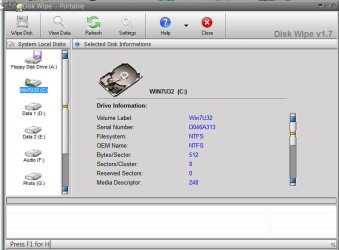
Securely wiped my C drive by accident

minixbox

New member
Local time
11:11 PM
Messages
2
I used a program called disk wipe to delete my sd card but it ended up selecting my main drive instead. I had selected the sd card drive but it said cannot format fat32 and kicked me back to the drive selection window and automatically selected my C drive. I thought the sd card drive was still selected but apparently not. I highly do not recommend this program.

Now the disk wipe program says wipe complete. I can still use my computer and it looks like nothing from the C drive was wiped. If I reboot the laptop, will the data get wiped? I am afraid of turning it off or putting it to sleep.
 

My Computer My Computer

At a glance

windows 7
Computer type
PC/Desktop
OS
windows 7
If I reboot the laptop, will the data get wiped? I am afraid of turning it off or putting it to sleep.
Usually the final step of such programs takes place after the program is closed and the computer restarted or after clicking a button Apply as in the case of partitioning programs.
 

My Computer My Computer

At a glance

Windows 7 Ultimate 64-bit, Windows 8.1 64-bit...
Computer type
PC/Desktop
Computer Manufacturer/Model Number
Customs, Dell, Gateway, HP, Toshiba, Acer, ASUS
OS
Windows 7 Ultimate 64-bit, Windows 8.1 64-bit, Mac OS X 10.10, Linux Mint 17, Windows 10 Pro TP
Keyboard
Microsoft
Mouse
Microsoft
Which level of wipe did you choose?

How do you know the hard drive containing the OS was chosen. You would have to deliberately choose it - so did you?

Did it tell you that it would apply this after a reboot?

To be sure I would boot into http://www.sevenforums.com/tutorials/668-system-recovery-options.html to System Restore to well before this date.

Also watch at reboot for any prompt that you have x time to press a key before the actions are applied. This may or may not appear if you SysRestore, but most wipe or partitioning programs offer this last resort to back out.
 
It was a 2 pass wipe, took almost 5 hours to complete, I just started the wipe and went to sleep. Found out the wrong drive was selected when I woke up to check on the progress.

I didn't deliberately choose the C drive. I only had the C drive and the SD card drive, which is D drive. I first selected the SD card drive, it said drive is too big to format for FAT32 and returned to the drive selection screen. When it returned to the drive selection screen, the C drive was automatically selected since the drives are listed in order alphabetically. I didn't realize this and thought the SD card drive was still selected.

Didn't give any message other than saying wipe completed and the elapsed time. I am trying to copy as much data off it as possible now. Hopefully I can get this done before there's any power outage forcing the laptop to shut off.
 

My Computer My Computer

At a glance

windows 7
Computer type
PC/Desktop
OS
windows 7
You can save a WIn7 backup image of all drives that will include the OS and all data and then just reapply the image to the drive if it completes the wipe before you can abort it or System Restore doesn't work. http://www.sevenforums.com/tutorials/663-backup-complete-computer-create-image-backup.html

To reapply the image stored on another HD or external to a wiped HD, follow http://www.sevenforums.com/tutorials/675-system-image-recovery.html using http://www.sevenforums.com/tutorials/668-system-recovery-options.html from the booted Win7 disk provided in reinstall tutorial below.
 
I am trying to copy as much data off it as possible now
You're doing the right thing. Then follow the advice about making a complete image. With some work (and a little luck :O) all will be fine.
 

My Computer My Computer

At a glance

W7, W8.1
Computer type
Laptop
Computer Manufacturer/Model Number
Dell \ Lenovo\ HP \ Toshiba
OS
W7, W8.1
Antivirus
MSE, Malwarebytes
Browser
FF
Normally one cannot wipe Windows with a program running in Windows.

Diskwipe also says that:

"I can't wipe the C partition, why?
You cannot wipe a C partition because it is a partition where Windows operating system is installed on. So, you can not wipe a partition which you currently use to to log in into Windows and run Disk Wipe from. You should access this partition from an operating system which is installed on another partition, disk drive or computer."

Diskwipe only works on partitions - not whole drives.

It is also stated so here : http://pcsupport.about.com/od/data-destruction/fl/disk-wipe-review.htm

"However, because Disk Wipe runs from inside the operating system, as opposed to from a disc (like with DBAN and ErAce), it can't be used to erase the drive that Windows is installed to."

It is quite possible you might have only wiped some other partition on your system drive.
 

My Computer My Computer

At a glance

Windows 7 Home Premium 32 bit
OS
Windows 7 Home Premium 32 bit
Diskwipe has wiped one or more partitions. The process is irreversable. The Win7 OS partition is still intact, because it was locked by win7, so can't be wiped. Check if all partitions hav still data on them. So you can determine what did happen.
 

My Computer My Computer

At a glance

Microsoft Windows 7 Home Premium 64-bits 7601...Intel(R) Core(TM) i3 CPU M 370 @ 2.40GHz4,00 GBATI Mobility Radeon HD 5400 Series
Computer type
Laptop
Computer Manufacturer/Model Number
ACER ASPIRE 5742G
OS
Microsoft Windows 7 Home Premium 64-bits 7601 Multiprocessor Free Service Pack 1
CPU
Intel(R) Core(TM) i3 CPU M 370 @ 2.40GHz
Motherboard
Acer Aspire 5742G
Memory
4,00 GB
Graphics Card(s)
ATI Mobility Radeon HD 5400 Series
Sound Card
(1) AMD High Definition Audio Device (2) Realtek High Defi
Screen Resolution
1366 x 768 x 32 bits (4294967296 colors) @ 60 Hz
Hard Drives
WDC WD5000BEVT-22ZAT0
This could be why Diskwipe prompted it needed to reboot to complete, as OP has indicated, if he was running the Windows version and not the disk. It sounds like he'd applied Wipe in the Windows version.

Again, in such cases there is normally an abort key to press when it reboots. If not System Restore could increase the chances it would forget the whole thing. And as a last resort, he could boot into WIn7 disk or REpair CD to recover with a fresh image he'd just made.
 
Last edited:
I agree with greg here. If it came down to it in the end you might be able to reverse some of the damage if any is/was done by booting off the windows disc if you have one and trying to do a repair; which usually can a lot of times solve issues; but then again not always because if the disk wipe program has already started its wipe process; then dare i say it you could be screwed unfortunately unless you do have a backup image like greg mentioned.
 
Last edited:

My Computer My Computer

At a glance

Windows 7 ultimate 64-bitIntel I7 2600K 3.4ghzCorsair 16gb ddr3 1600mhzNvidia Geforce gt 430
Computer type
PC/Desktop
Computer Manufacturer/Model Number
custom built
OS
Windows 7 ultimate 64-bit
CPU
Intel I7 2600K 3.4ghz
Motherboard
Asus Evo P8P67
Memory
Corsair 16gb ddr3 1600mhz
Graphics Card(s)
Nvidia Geforce gt 430
Sound Card
Sound Blaster Titanium x-fi pci express
Monitor(s) Displays
Dell E198WFP
Hard Drives
1 western digital 2TB drive.
PSU
Antec 1200 watt
Case
Inwin Dragon Rider
Cooling
6 case supplied cooling fans
Keyboard
logitech mk700
Mouse
logitech m705
Internet Speed
25-50mbps download; 10mbps upload(i think)
Antivirus
avg free 2014
Browser
mozilla firefox
Other Info
Also have a pretty bad speaker setup which is a klipsch promedia 5.1 surround speaker setup with huge subwoofer and lg blu ray player/writer. Also a hp officejet pro 8600 plus wireless all in one and a logitech s7500 webcam.
Hi minixbox,

Is this the Disk Wipe program you had run?

11-09-2014 22-13-16.jpg

If yes, then what is post #7 applies as stated by its author and reviewed by PCsupport.

If you are still running Windows on that machine , please post a screenshot of Windows Disk Management, with all the external drives/pendrives and SD Cards you had it connected when you ran disk wipe.

Let us have a look at it. May be you lost some other partition irretrievably. To my understanding Disk wipe wipes volumes in real time not on a future time.

Disk Wipe only said Wipe Completed. Did it ask you to reboot? Let me make sure.(though you had already said "Didn't give any message other than saying wipe completed and the elapsed time."
 

My Computer My Computer

At a glance

Windows 7 Home Premium 32 bit
OS
Windows 7 Home Premium 32 bit
Back
Top