
See Full map -- Abnormal map

churin

New member
Power User
Local time
3:09 PM
Messages
341
Location
California
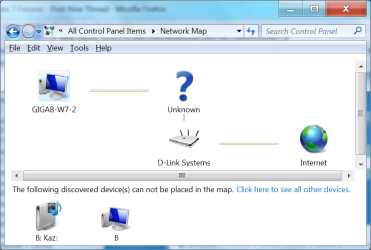
This is about networking between W7s in my home network. I have not been aware of any networking problem but I just checked network map by clicking on "See Full map" and the following is displayed. The same is displayed at the "B" computer except that the places for "B" and "GigaB-W7" are interchanged. Any idea?
 

Attachments
  • Untitled.png
    Untitled.png
    49.4 KB · Views: 77

My Computer

Computer type
PC/Desktop
OS
W7 Ult x64, W8 Pro x64 and W10 Pro x64
CPU
Phenom FX6300
Motherboard
Gigabyte GA-970A-UD3 rev. 1.2
Memory
16GB DDR3 1866 G.Skill F3-1866C9D-16GWM x2
Graphics Card(s)
Radeon R7 360
Sound Card
Asus Xonar DS
Monitor(s) Displays
27" x2, Dell P2715Q
Screen Resolution
3840 x 2160
Hard Drives
Samsung 850Pro 1TB SSD - system
Samsung 4TB SSD - Data
PSU
Corsair CX450M
Case
Corsair 200R
Cooling
Zalman CNPS5X Performa
Internet Speed
400Mbps/12Mbps
Other Info
2nd machine: Same as above
3rd machine: Apple MacAir with W7 Ult installed
From the layout of that diagram, it looks as if GIGAB-W7-2 is receiving internet from Unknown. Do you have a switch or something else between your computer and your router?
 

My Computer

Computer Manufacturer/Model Number
Apple Macbook Pro (April 2009)
OS
W7 Ult. x64 | OS X
CPU
Intel Mobile Core 2 Duo 2.93Ghz [T9800 Penryn]
Motherboard
NVIDIA nForce 730i Rev. B1 [Mac-F2268EC8 (U2E1)]
Memory
4096MB Samsung DDR3 Dual Channel [PC3-8500F 1066Mhz]
Graphics Card(s)
NVIDIA GeForce 9600M GT 512MB [G96M Rev. C1]
Sound Card
SB X-Fi Surround 5.1 USB | Onboard Realtek (Disabled)
Monitor(s) Displays
Acer x223wbd 22" | Apple Anti-Glare 17" (Disabled)
Screen Resolution
{Current} 1440x900 {Acer} 1680x1050 {Apple} 1920x1200
Hard Drives
{Internal}
Seagate Momentus 320GB 2.5" 7200RPM [ST9320421AS]

{Externals}
LaCie 320GB USB 2.0 HDD [301284UR]
LaCie 750GB USB 2.0 FW400 eSATA HDD [301314U]
LaCie 1TB USB 2.0 HDD [301304UR]
PSU
Magsafe
Case
Aluminum/Unibody (MBP52)
Cooling
2 x 6000 RPM Fans
Keyboard
Logitech G-15v2 [PN 920-000379]
Mouse
Logitech G-9 [PN 910-000338]
Internet Speed
12Mbps/2.5Mbps w/ 24Mbps Speed Boost [Comcast]
Other Info
Logitech X-540 Speakers [PN 970223-0122]
Sennheiser PC-151 Headset
Where the "?" should be the name of your network through which you connect to the internet. What do you have between the computer and the router?
 

My Computer

Computer Manufacturer/Model Number
Home built
OS
Windows 7 Ultimate 32 bit
CPU
Intel(R) Pentium(R) 4 CPU 3.00GHz
Motherboard
ASUS P4P800-VM Motherboard Chipset: Intel 865G + ICH5
Memory
2.50 GB RAM
Graphics Card(s)
NVIDIA GeForce 7600 GS
Sound Card
SoundMax Integrated Digital Audio (Chip)
Monitor(s) Displays
ViewSonic VX 1962 wm
Screen Resolution
1680 X 1050
Hard Drives
Seagate Barracuda 7200.10 80 GB
ST380215A ATA Device 18.6 GB
Western Digital "My Book" external hard drive 750 GB
Cooling
Fan based
Keyboard
Microsoft Comfort Curve Keyboard 2000 v10 USB
Mouse
Logitec optic USB
Internet Speed
3.01 Mb/s download 0.64 Mb/s upload
"GigaB-W7-2" is connected to the "D-Link System" router and to an ADSL modem: There is nothing between the PC and the router.
The computer "B" was originally connected to the Internet through other local network, but I wanted access to "B" from "GigaB-W7-2" so that I reconnected "B" to the network to which "GigaB-W7-2" was connected. I rebooted the "B" machine and the problem is gone.
Thank you everyone for your help.
 

My Computer

Computer type
PC/Desktop
OS
W7 Ult x64, W8 Pro x64 and W10 Pro x64
CPU
Phenom FX6300
Motherboard
Gigabyte GA-970A-UD3 rev. 1.2
Memory
16GB DDR3 1866 G.Skill F3-1866C9D-16GWM x2
Graphics Card(s)
Radeon R7 360
Sound Card
Asus Xonar DS
Monitor(s) Displays
27" x2, Dell P2715Q
Screen Resolution
3840 x 2160
Hard Drives
Samsung 850Pro 1TB SSD - system
Samsung 4TB SSD - Data
PSU
Corsair CX450M
Case
Corsair 200R
Cooling
Zalman CNPS5X Performa
Internet Speed
400Mbps/12Mbps
Other Info
2nd machine: Same as above
3rd machine: Apple MacAir with W7 Ult installed
Hello Churin,

Do you have your network adapter settings set like this below? It will not see the switch/modem/etc unless it is.
Network_Properties.jpg
Hope this helps,
Shawn
 

My Computer

Computer type
PC/Desktop
Computer Manufacturer/Model Number
Self built custom
OS
64-bit Windows 11 Pro for Workstations
CPU
Intel i7-8700K OC'd to 5 GHz
Motherboard
ASUS ROG Maximus XI Formula Z390
Memory
64 GB (4x16GB) G.SKILL TridentZ RGB DDR4 3600 MHz
Graphics Card(s)
ASUS ROG-STRIX-GTX1080TI-O11G-GAMING
Sound Card
Integrated
Monitor(s) Displays
2 x Samsung Odyssey G7 27"
Screen Resolution
2560x1440
Hard Drives
1TB Samsung 990 PRO M.2,
4TB Samsung 990 PRO PRO M.2,
TerraMaster F8 SSD Plus NAS
PSU
Seasonic Prime Titanium 850W
Case
Thermaltake Core P3
Cooling
Corsair Hydro H115i
Keyboard
Logitech wireless K800
Mouse
Logitech MX Master 4
Internet Speed
2 Gb/s Download and 100 Mb/s Upload
Antivirus
Malwarebyte Anti-Malware Premium
Browser
Google Chrome
Other Info
Logitech Z625 speaker system,
Logitech BRIO 4K Pro webcam,
HP Color LaserJet Pro MFP M477fdn,
APC SMART-UPS RT 1000 XL - SURT1000XLI,
Galaxy S23 Plus phone
Hi, Brink;

Yes it is checked.

Now, I need to report that what I implied in my previous post is not the cause of the problem.

There are three machines in this network. I was using "GigaB-W7" and other two(one of them is "B" as mentioned before) went asleep so they disappeared from the map. I waked them up then the problem came back.
Rebooting the two machines restores the normal map.
 
Last edited:

My Computer

Computer type
PC/Desktop
OS
W7 Ult x64, W8 Pro x64 and W10 Pro x64
CPU
Phenom FX6300
Motherboard
Gigabyte GA-970A-UD3 rev. 1.2
Memory
16GB DDR3 1866 G.Skill F3-1866C9D-16GWM x2
Graphics Card(s)
Radeon R7 360
Sound Card
Asus Xonar DS
Monitor(s) Displays
27" x2, Dell P2715Q
Screen Resolution
3840 x 2160
Hard Drives
Samsung 850Pro 1TB SSD - system
Samsung 4TB SSD - Data
PSU
Corsair CX450M
Case
Corsair 200R
Cooling
Zalman CNPS5X Performa
Internet Speed
400Mbps/12Mbps
Other Info
2nd machine: Same as above
3rd machine: Apple MacAir with W7 Ult installed
Back
Top