
The company I work for has a press brake with a computer running Windows 7. The computer is NOT connected to the network/internet.
A technician for the press brake manufacturer was recently on-site and updated the machine. Frankly, I don't know exactly what the updating entailed. Pursuant to this, the computer has intermittently "blue-screened" while in use. I've done the following:
1) Ran sfc /scannow. Corrupt files were found and repaired.
2) Ran chkdsk at restart.
3) Ran Memtest (passed).
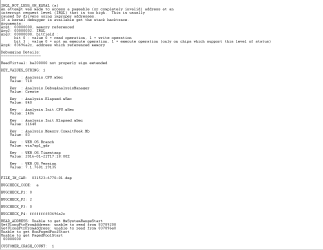
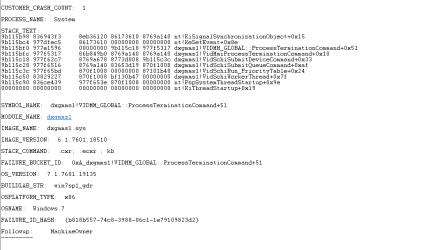
I found the following when looking at one of the .dmp files through Windbg:
NOTE: I decided to add pictures since the copy/paste in this post crammed everything together.
I'd appreciate any help/suggestions regarding this matter. Thank you.
A technician for the press brake manufacturer was recently on-site and updated the machine. Frankly, I don't know exactly what the updating entailed. Pursuant to this, the computer has intermittently "blue-screened" while in use. I've done the following:
1) Ran sfc /scannow. Corrupt files were found and repaired.
2) Ran chkdsk at restart.
3) Ran Memtest (passed).
I found the following when looking at one of the .dmp files through Windbg:
NOTE: I decided to add pictures since the copy/paste in this post crammed everything together.
I'd appreciate any help/suggestions regarding this matter. Thank you.
Attachments
My Computers
-
At a glance
Windows 7- OS
- Windows 7
-
- Computer type
- PC/Desktop


