
Solved Seemingly random BSODs and freezes

zach511

New member
Local time
1:57 AM
Messages
11
Running 64 bit Windows 7 Home Premium, I've started having both BSODs and freezes. The computer is a laptop by Sony (Vaio VGN-FW465J) that is about 3.5 years old.

The most recent changes to my computer before these began were installing/beginning to play Guild Wars 2 and obtaining a new Razer Abyssus mouse. I went through a few incorrect drivers before finding one that worked for the mouse (originally tried installing Synapse 2.0, thinking Abyssus was compatible, but it could never recognize it. I also found another driver from Razer's site that didn't work before I grabbed one that did. Possibly related?).

After those things (maybe three or four weeks ago), my computer began getting BSODs. I've tried googling the errors a few times to no avail, but I didn't think to write them down. I will try to add them here once it happens again. The computer restarts, generally booting without any signs something was wrong beyond the standard 'unexpected shutdown, do you want safemode?' screen. Two or three times, however, it has done memory checks- I don't think it found anything, but my technical knowledge doesn't really include much about that sort of thing.

Crashes seem random in nature. Some occur right after I start a game. Some occur in the middle of me playing a game. Some happen when all I have running is Skype and netflix. Some occur soon after startup (~10mins after), and sometimes I can have my computer running for 8 hours straight without problems. Generally I get a crash every day or two.

Most of these crashes are, as I said, BSODs. Some, however, are something I've not previously seen on Windows 7: freezes. First programs will stop doing whatever they're doing, but I'll be able to click to cycle through which is in front. Then I will no longer be able to click, but will be able to still move the mouse; finally, all mouse and keyboard control disappears, leaving me with just my screen showing me a snapshot of what had been going on. I've tried leaving this for ~1 hour without it returning to a normal state, so each time it's happened I've had to use the button on the laptop to shut it down, causing the same 'windows shut down unexpectedly' screen as in a normal crash.

I came here a week or so ago and tried following the directions about having dumps produced on crash, but for some reason they have not worked. I have never seen a MEMORY.DMP file in C:\Windows, and my minidump folder only has three things from before the problem started. Here is an image of my settings:
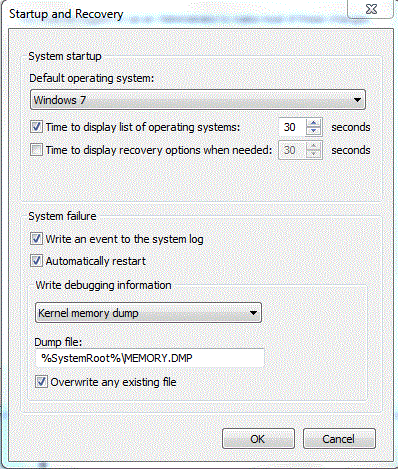
YK3Z6.gif


I did run the SF Diagnostic Tool as the post instructed, but it took 3 attempts before I could do so without a crash, and on that third attempt a crash occurred when the program seemed (?) to be finished. This is the only thing I can think of so far that has regularly caused crashes. I have uploaded the results of that, as requested.

I actually recently ordered a new computer anyways since this one was getting old- I got it during the summer of 2009. Despite this, I would certainly prefer that I could find a fix for this issue so that I could continue using this computer for other things- aside from this, it has been working well recently, in general.

If there is any other information I forgot, I'll try to post it as soon as possible. Thanks in advance for looking over all this!

Edit: Didn't link the image correctly, fixed it.
 

My Computer My Computer

OS
Windows 7 Home Premium 64bit
Welcome to SevenForums.

Please upload your msinfo32.nfo file. To get this: Start Menu -> Type msinfo32 into the Search programs and files box -> When it opens, go to File, Save -> Save as msinfo32.nfo and save in a place you will remember -> Let it finish the process of gathering and saving the system info -> Right click the .nfo file, click send to compressed (zipped) folder -> Upload the .zip file here.

Please upload your msinfo32.txt file. To get this: Start Menu -> Type msinfo32 into the Search programs and files box -> When it opens, go to File, Export -> Save as msinfo32.txt and save in a place you will remember -> Let it finish the process of gathering and saving the system info -> Right click the .txt file, click send to compressed (zipped) folder -> Upload the .zip file here.
McAfee is a frequent cause of BSOD-s, consider uninstalling it with the McAfee Removal Tool and replace with Microsoft Security Essentials at least to test.
Code:
[FONT=Lucida Console]fffff880`0b8a4718  fffff800`03c84fc0 nt!KiSystemCall64
fffff880`0b8a4720  fffff880`0904af6e mfefirek+0x4af6e
fffff880`0b8a4728  fffff880`09000000 mfefirek
fffff880`0b8a4730  fffff880`090700a4 mfefirek+0x700a4
fffff880`0b8a4738  fffff880`09000000 mfefirek
fffff880`0b8a4740  fffff880`090702e4 mfefirek+0x702e4
fffff880`0b8a4748  fffff880`09000000 mfefirek
fffff880`0b8a4750  fffff880`0906f534 mfefirek+0x6f534
fffff880`0b8a4758  fffff880`09000000 mfefirek
fffff880`0b8a4760  fffff880`0906b37c mfefirek+0x6b37c
fffff880`0b8a4768  fffff880`09000000 mfefirek
fffff880`0b8a4770  fffff880`0906a7f4 mfefirek+0x6a7f4
fffff880`0b8a4778  fffff880`09000000 mfefirek
fffff880`0b8a4780  fffff880`0906abcc mfefirek+0x6abcc
fffff880`0b8a4788  fffff880`0129d000Unable to load image \SystemRoot\system32\drivers\mfehidk.sys, Win32 error 0n2
*** WARNING: Unable to verify timestamp for mfehidk.sys
*** ERROR: Module load completed but symbols could not be loaded for mfehidk.sys
 mfehidk
fffff880`0b8a4790  fffff880`0132d624 mfehidk+0x90624
fffff880`0b8a4798  fffff880`0129d000 mfehidk
fffff880`0b8a47a0  fffff880`0132d654 mfehidk+0x90654
fffff880`0b8a47a8  fffff880`0129d000 mfehidk
fffff880`0b8a47b0  fffff880`013333fc mfehidk+0x963fc
fffff880`0b8a47b8  fffff800`03c07000 nt!KiSelectNextThread <PERF> (nt+0x0)
fffff880`0b8a47c0  fffff800`03ea168c nt!BBTBuffer <PERF> (nt+0x29a68c)
fffff880`0b8a47c8  fffff800`03c07000 nt!KiSelectNextThread <PERF> (nt+0x0)
fffff880`0b8a47d0  fffff800`03ea1698 nt!BBTBuffer <PERF> (nt+0x29a698)
fffff880`0b8a47d8  fffff800`03c07000 nt!KiSelectNextThread <PERF> (nt+0x0)
fffff880`0b8a47e0  fffff800`03e8be94 nt!BBTBuffer <PERF> (nt+0x284e94)
fffff880`0b8a47e8  fffff880`0b8a5018
fffff880`0b8a47f0  fffff880`09049c57 mfefirek+0x49c57[/FONT]
[FONT=Lucida Console]fffff880`0bcc9540  fffff880`012d33b0Unable to load image \SystemRoot\system32\drivers\mfehidk.sys, Win32 error 0n2
*** WARNING: Unable to verify timestamp for mfehidk.sys
*** ERROR: Module load completed but symbols could not be loaded for mfehidk.sys
 mfehidk+0x8a3b0
[/FONT]
MSE is recommended from a strict BSOD perspective, compatibility & stability compared to other antiviruses/internet security software:-:warn: Do not start the free trial of Malware Bytes; remember to deselect that option when prompted.

Run a full scan with both (separately) once downloaded, installed and updated.


Upload a screenshot of your hard disk using CrystalDiskInfo and Summary tab Speccy:
Make a hard drive test from the hard drive manufacturers website.

Run Disk Check on your hard disk for file system errors and bad sectors on it:


Run the System File Checker. It allows the user to scan for and restore corruptions in Windows system files.
1. Click on the :orb:
2. Type CMD on Search
3. Left click and Run as Administrator
4. Type SFC /scannow
Full tutorial here:


Free up the start-up, nothing except the antivirus is usually needed.


Video card drivers need to be updated. Update in the following way:
Click on the Start :orb: ► Control Panel ► Programs ► Uninstall a program ► Uninstall everything related to; ATI and restart the system.
Delete remnants of its drivers/older drivers using Driver Fusion/Sweeper
Code:
[FONT=Lucida Console]1: kd> lmvm atikmdag
start             end                 module name
fffff880`03e71000 fffff880`04488000   atikmdag T (no symbols)           
    Loaded symbol image file: atikmdag.sys
    Image path: \SystemRoot\system32\DRIVERS\atikmdag.sys
    Image name: atikmdag.sys
    Timestamp:        Wed Aug 05 10:14:11 2009 (4A790713)
    CheckSum:         005C7925
    ImageSize:        00617000
    Translations:     0000.04b0 0000.04e4 0409.04b0 0409.04e4[/FONT]
Check for latest driver updates from the laptops manufacturers website or see if this link allows you to update the driver.


Report if these changes bring improvement.
Then proceed with testing RAM.

Take memtest. Run for 8 passes and test each stick in a know good slot for an additional 6 passes.

The goal is to test all the RAM sticks and all the motherboard slots.

Check your motherboard manual to ensure the RAM sticks are in the recommended motherboard slots. Some motherboards have very specific slots required for the number of RAM sticks installed.

If you get errors, stop the test and continue with the next step.

1. Remove all but one stick of RAM from your computer (this will be RAM stick #1), and run Memtest86 again, for 7 passes.
*Be sure to note the RAM stick, use a piece of tape with a number, and note the motherboard slot.
If this stick passes the test then go to step #3.

2. If RAM stick #1 has errors, repeat the test with RAM stick #2 in the same motherboard slot.
*If RAM stick #2 passes, this indicates that RAM stick #1 may be bad. If you want to be absolutely sure, re-test RAM stick #1 in another known good slot.
*If RAM stick #2 has errors, this indicates another possible bad RAM stick, a possible motherboard slot failure or inadequate settings.
3. Test the next stick of RAM (stick #2) in the next motherboard slot.
*If this RAM stick has errors repeat step #2 using a known good stick if possible, or another stick.
*If this RAM stick has no errors and both sticks failed in slot#1, test RAM stick #1 in this slot.
4. If you find a stick that passes the test, test it in all the other motherboard slots.

If Part 2 testing shows errors, and all tests in Part 3 show errors, you will need to test the RAM sticks in another computer and/or test other RAM in your computer to identify the problem.

In this way, you can identify whether it is a bad stick of RAM, a bad motherboard, or incompatibility between the sticks.
:info: Errors are sometimes found after 8 passes.
:tip: Do this test overnight, before going to bed.

Post back your results.

summary of the dumps:
Code:
[FONT=Lucida Console]*******************************************************************************
*                                                                             *
*                        Bugcheck Analysis                                    *
*                                                                             *
*******************************************************************************
BugCheck 3B, {c0000005, fffff88009049c57, fffff8800b8a4870, 0}

Probably caused by : mfefirek.sys ( mfefirek+49c57 )

DEFAULT_BUCKET_ID:  WIN7_DRIVER_FAULT

BUGCHECK_STR:  0x3B

PROCESS_NAME:  McSvHost.exe

SYMBOL_NAME:  mfefirek+49c57

FOLLOWUP_NAME:  MachineOwner

MODULE_NAME: mfefirek

IMAGE_NAME:  mfefirek.sys

DEBUG_FLR_IMAGE_TIMESTAMP:  4f399f57

STACK_COMMAND:  .cxr 0xfffff8800b8a4870 ; kb

FAILURE_BUCKET_ID:  X64_0x3B_mfefirek+49c57

BUCKET_ID:  X64_0x3B_mfefirek+49c57
¨¨¨¨¨¨¨¨¨¨¨¨¨¨¨¨¨¨¨¨¨¨¨¨¨¨¨¨¨¨¨¨¨¨¨¨¨¨¨¨¨¨¨¨¨¨¨¨¨¨¨¨¨¨¨¨¨¨¨¨¨¨¨¨¨¨¨¨¨¨[/FONT][FONT=Lucida Console][FONT=Lucida Console]¨¨¨¨¨¨¨¨¨[/FONT] 

*******************************************************************************
*                                                                             *
*                        Bugcheck Analysis                                    *
*                                                                             *
*******************************************************************************
BugCheck 24, {1904fb, fffff8800bcc94c8, fffff8800bcc8d20, fffff880014d2027}

Probably caused by : Ntfs.sys ( Ntfs!NtfsCommonClose+1e7 )

BUGCHECK_STR:  0x24

DEFAULT_BUCKET_ID:  WIN7_DRIVER_FAULT

PROCESS_NAME:  System

SYMBOL_NAME:  Ntfs!NtfsCommonClose+1e7

FOLLOWUP_NAME:  MachineOwner

MODULE_NAME: Ntfs

IMAGE_NAME:  Ntfs.sys

DEBUG_FLR_IMAGE_TIMESTAMP:  4d79997b

STACK_COMMAND:  .cxr 0xfffff8800bcc8d20 ; kb

FAILURE_BUCKET_ID:  X64_0x24_Ntfs!NtfsCommonClose+1e7

BUCKET_ID:  X64_0x24_Ntfs!NtfsCommonClose+1e7
[/FONT][FONT=Lucida Console]¨¨¨¨¨¨¨¨¨¨¨¨¨¨¨¨¨¨¨¨¨¨¨¨¨¨¨¨¨¨¨¨¨¨¨¨¨¨¨¨¨¨¨¨¨¨¨¨¨¨¨¨¨¨¨¨¨¨¨¨¨¨¨¨¨¨¨¨¨¨[/FONT][FONT=Lucida Console]¨¨¨¨¨¨¨¨¨[/FONT]
 

My Computer My Computer

Computer type
PC/Desktop
Computer Manufacturer/Model Number
Self assembled
OS
Windows 10 Home 64Bit
CPU
Intel Core i5 10400 @ 2.90GHz
Motherboard
Intel Corporation DG41WV (PROCESSOR)
Memory
8.00GB Single-Channel Unknown @ 1329MHz (16-20-20-38)
Sound Card
Realtek High Definition Audio
Monitor(s) Displays
DELL E170S
Screen Resolution
1280x1024 pixels
Hard Drives
931GB TOSHIBA DT01ACA100 (SATA)
238GB TEAM TM8PS7256G (SATA SSD)
Case
Nothing Fancy
Cooling
Fans
Keyboard
A4 Tech Co LTD
Mouse
A4 Tech Co Ltd/Logitech
Internet Speed
25 Mbps
I don't have time to do all of that this morning, but I should be able to get to it tonight. Here are the msinfo32 files, at least. Looking at the rest of it, I actually use Malwarebytes alongside McAfee. I haven't seen any issues pop up in it recently, but I'll run another scan soon, and I'll try replacing McAfee with MSE.

Updating my graphics card driver isn't possible, to the best of my knowledge, without using some sort of hacked driver. Since my laptop is a Sony Vaio, it uses some sort of manufacturer-modified version of the drivers, and isn't compatible with official ones from ATI. That wasn't a problem back when I got it and the driver was recent, but I don't think they have updated the Sony driver for a few years now.
 

My Computer My Computer

OS
Windows 7 Home Premium 64bit
Thanks for the files.

I will wait for an update on your thread. Take your time and post back when you're done.

:)
 

My Computer My Computer

Computer type
PC/Desktop
Computer Manufacturer/Model Number
Self assembled
OS
Windows 10 Home 64Bit
CPU
Intel Core i5 10400 @ 2.90GHz
Motherboard
Intel Corporation DG41WV (PROCESSOR)
Memory
8.00GB Single-Channel Unknown @ 1329MHz (16-20-20-38)
Sound Card
Realtek High Definition Audio
Monitor(s) Displays
DELL E170S
Screen Resolution
1280x1024 pixels
Hard Drives
931GB TOSHIBA DT01ACA100 (SATA)
238GB TEAM TM8PS7256G (SATA SSD)
Case
Nothing Fancy
Cooling
Fans
Keyboard
A4 Tech Co LTD
Mouse
A4 Tech Co Ltd/Logitech
Internet Speed
25 Mbps
Ok, I've had time to do some of the things. I've replaced McAfee with MSE. I was able to run the quick scan (no problems found), but it froze when the full scan was nearly complete. The first time I tried to run Malwarebytes there was also a crash, but the second time I tried it was able to go all the way through, once again without finding problems.

I was able to run CrystalDiskInfo and Speccy without problems: results are uploaded. Let me know if there's anything else from either of those I should add. Having not heard of them previously, I wasn't entirely sure what you wanted from them.
 

My Computer My Computer

OS
Windows 7 Home Premium 64bit
Thanks,
Just wanted to see the status of the hard drive and the system temperatures.

Are you still experiencing any BSOD?
 

My Computer My Computer

Computer type
PC/Desktop
Computer Manufacturer/Model Number
Self assembled
OS
Windows 10 Home 64Bit
CPU
Intel Core i5 10400 @ 2.90GHz
Motherboard
Intel Corporation DG41WV (PROCESSOR)
Memory
8.00GB Single-Channel Unknown @ 1329MHz (16-20-20-38)
Sound Card
Realtek High Definition Audio
Monitor(s) Displays
DELL E170S
Screen Resolution
1280x1024 pixels
Hard Drives
931GB TOSHIBA DT01ACA100 (SATA)
238GB TEAM TM8PS7256G (SATA SSD)
Case
Nothing Fancy
Cooling
Fans
Keyboard
A4 Tech Co LTD
Mouse
A4 Tech Co Ltd/Logitech
Internet Speed
25 Mbps
More freezes than BSODs recently, but still having problems. I don't think there's been a BSOD since I switched antivirus programs, but I've had 3 separate freezes since then. After I powered down one of them, actually, the computer ran a disk check when I booted, and had to delete "a corrupt attribute record," which doesn't really mean anything to me. I took pictures of it, and could post them if that sounds potentially helpful.
 

My Computer My Computer

OS
Windows 7 Home Premium 64bit
Yes please upload the pictures.
Do you have a back up of your important files?

These freezes may be due to the hard drive itself.
 

My Computer My Computer

Computer type
PC/Desktop
Computer Manufacturer/Model Number
Self assembled
OS
Windows 10 Home 64Bit
CPU
Intel Core i5 10400 @ 2.90GHz
Motherboard
Intel Corporation DG41WV (PROCESSOR)
Memory
8.00GB Single-Channel Unknown @ 1329MHz (16-20-20-38)
Sound Card
Realtek High Definition Audio
Monitor(s) Displays
DELL E170S
Screen Resolution
1280x1024 pixels
Hard Drives
931GB TOSHIBA DT01ACA100 (SATA)
238GB TEAM TM8PS7256G (SATA SSD)
Case
Nothing Fancy
Cooling
Fans
Keyboard
A4 Tech Co LTD
Mouse
A4 Tech Co Ltd/Logitech
Internet Speed
25 Mbps
I tried to use the Toshiba hard drive diagnostic, found on the part of their site that the link you gave me had a link for. It didn't work: it listed the hard drive and wanted me to select it then run a check, but clicking would not select it. This seems to be a problem multiple people have had with their diagnostic tool, and a quick search didn't reveal any solution. They also have a DOS version that's supposed to boot from a disk, but its help file didn't list my model as compatible with it. Are there any general programs that could perform a similar test?

I was about to run a disk check, but wasn't sure which option I should use: 'Automatically fix file system errors,' 'Scan for and attempt recovery of bad sectors,' or both?

Also, just to be sure I did update the AMD driver- it seemed to be successful, updating to a 2012 version. I'm not sure how that worked, since I've tried multiple times to update it in the past to no avail, but I'm not about to complain haha.
 

My Computer My Computer

OS
Windows 7 Home Premium 64bit
I haven't made a backup yet, but I don't have anything terribly important on the hard drive. I might back things up to an external hard drive tonight while I sleep. Here are those pics:
 

My Computer My Computer

OS
Windows 7 Home Premium 64bit

My Computer My Computer

Computer type
PC/Desktop
Computer Manufacturer/Model Number
Self assembled
OS
Windows 10 Home 64Bit
CPU
Intel Core i5 10400 @ 2.90GHz
Motherboard
Intel Corporation DG41WV (PROCESSOR)
Memory
8.00GB Single-Channel Unknown @ 1329MHz (16-20-20-38)
Sound Card
Realtek High Definition Audio
Monitor(s) Displays
DELL E170S
Screen Resolution
1280x1024 pixels
Hard Drives
931GB TOSHIBA DT01ACA100 (SATA)
238GB TEAM TM8PS7256G (SATA SSD)
Case
Nothing Fancy
Cooling
Fans
Keyboard
A4 Tech Co LTD
Mouse
A4 Tech Co Ltd/Logitech
Internet Speed
25 Mbps
Ran a few tests in Seatools:
Short Drive Self Test: Pass
Short Generic: Pass
Long Generic: In progress, I'll update when it's done. It says ~2 hours.
 

My Computer My Computer

OS
Windows 7 Home Premium 64bit
Will wait for an update.
 

My Computer My Computer

Computer type
PC/Desktop
Computer Manufacturer/Model Number
Self assembled
OS
Windows 10 Home 64Bit
CPU
Intel Core i5 10400 @ 2.90GHz
Motherboard
Intel Corporation DG41WV (PROCESSOR)
Memory
8.00GB Single-Channel Unknown @ 1329MHz (16-20-20-38)
Sound Card
Realtek High Definition Audio
Monitor(s) Displays
DELL E170S
Screen Resolution
1280x1024 pixels
Hard Drives
931GB TOSHIBA DT01ACA100 (SATA)
238GB TEAM TM8PS7256G (SATA SSD)
Case
Nothing Fancy
Cooling
Fans
Keyboard
A4 Tech Co LTD
Mouse
A4 Tech Co Ltd/Logitech
Internet Speed
25 Mbps
The computer froze the first time I ran the generic long test when it had 30 minutes left (out of 2 hours 7 minutes projected start time. The second time I tried it, it failed: I uploaded a screenshot below. I guess that's probably my problem? Are there any other tests I should run through seagate?

Disk Check said the drive was successfully scanned with no problems found and is ready to use.

Using SFC /scannow: "Verification 100% complete. Windows Resource Protection did not find any integrity violations."
 
Last edited:

My Computer My Computer

OS
Windows 7 Home Premium 64bit
You should take the DOS test, see if the Hard drive passes the test
In any case, I think you should plan to get a new hard drive as this one may fail sooner or later (the freezes can be considered as a sign)
 

My Computer My Computer

Computer type
PC/Desktop
Computer Manufacturer/Model Number
Self assembled
OS
Windows 10 Home 64Bit
CPU
Intel Core i5 10400 @ 2.90GHz
Motherboard
Intel Corporation DG41WV (PROCESSOR)
Memory
8.00GB Single-Channel Unknown @ 1329MHz (16-20-20-38)
Sound Card
Realtek High Definition Audio
Monitor(s) Displays
DELL E170S
Screen Resolution
1280x1024 pixels
Hard Drives
931GB TOSHIBA DT01ACA100 (SATA)
238GB TEAM TM8PS7256G (SATA SSD)
Case
Nothing Fancy
Cooling
Fans
Keyboard
A4 Tech Co LTD
Mouse
A4 Tech Co Ltd/Logitech
Internet Speed
25 Mbps
Took a while to have time to do it (I tried and failed to make a backup- the computer kept crashing during backups, so I gave up since there isn't anything I'd be too upset with losing), but I did get a chance to run the DOS tests. The short one passed, but the long one failed, as per the attached picture. Is there anything I can do to at least temporarily fix that? I've read that SeaTools should be able to fix some problems for supported brands, but mine wasn't supported so all it could do was determine if there was a problem or not. Still not sure if I'll replace the hard drive: since I'll have a replacement soon, it might not be worth the money for a new HD for a secondary computer whose other parts are probably also nearing the end of their lives.
 

My Computer My Computer

OS
Windows 7 Home Premium 64bit
True, Seatools only support Seagate and Maxtor drives for repair. For $89 you could try Spinrite, the other alternative is save what you can, if you want it, to another drive and put it on a new HDD.

I have tried the Toshiba HDD utility too, but it only supports "Fujitsu Branded Toshiba" drives.
 

My Computer My Computer

Computer type
PC/Desktop
Computer Manufacturer/Model Number
Home Built Desktop By DataTech
OS
Windows 7 Ultimate X64 SP1
CPU
Intel i5-2550K, Differing ~4.4-4.8GHz No built in GPU
Motherboard
ASUS P8Z68-V PRO/GEN3
Memory
16GB G.Skill Sniper 1866MHz @ 2133MHz 2x8GB
Graphics Card(s)
ASUS GTX650TIB-DC2OC-2GD5, (650TI Boost)
Sound Card
Onboard Realtek 5-1
Monitor(s) Displays
Samsung P2570HD
Screen Resolution
1920x1080
Hard Drives
Samsung 840 Pro 256GB SSD for OS, 500GB Seagate Constellation (Enterprise drive) for Data
PSU
Corsair HX650W
Case
Inwin Dragon Rider
Cooling
Hyper 212 EVO w/two Noctua fans, push-pull, @1300 RPM
Keyboard
E-Z Eyes, bright yellow keys with large characters
Mouse
steelseries SENSEI Laser Pro Gaming
Internet Speed
48-51Mbs Mbs down, 11 Mbs up Xfinity Cable
Antivirus
Norton Internet Security 2013
Browser
IE 10, Opera, Pale Moon if needed
Other Info
4 case fans, LG BluRay-RE, ASUS DVD-RW, Mr. Fusion power supply, 1.21 gigawatts.
I usually pair the HD diagnostics with Disk Check and it's only when both find unfixable errors that I pronounce a drive dead. Here it's complicated by not having a maker's HD Repair scan for the HD brand so I don't even regard the Seagate scan as confirmed.

I think I would run Partition Wizard Surface Scan on the HD with both boxes checked, just to be sure. Since you're there run their File System check on all partitions to confirm DIsk Check.

If no bad sectors then work through the Troubleshooting Steps for Windows 7.

I'd even consider a Clean Reinstall - Factory OEM Windows 7 to see if that resolves it, if only to a test partition. Follow the steps to get a perfect baseline install, using only the tools and methods given.
 
I tried partition wizard twice (I didn't see any boxes to check, though? Saying 'surface scan' brought up the test window, and from there the only option I saw was to begin). Each time, it stopped and the computer froze at the same point (75.95% complete). It didn't say there was an error, but the fact that it crashed at the same point each time sort of suggests that somethings wrong, no? I wouldnt be opposed to a clean install, if that could fix it (it'd beat getting a whole new HD haha), but I'd rather go through and see if there are any other thoughts on ways it could potentially be fixed first.
 

My Computer My Computer

OS
Windows 7 Home Premium 64bit
Problem solved! I actually found a copy of hard drive scan tools issued by Sony, which detected and repaired a problem. I also decided to format the hard drive and reinstall windows last week, just to be sure, and haven't had any problems since. Thanks everyone for the help!
 

My Computer My Computer

OS
Windows 7 Home Premium 64bit
Back
Top