Send To Context Menu - Remove or Restore Default Items

How to Remove and Restore Default "Send To" Context Menu Items in Windows 7 and Windows 8

   Information
This will show you how to either remove or restore the default Send To context (right click) menu. This includes the Compressed (zipped) Folder, Desktop (create shortcut), Documents, Fax recipient, and Mail recipient menu items.

You can press and hold SHIFT + Right Click and release SHIFT on a item to see an expanded Sent To context menu.

   Note
The hidden SendTo system folder is located at the path below:

C:\Users\(user-name)\AppData\Roaming\Microsoft\Windows\SendTo

OR (shorter)

Shell:SendTo


EXAMPLE: Default Send To Context Menu
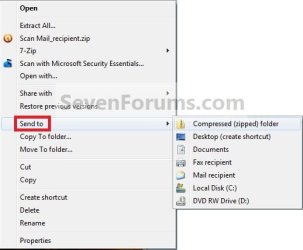
Context_menu.jpg
EXAMPLE: Expanded Send To Context Menu
NOTE: The expanded Send To context menu is opened by pressing and holding Shift before right clicking on the file or folder, then clicking on Send To.
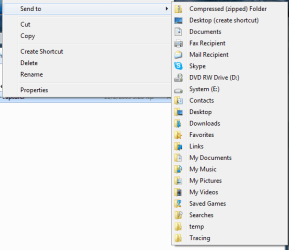
sendto2.png


OPTION ONE

To Manually Restore Send to Context Menu Items


1. Go to the hidden folder location below, and do step 2 or 3 below for what you would like to do.
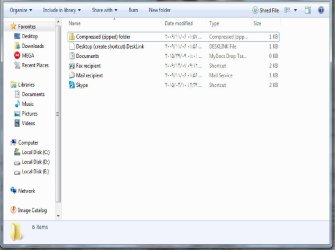
C:\Users\Default\AppData\Roaming\Microsoft\Windows
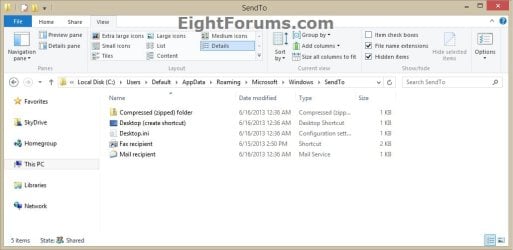
Default_SendTo.jpg
2. To Restore SendTo Folder and All Send to Context Menu Items
A) Copy the SendTo folder.

B) Go to the hidden folder (shell:sendto) location below.
C:\Users\(your user-name)\AppData\Roaming\Microsoft\Windows

C) Paste the SendTo folder, and approve.
3. To Restore Specific Send to Context Menu Item(s)
A) Open the SendTo folder.

B) Copy the shortcuts that you want to restore.

C) Go to the hidden folder (shell:sendto) location below.
C:\Users\(your user-name)\AppData\Roaming\Microsoft\Windows\SendTo
D) Paste the shortcuts into your SendTo folder, and approve.
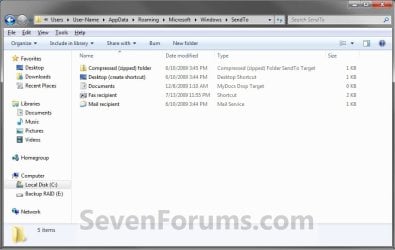
Send_To.jpg


OPTION TWO

To Restore a Send to Context Menu Item with a Download


1. To Restore Compressed (zipped) Folder
A) Click on the download button below to download the Compressed_(zipped)_folder.zip file.

Download


2. To Restore Desktop (create shortcut)
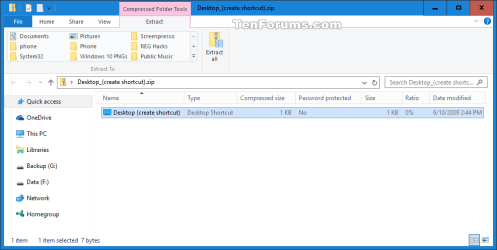
A) Click/tap on the download button below to download the Desktop_(create shortcut).zip file.

Download


3. To Restore Documents
A) Click/tap on the download button below to download the Documents.zip file.

Download


4. To Restore Fax Recipient
A) Click/tap on the download button below to download the Fax_Recipient .zip file.

Download


5. To Restore Mail Recipient
A) Click/tap on the download button below to download the Mail_Recipient .zip file.

Download


6. Save the ZIP file to your Desktop.

7. Open the .zip file and extract (drag and drop) the shortcut file to your desktop.

8. Right click on the shortcut, then click/tap on Properties, General tab, and on the Unblock button. (see screenshot below)
NOTE: If you do not have a Unblock button under the General tab, then the shortcut is already unblocked and you can continue on to step 9.
Unblock.jpg
9. Press the Windows + R keys to open the Run dialog, type shell:sendto, and press Enter.

10. Move the extracted shortcut(s) (step 7) into the SentTo folder. (see screenshot below)
NOTE: If you wanted to remove a Send To context menu item, then right click on a shortcut in the SendTo folder and click on Delete and Yes.
Send_To.jpg
11. When done, close the SendTo folder and delete the ZIP file on the desktop if you would like to.
That's it,
Shawn


Attachments

Last edited:
hi
why folder not expanding?
in xp in sendto folder i created folder and put some shortcut on that
now if i select sendto from right click i can see the shortcut that i created in a folder
but now on windows 8 folder wont expand?
this is a bug?
is there anyway use same way for windows 8?
sendto
>>>>>myfolder
>>>>>>>>>>>>myshortcut
>>>>>from right click myfolder wont expand
 

My Computer

Computer type
PC/Desktop
OS
Windows 8.1 Enterprise 32bit
Hello Javidya, and welcome to Seven Forums.

The folder you placed in "Send to" is only a shortcut of the folder. It will not expand open in the "Send to" context menu. Instead, you would only select to send the item you right clicked on to the folder. :)
 

My Computer

Computer type
PC/Desktop
Computer Manufacturer/Model Number
Self built custom
OS
64-bit Windows 11 Pro for Workstations
CPU
Intel i7-8700K OC'd to 5 GHz
Motherboard
ASUS ROG Maximus XI Formula Z390
Memory
64 GB (4x16GB) G.SKILL TridentZ RGB DDR4 3600 MHz
Graphics Card(s)
ASUS ROG-STRIX-GTX1080TI-O11G-GAMING
Sound Card
Integrated
Monitor(s) Displays
2 x Samsung Odyssey G7 27"
Screen Resolution
2560x1440
Hard Drives
1TB Samsung 990 PRO M.2,
4TB Samsung 990 PRO PRO M.2,
TerraMaster F8 SSD Plus NAS
PSU
Seasonic Prime Titanium 850W
Case
Thermaltake Core P3
Cooling
Corsair Hydro H115i
Keyboard
Logitech wireless K800
Mouse
Logitech MX Master 4
Internet Speed
2 Gb/s Download and 100 Mb/s Upload
Antivirus
Malwarebyte Anti-Malware Premium
Browser
Google Chrome
Other Info
Logitech Z625 speaker system,
Logitech BRIO 4K Pro webcam,
HP Color LaserJet Pro MFP M477fdn,
APC SMART-UPS RT 1000 XL - SURT1000XLI,
Galaxy S23 Plus phone
Hello Javidya, and welcome to Seven Forums.

The folder you placed in "Send to" is only a shortcut of the folder. It will not expand open in the "Send to" context menu. Instead, you would only select to send the item you right clicked on to the folder. :)

thank you for answer. you mean if i go to below folder ("SendTo") and make folder on it, itself change to shortcut? i say i make folder in this path and the put some of shortcut on it,its most expand i know its work in the xp and folder will expanded.i think its bug or new feature or with some trick maybe can do this in newer windows C:\Users\username\AppData\Roaming\Microsoft\Windows\SendTo thanks
 

My Computer

Computer type
PC/Desktop
OS
Windows 8.1 Enterprise 32bit
Nar, it's not a bug. It's by design. You would only have shortcuts in the "SendTo" folder that do not expand.
 

My Computer

Computer type
PC/Desktop
Computer Manufacturer/Model Number
Self built custom
OS
64-bit Windows 11 Pro for Workstations
CPU
Intel i7-8700K OC'd to 5 GHz
Motherboard
ASUS ROG Maximus XI Formula Z390
Memory
64 GB (4x16GB) G.SKILL TridentZ RGB DDR4 3600 MHz
Graphics Card(s)
ASUS ROG-STRIX-GTX1080TI-O11G-GAMING
Sound Card
Integrated
Monitor(s) Displays
2 x Samsung Odyssey G7 27"
Screen Resolution
2560x1440
Hard Drives
1TB Samsung 990 PRO M.2,
4TB Samsung 990 PRO PRO M.2,
TerraMaster F8 SSD Plus NAS
PSU
Seasonic Prime Titanium 850W
Case
Thermaltake Core P3
Cooling
Corsair Hydro H115i
Keyboard
Logitech wireless K800
Mouse
Logitech MX Master 4
Internet Speed
2 Gb/s Download and 100 Mb/s Upload
Antivirus
Malwarebyte Anti-Malware Premium
Browser
Google Chrome
Other Info
Logitech Z625 speaker system,
Logitech BRIO 4K Pro webcam,
HP Color LaserJet Pro MFP M477fdn,
APC SMART-UPS RT 1000 XL - SURT1000XLI,
Galaxy S23 Plus phone
Thank you to all the contributors on these threads

I just wanted to say that this entire site is always helpful when I need assistance. The contributors are thorough in their directions which is very much appreciated. :)

My Send To changed itself into a folder and just kept "holding" the items I tried to send via that platform. I had to delete the Mail Recipient file, then could not find information on how to get it in back into the Send To platform again. Then Seven Forums to the rescue again and Brink was so thorough that I was able to do this step by step, and it works beautifully again.

I am not sure why this would have changed by itself as it has always worked up until a few days ago. Do the Windows updates have any bearing on why the Send To file changes? I am 72 years of age, and when these things happen, I always seem to blame myself - sometimes I know that is truly the case, though. LOL!

Thanks again for all that you contributors do for the rest of us out here in the internet world:)
 

My Computer

Computer type
PC/Desktop
OS
Windows 7 Home Premium
Hello Nikki, and welcome to Seven Forums.

It's not uncommon for Windows Updates to occasionally break things, but Microsoft usually issues a patch for it not long afterwards.

It could have been caused by anything though, but I'm happy to hear that the tutorial was able to help you fix it. :)
 

My Computer

Computer type
PC/Desktop
Computer Manufacturer/Model Number
Self built custom
OS
64-bit Windows 11 Pro for Workstations
CPU
Intel i7-8700K OC'd to 5 GHz
Motherboard
ASUS ROG Maximus XI Formula Z390
Memory
64 GB (4x16GB) G.SKILL TridentZ RGB DDR4 3600 MHz
Graphics Card(s)
ASUS ROG-STRIX-GTX1080TI-O11G-GAMING
Sound Card
Integrated
Monitor(s) Displays
2 x Samsung Odyssey G7 27"
Screen Resolution
2560x1440
Hard Drives
1TB Samsung 990 PRO M.2,
4TB Samsung 990 PRO PRO M.2,
TerraMaster F8 SSD Plus NAS
PSU
Seasonic Prime Titanium 850W
Case
Thermaltake Core P3
Cooling
Corsair Hydro H115i
Keyboard
Logitech wireless K800
Mouse
Logitech MX Master 4
Internet Speed
2 Gb/s Download and 100 Mb/s Upload
Antivirus
Malwarebyte Anti-Malware Premium
Browser
Google Chrome
Other Info
Logitech Z625 speaker system,
Logitech BRIO 4K Pro webcam,
HP Color LaserJet Pro MFP M477fdn,
APC SMART-UPS RT 1000 XL - SURT1000XLI,
Galaxy S23 Plus phone
how could i add to the sent to; that it should go to "mailto:"?
 

My Computer

Computer type
PC/Desktop
Computer Manufacturer/Model Number
Custom Build
OS
Microsoft Windows 7 Ultimate 64-bit 7601 Multiprocessor Free Service Pack 1
CPU
Intel(R) Core(TM) i5-4430 CPU @ 3.00GHz
Motherboard
Gigabyte Technology Co., Ltd. P85-D3
Memory
8.00 GB
Graphics Card(s)
(1) NVIDIA GeForce GTX 750 Ti (2) Intel(R) HD Graphics 460
Sound Card
(1) NVIDIA High Definition Audio (2) Realtek High Definiti
Screen Resolution
1920 x 1080 x 32 bits (4294967296 colors) @ 60 Hz
Hard Drives
(1) Crucial_ CT120M500SSD1 SCSI Disk Device (2) WDC WD10EADS-00L5B1 SCSI Disk Device (3) WDC WD10EZEX-00ER1A0 SCSI Disk Device (4) StoreJet Transcend USB Device (5) StoreJet Transcend USB Device
Antivirus
eset
Browser
chrome
Hello Avi,

The Mail recipient item would be for that. :)
 

My Computer

Computer type
PC/Desktop
Computer Manufacturer/Model Number
Self built custom
OS
64-bit Windows 11 Pro for Workstations
CPU
Intel i7-8700K OC'd to 5 GHz
Motherboard
ASUS ROG Maximus XI Formula Z390
Memory
64 GB (4x16GB) G.SKILL TridentZ RGB DDR4 3600 MHz
Graphics Card(s)
ASUS ROG-STRIX-GTX1080TI-O11G-GAMING
Sound Card
Integrated
Monitor(s) Displays
2 x Samsung Odyssey G7 27"
Screen Resolution
2560x1440
Hard Drives
1TB Samsung 990 PRO M.2,
4TB Samsung 990 PRO PRO M.2,
TerraMaster F8 SSD Plus NAS
PSU
Seasonic Prime Titanium 850W
Case
Thermaltake Core P3
Cooling
Corsair Hydro H115i
Keyboard
Logitech wireless K800
Mouse
Logitech MX Master 4
Internet Speed
2 Gb/s Download and 100 Mb/s Upload
Antivirus
Malwarebyte Anti-Malware Premium
Browser
Google Chrome
Other Info
Logitech Z625 speaker system,
Logitech BRIO 4K Pro webcam,
HP Color LaserJet Pro MFP M477fdn,
APC SMART-UPS RT 1000 XL - SURT1000XLI,
Galaxy S23 Plus phone

Attachments

  • 2015-07-15_162911.png
    2015-07-15_162911.png
    3.1 KB · Views: 413

My Computer

Computer type
PC/Desktop
Computer Manufacturer/Model Number
Custom Build
OS
Microsoft Windows 7 Ultimate 64-bit 7601 Multiprocessor Free Service Pack 1
CPU
Intel(R) Core(TM) i5-4430 CPU @ 3.00GHz
Motherboard
Gigabyte Technology Co., Ltd. P85-D3
Memory
8.00 GB
Graphics Card(s)
(1) NVIDIA GeForce GTX 750 Ti (2) Intel(R) HD Graphics 460
Sound Card
(1) NVIDIA High Definition Audio (2) Realtek High Definiti
Screen Resolution
1920 x 1080 x 32 bits (4294967296 colors) @ 60 Hz
Hard Drives
(1) Crucial_ CT120M500SSD1 SCSI Disk Device (2) WDC WD10EADS-00L5B1 SCSI Disk Device (3) WDC WD10EZEX-00ER1A0 SCSI Disk Device (4) StoreJet Transcend USB Device (5) StoreJet Transcend USB Device
Antivirus
eset
Browser
chrome
What email client program are you using?

For example: Outlook or Windows Live Mail
 

My Computer

Computer type
PC/Desktop
Computer Manufacturer/Model Number
Self built custom
OS
64-bit Windows 11 Pro for Workstations
CPU
Intel i7-8700K OC'd to 5 GHz
Motherboard
ASUS ROG Maximus XI Formula Z390
Memory
64 GB (4x16GB) G.SKILL TridentZ RGB DDR4 3600 MHz
Graphics Card(s)
ASUS ROG-STRIX-GTX1080TI-O11G-GAMING
Sound Card
Integrated
Monitor(s) Displays
2 x Samsung Odyssey G7 27"
Screen Resolution
2560x1440
Hard Drives
1TB Samsung 990 PRO M.2,
4TB Samsung 990 PRO PRO M.2,
TerraMaster F8 SSD Plus NAS
PSU
Seasonic Prime Titanium 850W
Case
Thermaltake Core P3
Cooling
Corsair Hydro H115i
Keyboard
Logitech wireless K800
Mouse
Logitech MX Master 4
Internet Speed
2 Gb/s Download and 100 Mb/s Upload
Antivirus
Malwarebyte Anti-Malware Premium
Browser
Google Chrome
Other Info
Logitech Z625 speaker system,
Logitech BRIO 4K Pro webcam,
HP Color LaserJet Pro MFP M477fdn,
APC SMART-UPS RT 1000 XL - SURT1000XLI,
Galaxy S23 Plus phone
What email client program are you using?

For example: Outlook or Windows Live Mail

gmail and no i don't want to use any third party software (like affixa)
 

My Computer

Computer type
PC/Desktop
Computer Manufacturer/Model Number
Custom Build
OS
Microsoft Windows 7 Ultimate 64-bit 7601 Multiprocessor Free Service Pack 1
CPU
Intel(R) Core(TM) i5-4430 CPU @ 3.00GHz
Motherboard
Gigabyte Technology Co., Ltd. P85-D3
Memory
8.00 GB
Graphics Card(s)
(1) NVIDIA GeForce GTX 750 Ti (2) Intel(R) HD Graphics 460
Sound Card
(1) NVIDIA High Definition Audio (2) Realtek High Definiti
Screen Resolution
1920 x 1080 x 32 bits (4294967296 colors) @ 60 Hz
Hard Drives
(1) Crucial_ CT120M500SSD1 SCSI Disk Device (2) WDC WD10EADS-00L5B1 SCSI Disk Device (3) WDC WD10EZEX-00ER1A0 SCSI Disk Device (4) StoreJet Transcend USB Device (5) StoreJet Transcend USB Device
Antivirus
eset
Browser
chrome

My Computer

Computer type
PC/Desktop
Computer Manufacturer/Model Number
Self built custom
OS
64-bit Windows 11 Pro for Workstations
CPU
Intel i7-8700K OC'd to 5 GHz
Motherboard
ASUS ROG Maximus XI Formula Z390
Memory
64 GB (4x16GB) G.SKILL TridentZ RGB DDR4 3600 MHz
Graphics Card(s)
ASUS ROG-STRIX-GTX1080TI-O11G-GAMING
Sound Card
Integrated
Monitor(s) Displays
2 x Samsung Odyssey G7 27"
Screen Resolution
2560x1440
Hard Drives
1TB Samsung 990 PRO M.2,
4TB Samsung 990 PRO PRO M.2,
TerraMaster F8 SSD Plus NAS
PSU
Seasonic Prime Titanium 850W
Case
Thermaltake Core P3
Cooling
Corsair Hydro H115i
Keyboard
Logitech wireless K800
Mouse
Logitech MX Master 4
Internet Speed
2 Gb/s Download and 100 Mb/s Upload
Antivirus
Malwarebyte Anti-Malware Premium
Browser
Google Chrome
Other Info
Logitech Z625 speaker system,
Logitech BRIO 4K Pro webcam,
HP Color LaserJet Pro MFP M477fdn,
APC SMART-UPS RT 1000 XL - SURT1000XLI,
Galaxy S23 Plus phone
i have already set google chrome as the default mailto: protocol handler but how do i add it to the context menu?
 

My Computer

Computer type
PC/Desktop
Computer Manufacturer/Model Number
Custom Build
OS
Microsoft Windows 7 Ultimate 64-bit 7601 Multiprocessor Free Service Pack 1
CPU
Intel(R) Core(TM) i5-4430 CPU @ 3.00GHz
Motherboard
Gigabyte Technology Co., Ltd. P85-D3
Memory
8.00 GB
Graphics Card(s)
(1) NVIDIA GeForce GTX 750 Ti (2) Intel(R) HD Graphics 460
Sound Card
(1) NVIDIA High Definition Audio (2) Realtek High Definiti
Screen Resolution
1920 x 1080 x 32 bits (4294967296 colors) @ 60 Hz
Hard Drives
(1) Crucial_ CT120M500SSD1 SCSI Disk Device (2) WDC WD10EADS-00L5B1 SCSI Disk Device (3) WDC WD10EZEX-00ER1A0 SCSI Disk Device (4) StoreJet Transcend USB Device (5) StoreJet Transcend USB Device
Antivirus
eset
Browser
chrome

My Computer

Computer type
PC/Desktop
Computer Manufacturer/Model Number
Self built custom
OS
64-bit Windows 11 Pro for Workstations
CPU
Intel i7-8700K OC'd to 5 GHz
Motherboard
ASUS ROG Maximus XI Formula Z390
Memory
64 GB (4x16GB) G.SKILL TridentZ RGB DDR4 3600 MHz
Graphics Card(s)
ASUS ROG-STRIX-GTX1080TI-O11G-GAMING
Sound Card
Integrated
Monitor(s) Displays
2 x Samsung Odyssey G7 27"
Screen Resolution
2560x1440
Hard Drives
1TB Samsung 990 PRO M.2,
4TB Samsung 990 PRO PRO M.2,
TerraMaster F8 SSD Plus NAS
PSU
Seasonic Prime Titanium 850W
Case
Thermaltake Core P3
Cooling
Corsair Hydro H115i
Keyboard
Logitech wireless K800
Mouse
Logitech MX Master 4
Internet Speed
2 Gb/s Download and 100 Mb/s Upload
Antivirus
Malwarebyte Anti-Malware Premium
Browser
Google Chrome
Other Info
Logitech Z625 speaker system,
Logitech BRIO 4K Pro webcam,
HP Color LaserJet Pro MFP M477fdn,
APC SMART-UPS RT 1000 XL - SURT1000XLI,
Galaxy S23 Plus phone
Hello everyone
Thanks for the helpful forum
I have followed the instructions of this thread to have "desktop (create shortcut)" in sendTo menu as an option.As i provided a screenshot i have the file in my sendto folder in Appdata.But i don't have it in the menu yet :(
 

Attachments

  • Problem.jpg
    Problem.jpg
    133 KB · Views: 215

My Computer

Computer type
PC/Desktop
OS
windows7 Ultimate 32bit
Memory
3 GB
Sound Card
Realtek HD Audio
Antivirus
ESET Smart Security
Hello amirfengineer, and welcome to Seven Forums. :)

It looks like something has renamed the file extension of the Desktop (create shortcut) shortcut causing it to not work.

Renaming the file to remove .DeskLink off the end should help.
 

My Computer

Computer type
PC/Desktop
Computer Manufacturer/Model Number
Self built custom
OS
64-bit Windows 11 Pro for Workstations
CPU
Intel i7-8700K OC'd to 5 GHz
Motherboard
ASUS ROG Maximus XI Formula Z390
Memory
64 GB (4x16GB) G.SKILL TridentZ RGB DDR4 3600 MHz
Graphics Card(s)
ASUS ROG-STRIX-GTX1080TI-O11G-GAMING
Sound Card
Integrated
Monitor(s) Displays
2 x Samsung Odyssey G7 27"
Screen Resolution
2560x1440
Hard Drives
1TB Samsung 990 PRO M.2,
4TB Samsung 990 PRO PRO M.2,
TerraMaster F8 SSD Plus NAS
PSU
Seasonic Prime Titanium 850W
Case
Thermaltake Core P3
Cooling
Corsair Hydro H115i
Keyboard
Logitech wireless K800
Mouse
Logitech MX Master 4
Internet Speed
2 Gb/s Download and 100 Mb/s Upload
Antivirus
Malwarebyte Anti-Malware Premium
Browser
Google Chrome
Other Info
Logitech Z625 speaker system,
Logitech BRIO 4K Pro webcam,
HP Color LaserJet Pro MFP M477fdn,
APC SMART-UPS RT 1000 XL - SURT1000XLI,
Galaxy S23 Plus phone
Hello Brink

I deleted ".DeskLink" of the end of the file name and renamed it agian by adding ".DeskLink" to the name.But the problem hasn't been solved.
 

My Computer

Computer type
PC/Desktop
OS
windows7 Ultimate 32bit
Memory
3 GB
Sound Card
Realtek HD Audio
Antivirus
ESET Smart Security
The ".DeskLink" is not suppose to be there.
 

My Computer

Computer type
PC/Desktop
Computer Manufacturer/Model Number
Self built custom
OS
64-bit Windows 11 Pro for Workstations
CPU
Intel i7-8700K OC'd to 5 GHz
Motherboard
ASUS ROG Maximus XI Formula Z390
Memory
64 GB (4x16GB) G.SKILL TridentZ RGB DDR4 3600 MHz
Graphics Card(s)
ASUS ROG-STRIX-GTX1080TI-O11G-GAMING
Sound Card
Integrated
Monitor(s) Displays
2 x Samsung Odyssey G7 27"
Screen Resolution
2560x1440
Hard Drives
1TB Samsung 990 PRO M.2,
4TB Samsung 990 PRO PRO M.2,
TerraMaster F8 SSD Plus NAS
PSU
Seasonic Prime Titanium 850W
Case
Thermaltake Core P3
Cooling
Corsair Hydro H115i
Keyboard
Logitech wireless K800
Mouse
Logitech MX Master 4
Internet Speed
2 Gb/s Download and 100 Mb/s Upload
Antivirus
Malwarebyte Anti-Malware Premium
Browser
Google Chrome
Other Info
Logitech Z625 speaker system,
Logitech BRIO 4K Pro webcam,
HP Color LaserJet Pro MFP M477fdn,
APC SMART-UPS RT 1000 XL - SURT1000XLI,
Galaxy S23 Plus phone
What do you mean?

The file that i downloaded of this thread to restore desktop shortcut is a .DeskLink file too.

Please explain more.
 

My Computer

Computer type
PC/Desktop
OS
windows7 Ultimate 32bit
Memory
3 GB
Sound Card
Realtek HD Audio
Antivirus
ESET Smart Security
The download from the tutorial doesn't have that. That's what you would see in the properties of the shortcut, but it should be like this below.

Are you using some sort of download manager, or have some 3rd party AV/security program that could be renaming the shortcut?

shortcut.png
 

My Computer

Computer type
PC/Desktop
Computer Manufacturer/Model Number
Self built custom
OS
64-bit Windows 11 Pro for Workstations
CPU
Intel i7-8700K OC'd to 5 GHz
Motherboard
ASUS ROG Maximus XI Formula Z390
Memory
64 GB (4x16GB) G.SKILL TridentZ RGB DDR4 3600 MHz
Graphics Card(s)
ASUS ROG-STRIX-GTX1080TI-O11G-GAMING
Sound Card
Integrated
Monitor(s) Displays
2 x Samsung Odyssey G7 27"
Screen Resolution
2560x1440
Hard Drives
1TB Samsung 990 PRO M.2,
4TB Samsung 990 PRO PRO M.2,
TerraMaster F8 SSD Plus NAS
PSU
Seasonic Prime Titanium 850W
Case
Thermaltake Core P3
Cooling
Corsair Hydro H115i
Keyboard
Logitech wireless K800
Mouse
Logitech MX Master 4
Internet Speed
2 Gb/s Download and 100 Mb/s Upload
Antivirus
Malwarebyte Anti-Malware Premium
Browser
Google Chrome
Other Info
Logitech Z625 speaker system,
Logitech BRIO 4K Pro webcam,
HP Color LaserJet Pro MFP M477fdn,
APC SMART-UPS RT 1000 XL - SURT1000XLI,
Galaxy S23 Plus phone
Back
Top