Send webpage to OneNote - graphics issue

Kari

An Angry Old Man
Guru
VIP
SF Team
Local time
4:00 AM
Messages
17,473
Location
A Finnish ex-pat in Leipzig, Germany
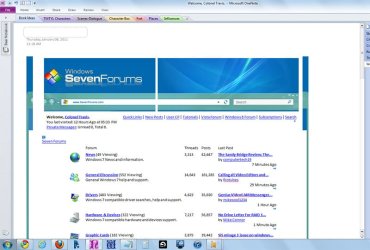
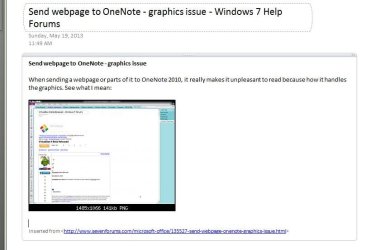
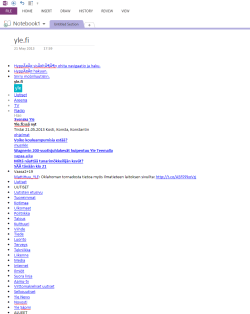
When sending a webpage or parts of it to OneNote 2010, it really makes it unpleasant to read because how it handles the graphics. See what I mean:

OneNote_1.png

Here's the same page sent to OneNote 2010, this time as an image:
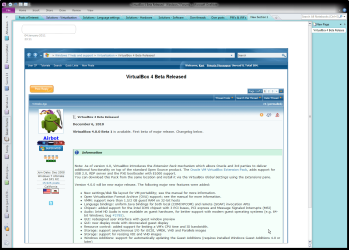
OneNote_2.png

Looks good but because it's an image, I can not edit it, add my own remarks in between the text and so on.

Is there a way to get a page sent to OneNote as an editable page, keeping the same layout than the original webpage?

Kari
 

My Computer My Computer

Computer type
Laptop
Computer Manufacturer/Model Number
HP ENVY 17-1150eg
OS
Windows 10 Pro x64 EN-GB
CPU
1.6 GHz Intel Core i7-720QM Processor
Memory
6 GB
Graphics Card(s)
ATI Mobility Radeon HD 5850 Graphics
Sound Card
Beats sound system with integrated subwoofer
Monitor(s) Displays
17" laptop display, 22" LED and 32" Full HD TV through HDMI
Screen Resolution
1600*900 (1), 1920*1080 (2&3)
Hard Drives
Internal: 2 x 500 GB SATA Hard Disk Drive 7200 rpm
External: 2TB for backups, 3TB USB3 network drive for media
Cooling
As Envy runs a bit warm, I have it on a Cooler Master pad
Keyboard
Logitech diNovo Media Desktop Laser (bluetooth)
Mouse
Logitech Performance Mouse MX
Internet Speed
50/10 Mbps VDSL
Antivirus
Windows Defender 4.3.9431.0
Browser
Maxthon 3.5.2., IE11
Open it in Internet Explorer
Right mouse click
SendtoNote
Now you can edit.

Regards, Louis
 

My Computer My Computer

OS
Windows 7 Ultimate x64
Hi Loconel, welcome to the Seven Forums.

Yes, I know I can edit. And I want to have pages in OneNote so I can edit them if the need arises. That is the reason why I would like to solve this small but annoying issue. The page sent to OneNote looks very ugly because most of the graphic elements are misplaced, or not shown at all. If I want it look right in OneNote, I have to send it as an image, which makes it impossible to edit text on it.

So the question remains: is it possible to get the page to OneNote so that graphics are shown as in the original webpage (WYSIWYG)?

Kari
 

My Computer My Computer

Computer type
Laptop
Computer Manufacturer/Model Number
HP ENVY 17-1150eg
OS
Windows 10 Pro x64 EN-GB
CPU
1.6 GHz Intel Core i7-720QM Processor
Memory
6 GB
Graphics Card(s)
ATI Mobility Radeon HD 5850 Graphics
Sound Card
Beats sound system with integrated subwoofer
Monitor(s) Displays
17" laptop display, 22" LED and 32" Full HD TV through HDMI
Screen Resolution
1600*900 (1), 1920*1080 (2&3)
Hard Drives
Internal: 2 x 500 GB SATA Hard Disk Drive 7200 rpm
External: 2TB for backups, 3TB USB3 network drive for media
Cooling
As Envy runs a bit warm, I have it on a Cooler Master pad
Keyboard
Logitech diNovo Media Desktop Laser (bluetooth)
Mouse
Logitech Performance Mouse MX
Internet Speed
50/10 Mbps VDSL
Antivirus
Windows Defender 4.3.9431.0
Browser
Maxthon 3.5.2., IE11
Hi Kari

Tried but got the same results as you did, especially for SF.
I was using FF with Clip to One-note Addon.
 

My Computer My Computer

Computer Manufacturer/Model Number
Custom
OS
Win7 HP (x64)/Win7 Ultimate (x64)
CPU
Core i7 920
Motherboard
Intel X58
Memory
6 x 2GB Corsair XMS3
Graphics Card(s)
CF HD4890
Sound Card
Asus Xonar
Monitor(s) Displays
Dell 2408WFP
Screen Resolution
1920 x 1200
Hard Drives
2 x 150GB WDC Velociraptors (Raid 0)
1 x 1TB Seagate
1 x 1.5TB Seagate
PSU
Corsair HX1000W
Case
Antec 1200
Keyboard
Razer Lycosa/N52te
Mouse
Razer Lachesis
Kari,

I don't know if this helps; from IE edit the web page with Word then Send to OneNote??? Is that any better??

WS
 

My Computer My Computer

Computer type
PC/Desktop
Computer Manufacturer/Model Number
Dell OP7010
OS
Windows 7 Enterprise (x64); Windows Server 2008 R2 (x64)
Memory
16GB
Monitor(s) Displays
4 Dell 24" LCD
Screen Resolution
1280x1024
Keyboard
Dell
Mouse
Dell Optical
Internet Speed
40meg
Thanks for the tip, WS, but it does not solve my issue. Resulting OneNote note with the webpage looks equally disturbing, graphics are all wrong or missing.

If some of you geeks from Redmond happen to see this after Googling, sorry, Binging for Office issues, please mention this on your next Office Development Team meeting: Why is it that Microsoft Office OneNote 2011 can not show an editable WYSIWYG webpage, when the page is sent from Microsoft Internet Explorer to it?

Kari
 

My Computer My Computer

Computer type
Laptop
Computer Manufacturer/Model Number
HP ENVY 17-1150eg
OS
Windows 10 Pro x64 EN-GB
CPU
1.6 GHz Intel Core i7-720QM Processor
Memory
6 GB
Graphics Card(s)
ATI Mobility Radeon HD 5850 Graphics
Sound Card
Beats sound system with integrated subwoofer
Monitor(s) Displays
17" laptop display, 22" LED and 32" Full HD TV through HDMI
Screen Resolution
1600*900 (1), 1920*1080 (2&3)
Hard Drives
Internal: 2 x 500 GB SATA Hard Disk Drive 7200 rpm
External: 2TB for backups, 3TB USB3 network drive for media
Cooling
As Envy runs a bit warm, I have it on a Cooler Master pad
Keyboard
Logitech diNovo Media Desktop Laser (bluetooth)
Mouse
Logitech Performance Mouse MX
Internet Speed
50/10 Mbps VDSL
Antivirus
Windows Defender 4.3.9431.0
Browser
Maxthon 3.5.2., IE11
Maybe one of these things might help:

Thing 1.) OneNote 2007 - The HTML Importer
Thing 2.) Clip to OneNote extension for FF.

They're not perfect. Here's what it looks like on my PC:

Importer.jpg


But it's better than the usual Send To OneNote and you can edit. I'm using 2010 and the second one works. The first one isn't compatible with 2010 or Windows 7 or maybe x64, I don't know. All I know is I have the trifecta and it doesn't work.

I've used OneNote every working day for several years and the only other way around this problem is to copy and paste, which is more work, plus it isn't really solving the problem. But I actually prefer that way instead of the FF extension because I'm usually dealing with just text and photos. If it's video or audio, I'll download that separately and paste it in my notebook. Every now and then I copy and paste a site logo or graphic or whatnot to my notebook. The rest of the webpage - format, graphics, etc. - is almost always waste of my time. Again, that's just me.

But I agree, the situation can be a total pain. Sign me up on your Redmond geek petition. If that FF extension guy can do what he did, there's gotta be a way MS can improve it and put it in the next version.
 

My Computer My Computer

Computer Manufacturer/Model Number
Colonel Travis 5000
OS
Black Label 7 x64
CPU
AMD Phenom II X6 1055t
Motherboard
GA-890FXA-UD5
Memory
8GB Corsair XMS3
Graphics Card(s)
Radeon HD 6790
Sound Card
X-FI Titanium Fatal1ty Pro
Monitor(s) Displays
Acer AJ15
Screen Resolution
1600x900
Hard Drives
OCZ Agility 3 SSD 120GB |
Corsair Force GT SSD 120 GB |
Barracuda 7200 SATA 300GB |
WD Caviar Green SATA 500GB
PSU
OCZ ModXStream 700W
Cooling
50 billion case fans
Internet Speed
35Mbps/35Mbps
Thanks, Colonel, but seems not to be working here. Using the Clip to OneNote FF extension you mentioned, OneNote 2010 in Windows 7 Ultimate x64.

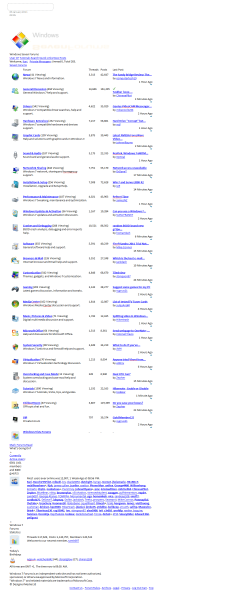
Here screenshots of this page sent to OneNote, and of Seven Forums front page. Resulting output looks the same than when sent from IE. I took the full page screenshots to show how really ugly the output looks.

The output is so ugly I prefer to send pages as images. How the h*** am I supposed to sent a webpage so it keeps it's formatting?

(You have to click images to enlarge, click second time to open it in a webpage, and click once more to zoom to see the images properly.)

OneNote_3.png

OneNote_4.png
 

My Computer My Computer

Computer type
Laptop
Computer Manufacturer/Model Number
HP ENVY 17-1150eg
OS
Windows 10 Pro x64 EN-GB
CPU
1.6 GHz Intel Core i7-720QM Processor
Memory
6 GB
Graphics Card(s)
ATI Mobility Radeon HD 5850 Graphics
Sound Card
Beats sound system with integrated subwoofer
Monitor(s) Displays
17" laptop display, 22" LED and 32" Full HD TV through HDMI
Screen Resolution
1600*900 (1), 1920*1080 (2&3)
Hard Drives
Internal: 2 x 500 GB SATA Hard Disk Drive 7200 rpm
External: 2TB for backups, 3TB USB3 network drive for media
Cooling
As Envy runs a bit warm, I have it on a Cooler Master pad
Keyboard
Logitech diNovo Media Desktop Laser (bluetooth)
Mouse
Logitech Performance Mouse MX
Internet Speed
50/10 Mbps VDSL
Antivirus
Windows Defender 4.3.9431.0
Browser
Maxthon 3.5.2., IE11
Ha - yeah, other than that importer, I'm afraid you're (we're) screwed.

You can copy text (right click) out of a screen clipping, but why not skip the clipping and just copy the text from the site yourself?!?! You can't copy text embedded in a photo, for example. I don't know my MS thinks that little feature is so fancy.

In theory, it doesn't seem it would be that difficult for MS to make OneNote reproduce a web page as-is. Maybe I'm wrong. I wish the company would treat it as the incredible tool it is, instead of the Office red-headed stepchild.
 

My Computer My Computer

Computer Manufacturer/Model Number
Colonel Travis 5000
OS
Black Label 7 x64
CPU
AMD Phenom II X6 1055t
Motherboard
GA-890FXA-UD5
Memory
8GB Corsair XMS3
Graphics Card(s)
Radeon HD 6790
Sound Card
X-FI Titanium Fatal1ty Pro
Monitor(s) Displays
Acer AJ15
Screen Resolution
1600x900
Hard Drives
OCZ Agility 3 SSD 120GB |
Corsair Force GT SSD 120 GB |
Barracuda 7200 SATA 300GB |
WD Caviar Green SATA 500GB
PSU
OCZ ModXStream 700W
Cooling
50 billion case fans
Internet Speed
35Mbps/35Mbps
Copy paste does not work, either. Even if you choose "Keep formatting" in OneNote paste, it's screwed... To copy a web page, for instance this thread, or even a single post, I would need to copy every element alone and completely recreate the page in OneNote.

I like OneNote. It really makes my life easier, it's easy to learn and use. I just find it very strange that this issue exists, using Microsoft's own browser an OneNote together.

Kari
 

My Computer My Computer

Computer type
Laptop
Computer Manufacturer/Model Number
HP ENVY 17-1150eg
OS
Windows 10 Pro x64 EN-GB
CPU
1.6 GHz Intel Core i7-720QM Processor
Memory
6 GB
Graphics Card(s)
ATI Mobility Radeon HD 5850 Graphics
Sound Card
Beats sound system with integrated subwoofer
Monitor(s) Displays
17" laptop display, 22" LED and 32" Full HD TV through HDMI
Screen Resolution
1600*900 (1), 1920*1080 (2&3)
Hard Drives
Internal: 2 x 500 GB SATA Hard Disk Drive 7200 rpm
External: 2TB for backups, 3TB USB3 network drive for media
Cooling
As Envy runs a bit warm, I have it on a Cooler Master pad
Keyboard
Logitech diNovo Media Desktop Laser (bluetooth)
Mouse
Logitech Performance Mouse MX
Internet Speed
50/10 Mbps VDSL
Antivirus
Windows Defender 4.3.9431.0
Browser
Maxthon 3.5.2., IE11
You can also setup the XPS Document Printer as your OneNote Printer and print to it. It then creates an XPS file that you can save. When you paste it into one of your notebook pages you have the 3 options.
1. Insert Link to the Original File
2. Insert a copy of the file onto the page
3. Insert the file as printout so I can add notes to it.
If you choose three you can write on it if you want and add comments.

I still think that using IE9 and selecting everything on the page that when you click on the "Send to OneNote" that it should be able to format the page correctly on your Notebook page. This is really a problem with this product.

If I just want to copy part of a page and send to OneNote it works fine. It is just the whole page that is a problem.
 

My Computer My Computer

OS
Windows 7 64bit
Kari just a thought on my part, is this a fresh install of Office OneNote or have you upgraded from say 2007, if an upgrade your files will still be in the 2007 format and you may need to convert them to the 2010 format to use all the features.

I could be way of course here but those are my thoughts.;)
 

My Computer My Computer

Computer type
PC/Desktop
Computer Manufacturer/Model Number
Acer Aspire XC-704 x64 bit/ Asus K55A Notebook PC/HP Envy x360 Convertible 15-bq0xx
OS
Windows 10 64bit/Windows 10 64bit/Windows 10 64bit
CPU
Intel Pentium J3710 @ 60GHz/Intel B820,1.7GHz/AMD A9 Radeon
Motherboard
Acer Aspire XC-704 (SOCKET 0)/Asus/HP 8312 (Socket FP4)
Memory
8.00GB DDR3 @ 1599MHz/8GB 2 x 4GB DDR3/8.00GB Dual-Channel
Graphics Card(s)
Intel HD Graphics/Intel/512MB ATI AMD Radeon R5 Graphics (HP
Sound Card
Realtek High Definition Audio/Onboard/AMD High Definition Au
Monitor(s) Displays
Acer LCD K222HQL /Asus 15.6/Generic PnP Monitor (1920x1080@6
Screen Resolution
1920x1080@59Hz/1366 x 768/1920x1080@60Hz
Hard Drives
1863GBWesternn Digital WDC/Asus/119GB SanDisk SD8SN8U-128G-1006 (SSD)
931GB Hitachi HGST HTS721010A9E630 (SATA)
Keyboard
Microsoft Natural Ergonomic Keyboard 4000 (UK)/Inbuilt/Inbui
Mouse
Microsoft Optical Wheel Mouse/Same plus Touchpad/Same + Pad
Internet Speed
Infinity 2 up to 76 Mbps
Antivirus
MSE/MSE/MSE and all 3 have MalwareBytes Premium
Browser
Edge, Firefox/Edge, Firefox/Edge, Firefox, Chrome
Other Info
Seagate Expansion 500GB External Desktop Drive
Seagate Expansion Portable Drives 500GB and 1TB
Epson XP-332 Wireless Printer
Thanks for interest, Joan.

No, fresh Office 2010 installation. I have given up this, seems there's no solution.

Kari
 

My Computer My Computer

Computer type
Laptop
Computer Manufacturer/Model Number
HP ENVY 17-1150eg
OS
Windows 10 Pro x64 EN-GB
CPU
1.6 GHz Intel Core i7-720QM Processor
Memory
6 GB
Graphics Card(s)
ATI Mobility Radeon HD 5850 Graphics
Sound Card
Beats sound system with integrated subwoofer
Monitor(s) Displays
17" laptop display, 22" LED and 32" Full HD TV through HDMI
Screen Resolution
1600*900 (1), 1920*1080 (2&3)
Hard Drives
Internal: 2 x 500 GB SATA Hard Disk Drive 7200 rpm
External: 2TB for backups, 3TB USB3 network drive for media
Cooling
As Envy runs a bit warm, I have it on a Cooler Master pad
Keyboard
Logitech diNovo Media Desktop Laser (bluetooth)
Mouse
Logitech Performance Mouse MX
Internet Speed
50/10 Mbps VDSL
Antivirus
Windows Defender 4.3.9431.0
Browser
Maxthon 3.5.2., IE11
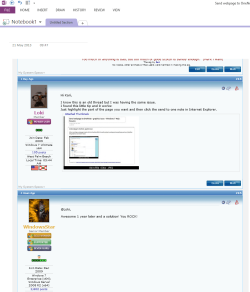
Hi Kari,

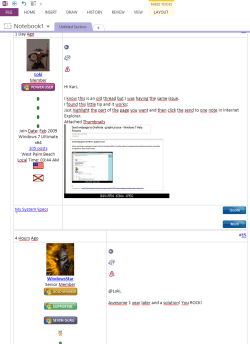
I know this is an old thread but I was having the same issue.
I found this little tip and it works:
Just highlight the part of the page you want and then click the send to one note in Internet Explorer.
 

Attachments

  • Capture.JPG
    Capture.JPG
    48 KB · Views: 6

My Computer My Computer

Computer type
PC/Desktop
Computer Manufacturer/Model Number
Custom
OS
Windows 7 Ultimate x64
CPU
AMD A10-7850 Quad Core 3.7 GHz
Motherboard
MSI MS-7900
Memory
16 GB
Graphics Card(s)
MSI Radeon R7 250 OC Crossfired with A10 AMD Radeon R7
Monitor(s) Displays
Samsung SyncMaster XL2370HD, ViewSonic VA1912wb
Screen Resolution
1920*1080, 1440*900
Hard Drives
128 GB SSD
512 GB SSD
500 GB HDD
PSU
Corsair CX500
Case
Rosewill THOR V2 BLACK
Keyboard
Logitech G15
Mouse
CMSTORM MS2K
Internet Speed
ATT U-Verse
Antivirus
Microsoft Security Essentials, MalwareBytes
Browser
Firefox (lastest stable) with NoScript
Other Info
Just a humdrum little system.
@Loki,

Awesome 1 year later and a solution! You ROCK!
 

My Computer My Computer

Computer type
PC/Desktop
Computer Manufacturer/Model Number
Dell OP7010
OS
Windows 7 Enterprise (x64); Windows Server 2008 R2 (x64)
Memory
16GB
Monitor(s) Displays
4 Dell 24" LCD
Screen Resolution
1280x1024
Keyboard
Dell
Mouse
Dell Optical
Internet Speed
40meg
Sorry but no, that is not a solution. Loki is simply describing the same situation as a solution for which I originally asked help, selecting Send to OneNote from IE context Menu.

It does not work, sending a page to OneNote does not work. The system will screw the graphics. As told in my original post, only way to get graphics OK and the OneNote page to look as original webpage is to save it as an image, which is not a solution for then the page cannot be edited.

Here, screenshots from today show the exactly same situation as in my original post. First done as I originally told I am doing, the way which according to Loki is the solution:

2013-05-21_094620.png

And then saved as an image:

2013-05-21_094804.png

I hope that you can see the difference. Sending to OneNote does not maintain the layout, it totally screws the saved page making it unpleasant to look.

Kari
 

My Computer My Computer

Computer type
Laptop
Computer Manufacturer/Model Number
HP ENVY 17-1150eg
OS
Windows 10 Pro x64 EN-GB
CPU
1.6 GHz Intel Core i7-720QM Processor
Memory
6 GB
Graphics Card(s)
ATI Mobility Radeon HD 5850 Graphics
Sound Card
Beats sound system with integrated subwoofer
Monitor(s) Displays
17" laptop display, 22" LED and 32" Full HD TV through HDMI
Screen Resolution
1600*900 (1), 1920*1080 (2&3)
Hard Drives
Internal: 2 x 500 GB SATA Hard Disk Drive 7200 rpm
External: 2TB for backups, 3TB USB3 network drive for media
Cooling
As Envy runs a bit warm, I have it on a Cooler Master pad
Keyboard
Logitech diNovo Media Desktop Laser (bluetooth)
Mouse
Logitech Performance Mouse MX
Internet Speed
50/10 Mbps VDSL
Antivirus
Windows Defender 4.3.9431.0
Browser
Maxthon 3.5.2., IE11
Kari,

Curious, does this happen for all web site of just this one site. If other sites work fine then it could be that this site is using HTML tags in a way that OneNote can't understand.
 

My Computer My Computer

OS
Windows 7 Ultimate x64
Kari,

Curious, does this happen for all web site of just this one site. If other sites work fine then it could be that this site is using HTML tags in a way that OneNote can't understand.
It's all pages, it is a simple fact that Send to OneNote feature in IE context menu is totally unusable.

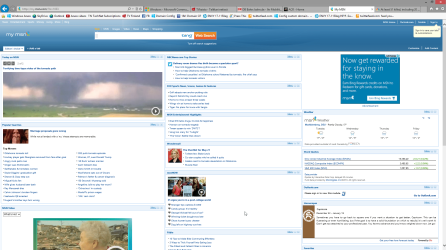
This is MSN.com as I had it a minute ago:

2013-05-21_175232.png[/ATTACH]​

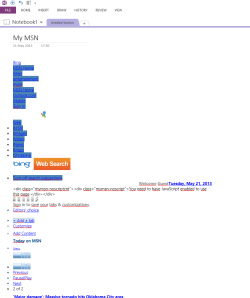
And this is the same page sent to OneNote:

2013-05-21_175143.png

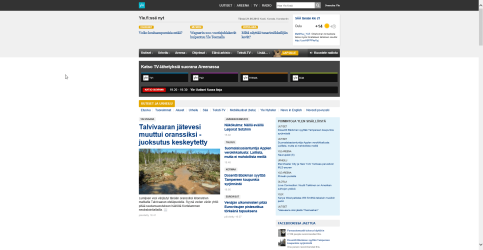
My favorite news site back from my native Finland, important to an ex-pat:

2013-05-21_175936.png

The same page sent to OneNote:

2013-05-21_180013.png

It is a feature that has never worked, basically totally useless if you want to send anything more than a simple link or sentence from a webpage.

Kari
 

My Computer My Computer

Computer type
Laptop
Computer Manufacturer/Model Number
HP ENVY 17-1150eg
OS
Windows 10 Pro x64 EN-GB
CPU
1.6 GHz Intel Core i7-720QM Processor
Memory
6 GB
Graphics Card(s)
ATI Mobility Radeon HD 5850 Graphics
Sound Card
Beats sound system with integrated subwoofer
Monitor(s) Displays
17" laptop display, 22" LED and 32" Full HD TV through HDMI
Screen Resolution
1600*900 (1), 1920*1080 (2&3)
Hard Drives
Internal: 2 x 500 GB SATA Hard Disk Drive 7200 rpm
External: 2TB for backups, 3TB USB3 network drive for media
Cooling
As Envy runs a bit warm, I have it on a Cooler Master pad
Keyboard
Logitech diNovo Media Desktop Laser (bluetooth)
Mouse
Logitech Performance Mouse MX
Internet Speed
50/10 Mbps VDSL
Antivirus
Windows Defender 4.3.9431.0
Browser
Maxthon 3.5.2., IE11
Ugh! no solution. Errrrrr!
 

My Computer My Computer

Computer type
PC/Desktop
Computer Manufacturer/Model Number
Dell OP7010
OS
Windows 7 Enterprise (x64); Windows Server 2008 R2 (x64)
Memory
16GB
Monitor(s) Displays
4 Dell 24" LCD
Screen Resolution
1280x1024
Keyboard
Dell
Mouse
Dell Optical
Internet Speed
40meg
I know exactly what you are looking for. Evernote has an awesome web clipper for IE, FF and Chrome that keeps url, the formatting of the webpage and the links are clickable. Looking at the note in Evernote is exactly like looking at the webpage.
You have options to clip an article, a url or clip the pull page (not only what is visible but the whole page scrolling and all)
Evernote Web Clipper | Evernote

PLEASE someone, recreate this for OneNote
 

My Computer My Computer

Computer type
PC/Desktop
OS
Windows 7 64bit
Back
Top