Solved SendTo Extended Menu

kiwichick

New member
Member
Local time
10:56 PM
Messages
81
Hi there, Sorry if I've missed something somewhere in the forum.

I have read plenty of posts (here and elsewhere) about Shift+Right-Click extended menu registry entries and how to add/remove them. But they all seem to be about the (immediate) context menu and I can't find anything relating to the SendTo extended menu items. How do I add/remove an Extended key for those added by default (Favorites, Contacts, Links etc)? And how can I add an Extended key to ones I have placed in my AppData\Roaming\Microsoft\Windows\SendTo folder?

And why do I have a link to "Documents" in the standard SendTo menu and a link to "My Documents" in the extended SendTo menu? They're both the same location so it doesn't make any sense to have two of them. Is this normal behaviour?

Cheers.
 

My Computer My Computer

Computer Manufacturer/Model Number
Acer Aspire 5741
OS
windows 7 Home Premium
CPU
Intel Core i5 @ 2.27GHz 32nm Technology
Motherboard
Acer Aspire 5741 (CPU)
Memory
DDR3 4.0GB
Graphics Card(s)
Intel(R) Graphics Media Accelerator HD
Sound Card
Realtek High Definition Audio Intel(R) Display Audio
Monitor(s) Displays
Generic PnP Monitor on Intel Graphics Media Accelerator HD
Screen Resolution
1366x768
Hard Drives
Seagate 2.5" SATA 500GB
Keyboard
Synaptics PS/2 Port TouchPad
Mouse
Microsoft Comfort Mouse 4500 (IntelliPoint)
Thanks OakenG, but I don't think you read my post completely. I am talking about the SendTo menu. These programs do not work for that.
 

My Computer My Computer

Computer Manufacturer/Model Number
Acer Aspire 5741
OS
windows 7 Home Premium
CPU
Intel Core i5 @ 2.27GHz 32nm Technology
Motherboard
Acer Aspire 5741 (CPU)
Memory
DDR3 4.0GB
Graphics Card(s)
Intel(R) Graphics Media Accelerator HD
Sound Card
Realtek High Definition Audio Intel(R) Display Audio
Monitor(s) Displays
Generic PnP Monitor on Intel Graphics Media Accelerator HD
Screen Resolution
1366x768
Hard Drives
Seagate 2.5" SATA 500GB
Keyboard
Synaptics PS/2 Port TouchPad
Mouse
Microsoft Comfort Mouse 4500 (IntelliPoint)
The difference between "sendTo" and "extended sendTo", is that the standard one is via registry keys, while the extended is folders in the users profile location.

The standard, would be used so that (for example) a .jpg file has options to be 'sent to' either programs: outlook recipient, Photoshop, Gimp, msPaint; or folders: desktop, (my) documents, etc...

The Extended includes user profile folders, so if structured correctly can copy the .jpg to (my) documents, desktop, downloads, favourites, photoshop_working_files, php_source_code, Links, Music, Videos, etc...
depending on folders in your user profile ( C:\users\username\ )

Because the 'standard' way includes the link named 'documents', and the extended also contains link named 'My documents', this explains why you are seeing both folders, when they are the same location.
 

My Computer My Computer

OS
Windows 7 Enterprise
CPU
Intel Pentium Dual E2200 @2.2GHz
Motherboard
Gigabyte II-G31
Memory
4GB
Graphics Card(s)
Palit GForce 9500GT 1GB
Sound Card
onBoard
Hard Drives
WesternDigital: 250GB + 1TB + 1TB + 2TB
PSU
450W
Case
CoolerMaster CM690
Cooling
Corsair H50
Mouse
Logitech MX518

My Computer My Computer

Computer Manufacturer/Model Number
HP Pavillion dv5t (generation 1)
OS
Vista 64 bit and 32 bit (SP2)
CPU
Intel(R) Core(TM)2 Duo Processor T9400 (2.53 GHz
Memory
4GB DDR2 System Memory (2 Dimm)
Graphics Card(s)
512 MB NVIDIA GeForce 9600M GT
Monitor(s) Displays
15.4" diagonal WSXGA+ High-Definition HP BrightView Widescre
Screen Resolution
1680 x 1050
Hard Drives
320GB 5400RPM SATA Hard Drive with HP ProtectSmart Hard Drive Protection
Keyboard
Built-in HP
Mouse
Built in - Synaptics TouchPad V6.5 on PS/2 Port
Internet Speed
Max
Other Info
~ Intel Next-Gen Wireless-N Mini-card w/Bluetooth ~ Blu-Ray ROM DVD+/-R/RW ~ Integ. HDTV Hybrid Tuner ~ 12 Cell Battery ~ MS Office (Home Premium) 2007 ~
In regard to your question about Documents and My Documents, I believe that they are not the same location. The My Documents folder is the Library folder, which is essentially a virtual location, whereas the Documents folder is the actual location of the files and folders that comprise your Documents.
 

My Computer My Computer

Computer Manufacturer/Model Number
HP Pavillion dv5t (generation 1)
OS
Vista 64 bit and 32 bit (SP2)
CPU
Intel(R) Core(TM)2 Duo Processor T9400 (2.53 GHz
Memory
4GB DDR2 System Memory (2 Dimm)
Graphics Card(s)
512 MB NVIDIA GeForce 9600M GT
Monitor(s) Displays
15.4" diagonal WSXGA+ High-Definition HP BrightView Widescre
Screen Resolution
1680 x 1050
Hard Drives
320GB 5400RPM SATA Hard Drive with HP ProtectSmart Hard Drive Protection
Keyboard
Built-in HP
Mouse
Built in - Synaptics TouchPad V6.5 on PS/2 Port
Internet Speed
Max
Other Info
~ Intel Next-Gen Wireless-N Mini-card w/Bluetooth ~ Blu-Ray ROM DVD+/-R/RW ~ Integ. HDTV Hybrid Tuner ~ 12 Cell Battery ~ MS Office (Home Premium) 2007 ~
Documents and My Documents are the same folder. The My Documents is a symbolic link, or junction, used for compatibility with software designed for XP.
whereas Documents is the new name in Vista/7.

Dont get confused with the Documents library, which includes the location 'my documents', set as the default save location.
 

My Computer My Computer

OS
Windows 7 Enterprise
CPU
Intel Pentium Dual E2200 @2.2GHz
Motherboard
Gigabyte II-G31
Memory
4GB
Graphics Card(s)
Palit GForce 9500GT 1GB
Sound Card
onBoard
Hard Drives
WesternDigital: 250GB + 1TB + 1TB + 2TB
PSU
450W
Case
CoolerMaster CM690
Cooling
Corsair H50
Mouse
Logitech MX518
Thanks OakenG, but I don't think you read my post completely. I am talking about the SendTo menu. These programs do not work for that.

Indeed, I did not catch the subtlety in your post AND I will shamelessly blame this on my current codeine consumption. :eek:

If you are open to a third party solution then maybe Send To Other Location might be suitable?

I've not installed it myself though a close friend uses it happily on his Windows 7 machine.
 

My Computer My Computer

Computer type
PC/Desktop
OS
Windows 7
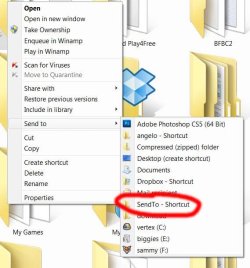
ever so slightly off topic, and a bit confusing to get your head around - but i've put a shortcut to the send-to folder in the send-to folder itself.

this way, i can 'send' any folder to the send-to folder, so that it appears in the send-to list.

to me, it's an easier way of adding a new send-to location, rather than trying to find the actual send-to folder and sticking a shortcut there.

hmm, maybe i could have worded that better as it is a bit confusing. :confused:

for example, if i make a new folder that i know i'm going to be wanting to send stuff to later, i make it, then right-click >> send to >> 'sendTo shortcut'. that new folder then appears in my send-to list as a new sendable location.
 

Attachments

  • send.jpg
    send.jpg
    45.6 KB · Views: 15

My Computer My Computer

Computer Manufacturer/Model Number
mickey megabyte 1234
OS
ultimate 64 sp1
CPU
i5 2500K [email protected]
Motherboard
MSI P67A-GD53
Memory
8 gigs GSkill Ripjaws 1600
Graphics Card(s)
amd hd6950
Sound Card
creative x-fi gamer
Monitor(s) Displays
samsung 24"
Screen Resolution
1920x1080
Hard Drives
ocz vertex 2e 60 gig, samsung f3 1tb, buffalo 2tb ext
PSU
antec 550
Case
antec three hundred
Cooling
i'm a cooling fan
Keyboard
saitek eclipse ii
Mouse
logitech g3
Internet Speed
about 4 Mbps
Other Info
i love win7
Thanks for all your comments ans suggestions guys.

Imperfect1: None of those were any help unfortunately - there is nothing specific to the extended SendTo menu. And yes, Documents and My Documents are the same folder - sending a file to both shows that.

mickey megabyte: Yeah me too - it's one of the first things I do on a new install. So handy
 

My Computer My Computer

Computer Manufacturer/Model Number
Acer Aspire 5741
OS
windows 7 Home Premium
CPU
Intel Core i5 @ 2.27GHz 32nm Technology
Motherboard
Acer Aspire 5741 (CPU)
Memory
DDR3 4.0GB
Graphics Card(s)
Intel(R) Graphics Media Accelerator HD
Sound Card
Realtek High Definition Audio Intel(R) Display Audio
Monitor(s) Displays
Generic PnP Monitor on Intel Graphics Media Accelerator HD
Screen Resolution
1366x768
Hard Drives
Seagate 2.5" SATA 500GB
Keyboard
Synaptics PS/2 Port TouchPad
Mouse
Microsoft Comfort Mouse 4500 (IntelliPoint)
ever so slightly off topic, and a bit confusing to get your head around - but i've put a shortcut to the send-to folder in the send-to folder itself.

this way, i can 'send' any folder to the send-to folder, so that it appears in the send-to list.

to me, it's an easier way of adding a new send-to location, rather than trying to find the actual send-to folder and sticking a shortcut there.

hmm, maybe i could have worded that better as it is a bit confusing. :confused:

for example, if i make a new folder that i know i'm going to be wanting to send stuff to later, i make it, then right-click >> send to >> 'sendTo shortcut'. that new folder then appears in my send-to list as a new sendable location.

I got the same tip from Leo Laporte years ago. 'cept he renamed the pasted Send To folder "Send To SendTo" so that's what showed in the menu.

Nice recursive solution. Way easier than drag & drop.

toctoc.gif
 

My Computer My Computer

Computer Manufacturer/Model Number
HP Media Center
OS
Windows 7 32 bit
CPU
AMD 5200+ dual core
Memory
2 GB
Graphics Card(s)
NVidia GeForce 6150SE 128 MB
Monitor(s) Displays
CRT
Screen Resolution
1280x1024
Hard Drives
500 GB Sata internal :

SIIG USB 3.0 docking stations w/WD Caviar Black 6 Gb/s drives
Keyboard
PS/2
Mouse
PS/2 Wheel Mouse
Other Info
SIIG USB 3.0 PCIexpress card.
Thanks OakenG, but I don't think you read my post completely. I am talking about the SendTo menu. These programs do not work for that.

One quick way to open the Send To folder that's in Roaming for the logged in user is type "shell:sendto" in the Run box (without the quotes.)

If you have Everything Search type in Send To and you'll see a bunch.

Also this utility: SpecialFoldersView - Special Folders Viewer

will show the SendTo for the logged in user same as typing shell:sendto in Run box.
 

My Computer My Computer

Computer Manufacturer/Model Number
HP Media Center
OS
Windows 7 32 bit
CPU
AMD 5200+ dual core
Memory
2 GB
Graphics Card(s)
NVidia GeForce 6150SE 128 MB
Monitor(s) Displays
CRT
Screen Resolution
1280x1024
Hard Drives
500 GB Sata internal :

SIIG USB 3.0 docking stations w/WD Caviar Black 6 Gb/s drives
Keyboard
PS/2
Mouse
PS/2 Wheel Mouse
Other Info
SIIG USB 3.0 PCIexpress card.
Ok, for those who seem to be a little confused about what I'm asking, I want to be able to add the Extended (Shift+Right-click) key to shortcuts in the SendTo menu. SendTo menu NOT context menu. Not that I don't appreciate everyone's input but all the suggestions so far are only applicable to the context menu. So:

1. When I create a shortcut in my SendTo folder is there an entry made in the registry? If so, where will I find it? And if not, can I create one in order to add the Extended key to the entry?

2. And for shortcuts that are in the SendTo menu by default, do they have entries in the registry? And if so, where will I find them?
 

My Computer My Computer

Computer Manufacturer/Model Number
Acer Aspire 5741
OS
windows 7 Home Premium
CPU
Intel Core i5 @ 2.27GHz 32nm Technology
Motherboard
Acer Aspire 5741 (CPU)
Memory
DDR3 4.0GB
Graphics Card(s)
Intel(R) Graphics Media Accelerator HD
Sound Card
Realtek High Definition Audio Intel(R) Display Audio
Monitor(s) Displays
Generic PnP Monitor on Intel Graphics Media Accelerator HD
Screen Resolution
1366x768
Hard Drives
Seagate 2.5" SATA 500GB
Keyboard
Synaptics PS/2 Port TouchPad
Mouse
Microsoft Comfort Mouse 4500 (IntelliPoint)
sorry, i'm not quite sure what you are asking. the send-to menu is part of the context (ie right-click) menu isn't it?

i don't think the entries are stored in the registry, they are stored in an actual folder on your drive.

type (or paste) shell:sendto into the searchbox on the bottom of your start-menu to open the actual folder in windows explorer.

again, apologies if i've misunderstood.
 

My Computer My Computer

Computer Manufacturer/Model Number
mickey megabyte 1234
OS
ultimate 64 sp1
CPU
i5 2500K [email protected]
Motherboard
MSI P67A-GD53
Memory
8 gigs GSkill Ripjaws 1600
Graphics Card(s)
amd hd6950
Sound Card
creative x-fi gamer
Monitor(s) Displays
samsung 24"
Screen Resolution
1920x1080
Hard Drives
ocz vertex 2e 60 gig, samsung f3 1tb, buffalo 2tb ext
PSU
antec 550
Case
antec three hundred
Cooling
i'm a cooling fan
Keyboard
saitek eclipse ii
Mouse
logitech g3
Internet Speed
about 4 Mbps
Other Info
i love win7
Take a look at this article (Access and Customize Windows 7's Extended Context Menu - ) relating to 3rd party software: ShellMenuView. The article describes in detail how best to utilize this software which allows you to customize the EXTENDED Send To menu:ShellMenuView (http://www.nirsoft.net) is a very lightweight utility (~80KB and doesn't require installation) that is compatible with everything from Windows 98 to Windows 7 x64.
 

My Computer My Computer

Computer Manufacturer/Model Number
HP Pavillion dv5t (generation 1)
OS
Vista 64 bit and 32 bit (SP2)
CPU
Intel(R) Core(TM)2 Duo Processor T9400 (2.53 GHz
Memory
4GB DDR2 System Memory (2 Dimm)
Graphics Card(s)
512 MB NVIDIA GeForce 9600M GT
Monitor(s) Displays
15.4" diagonal WSXGA+ High-Definition HP BrightView Widescre
Screen Resolution
1680 x 1050
Hard Drives
320GB 5400RPM SATA Hard Drive with HP ProtectSmart Hard Drive Protection
Keyboard
Built-in HP
Mouse
Built in - Synaptics TouchPad V6.5 on PS/2 Port
Internet Speed
Max
Other Info
~ Intel Next-Gen Wireless-N Mini-card w/Bluetooth ~ Blu-Ray ROM DVD+/-R/RW ~ Integ. HDTV Hybrid Tuner ~ 12 Cell Battery ~ MS Office (Home Premium) 2007 ~
This is the "standard" right-click menu on a file when Send to" is selected;


This is the <Shift> + Right-click menu on the same file when "Send to" is selected;


I understand you want to add a shortcut to the second menu. Meaning of course that it will not appear in the standard menu.

Is this correct?

Regards....Mike Connor
 
Last edited:

My Computer My Computer

OS
Several, including Windows 7 x64 Ultimate
Anyway, to add a shortcut to that menu, here I have added the shortcut

TESTFOLDER


You just need to copy the shortcut into your user folder, or make a new folder;


Regards....Mike Connor
 

My Computer My Computer

OS
Several, including Windows 7 x64 Ultimate
Ok, for those who seem to be a little confused about what I'm asking, I want to be able to add the Extended (Shift+Right-click) key to shortcuts in the SendTo menu. SendTo menu NOT context menu. Not that I don't appreciate everyone's input but all the suggestions so far are only applicable to the context menu. So:

1. When I create a shortcut in my SendTo folder is there an entry made in the registry? If so, where will I find it? And if not, can I create one in order to add the Extended key to the entry?

2. And for shortcuts that are in the SendTo menu by default, do they have entries in the registry? And if so, where will I find them?

Much about Windows Registry is not documented. You can investigate it yourself either by using a Registry monitor and adding a shortcut with a unique name, or add the shortcut with the unique name first then use a non-destructive Registry search tool.
The one I use is:

RegScanner: Alternative to RegEdit find/search/scan of Windows
 

My Computer My Computer

Computer Manufacturer/Model Number
HP Media Center
OS
Windows 7 32 bit
CPU
AMD 5200+ dual core
Memory
2 GB
Graphics Card(s)
NVidia GeForce 6150SE 128 MB
Monitor(s) Displays
CRT
Screen Resolution
1280x1024
Hard Drives
500 GB Sata internal :

SIIG USB 3.0 docking stations w/WD Caviar Black 6 Gb/s drives
Keyboard
PS/2
Mouse
PS/2 Wheel Mouse
Other Info
SIIG USB 3.0 PCIexpress card.
Imperfect1: Sorry but ShellMenuView does not customize the extended Send To menu. It customizes only the Context menu NOT the Context / SendTo menu. In fact there are no SendTo menu entries, extended or otherwise, listed in ShellMenuView.

Mike Connor: "You just need to copy the shortcut into your user folder, or make a new folder" OMG!! I can't believe it was that easy. How on earth is it that no-one else seems to know this??? Thank you, thank you, thank you, you legend!!
 

My Computer My Computer

Computer Manufacturer/Model Number
Acer Aspire 5741
OS
windows 7 Home Premium
CPU
Intel Core i5 @ 2.27GHz 32nm Technology
Motherboard
Acer Aspire 5741 (CPU)
Memory
DDR3 4.0GB
Graphics Card(s)
Intel(R) Graphics Media Accelerator HD
Sound Card
Realtek High Definition Audio Intel(R) Display Audio
Monitor(s) Displays
Generic PnP Monitor on Intel Graphics Media Accelerator HD
Screen Resolution
1366x768
Hard Drives
Seagate 2.5" SATA 500GB
Keyboard
Synaptics PS/2 Port TouchPad
Mouse
Microsoft Comfort Mouse 4500 (IntelliPoint)
Imperfect1: Sorry but ShellMenuView does not customize the extended Send To menu. It customizes only the Context menu NOT the Context / SendTo menu. In fact there are no SendTo menu entries, extended or otherwise, listed in ShellMenuView.

Mike Connor: "You just need to copy the shortcut into your user folder, or make a new folder" OMG!! I can't believe it was that easy. How on earth is it that no-one else seems to know this??? Thank you, thank you, thank you, you legend!!

My pleasure.

I think not many people know about it because hardly anybody uses the extended menu. A lot probably don't know what it is.

Regards....Mike Connor
 

My Computer My Computer

OS
Several, including Windows 7 x64 Ultimate
Back
Top