SendTo Help

Morrac32

New member
Local time
5:19 PM
Messages
10
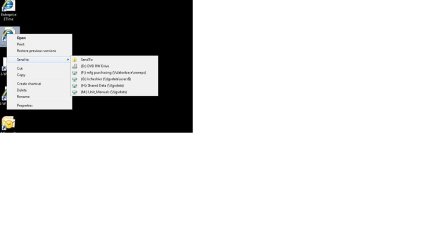
I am working on my computer and somehow the Send To menu only shows the SendTo folder as a choice instead of Compressed Folder, Send to Desktop, etc. The SendTo folder has all the right links in it but the menu only shows the folder. How do I get this back to the way it is supposed to be?
 

My Computer

OS
Windows 7 Pro 32-bit
I don't quite understand, can you post a screenshot?

You might like to try this;
:: gabrieleponti.com ::

Regards....Mike Connor
 

My Computer

OS
Several, including Windows 7 x64 Ultimate
Sorry don't understand what you are trying to say.

Please post a screen shot of the send to menu.

Also Send To is in User\Username\AppData\Roaming\Send to (I think that is the correct path. I'm on XP PC right now and can't check it)
 

My Computer

Computer Manufacturer/Model Number
Built be Me
OS
Windows 7 Pro x64
CPU
i5 760
Motherboard
Asus P7P55D-E Pro
Memory
16GB
Graphics Card(s)
Nvidia GTS450
Sound Card
On board
Monitor(s) Displays
Dell 2007WFP Dell 1800FP
Screen Resolution
1680x1050 1280x1024
Hard Drives
Seagate 250GB & 750GB
WD 1TB
PSU
Antec 750
Case
In Win
Cooling
Cooler Master Hyper 212+
Keyboard
IBM
Mouse
MS
Here is the screenshot
 

Attachments

  • screenshot.jpg
    screenshot.jpg
    15.7 KB · Views: 39

My Computer

OS
Windows 7 Pro 32-bit
The path to the folder containing the send to items is;

C:\Users\yourname\AppData\Roaming\Microsoft\Windows\SendTo

This is mine, but I use the "Send To Toys" which I mentioned above, and these give more functionality;


Regards....Mike Connor
 

My Computer

OS
Several, including Windows 7 x64 Ultimate
Here is the screenshot

The shortcuts you want to use are not in that folder. All you have there is a link to the SendTo folder itself, ( useful for some special tasks), and a list of drives you can send stuff to.

Navigate to the folder using the path I gave you and see what shortcuts are in it. If the ones you want are missing, you can simply add them.

Regards....Mike Connor
 

My Computer

OS
Several, including Windows 7 x64 Ultimate
Here is the screenshot


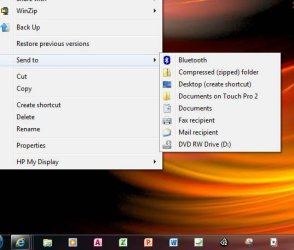
I think I see what you mean?....

send to.jpg

The send to "Compressed (zipped) folder" option is missing. Do you have a zip program installed? Perhaps that's the issue?
 

My Computer

Computer type
PC/Desktop
Computer Manufacturer/Model Number
Custom built by me.
OS
Windows 10 Pro
CPU
Intel Core i7-4770K (3.5Ghz)
Motherboard
Gigabyte G1 Sniper 5 (F10 Bios)
Memory
32 gig Corsair Dominator Platinum (4x8Gig)
Graphics Card(s)
Sapphire Tri-X R9 Fury
Sound Card
Soundblaster ZXR
Monitor(s) Displays
NEC PA242W 24" LCD Monitor
Screen Resolution
1920 x 1200
Hard Drives
Primary - Samsung 850 Pro (512gig), Samsung 840 Pro (256gig), 2TB WD Caviar Black.
PSU
EVGA Supernova 1000 G2
Case
Cooler Master HAF X
Cooling
Corsair H100i with Corsair Air Series SP120 Quiet Fans
Keyboard
Logitech Wireless Wave
Mouse
Logitech Performance MX
Internet Speed
High Speed Cable
Antivirus
Norton Security
Browser
IE11
Other Info
Memory Timings - 1866MHz @ 9-9-9-27-1T @ 1.5 volts
I have everything in the SendTo folder that I am supposed to have but instead of that showing up on the SendTo menu I just get the what I have in the screenshot. I can log in as another user and everything in the SendTo menu is there like it should be.
 

My Computer

OS
Windows 7 Pro 32-bit
I have everything in the SendTo folder that I am supposed to have but instead of that showing up on the SendTo menu I just get the what I have in the screenshot. I can log in as another user and everything in the SendTo menu is there like it should be.

OK. Download the free version of this;

Malwarebytes

and run a FULL scan after updating the database. If it finds anything post the log here.

If that turns up clean, then we can move on.

Regards....Mike Connor
 

My Computer

OS
Several, including Windows 7 x64 Ultimate
Hmmmm..... I don't think Malwarebytes needs to be ran here but.....

At any rate back to the OP..... You say.....

I have everything in the SendTo folder that I am supposed to have but instead of that showing up on the SendTo menu I just get the what I have in the screenshot. I can log in as another user and everything in the SendTo menu is there like it should be.

Do you have full admin rights?

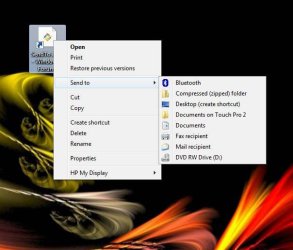
BTW Here's mine using the samething you're using - an IE shortcut.....

send to2.jpg

Also what happens if you click the "Send To" link in on the right?

Thanks.
 

My Computer

Computer type
PC/Desktop
Computer Manufacturer/Model Number
Custom built by me.
OS
Windows 10 Pro
CPU
Intel Core i7-4770K (3.5Ghz)
Motherboard
Gigabyte G1 Sniper 5 (F10 Bios)
Memory
32 gig Corsair Dominator Platinum (4x8Gig)
Graphics Card(s)
Sapphire Tri-X R9 Fury
Sound Card
Soundblaster ZXR
Monitor(s) Displays
NEC PA242W 24" LCD Monitor
Screen Resolution
1920 x 1200
Hard Drives
Primary - Samsung 850 Pro (512gig), Samsung 840 Pro (256gig), 2TB WD Caviar Black.
PSU
EVGA Supernova 1000 G2
Case
Cooler Master HAF X
Cooling
Corsair H100i with Corsair Air Series SP120 Quiet Fans
Keyboard
Logitech Wireless Wave
Mouse
Logitech Performance MX
Internet Speed
High Speed Cable
Antivirus
Norton Security
Browser
IE11
Other Info
Memory Timings - 1866MHz @ 9-9-9-27-1T @ 1.5 volts

My Computer

Computer type
PC/Desktop
Computer Manufacturer/Model Number
Self built custom
OS
64-bit Windows 11 Pro for Workstations
CPU
Intel i7-8700K OC'd to 5 GHz
Motherboard
ASUS ROG Maximus XI Formula Z390
Memory
64 GB (4x16GB) G.SKILL TridentZ RGB DDR4 3600 MHz
Graphics Card(s)
ASUS ROG-STRIX-GTX1080TI-O11G-GAMING
Sound Card
Integrated
Monitor(s) Displays
2 x Samsung Odyssey G7 27"
Screen Resolution
2560x1440
Hard Drives
1TB Samsung 990 PRO M.2,
4TB Samsung 990 PRO PRO M.2,
TerraMaster F8 SSD Plus NAS
PSU
Seasonic Prime Titanium 850W
Case
Thermaltake Core P3
Cooling
Corsair Hydro H115i
Keyboard
Logitech wireless K800
Mouse
Logitech MX Master 4
Internet Speed
2 Gb/s Download and 100 Mb/s Upload
Antivirus
Malwarebyte Anti-Malware Premium
Browser
Google Chrome
Other Info
Logitech Z625 speaker system,
Logitech BRIO 4K Pro webcam,
HP Color LaserJet Pro MFP M477fdn,
APC SMART-UPS RT 1000 XL - SURT1000XLI,
Galaxy S23 Plus phone
Do you have full admin rights?

Also what happens if you click the "Send To" link in on the right?

Thanks.

Yes, I have full admin rights.

If I click on "SendTo" on the right whatever I right-clicked on gets sent to the SentTo folder.
 

My Computer

OS
Windows 7 Pro 32-bit

My Computer

Computer type
PC/Desktop
Computer Manufacturer/Model Number
Custom built by me.
OS
Windows 10 Pro
CPU
Intel Core i7-4770K (3.5Ghz)
Motherboard
Gigabyte G1 Sniper 5 (F10 Bios)
Memory
32 gig Corsair Dominator Platinum (4x8Gig)
Graphics Card(s)
Sapphire Tri-X R9 Fury
Sound Card
Soundblaster ZXR
Monitor(s) Displays
NEC PA242W 24" LCD Monitor
Screen Resolution
1920 x 1200
Hard Drives
Primary - Samsung 850 Pro (512gig), Samsung 840 Pro (256gig), 2TB WD Caviar Black.
PSU
EVGA Supernova 1000 G2
Case
Cooler Master HAF X
Cooling
Corsair H100i with Corsair Air Series SP120 Quiet Fans
Keyboard
Logitech Wireless Wave
Mouse
Logitech Performance MX
Internet Speed
High Speed Cable
Antivirus
Norton Security
Browser
IE11
Other Info
Memory Timings - 1866MHz @ 9-9-9-27-1T @ 1.5 volts
Hello Morrac, and welcome to Seven Forums.

See if this may be able to help add it back to the Send To context menu.

http://www.sevenforums.com/tutorials/45421-send-context-menu-remove-restore-default-items.html

Hope this helps,
Shawn

Tried that already. Didn't work.

Thanks though.

That would normally work, but there is a spate of malware at the moment which is affecting some menus.

Run the malware scan, and see what it tells you.

Regards....Mike Connor
 

My Computer

OS
Several, including Windows 7 x64 Ultimate
Hello Morrac, and welcome to Seven Forums.

See if this may be able to help add it back to the Send To context menu.

http://www.sevenforums.com/tutorials/45421-send-context-menu-remove-restore-default-items.html

Hope this helps,
Shawn

Tried that already. Didn't work.

Thanks though.


After making sure that you are malware free, see if downloading and merging the ZIP option in the tutorial below may be able to help. It will restore the default associations for it.

http://www.sevenforums.com/tutorials/19449-default-file-type-associations-restore.html
 

My Computer

Computer type
PC/Desktop
Computer Manufacturer/Model Number
Self built custom
OS
64-bit Windows 11 Pro for Workstations
CPU
Intel i7-8700K OC'd to 5 GHz
Motherboard
ASUS ROG Maximus XI Formula Z390
Memory
64 GB (4x16GB) G.SKILL TridentZ RGB DDR4 3600 MHz
Graphics Card(s)
ASUS ROG-STRIX-GTX1080TI-O11G-GAMING
Sound Card
Integrated
Monitor(s) Displays
2 x Samsung Odyssey G7 27"
Screen Resolution
2560x1440
Hard Drives
1TB Samsung 990 PRO M.2,
4TB Samsung 990 PRO PRO M.2,
TerraMaster F8 SSD Plus NAS
PSU
Seasonic Prime Titanium 850W
Case
Thermaltake Core P3
Cooling
Corsair Hydro H115i
Keyboard
Logitech wireless K800
Mouse
Logitech MX Master 4
Internet Speed
2 Gb/s Download and 100 Mb/s Upload
Antivirus
Malwarebyte Anti-Malware Premium
Browser
Google Chrome
Other Info
Logitech Z625 speaker system,
Logitech BRIO 4K Pro webcam,
HP Color LaserJet Pro MFP M477fdn,
APC SMART-UPS RT 1000 XL - SURT1000XLI,
Galaxy S23 Plus phone
Hello Morrac, and welcome to Seven Forums.

See if this may be able to help add it back to the Send To context menu.

http://www.sevenforums.com/tutorials/45421-send-context-menu-remove-restore-default-items.html

Hope this helps,
Shawn

Tried that already. Didn't work.

Thanks though.


After making sure that you are malware free, see if downloading and merging the ZIP option in the tutorial below may be able to help. It will restore the default associations for it.

http://www.sevenforums.com/tutorials/19449-default-file-type-associations-restore.html

This also did not work.
 

My Computer

OS
Windows 7 Pro 32-bit
This also did not work.

Ok, did you try what was suggested here......

I have everything in the SendTo folder that I am supposed to have but instead of that showing up on the SendTo menu I just get the what I have in the screenshot. I can log in as another user and everything in the SendTo menu is there like it should be.

OK. Download the free version of this;

Malwarebytes

and run a FULL scan after updating the database. If it finds anything post the log here.

If that turns up clean, then we can move on.

Regards....Mike Connor

Need to let us know.

Thanks.
 

My Computer

Computer type
PC/Desktop
Computer Manufacturer/Model Number
Custom built by me.
OS
Windows 10 Pro
CPU
Intel Core i7-4770K (3.5Ghz)
Motherboard
Gigabyte G1 Sniper 5 (F10 Bios)
Memory
32 gig Corsair Dominator Platinum (4x8Gig)
Graphics Card(s)
Sapphire Tri-X R9 Fury
Sound Card
Soundblaster ZXR
Monitor(s) Displays
NEC PA242W 24" LCD Monitor
Screen Resolution
1920 x 1200
Hard Drives
Primary - Samsung 850 Pro (512gig), Samsung 840 Pro (256gig), 2TB WD Caviar Black.
PSU
EVGA Supernova 1000 G2
Case
Cooler Master HAF X
Cooling
Corsair H100i with Corsair Air Series SP120 Quiet Fans
Keyboard
Logitech Wireless Wave
Mouse
Logitech Performance MX
Internet Speed
High Speed Cable
Antivirus
Norton Security
Browser
IE11
Other Info
Memory Timings - 1866MHz @ 9-9-9-27-1T @ 1.5 volts
Yes, Malwarebytes ran with nothing found.
 

My Computer

OS
Windows 7 Pro 32-bit
Back
Top