server 2008 with mulitple IP addresses

amartin99

New member
Member
Local time
8:58 AM
Messages
35
hello
I have a windows server 2008 from OVH
and I just ordered an IP block of 4

but I haven't a clue how to use the new IP's hehehe

I want to assign IP addresses to dif windows user accounts
 

My Computer My Computer

Computer Manufacturer/Model Number
Dell STUDIO XPS 435T/9000
OS
Windows 7 Home Premium 64bit
CPU
i7 960@3200
Motherboard
Dell 0X501H
Memory
DDR3 3 1GB chips
Graphics Card(s)
NVIDIA GeForce 310
Sound Card
Dell INTEGRATED 7.1
Monitor(s) Displays
dell 20inch
You can't assign IP addresses to user accounts. Only machines. Also what is the make/model of the router? NAT will need to be adjusted for this to work.

Josh
 

My Computer My Computer

Computer type
PC/Desktop
Computer Manufacturer/Model Number
Custom Built
OS
Windows 7 Professional x64 SP1 ; Windows Server 2012 R2 Standard
CPU
Intel Core i5 2400 @ 3.10GHz
Motherboard
Foxconn H67MP-S/-V/H67MP
Memory
8.0GB DDR3 @ 665MHz (2GBx4)
Graphics Card(s)
AMD Radeon HD 6870
Sound Card
Realtek High Definition Audio
Monitor(s) Displays
AOC 2243W & SMB1930NW
Screen Resolution
1440x900 & 1920x1080
Hard Drives
977GB Seagate ST31000524AS ATA Drive (SATA)
250GB WD iSCSI attached Drive
PSU
750W Gaming PSU
Case
Novatech Night
Cooling
Fan
Keyboard
Dell Standard PS/2 Keyboard
Mouse
R.A.T 07 Gaming Mouse
Internet Speed
Download: 10 Mbps Ping: 30ms Upload: 0.81 Mbps
Browser
Google Chrome
Other Info
Optiarc DVD RW AD-5260S ATA Device
I have no idea about the router

I just clicked to order an IP block of 4 at OVH
and this is the email they sent me

---------------------------------
178.32.253.8/30 Network IP : 178.32.253.8 Broadcast IP : 178.32.253.11 Gateway IP : 178.32.253.10 (not usable) Netmask : 255.255.255.252 If you want to use this block on a server, all the IPs are usable. The IP network (178.32.253.8) and also the broadcast IP (178.32.253.11). In this case OVH recommends using the netmask '255.255.255.255' so that the configuration remains valid in case of block division. -- Comment: If however this block should be switched to a virtual rack or a Dedicated Cloud offer, it would release the addresses following: Network IP : 178.32.253.8 IP gateway : 178.32.253.10 Broadcast IP : 178.32.253.11 Then use the subnet mask 255.255.255.252.
-----------------------------------------------

I tried connecting to them all threw RDP but no response
I have no idea what im doing hehehe
 

My Computer My Computer

Computer Manufacturer/Model Number
Dell STUDIO XPS 435T/9000
OS
Windows 7 Home Premium 64bit
CPU
i7 960@3200
Motherboard
Dell 0X501H
Memory
DDR3 3 1GB chips
Graphics Card(s)
NVIDIA GeForce 310
Sound Card
Dell INTEGRATED 7.1
Monitor(s) Displays
dell 20inch
Essentially you have a /30 network with two usable IP addresses with one being the network identifier used for routing and the other being the broadcast address used for broadcasts on multi-access environments (Ethernet, token ring, fiddi... etc).

Or you can use a /32 subnet mask for each IP address and have them connected directly to the internet.

If you use the /32 subnet mask then you may run into issues with the router side since your IP address block will not be advertised via BGP to the internet routing table. Unless you can give me a make/model of the router I cannot help you with this. :(

Josh
 

My Computer My Computer

Computer type
PC/Desktop
Computer Manufacturer/Model Number
Custom Built
OS
Windows 7 Professional x64 SP1 ; Windows Server 2012 R2 Standard
CPU
Intel Core i5 2400 @ 3.10GHz
Motherboard
Foxconn H67MP-S/-V/H67MP
Memory
8.0GB DDR3 @ 665MHz (2GBx4)
Graphics Card(s)
AMD Radeon HD 6870
Sound Card
Realtek High Definition Audio
Monitor(s) Displays
AOC 2243W & SMB1930NW
Screen Resolution
1440x900 & 1920x1080
Hard Drives
977GB Seagate ST31000524AS ATA Drive (SATA)
250GB WD iSCSI attached Drive
PSU
750W Gaming PSU
Case
Novatech Night
Cooling
Fan
Keyboard
Dell Standard PS/2 Keyboard
Mouse
R.A.T 07 Gaming Mouse
Internet Speed
Download: 10 Mbps Ping: 30ms Upload: 0.81 Mbps
Browser
Google Chrome
Other Info
Optiarc DVD RW AD-5260S ATA Device
your way over my head hehehe

I have clients that conect to my servers vea RDP
I want to offer them more then one IP address from this one server
like when they connect from the server out to another server I want the other server to see them as dif IP addresses

im explaining this poorly
lets put it in a forum context of sorts
I want t have 4 people connect to my server vea RDP
then open a browser and use it to visit a forum
and have that forum see them each as having a dif IP address
 

My Computer My Computer

Computer Manufacturer/Model Number
Dell STUDIO XPS 435T/9000
OS
Windows 7 Home Premium 64bit
CPU
i7 960@3200
Motherboard
Dell 0X501H
Memory
DDR3 3 1GB chips
Graphics Card(s)
NVIDIA GeForce 310
Sound Card
Dell INTEGRATED 7.1
Monitor(s) Displays
dell 20inch
Where are your clients connecting from?

Josh
 

My Computer My Computer

Computer type
PC/Desktop
Computer Manufacturer/Model Number
Custom Built
OS
Windows 7 Professional x64 SP1 ; Windows Server 2012 R2 Standard
CPU
Intel Core i5 2400 @ 3.10GHz
Motherboard
Foxconn H67MP-S/-V/H67MP
Memory
8.0GB DDR3 @ 665MHz (2GBx4)
Graphics Card(s)
AMD Radeon HD 6870
Sound Card
Realtek High Definition Audio
Monitor(s) Displays
AOC 2243W & SMB1930NW
Screen Resolution
1440x900 & 1920x1080
Hard Drives
977GB Seagate ST31000524AS ATA Drive (SATA)
250GB WD iSCSI attached Drive
PSU
750W Gaming PSU
Case
Novatech Night
Cooling
Fan
Keyboard
Dell Standard PS/2 Keyboard
Mouse
R.A.T 07 Gaming Mouse
Internet Speed
Download: 10 Mbps Ping: 30ms Upload: 0.81 Mbps
Browser
Google Chrome
Other Info
Optiarc DVD RW AD-5260S ATA Device
all over the world
has to be threw RDP
 

My Computer My Computer

Computer Manufacturer/Model Number
Dell STUDIO XPS 435T/9000
OS
Windows 7 Home Premium 64bit
CPU
i7 960@3200
Motherboard
Dell 0X501H
Memory
DDR3 3 1GB chips
Graphics Card(s)
NVIDIA GeForce 310
Sound Card
Dell INTEGRATED 7.1
Monitor(s) Displays
dell 20inch
Are the RDP connections coming through the internet or not?

Josh
 

My Computer My Computer

Computer type
PC/Desktop
Computer Manufacturer/Model Number
Custom Built
OS
Windows 7 Professional x64 SP1 ; Windows Server 2012 R2 Standard
CPU
Intel Core i5 2400 @ 3.10GHz
Motherboard
Foxconn H67MP-S/-V/H67MP
Memory
8.0GB DDR3 @ 665MHz (2GBx4)
Graphics Card(s)
AMD Radeon HD 6870
Sound Card
Realtek High Definition Audio
Monitor(s) Displays
AOC 2243W & SMB1930NW
Screen Resolution
1440x900 & 1920x1080
Hard Drives
977GB Seagate ST31000524AS ATA Drive (SATA)
250GB WD iSCSI attached Drive
PSU
750W Gaming PSU
Case
Novatech Night
Cooling
Fan
Keyboard
Dell Standard PS/2 Keyboard
Mouse
R.A.T 07 Gaming Mouse
Internet Speed
Download: 10 Mbps Ping: 30ms Upload: 0.81 Mbps
Browser
Google Chrome
Other Info
Optiarc DVD RW AD-5260S ATA Device
yes threw the internet
 

My Computer My Computer

Computer Manufacturer/Model Number
Dell STUDIO XPS 435T/9000
OS
Windows 7 Home Premium 64bit
CPU
i7 960@3200
Motherboard
Dell 0X501H
Memory
DDR3 3 1GB chips
Graphics Card(s)
NVIDIA GeForce 310
Sound Card
Dell INTEGRATED 7.1
Monitor(s) Displays
dell 20inch
You will need to change some settings on your router in order to apply the appropriate address scheme. How many servers are there? If only one, how many interfaces are there? You can only assign one IP address per interface on a server.

Josh
 

My Computer My Computer

Computer type
PC/Desktop
Computer Manufacturer/Model Number
Custom Built
OS
Windows 7 Professional x64 SP1 ; Windows Server 2012 R2 Standard
CPU
Intel Core i5 2400 @ 3.10GHz
Motherboard
Foxconn H67MP-S/-V/H67MP
Memory
8.0GB DDR3 @ 665MHz (2GBx4)
Graphics Card(s)
AMD Radeon HD 6870
Sound Card
Realtek High Definition Audio
Monitor(s) Displays
AOC 2243W & SMB1930NW
Screen Resolution
1440x900 & 1920x1080
Hard Drives
977GB Seagate ST31000524AS ATA Drive (SATA)
250GB WD iSCSI attached Drive
PSU
750W Gaming PSU
Case
Novatech Night
Cooling
Fan
Keyboard
Dell Standard PS/2 Keyboard
Mouse
R.A.T 07 Gaming Mouse
Internet Speed
Download: 10 Mbps Ping: 30ms Upload: 0.81 Mbps
Browser
Google Chrome
Other Info
Optiarc DVD RW AD-5260S ATA Device
hmmmm I have about 15 servers but I suspect OVH uses a sepret router for each

here is what I have
Mini SP - OVH
 

My Computer My Computer

Computer Manufacturer/Model Number
Dell STUDIO XPS 435T/9000
OS
Windows 7 Home Premium 64bit
CPU
i7 960@3200
Motherboard
Dell 0X501H
Memory
DDR3 3 1GB chips
Graphics Card(s)
NVIDIA GeForce 310
Sound Card
Dell INTEGRATED 7.1
Monitor(s) Displays
dell 20inch
Ohh... I thought the servers were from within your network.

Unless the server has multiple interfaces you won't be able to assign multiple IP addresses. When making RDP sessions from within an RDP connection the server will use the interface within the same subnet otherwise it will use a source IP address of the one with the default gateway.

You cannot assign an IP address to a particular user. A single user could connect via RDP to any of the assigned IP addresses. You could set an access control list which will deny a particular IP address based on a source machine (IP address) however if that user logs on to any other machine that will bypass this. :( I'm not sure how you would circumvent this other than setting up user accounts on the server side and doing logging to see who logs on.

Josh
 

My Computer My Computer

Computer type
PC/Desktop
Computer Manufacturer/Model Number
Custom Built
OS
Windows 7 Professional x64 SP1 ; Windows Server 2012 R2 Standard
CPU
Intel Core i5 2400 @ 3.10GHz
Motherboard
Foxconn H67MP-S/-V/H67MP
Memory
8.0GB DDR3 @ 665MHz (2GBx4)
Graphics Card(s)
AMD Radeon HD 6870
Sound Card
Realtek High Definition Audio
Monitor(s) Displays
AOC 2243W & SMB1930NW
Screen Resolution
1440x900 & 1920x1080
Hard Drives
977GB Seagate ST31000524AS ATA Drive (SATA)
250GB WD iSCSI attached Drive
PSU
750W Gaming PSU
Case
Novatech Night
Cooling
Fan
Keyboard
Dell Standard PS/2 Keyboard
Mouse
R.A.T 07 Gaming Mouse
Internet Speed
Download: 10 Mbps Ping: 30ms Upload: 0.81 Mbps
Browser
Google Chrome
Other Info
Optiarc DVD RW AD-5260S ATA Device
hmmm
could it be setup as you say so a user could connect to any of the assigned IP addresses
and then that user would be working from that address
so I just share the IP with him that I want him to use
 

My Computer My Computer

Computer Manufacturer/Model Number
Dell STUDIO XPS 435T/9000
OS
Windows 7 Home Premium 64bit
CPU
i7 960@3200
Motherboard
Dell 0X501H
Memory
DDR3 3 1GB chips
Graphics Card(s)
NVIDIA GeForce 310
Sound Card
Dell INTEGRATED 7.1
Monitor(s) Displays
dell 20inch
If you wish yes, that being said it may be possible for him to find out about the other IP addresses depending on the permissions he has on that server.

Josh
 

My Computer My Computer

Computer type
PC/Desktop
Computer Manufacturer/Model Number
Custom Built
OS
Windows 7 Professional x64 SP1 ; Windows Server 2012 R2 Standard
CPU
Intel Core i5 2400 @ 3.10GHz
Motherboard
Foxconn H67MP-S/-V/H67MP
Memory
8.0GB DDR3 @ 665MHz (2GBx4)
Graphics Card(s)
AMD Radeon HD 6870
Sound Card
Realtek High Definition Audio
Monitor(s) Displays
AOC 2243W & SMB1930NW
Screen Resolution
1440x900 & 1920x1080
Hard Drives
977GB Seagate ST31000524AS ATA Drive (SATA)
250GB WD iSCSI attached Drive
PSU
750W Gaming PSU
Case
Novatech Night
Cooling
Fan
Keyboard
Dell Standard PS/2 Keyboard
Mouse
R.A.T 07 Gaming Mouse
Internet Speed
Download: 10 Mbps Ping: 30ms Upload: 0.81 Mbps
Browser
Google Chrome
Other Info
Optiarc DVD RW AD-5260S ATA Device
nice so how do I do that ?
 

My Computer My Computer

Computer Manufacturer/Model Number
Dell STUDIO XPS 435T/9000
OS
Windows 7 Home Premium 64bit
CPU
i7 960@3200
Motherboard
Dell 0X501H
Memory
DDR3 3 1GB chips
Graphics Card(s)
NVIDIA GeForce 310
Sound Card
Dell INTEGRATED 7.1
Monitor(s) Displays
dell 20inch
Do you have separate user accounts for each person?

Josh
 

My Computer My Computer

Computer type
PC/Desktop
Computer Manufacturer/Model Number
Custom Built
OS
Windows 7 Professional x64 SP1 ; Windows Server 2012 R2 Standard
CPU
Intel Core i5 2400 @ 3.10GHz
Motherboard
Foxconn H67MP-S/-V/H67MP
Memory
8.0GB DDR3 @ 665MHz (2GBx4)
Graphics Card(s)
AMD Radeon HD 6870
Sound Card
Realtek High Definition Audio
Monitor(s) Displays
AOC 2243W & SMB1930NW
Screen Resolution
1440x900 & 1920x1080
Hard Drives
977GB Seagate ST31000524AS ATA Drive (SATA)
250GB WD iSCSI attached Drive
PSU
750W Gaming PSU
Case
Novatech Night
Cooling
Fan
Keyboard
Dell Standard PS/2 Keyboard
Mouse
R.A.T 07 Gaming Mouse
Internet Speed
Download: 10 Mbps Ping: 30ms Upload: 0.81 Mbps
Browser
Google Chrome
Other Info
Optiarc DVD RW AD-5260S ATA Device
yes every user has there own account
 

My Computer My Computer

Computer Manufacturer/Model Number
Dell STUDIO XPS 435T/9000
OS
Windows 7 Home Premium 64bit
CPU
i7 960@3200
Motherboard
Dell 0X501H
Memory
DDR3 3 1GB chips
Graphics Card(s)
NVIDIA GeForce 310
Sound Card
Dell INTEGRATED 7.1
Monitor(s) Displays
dell 20inch
If everyone has their own user accounts then it would be easier to audit (log) when they log on to a particular server. These links may be of use in order to setup Security Auditing.

Audit logon events: Security Configuration Editor; Security Services

Define or modify auditing policy settings for an event category: Auditing

Since you are not set up as a domain you will have to follow the local computer steps and the policy is defined in the Local Security Policy.

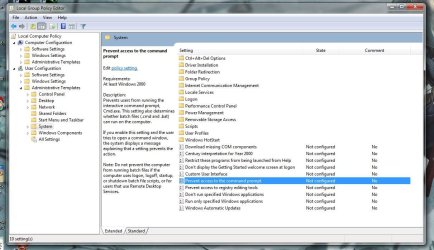
An easy way of finding out the other IP addresses in use that I can think of is via Command Prompt. You can disable this for a particular use by defining the local group policy on each server.

Follow this tutorial to apply to users that you wish to restrict access and then modify the setting listed below for 'User Configuration' - http://www.sevenforums.com/tutorials/151415-group-policy-apply-specific-user-group.html

group_policy.JPG

Hope This Helps,
Josh
 

My Computer My Computer

Computer type
PC/Desktop
Computer Manufacturer/Model Number
Custom Built
OS
Windows 7 Professional x64 SP1 ; Windows Server 2012 R2 Standard
CPU
Intel Core i5 2400 @ 3.10GHz
Motherboard
Foxconn H67MP-S/-V/H67MP
Memory
8.0GB DDR3 @ 665MHz (2GBx4)
Graphics Card(s)
AMD Radeon HD 6870
Sound Card
Realtek High Definition Audio
Monitor(s) Displays
AOC 2243W & SMB1930NW
Screen Resolution
1440x900 & 1920x1080
Hard Drives
977GB Seagate ST31000524AS ATA Drive (SATA)
250GB WD iSCSI attached Drive
PSU
750W Gaming PSU
Case
Novatech Night
Cooling
Fan
Keyboard
Dell Standard PS/2 Keyboard
Mouse
R.A.T 07 Gaming Mouse
Internet Speed
Download: 10 Mbps Ping: 30ms Upload: 0.81 Mbps
Browser
Google Chrome
Other Info
Optiarc DVD RW AD-5260S ATA Device
O I think you misunderstood me
rate now im still just trying to figure out how to use the IP's
 

My Computer My Computer

Computer Manufacturer/Model Number
Dell STUDIO XPS 435T/9000
OS
Windows 7 Home Premium 64bit
CPU
i7 960@3200
Motherboard
Dell 0X501H
Memory
DDR3 3 1GB chips
Graphics Card(s)
NVIDIA GeForce 310
Sound Card
Dell INTEGRATED 7.1
Monitor(s) Displays
dell 20inch
your way over my head hehehe

I have clients that conect to my servers vea RDP
I want to offer them more then one IP address from this one server
like when they connect from the server out to another server I want the other server to see them as dif IP addresses

im explaining this poorly
lets put it in a forum context of sorts
I want t have 4 people connect to my server vea RDP
then open a browser and use it to visit a forum
and have that forum see them each as having a dif IP address

O I think you misunderstood me
rate now im still just trying to figure out how to use the IP's

My apologies, based on your previous post I thought you wished to only allow them to RDP to a particular IP address.

After re-reading your post I believe what you want is not possible :( On a machine only one interface can have an IP address and default gateway. If a user tries to access the web it will use the default gateway with the lowest metric if found with multiple IP addresses. Meaning, no matter what user logs on they will always be seen as the same IP address on the internet.

Is their a particular reason for this? If you can give us an indication as to why we might be able to offer a suitable alternative.

Josh
 

My Computer My Computer

Computer type
PC/Desktop
Computer Manufacturer/Model Number
Custom Built
OS
Windows 7 Professional x64 SP1 ; Windows Server 2012 R2 Standard
CPU
Intel Core i5 2400 @ 3.10GHz
Motherboard
Foxconn H67MP-S/-V/H67MP
Memory
8.0GB DDR3 @ 665MHz (2GBx4)
Graphics Card(s)
AMD Radeon HD 6870
Sound Card
Realtek High Definition Audio
Monitor(s) Displays
AOC 2243W & SMB1930NW
Screen Resolution
1440x900 & 1920x1080
Hard Drives
977GB Seagate ST31000524AS ATA Drive (SATA)
250GB WD iSCSI attached Drive
PSU
750W Gaming PSU
Case
Novatech Night
Cooling
Fan
Keyboard
Dell Standard PS/2 Keyboard
Mouse
R.A.T 07 Gaming Mouse
Internet Speed
Download: 10 Mbps Ping: 30ms Upload: 0.81 Mbps
Browser
Google Chrome
Other Info
Optiarc DVD RW AD-5260S ATA Device
Back
Top