
Server Execution Failed

Dzomlija

Dark Lord of the Sith
Guru
VIP
Local time
8:28 PM
Messages
1,258
Does anybody know what is causing this error:
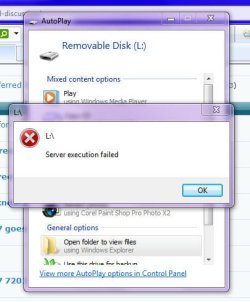
server_exec_failed.jpg

I restarted Prometheus this morning to allow some updates to be installed, and when I got home from work this afternoon, I get the message "Server Execution Failed" with anything that uses "explorer.exe" (Computer, Control Panel, Libraries, etc...).

My drive letter assignments for two of my drives have also become jumbled:

I is now D and D is now I (F, G, H and J are all still correctly assigned).

I used System Restore to reverse the updates, but that did not solve the problem. SFC /SCANNOW reports "Windows Resource Protection did not find any integrity violations."

And Murphy's Law states: "The split second you mention the problem to someone else, it goes away". As I was making this post, the "Server Execution Failed" error went away, and Explorer.exe started working normally again...

Go Figure...
 

My Computer

Computer type
PC/Desktop
Computer Manufacturer/Model Number
Virtual Machine
OS
Windows 7 Professional 32-bit SP1
CPU
AMD A4/A6
Motherboard
Intel Corporation 440BX Desktop Reference Platform
Memory
3.00GB EDO
Graphics Card(s)
VMware SVGA 3D
Sound Card
High Definition Audio Device
Monitor(s) Displays
Generic Non-PnP Monitor on VMware SVGA 3D
Screen Resolution
1440x900
Hard Drives
1 x 60GB VMware Virtual SATA Hard Drive ATA Device
Antivirus
Kaspersky Total Security
Infection?
 

My Computer

Computer Manufacturer/Model Number
Samsung NP530U4B-S02IN
OS
Windows® 8 Pro (64-bit)
CPU
Intel® Core™ i5 Processor 2467M (1.60GHz, 3MB L3 Cache)
Motherboard
Samsung Electronics
Memory
6GB DDR3 System Memory at 1,333MHz (on BD 4GB + 2GB x 1)
Graphics Card(s)
AMD Radeon™ HD7550M 1GB DDR3 (Ext. Graphic)
Sound Card
Realtek High Definition Audio
Monitor(s) Displays
35.56cm (14.0) SuperBright 300nit HD LED Display
Screen Resolution
1366x768
Hard Drives
1TB S-ATA II Hard Drive (5400RPM) with ExpressCache 16GB SSD
Internet Speed
sucks
Antivirus
Microsoft Security Essentials
Browser
Google Chrome (Sync enabled)
In all honesty, this is the first time since the January release of the BETA, and the RC in March that I've had a problem with Windows 7.

It's possible that I had just overloaded the system somehow, bearing in mind that I don't turn off Prometheus for anything other than severe weather reminiscent of the end of the world. Updates have been configured to be downloaded but not automatically installed, so that I can keep reboots to a minimum.

I'll be keeping an eye on her for a few days, to see if the problem comes back...
 

My Computer

Computer type
PC/Desktop
Computer Manufacturer/Model Number
Virtual Machine
OS
Windows 7 Professional 32-bit SP1
CPU
AMD A4/A6
Motherboard
Intel Corporation 440BX Desktop Reference Platform
Memory
3.00GB EDO
Graphics Card(s)
VMware SVGA 3D
Sound Card
High Definition Audio Device
Monitor(s) Displays
Generic Non-PnP Monitor on VMware SVGA 3D
Screen Resolution
1440x900
Hard Drives
1 x 60GB VMware Virtual SATA Hard Drive ATA Device
Antivirus
Kaspersky Total Security
I got that error message in RC, three days after installing it for the first time. The solution for me was, after wasting a whole day trying to fix it, to format and start over :(
 

My Computer

OS
Windows 7
Problem with Drive letter change

I had the same error as you, and figured it out, that it started to happen after I have changed a drive letter... I had My documents folder location set to non default one on my drive G... i don't remember if there were other dependencies on this drive...
So after sometime i decided to change the letter to S, and after a restart, explorer started giving me this error... and did not open My computer folder at all... So i went back to Computer management and changed the drive letter back... and viola... My computer now opens and everything is back to normal again... Stupid Microsoft engineers :mad:!!!!:sick::mad:
 

My Computer

OS
Vista, Windows 7
CPU
Intel
Motherboard
Gigabyte
Memory
4GB
Graphics Card(s)
Nvidia 9800GTX+
It's definitely a codec problem. For me it was a Nero codec (c:\program files\common files\ahead\dsfilter\NeMP4Splitter.ax) locking up WMP. It was in the Vista install that I upgraded from, so I don't think it's a W7 bug exactly (would be nice if it had a better error message though).
 

My Computer

OS
Windows 7
"Server Execution Failed" with anything

Ive seen it multiple times throughout the Windows 7 beta/RC builds, Its a COM system deadlock failure...killing either Explorer or WMP usually solves the problem ;)

Well to solve this problem you need to shut down the firewall.
And also this problem comes of outpost.I removed it and it worked.100%
 

My Computer

OS
Windows 7
Well to solve this problem you need to shut down the firewall.
well... I fail to see how disabling the firewall would prevent the explorer shell from spitting out errors, especially since it magically worked for Dzomlija. and please don't be offended, but don't suggest dangerous solutions without some sort of explanation.
 

My Computer

OS
Windows 7 Home Premium/Ubuntu Lucid
Internet Speed
900MBps/88KBps
Sorry to bump this thread.

I have tried fiddling about to sort the "server execution failed" message I get every time I try to open something in WMP (music files, videos and so on) but cannot figure out how to get it to work.

Any ideas please? Other than get rid of WMP and install a better media application...
 

My Computer

Computer Manufacturer/Model Number
Toshiba Satellite L450 18D laptop
OS
Windows 7 home premium 64-bit
CPU
Intel Celeron T3100 1.9ghz
Memory
2048mb
Graphics Card(s)
Mobile Intel® GMA 4500M
Sound Card
Toshiba 24bit stereo card
Monitor(s) Displays
Toshiba TruBrite HDtft 15.6"
Hard Drives
250gb
I have done these fixes as well -

net localgroup "Administrators" "NT Authority\Local Service" /add

i am getting error 1378 specified account name already member of group


works for a day or sometimes 4 -6 hours ad then i have to reboot to reconnect again - any help appreciated other than reformat - lol am connected to sbs 2003 which is I'm sure the culprit , but as i ordered a new pc can i load my Dell poweredge 400sc server with an updated version of server that is compatible with win-7?
 

My Computer

Computer Manufacturer/Model Number
dell optiplex - 2003
OS
windows7 7600 x86
CPU
itel pentium 4
Memory
3.00 GB
Graphics Card(s)
diamond radion x1050
Sound Card
SoundMax
Monitor(s) Displays
dell 2408wfp dell e172fp
Screen Resolution
1920 x 1200 1280 x 1024
Hard Drives
2 - 80 GB internals WD
1 - 01 TB ext
2 - 750 GB ext
1- 500 GB ext
all running on system no problems
Keyboard
old logitech cordless
Mouse
logitech wireless
Internet Speed
16 / 4
Other Info
networked into my sbs2003 server running sp1 still
it's a wonder I could even get windows 7 to connect to it
I have the same problem "server execution failed" I can open one mpg when I try to open the second one the error is coming. Any ideas please? I tried all the above repair instructions, nothing.
 

My Computer

OS
Windows 7 ultimate 32
I don't think it's a repairable problem. More likely it's a bug in Windows or WMP.

On my system it happens occasionally under these conditions:

(1) Play a MP4 video
(2) Close WMP and *quickly* double-click on another MP4 video file
(3) WMP doesn't start for about 60 sec and no video will launch
(4) After 60 sec, the "server execution failed" message happens
(5) Following that the 2nd video can be double-clicked and will launch OK

I cannot reproduce it at will, so the bug may be a software race condition which only happens under narrow situations.

If you get the error every time (not just infrequently) the cause may be different.
 

My Computer

Computer Manufacturer/Model Number
Digital Storm
OS
Windows 7 Home Premium 64 bit
CPU
Intel i7-860 @ 3.78 Ghz
Motherboard
EVGA P55 FTW
Memory
8GB Mushkin Enhanced DS1600-6G HP3-12800
Graphics Card(s)
EVGA GTX275
Monitor(s) Displays
LG Flatron W2361VG
Hard Drives
300GB 7200 rpm WD Velociraptor SATA
2 x 1.5TB Seagate ST31500341AS 7200 rpm SATA (non-RAID)
PSU
Thermaltake TR2 RX-850 AP (850 watts)
Case
HAF922
Cooling
Noctua NH-D14
Internet Speed
6 megabit DSL (6 megabit/sec down, 512 kilobit/sec up)
Other Info
DSL modem: Westell C90-610030-06 rev G
Router: NetGear WNDR3700
Yes error was every time after I was opening the second wmp movie. I used sfc /scannow and now it's ok.
 

My Computer

OS
Windows 7 ultimate 32
Back
Top