
Server network settings

Gazza13

New member
Local time
5:20 AM
Messages
20
Hi, I have a pc running Windows XP Pro. This was formerly connected to my office server and so still has the server login settings etc. I now wish to use this computer as a stand alone home pc and so wish to remove or disable these settings as they seem to be slowing things down, especially shortcuts to excel and word workbooks. Does anyone know what I need to do?
Many thanks
~Gary
 

My Computer

OS
XP
Hi, I have a pc running Windows XP Pro. This was formerly connected to my office server and so still has the server login settings etc. I now wish to use this computer as a stand alone home pc and so wish to remove or disable these settings as they seem to be slowing things down, especially shortcuts to excel and word workbooks. Does anyone know what I need to do?
Many thanks
~Gary

Welcome to the windows 7 forums Gazza13

first you need to log onto the machine as an administrator and un join from the domain that you were joined to.

If you know the password of the local machine administrator account, you can log on to the local machine instead of the domain and then unjoin from the domain.

Rich
 

My Computer

Computer type
Laptop
Computer Manufacturer/Model Number
Toshiba Laptop Qosimo X870
OS
Windows 7 Pro x64 SP1
CPU
Intel Core I7
Motherboard
Toshiba Qosmio
Memory
16 Gigs
Graphics Card(s)
NVIDIA GeForce GTX 670M
Monitor(s) Displays
17.7" laptop
Screen Resolution
1600 x 900
Hard Drives
256 Gig SanDisk SSD for C
256 Gig Intel SSD for D
Internet Speed
50/25 FIOS
Antivirus
Vipre (all you can eat for 10 machines)
Browser
IE and FF
Other Info
I have dos 6.22, wfwg 3.11, win98, 2000 and xp VHD's available for testing. MS's Virtual PC works great.
Hi Gazza13,

Hopefully that there's no GPO Settings applied to your computer. Things can get a little complicated if the computer is part of a Domain then downgrade it to a Workgroup or Homegroup. This will be a result of an Orphaned GPO. If your computer was part of a Domain network in the OU (Organizational Unit) with GPO applied, it needs to be moved out of that OU prior to the downgrade. Removing the Computer out of GPO will remove all GP Objects applied in that computer.

Let's hope not, richnrockville simple suggestion would work just fine. :)
 

My Computer

Computer Manufacturer/Model Number
Lenovo Desktop/Samsung Laptop
OS
Win7 & Win8 64bit
CPU
Intel i5
Internet Speed
Charter-20 Mbps
Antivirus
Avast
Browser
FF, IE9 and Chrome
Thanks Guys, I have the password and can log in as administrator.
How do I:
a) check to see if there is a GPO setting applied?
b) un join the domain?
 

My Computer

OS
XP
Can we check something quick first before we proceed? Right Click My Computer, then Properties, then in Computer Name Tab, do you see Domain? Usually the Domain Name is Name.local or if it's Workgroup, there's nothing need to be done.
 

My Computer

Computer Manufacturer/Model Number
Lenovo Desktop/Samsung Laptop
OS
Win7 & Win8 64bit
CPU
Intel i5
Internet Speed
Charter-20 Mbps
Antivirus
Avast
Browser
FF, IE9 and Chrome
OK, the domain is druittfn.local (druittfn being the name of the Company the computer came from). The Full Computer name is WSXP-37.druittfn.local
 

My Computer

OS
XP
Thanks, we just want to make sure if it's under Domain.

Your computer might need to be in that Domain Network to find out all the GPO setting applied. Is this possible?
Then from your computer, open up a command prompt in an elevated command, Click on :orb: type cmd see at the top run as Administrator, from the command prompt type gpresult then press enter.
Usually the Network Admin would setup the GPO from the Server.
 

My Computer

Computer Manufacturer/Model Number
Lenovo Desktop/Samsung Laptop
OS
Win7 & Win8 64bit
CPU
Intel i5
Internet Speed
Charter-20 Mbps
Antivirus
Avast
Browser
FF, IE9 and Chrome
Thanks again, to put the computer back into the Domain network would be extremely difficult. I have run the gpresult at the command prompt (with the computer not connected to network). Result as follows:

RSOP results for druittfn\gary on WSXP : Loging Mode

OS Type: Microsoft Windows XP Professional
OS Configuration: Member Workstation
OS Version: 5.1.2600
Domain Name: DRUITTFN
Domain Type: Windows NT 4
Site Name: N/A
Roaming Profile:
Local Profile: C:\Documents and Settings\gary
Connected over a slow link?: No

COMPUTER SETTINGS
Last time Group Policy was applied: 4/01/2012 at 3;30:09 PM
Group Policy was applied from DFNSERVER.druittfn.local
Group Policy slow link threshold: 500kbps

Applied Group Policy Objects
Disable Offline Files
Windows Firewall
Remote Desktop
Local Administrator
Disable Simple File Sharing
GeeDee Security Fix
Windows Update Enabled
UAC Control
Small Business Server Windows Firewall
Small Business Server Client Computer
Small Business Server Remote Assistance Policy
Small Business Server Lockout Policy
Small Business Server Domain Password Policy
Default Domain Policy

The following GPOs were not applied because they were filtered out
Small Business Server Windows Firewall
Filtering: Denied <WMI Filter>
ERROR: Generic failure
The computer is part of the following security groups:
BUITIN\Administrators
Everyone
Debugger Users
BUILTIN\Users
NT AUTHORITY\NETWORK
NT AUTHORITY\Authentcation Users

USER SETTINGS:
Last time Group Policy was applied: 4/01/2012 at 3;30:09 PM
Group Policy was applied from DFNSERVER.druittfn.local
Group Policy slow link threshold: 500kbps

Applied Group Policy Objects
Disable Offline Files
Small Business Server Folder Redirection
Default Domain Policy

The following GPOs were not applied because they were filtered out
Small Business Server Client Computer
Filtering: Not Applied <Empty>
Small Business Server Internet Connection Firewall
Filtering: Denied <WMI Filter>
ERROR: Generic failure.
The user is part of the following security groups:
Everyone
Debugger Users
BUILTIN\Administrators
BUILTIN\Users
NT AUTHORITY\INTERACTIVE
NT AUTHORITY\Authentcation Users
Local

Is this helpful?
Cheers
~Gary
 

My Computer

OS
XP
They are very helpful. There are a few GP Objects applied to your computer.
How did you end up with this computer if you don't mind me asking?
 
Last edited:

My Computer

Computer Manufacturer/Model Number
Lenovo Desktop/Samsung Laptop
OS
Win7 & Win8 64bit
CPU
Intel i5
Internet Speed
Charter-20 Mbps
Antivirus
Avast
Browser
FF, IE9 and Chrome
Replaced it with a new one at work as it's now 4 years old...
 

My Computer

OS
XP
Gazza - Please re-read Post# 8 and as you can see there are a few GP Objects applied to your computer, some are important. You may take a chance downgrading your XP to Workgroup if those GP Objects will be useless to you, if not you might run into some issues eventually.

I would suggest creating an Admin Local Account if you don't have one yet, so that after you have downgraded the XP Machine you'll be able to log on locally.

Another option that you might do, if you don't mind doing it is a Clean Install. It's up to you.

Edit: Also, in a near future that you'll have an XP issue please post here. This is a Windows 7 Forum. We'll keep this Thread here and will continue assisting you. :)
 
Last edited:

My Computer

Computer Manufacturer/Model Number
Lenovo Desktop/Samsung Laptop
OS
Win7 & Win8 64bit
CPU
Intel i5
Internet Speed
Charter-20 Mbps
Antivirus
Avast
Browser
FF, IE9 and Chrome
Thanks 2xg for your suggestion. Just a couple of questions:

How do I create an Admin Local Account?
If I do a clean install will I lose programs and/or data?
Will I be able to connect to my home group network?

Cheers
~Gary
 

My Computer

OS
XP
How do I create an Admin Local Account?
How to create and configure user accounts in Windows XP

If I do a clean install will I lose programs and/or data?
Yes, and you will need either the Recovery Discs that came with your computer or Driver disc and XP CD. Which ones do you have?
You may backup important files, you'll have to reinstall all the programs/software.

Will I be able to connect to my home group network?
Yes, but make sure that your Network Adapter driver is installed to make this happen.
 

My Computer

Computer Manufacturer/Model Number
Lenovo Desktop/Samsung Laptop
OS
Win7 & Win8 64bit
CPU
Intel i5
Internet Speed
Charter-20 Mbps
Antivirus
Avast
Browser
FF, IE9 and Chrome
Hi 2xg
Many thanks for your help and suggestions, much appreciated.
Cheers
~Gary
 

My Computer

OS
XP
I have now set up a local user account.
I would prefer not to do a clean install and do not have the recovery discs.
Can I get rid of the domain network stuff without the discs?
Cheers
~Gary
 

My Computer

OS
XP
Gary,

What's the Make and Model of your computer?
Do you have an XP CD/DVD? You would need it for the clean install.
Here's a complete guide, make sure that you read it first before you do anything.

Clean install will get rid of your Domain Stuff and also remove all your programs installed. Backup important files into external USB device before you do this.

Again, you have another option given to you by downgrading it to a Workgroup and also given all the circumstances.

Your call...
 

My Computer

Computer Manufacturer/Model Number
Lenovo Desktop/Samsung Laptop
OS
Win7 & Win8 64bit
CPU
Intel i5
Internet Speed
Charter-20 Mbps
Antivirus
Avast
Browser
FF, IE9 and Chrome
A clean install is starting to look like the way to go. Before committing to that can you please explain the downgrading to a Workgroup option. I have gone in and tried to set up a local user account as per the instructions provided but the domain seems to automatically take over it's operations and causes problems. Have I done something wrong?
 

My Computer

OS
XP
Sorry, computer is a SATA 250gb, 1024Mb RAM with a CORE2 DUO 2.2GHZ processor (can't find a model number). I have the XP Pro product code and should be able to get hold of the installation disc.
 

My Computer

OS
XP
If you will be doing a Clean install, after the setup installation it will ask you to create an Admin Account.

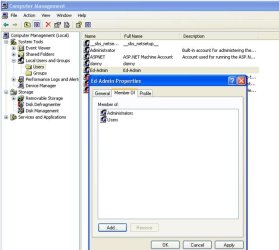
If you're not planning to do a Clean install and would like to proceed downgrading from domain to a workgroup then Yes make sure that you have an local admin account created. Please see attached file of what I'm talking about. I just created a dummy local admin called Ed-Admin from Computer Management (right click on My Computer, then select Manage, expand local Users and Group). The purpose of creating a local admin account is that you won't get locked out after you've demoted or downgraded your XP computer.
Are you still undecided what to do? :D
 

Attachments

  • LocAdminAcct.jpg
    LocAdminAcct.jpg
    43.2 KB · Views: 11

My Computer

Computer Manufacturer/Model Number
Lenovo Desktop/Samsung Laptop
OS
Win7 & Win8 64bit
CPU
Intel i5
Internet Speed
Charter-20 Mbps
Antivirus
Avast
Browser
FF, IE9 and Chrome
Thanks again. I followed your instructions but my computer acts a little differently. I can go My Computer/Local Users and Groups/Users - this brings up a number of user accounts including the one I have just set up. It does not bring up the accounts connected to the domain/network. I guess this means that we do have local log in accounts?

Yes, I am still undecided but would prefer not to have to do a Clean Install. If we go ahead and downgrade my questions are:

a) Will I retain the current software and programs?
b) Do I need to back up my data files

Thanks again for all of your time,
Gary
 

My Computer

OS
XP
Back
Top