
Solved Service host intermittently hogging my CPU

RknRusty

New member
Power User
Local time
2:41 AM
Messages
118
Location
South Carolina Midlands
Lately I've been noticing something using a lot of the CPU in my desktop computer, while I would expect the system to be idle. One of the service hosts seems to be responsible, as can be seen in the picture below. I tried restarting it with Process Explorer, but it will not allow it, and I don't know how to take control of it. It will eventually stop, but it happens fairly often, maybe once a day, and it's a bit of a nuisance.

I have run Malwarebytes in addition to my current version of Norton Security, and it always comes up clean. I took a screenshot with this host's associated services displayed. I wonder if someone can look at it and tell me what might be going on. Or at least how to take administrative control so I can try restarting it.
Thanks,
Rusty
 

Attachments
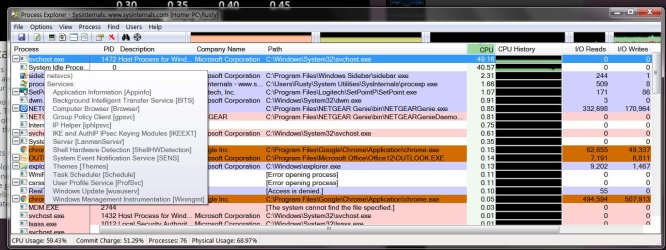
  • Proc explorer.jpg
    Proc explorer.jpg
    154.8 KB · Views: 3

My Computer My Computer

Computer type
PC/Desktop
Computer Manufacturer/Model Number
eMachines ET1810-03 (Acer) - single user
OS
Windows 7 Home Premium - always up to date
CPU
Intel E2210 2.2Ghz
Motherboard
(OEM) ECS MCP73VT-PM with AMI BIOS R01-A3 (4-29-2009)
Memory
3Gb DDR2
Graphics Card(s)
NVIDIA GeForce 7050/610I GPU
Sound Card
Realtek ALC888/1200 8-channel HD integrated
Monitor(s) Displays
AOC 22" LED
Screen Resolution
1920 x 1080
Hard Drives
Internal - Seagate 320Gb SATA; External - Western Digital 320Gb USB (3.5" internal drive inside a RocketFish USB enclosure)
Keyboard
Wireless
Mouse
Logitech M705 laser wireless
Internet Speed
TWC Cable Broadband ~ 15 Mbps Down/1 Mbps Up
Antivirus
NIS
Browser
Chrome
Other Info
Microsoft Office 2007, incl Outlook SP3; Netgear router; ubee modem
This is a tough one because there are so many services to choose from. Maybe you can explore this PID 1472 when there is no problem so that we can narrow down the service that is the culprit.
 

My Computer My Computer

Computer Manufacturer/Model Number
HP, Dell, Gateway, Toshiba - 4 laptops and 2 desktops
OS
Vista, Windows7, Mint Mate, Zorin, Windows 8
CPU
from 1.6GHz Duo to i7
Monitor(s) Displays
2x HP w2207
Hard Drives
5x HDD, 7x SSD, 12x Externals
Keyboard
with trackball - no mices
Mouse
Trackball mice
Internet Speed
DSL 6000
Thanks for the reply.
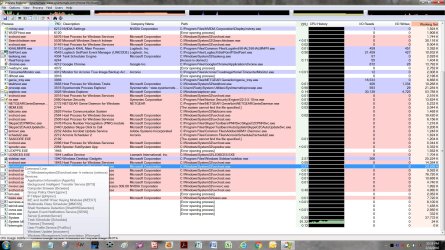
Here's PID 1472 while it's not using up the CPU.
 

Attachments

  • svchost 1472.jpg
    svchost 1472.jpg
    391.4 KB · Views: 6

My Computer My Computer

Computer type
PC/Desktop
Computer Manufacturer/Model Number
eMachines ET1810-03 (Acer) - single user
OS
Windows 7 Home Premium - always up to date
CPU
Intel E2210 2.2Ghz
Motherboard
(OEM) ECS MCP73VT-PM with AMI BIOS R01-A3 (4-29-2009)
Memory
3Gb DDR2
Graphics Card(s)
NVIDIA GeForce 7050/610I GPU
Sound Card
Realtek ALC888/1200 8-channel HD integrated
Monitor(s) Displays
AOC 22" LED
Screen Resolution
1920 x 1080
Hard Drives
Internal - Seagate 320Gb SATA; External - Western Digital 320Gb USB (3.5" internal drive inside a RocketFish USB enclosure)
Keyboard
Wireless
Mouse
Logitech M705 laser wireless
Internet Speed
TWC Cable Broadband ~ 15 Mbps Down/1 Mbps Up
Antivirus
NIS
Browser
Chrome
Other Info
Microsoft Office 2007, incl Outlook SP3; Netgear router; ubee modem
It is probably the Windows Update process that is eating up the CPU and probably more RAM than it should.

It is easy to tell - when you notice the high CPU, temporarily stop the Windows Update service.

Have you applied all Windows Updates? Or are you skipping some for fear of W10 and telemetry?
 

My Computer My Computer

Computer type
Laptop
Computer Manufacturer/Model Number
Employer provided Dell Latitude
OS
W7 Pro SP1 64bit
CPU
i7
Memory
8GB
Graphics Card(s)
Intel HD Graphics
Hard Drives
crappy SSD
Antivirus
Employer mandated Symantec Endpoint Protection
Browser
Pale Moon 64bit, IE11 64bit & Chrome 64bit
I'd bet with UI--there have been updates to WU, and I see some here have had the problems cited in the updates (delays, slowness if not CPU activity) and it's been tricky to sort the WUs that fix problems with W10 vs just wuauserv itself.

Most recently for example KB3135445 was about Windows Update Client but afaict had nothing to do with W10 specifically so it's installed on my PCs.

But these svchost issues are the most troublesome for sure given how it's so hard to find which among the >dozen services is actually responsible.
 

My Computer My Computer

Computer type
Laptop
Computer Manufacturer/Model Number
Dell Latitude E6540 Laptop
OS
Windows 7 Professional 64bit
CPU
Intel Core i7 4600M @ 2.90GHz
Motherboard
Dell Inc. 0CYT5F (SOCKET 0)
Memory
16.0GB Dual-Channel DDR3 @ 797MHz (11-11-11-28)
Graphics Card(s)
Intel HD Graphics 4600 (Dell) 2048MB ATI AMD Radeon HD 8790M
Sound Card
Realtek High Definition Audio
Monitor(s) Displays
HP ZR30w (2560x1600@60Hz)
Hard Drives
256GB LITEONIT LMT-256M6M-41 mm SATA (SSD)
1TB Samsung SSD 860 EVO mSATA SATA (SSD)
2TB USB 3.0 USB Device
115GB SanDisk Ultra Fit USB
Other Info
Multiple Dell E-Port Plus II Port Replicator/Docking Stations 0Y72NH USB 3.0 + 130W AC Adapters
Old #1472 is hard at work as I write this... making Pandora skip whenever I save and refresh.
I'll double check on the updates, I don't recall getting any on Tuesdays lately, but I usually install them after checking to make sure there's not something obvious that I want to avoid.
Thanks for the replies, I'll keep you posted.
Rusty
 

My Computer My Computer

Computer type
PC/Desktop
Computer Manufacturer/Model Number
eMachines ET1810-03 (Acer) - single user
OS
Windows 7 Home Premium - always up to date
CPU
Intel E2210 2.2Ghz
Motherboard
(OEM) ECS MCP73VT-PM with AMI BIOS R01-A3 (4-29-2009)
Memory
3Gb DDR2
Graphics Card(s)
NVIDIA GeForce 7050/610I GPU
Sound Card
Realtek ALC888/1200 8-channel HD integrated
Monitor(s) Displays
AOC 22" LED
Screen Resolution
1920 x 1080
Hard Drives
Internal - Seagate 320Gb SATA; External - Western Digital 320Gb USB (3.5" internal drive inside a RocketFish USB enclosure)
Keyboard
Wireless
Mouse
Logitech M705 laser wireless
Internet Speed
TWC Cable Broadband ~ 15 Mbps Down/1 Mbps Up
Antivirus
NIS
Browser
Chrome
Other Info
Microsoft Office 2007, incl Outlook SP3; Netgear router; ubee modem
bits

as a quick check turn off the bits service and see if it drops.

Roy
 

My Computer My Computer

Computer type
PC/Desktop
Computer Manufacturer/Model Number
medionl/Aspire 6930G/acer x55a
OS
W7 home premium 32bit/W7HP 64bit/w10 tp insider ring
CPU
E5300 dual core
Motherboard
medion MS7366
Memory
3gb
Graphics Card(s)
Nvidia Geforce 7100 Nforce 630i
Monitor(s) Displays
avixc
Internet Speed
n (isp resticted to 72)
Antivirus
mse/pands
Browser
palemoon
Other Info
Belkin Fd7050 n USB using Railink RT2870 drivers, more upto date
I just checked my update history and there were 3 or 4 that dated back to late 2015, plus one from 2013 that had not been installed. I don't know how or why they were omitted, but I'll see how she runs after they are installed. I will have time to look more closely this weekend, so I'll report back with anything I figure out.

Meanwhile, Roy, in Process Explorer I selected Svchost #1472 and clicked Properties, and selected BITS in the list. I tried clicking on Permissions, Stop and Restart, but am denied access on all of those.

I also opened Autoruns and found nothing there that resembled what I'm looking for. Then I switched to Windows Task Manager and it doesn't list any Svchost under the "Services" or any other tab.

Can you tell me how to assign admin privileges to this service?

Please keep in mind that I'm not a windows expert, so don't assume I know or understand a lot of details. I just try and do what you helpful folks suggest without asking too many goofy questions.

Thanks,
Rusty

EDIT: Eureka! I think I found it. Does this look right? I set it to Startup type=Disabled.
I'll turn it back on and leave it running normally until the problem recurs, and then disable it to see what happens. Then we can proceed from there.
 

Attachments

  • Computer management.JPG
    Computer management.JPG
    122 KB · Views: 1

My Computer My Computer

Computer type
PC/Desktop
Computer Manufacturer/Model Number
eMachines ET1810-03 (Acer) - single user
OS
Windows 7 Home Premium - always up to date
CPU
Intel E2210 2.2Ghz
Motherboard
(OEM) ECS MCP73VT-PM with AMI BIOS R01-A3 (4-29-2009)
Memory
3Gb DDR2
Graphics Card(s)
NVIDIA GeForce 7050/610I GPU
Sound Card
Realtek ALC888/1200 8-channel HD integrated
Monitor(s) Displays
AOC 22" LED
Screen Resolution
1920 x 1080
Hard Drives
Internal - Seagate 320Gb SATA; External - Western Digital 320Gb USB (3.5" internal drive inside a RocketFish USB enclosure)
Keyboard
Wireless
Mouse
Logitech M705 laser wireless
Internet Speed
TWC Cable Broadband ~ 15 Mbps Down/1 Mbps Up
Antivirus
NIS
Browser
Chrome
Other Info
Microsoft Office 2007, incl Outlook SP3; Netgear router; ubee modem
It has not happened again, ever since I disabled and re-enabled the BITS startup type in Task Manager.
I'll mark this as Solved until it happens again.
Thanks for everyone's help.
Rusty
 

My Computer My Computer

Computer type
PC/Desktop
Computer Manufacturer/Model Number
eMachines ET1810-03 (Acer) - single user
OS
Windows 7 Home Premium - always up to date
CPU
Intel E2210 2.2Ghz
Motherboard
(OEM) ECS MCP73VT-PM with AMI BIOS R01-A3 (4-29-2009)
Memory
3Gb DDR2
Graphics Card(s)
NVIDIA GeForce 7050/610I GPU
Sound Card
Realtek ALC888/1200 8-channel HD integrated
Monitor(s) Displays
AOC 22" LED
Screen Resolution
1920 x 1080
Hard Drives
Internal - Seagate 320Gb SATA; External - Western Digital 320Gb USB (3.5" internal drive inside a RocketFish USB enclosure)
Keyboard
Wireless
Mouse
Logitech M705 laser wireless
Internet Speed
TWC Cable Broadband ~ 15 Mbps Down/1 Mbps Up
Antivirus
NIS
Browser
Chrome
Other Info
Microsoft Office 2007, incl Outlook SP3; Netgear router; ubee modem
Back
Top