
Service Pack 1 error 80070005 (Access Denied)

ncalcs99

New member
Local time
6:47 AM
Messages
12
Hi all,

I've been trying to install the Service Pack 1 for Windows 7 Pro 64 bit. I am able to install it, but after I restart my computer, Windows attempts to configure the Service Pack and then fails causing it the system to revert. Once the desktop appears, I see a window that says the configuration failed with error code 80070005. I am still able to get to my desktop and operate as normal, but no Service Pack is installed.

I've tried some of the main troubleshooting options: Used the System Update Readiness Tool (SURT), ran a sfc /scannow (no problems), removed temporary internet files, ran Microsoft Hotfix, disabled antivirus and firewalls during installation and configuration.

Here are some notes that may help with diagnostics:

I have 25.6 Gigs available on C:\Windows drive. Partitioned drive.

I recently changed everything (CPU, Mobo, VGU, Mem) on this PC (although looking at the history, I've never had service pack 1 installed).

Attachments:

Attached are the shortened CB Log (I think it captures the errors that occurred during configuration) and a screenshot of my Windows Update history.

Thanks in advance for any help!
 

Attachments

My Computer My Computer

At a glance

Microsoft Windows 7 Professional 64-bit 7600 ...Intel(R) Core(TM) i5-4690K CPU @ 3.50GHz8.00 GBNVIDIA GeForce GTX 970
Computer type
PC/Desktop
OS
Microsoft Windows 7 Professional 64-bit 7600 Multiprocessor Free
CPU
Intel(R) Core(TM) i5-4690K CPU @ 3.50GHz
Motherboard
ASUSTeK COMPUTER INC. MAXIMUS VI HERO
Memory
8.00 GB
Graphics Card(s)
NVIDIA GeForce GTX 970
Sound Card
(1) NVIDIA High Definition Audio (2) NVIDIA Virtual Audio
Screen Resolution
1920 x 1080 x 32 bits (4294967296 colors) @ 60 Hz
Hard Drives
Hitachi HDS721010CLA332 SCSI Disk Device
The uploaded CBS data is only the rollback after the reboot - and contains no data about the install phase.

Please upload the latest TWO CBSPersist cab files, and the C:\Windows\windowsupdate.log file - all zipped!
 

My Computer My Computer

At a glance

Win 7 x64 Home Premium (and x86 VirtualBox VM...i3 370M/i7 6500U8GB - finally :)/8GBit's an i3, dude!/dual Intel&nVidia
Computer type
Laptop
Computer Manufacturer/Model Number
Asus K52F or Lenovo B51-80
OS
Win 7 x64 Home Premium (and x86 VirtualBox VM)/Win10
CPU
i3 370M/i7 6500U
Motherboard
Asus/Lenovo
Memory
8GB - finally :)/8GB
Graphics Card(s)
it's an i3, dude!/dual Intel&nVidia
Sound Card
onboard
Monitor(s) Displays
15.6" built-in
Screen Resolution
1366x768/1920x1080
Hard Drives
750GB Seagate internal
Sundry external drives attached to other computers on the local network
1TB SSD on the Lenovo
PSU
n/a
Internet Speed
as much as I can get - usually on a dongle/phone, so <1MB/s
Antivirus
MSE/Defender
Browser
IE11/12/Edge/Chrome/FF(if I must)
The uploaded CBS data is only the rollback after the reboot - and contains no data about the install phase.

Please upload the latest TWO CBSPersist cab files, and the C:\Windows\windowsupdate.log file - all zipped!

Here they are:

I think this is what you are looking for?
 
Last edited:

My Computer My Computer

At a glance

Microsoft Windows 7 Professional 64-bit 7600 ...Intel(R) Core(TM) i5-4690K CPU @ 3.50GHz8.00 GBNVIDIA GeForce GTX 970
Computer type
PC/Desktop
OS
Microsoft Windows 7 Professional 64-bit 7600 Multiprocessor Free
CPU
Intel(R) Core(TM) i5-4690K CPU @ 3.50GHz
Motherboard
ASUSTeK COMPUTER INC. MAXIMUS VI HERO
Memory
8.00 GB
Graphics Card(s)
NVIDIA GeForce GTX 970
Sound Card
(1) NVIDIA High Definition Audio (2) NVIDIA Virtual Audio
Screen Resolution
1920 x 1080 x 32 bits (4294967296 colors) @ 60 Hz
Hard Drives
Hitachi HDS721010CLA332 SCSI Disk Device
This appears to be the root error in the WindowsUpdate log...
Code:
2015-05-29 07:16:30:797  952 3c0 Misc  Microsoft signed: Yes
2015-05-29 07:16:30:797  952 3c0 PT +++++++++++  PT: Synchronizing server updates  +++++++++++
2015-05-29 07:16:30:797  952 3c0 PT   + ServiceId = {9482F4B4-E343-43B6-B170-9A65BC822C77}, Server URL = [URL]https://www.update.microsoft.com/v6/ClientWebService/client.asmx[/URL]
2015-05-29 07:16:31:795  952 3c0 Agent WARNING: Failed to evaluate Installed rule, updateId = {2A1234D0-3E2D-4D9E-AA5E-3430A20EDC11}.100, hr = 80242013
2015-05-29 07:16:32:107  952 3c0 Misc Validating signature for C:\Windows\SoftwareDistribution\WuRedir\9482F4B4-E343-43B6-B170-9A65BC822C77\muv4wuredir.cab:
2015-05-29 07:16:32:107  952 3c0 Misc  Microsoft signed: Yes
2015-05-29 07:16:32:123  952 3c0 Misc Validating signature for C:\Windows\SoftwareDistribution\WuRedir\9482F4B4-E343-43B6-B170-9A65BC822C77\muv4wuredir.cab:
2015-05-29 07:16:32:123  952 3c0 Misc  Microsoft signed: Yes

Here's a string of errors during the rollback phase, that may be part of the problem (from the most recent Persist file)...
Code:
 Line 163451: 2015-05-29 14:54:58, Error                 CSI    00000012 (F) Logged @2015/5/29:21:54:58.743 : [ml:148{74},l:146{73}]"FirewallConfigInstaller:AddRemoveFirewallConfig() installation type is 4."
 Line 163453: 2015-05-29 14:54:58, Error                 CSI    00000013 (F) Logged @2015/5/29:21:54:58.743 : [ml:132{66},l:130{65}]"FirewallConfigInstaller:AddRemoveFirewallConfig() SERVICING is 1."
 Line 163455: 2015-05-29 14:54:58, Error                 CSI    00000014 (F) Logged @2015/5/29:21:54:58.743 : [ml:660{330},l:658{329}]"FirewallConfigInstaller:AddRemoveFirewallConfig() installing <firewallRule xmlns="urn:schemas-microsoft-com:asm.v3" Action="Allow" Active="FALSE" Binary="System" Desc="@FirewallAPI.dll,-28756" Dir="In" LPort="3389" Name="@FirewallAPI.dll,-28753" Protocol="6" group="@FirewallAPI.dll,-28752" internalName="RemoteDesktop-In-TCP" />"
 Line 163457: 2015-05-29 14:54:58, Error                 CSI    00000015 (F) Logged @2015/5/29:21:54:58.743 : [ml:142{71},l:140{70}]"FirewallConfigInstaller:AddRemoveFirewallConfig() Installing a rule..."
 Line 163459: 2015-05-29 14:54:58, Error                 CSI    00000016 (F) Logged @2015/5/29:21:54:58.743 : [ml:228{114},l:226{113}]"FirewallConfigInstaller::AddFirewallRule DEFAULTS adding rule (RemoteDesktop-In-TCP | @FirewallAPI.dll,-28753, 7)"
 Line 163461: 2015-05-29 14:54:58, Error                 CSI    00000017 (F) Logged @2015/5/29:21:54:58.743 : [ml:242{121},l:240{120}]"FirewallConfigInstaller::AddFirewallRule POLICY adding rule (RemoteDesktop-In-TCP | @FirewallAPI.dll,-28753, 2147483647)"
 Line 163463: 2015-05-29 14:54:58, Error                 CSI    00000018 (F) Logged @2015/5/29:21:54:58.743 : [ml:152{76},l:150{75}]"FirewallConfigInstaller::AddFirewallRule Active - Inactive Profiles (0 - 0)"
 Line 163465: 2015-05-29 14:54:58, Error                 CSI    00000019 (F) Logged @2015/5/29:21:54:58.743 : [ml:152{76},l:150{75}]"FirewallConfigInstaller::AddFirewallRule Active - Inactive Profiles (0 - 7)"
 Line 163467: 2015-05-29 14:54:58, Error                 CSI    0000001a (F) Logged @2015/5/29:21:54:58.743 : [ml:228{114},l:226{113}]"FirewallConfigInstaller::AddFirewallRule adding INACTIVE rule (RemoteDesktop-In-TCP | @FirewallAPI.dll,-28753, 7)"
 Line 163469: 2015-05-29 14:54:58, Error                 CSI    0000001b (F) Logged @2015/5/29:21:54:58.774 : [ml:214{107},l:212{106}]"FirewallConfigInstaller::AddFirewallRule - CFirewall::AddRule/SetRule failed: 0x80070005 (Status: 0x10000)"
 Line 163471: 2015-05-29 14:54:58, Error                 CSI    0000001c (F) Logged @2015/5/29:21:54:58.774 : [ml:178{89},l:176{88}]"FirewallConfigInstaller:AddRemoveFirewallConfig() AddFirewallRule() failed. (0x80070005)"

Looking back at the install pahse, we get the same set of errors, followed by...
Code:
2015-05-29 14:45:00, Error                 CSI    [EMAIL="0000001d@2015/5/29:21:45:00.392"]0000001d@2015/5/29:21:45:00.392[/EMAIL] (F) CMIADAPTER: Inner Error Message from AI HRESULT = HRESULT_FROM_WIN32(ERROR_ACCESS_DENIED)
 [
[19]"Access is denied.
"
]
[gle=0x80004005]
2015-05-29 14:45:00, Error                 CSI    [EMAIL="0000001e@2015/5/29:21:45:00.392"]0000001e@2015/5/29:21:45:00.392[/EMAIL] (F) CMIADAPTER: AI failed. HRESULT = HRESULT_FROM_WIN32(ERROR_ACCESS_DENIED)
 Element:
 [268]"<firewallRule xmlns="urn:schemas-microsoft-com:asm.v3" Action="Allow" Active="FALSE" Binary="System" Desc="@FirewallAPI.dll,-28756" Dir="In" LPort="3389" Name="@FirewallAPI.dll,-28753" Protocol="6" group="@FirewallAPI.dll,-28752" internalName="RemoteDesktop-In-TCP" />"
[gle=0x80004005]
2015-05-29 14:45:00, Error                 CSI    [EMAIL="00000838@2015/5/29:21:45:00.392"]00000838@2015/5/29:21:45:00.392[/EMAIL] (F) d:\win7sp1_gdr\base\wcp\cmiadapter\installers.cpp(352): Error HRESULT_FROM_WIN32(ERROR_ACCESS_DENIED) originated in function Windows::WCP::CmiAdapter::CMIWrapperBasicInstaller::ResolveAndInvokeInstaller expression: hr
[gle=0x80004005]
2015-05-29 14:45:00, Info                  CBS    Progress: UI message updated. Operation type: Service Pack. Stage: 1 out of 1. Percent progress: 96.
2015-05-29 14:45:07, Error                 CSI    [EMAIL="0000001f@2015/5/29:21:45:07.740"]0000001f@2015/5/29:21:45:07.740[/EMAIL] (F) CMIADAPTER: Exiting with HRESULT code = HRESULT_FROM_WIN32(ERROR_ACCESS_DENIED).
[gle=0x80004005]
2015-05-29 14:45:07, Error                 CSI    [EMAIL="00000839@2015/5/29:21:45:07.740"]00000839@2015/5/29:21:45:07.740[/EMAIL] (F) d:\win7sp1_gdr\base\wcp\cmiadapter\installers.cpp(123): Error HRESULT_FROM_WIN32(ERROR_ACCESS_DENIED) originated in function Windows::WCP::CmiAdapter::CMIWrapperBasicInstaller::Install expression: hr
[gle=0x80004005]

What AV is currently installed? What other security software has ever been installed?
 

My Computer My Computer

At a glance

Win 7 x64 Home Premium (and x86 VirtualBox VM...i3 370M/i7 6500U8GB - finally :)/8GBit's an i3, dude!/dual Intel&nVidia
Computer type
Laptop
Computer Manufacturer/Model Number
Asus K52F or Lenovo B51-80
OS
Win 7 x64 Home Premium (and x86 VirtualBox VM)/Win10
CPU
i3 370M/i7 6500U
Motherboard
Asus/Lenovo
Memory
8GB - finally :)/8GB
Graphics Card(s)
it's an i3, dude!/dual Intel&nVidia
Sound Card
onboard
Monitor(s) Displays
15.6" built-in
Screen Resolution
1366x768/1920x1080
Hard Drives
750GB Seagate internal
Sundry external drives attached to other computers on the local network
1TB SSD on the Lenovo
PSU
n/a
Internet Speed
as much as I can get - usually on a dongle/phone, so <1MB/s
Antivirus
MSE/Defender
Browser
IE11/12/Edge/Chrome/FF(if I must)
This appears to be the root error in the WindowsUpdate log...
Code:
2015-05-29 07:16:30:797  952 3c0 Misc  Microsoft signed: Yes
2015-05-29 07:16:30:797  952 3c0 PT +++++++++++  PT: Synchronizing server updates  +++++++++++
2015-05-29 07:16:30:797  952 3c0 PT   + ServiceId = {9482F4B4-E343-43B6-B170-9A65BC822C77}, Server URL = [URL]https://www.update.microsoft.com/v6/ClientWebService/client.asmx[/URL]
2015-05-29 07:16:31:795  952 3c0 Agent WARNING: Failed to evaluate Installed rule, updateId = {2A1234D0-3E2D-4D9E-AA5E-3430A20EDC11}.100, hr = 80242013
2015-05-29 07:16:32:107  952 3c0 Misc Validating signature for C:\Windows\SoftwareDistribution\WuRedir\9482F4B4-E343-43B6-B170-9A65BC822C77\muv4wuredir.cab:
2015-05-29 07:16:32:107  952 3c0 Misc  Microsoft signed: Yes
2015-05-29 07:16:32:123  952 3c0 Misc Validating signature for C:\Windows\SoftwareDistribution\WuRedir\9482F4B4-E343-43B6-B170-9A65BC822C77\muv4wuredir.cab:
2015-05-29 07:16:32:123  952 3c0 Misc  Microsoft signed: Yes

Here's a string of errors during the rollback phase, that may be part of the problem (from the most recent Persist file)...
Code:
 Line 163451: 2015-05-29 14:54:58, Error                 CSI    00000012 (F) Logged @2015/5/29:21:54:58.743 : [ml:148{74},l:146{73}]"FirewallConfigInstaller:AddRemoveFirewallConfig() installation type is 4."
 Line 163453: 2015-05-29 14:54:58, Error                 CSI    00000013 (F) Logged @2015/5/29:21:54:58.743 : [ml:132{66},l:130{65}]"FirewallConfigInstaller:AddRemoveFirewallConfig() SERVICING is 1."
 Line 163455: 2015-05-29 14:54:58, Error                 CSI    00000014 (F) Logged @2015/5/29:21:54:58.743 : [ml:660{330},l:658{329}]"FirewallConfigInstaller:AddRemoveFirewallConfig() installing <firewallRule xmlns="urn:schemas-microsoft-com:asm.v3" Action="Allow" Active="FALSE" Binary="System" Desc="@FirewallAPI.dll,-28756" Dir="In" LPort="3389" Name="@FirewallAPI.dll,-28753" Protocol="6" group="@FirewallAPI.dll,-28752" internalName="RemoteDesktop-In-TCP" />"
 Line 163457: 2015-05-29 14:54:58, Error                 CSI    00000015 (F) Logged @2015/5/29:21:54:58.743 : [ml:142{71},l:140{70}]"FirewallConfigInstaller:AddRemoveFirewallConfig() Installing a rule..."
 Line 163459: 2015-05-29 14:54:58, Error                 CSI    00000016 (F) Logged @2015/5/29:21:54:58.743 : [ml:228{114},l:226{113}]"FirewallConfigInstaller::AddFirewallRule DEFAULTS adding rule (RemoteDesktop-In-TCP | @FirewallAPI.dll,-28753, 7)"
 Line 163461: 2015-05-29 14:54:58, Error                 CSI    00000017 (F) Logged @2015/5/29:21:54:58.743 : [ml:242{121},l:240{120}]"FirewallConfigInstaller::AddFirewallRule POLICY adding rule (RemoteDesktop-In-TCP | @FirewallAPI.dll,-28753, 2147483647)"
 Line 163463: 2015-05-29 14:54:58, Error                 CSI    00000018 (F) Logged @2015/5/29:21:54:58.743 : [ml:152{76},l:150{75}]"FirewallConfigInstaller::AddFirewallRule Active - Inactive Profiles (0 - 0)"
 Line 163465: 2015-05-29 14:54:58, Error                 CSI    00000019 (F) Logged @2015/5/29:21:54:58.743 : [ml:152{76},l:150{75}]"FirewallConfigInstaller::AddFirewallRule Active - Inactive Profiles (0 - 7)"
 Line 163467: 2015-05-29 14:54:58, Error                 CSI    0000001a (F) Logged @2015/5/29:21:54:58.743 : [ml:228{114},l:226{113}]"FirewallConfigInstaller::AddFirewallRule adding INACTIVE rule (RemoteDesktop-In-TCP | @FirewallAPI.dll,-28753, 7)"
 Line 163469: 2015-05-29 14:54:58, Error                 CSI    0000001b (F) Logged @2015/5/29:21:54:58.774 : [ml:214{107},l:212{106}]"FirewallConfigInstaller::AddFirewallRule - CFirewall::AddRule/SetRule failed: 0x80070005 (Status: 0x10000)"
 Line 163471: 2015-05-29 14:54:58, Error                 CSI    0000001c (F) Logged @2015/5/29:21:54:58.774 : [ml:178{89},l:176{88}]"FirewallConfigInstaller:AddRemoveFirewallConfig() AddFirewallRule() failed. (0x80070005)"

Looking back at the install pahse, we get the same set of errors, followed by...
Code:
2015-05-29 14:45:00, Error                 CSI    [EMAIL="0000001d@2015/5/29:21:45:00.392"]0000001d@2015/5/29:21:45:00.392[/EMAIL] (F) CMIADAPTER: Inner Error Message from AI HRESULT = HRESULT_FROM_WIN32(ERROR_ACCESS_DENIED)
 [
[19]"Access is denied.
"
]
[gle=0x80004005]
2015-05-29 14:45:00, Error                 CSI    [EMAIL="0000001e@2015/5/29:21:45:00.392"]0000001e@2015/5/29:21:45:00.392[/EMAIL] (F) CMIADAPTER: AI failed. HRESULT = HRESULT_FROM_WIN32(ERROR_ACCESS_DENIED)
 Element:
 [268]"<firewallRule xmlns="urn:schemas-microsoft-com:asm.v3" Action="Allow" Active="FALSE" Binary="System" Desc="@FirewallAPI.dll,-28756" Dir="In" LPort="3389" Name="@FirewallAPI.dll,-28753" Protocol="6" group="@FirewallAPI.dll,-28752" internalName="RemoteDesktop-In-TCP" />"
[gle=0x80004005]
2015-05-29 14:45:00, Error                 CSI    [EMAIL="00000838@2015/5/29:21:45:00.392"]00000838@2015/5/29:21:45:00.392[/EMAIL] (F) d:\win7sp1_gdr\base\wcp\cmiadapter\installers.cpp(352): Error HRESULT_FROM_WIN32(ERROR_ACCESS_DENIED) originated in function Windows::WCP::CmiAdapter::CMIWrapperBasicInstaller::ResolveAndInvokeInstaller expression: hr
[gle=0x80004005]
2015-05-29 14:45:00, Info                  CBS    Progress: UI message updated. Operation type: Service Pack. Stage: 1 out of 1. Percent progress: 96.
2015-05-29 14:45:07, Error                 CSI    [EMAIL="0000001f@2015/5/29:21:45:07.740"]0000001f@2015/5/29:21:45:07.740[/EMAIL] (F) CMIADAPTER: Exiting with HRESULT code = HRESULT_FROM_WIN32(ERROR_ACCESS_DENIED).
[gle=0x80004005]
2015-05-29 14:45:07, Error                 CSI    [EMAIL="00000839@2015/5/29:21:45:07.740"]00000839@2015/5/29:21:45:07.740[/EMAIL] (F) d:\win7sp1_gdr\base\wcp\cmiadapter\installers.cpp(123): Error HRESULT_FROM_WIN32(ERROR_ACCESS_DENIED) originated in function Windows::WCP::CmiAdapter::CMIWrapperBasicInstaller::Install expression: hr
[gle=0x80004005]

What AV is currently installed? What other security software has ever been installed?

I currently have Norton Security Suite through my cable TV/Internet provider and I have had McAfee in the past. I've also had to run Malwarebytes to remove some malware in the past.
 

My Computer My Computer

At a glance

Microsoft Windows 7 Professional 64-bit 7600 ...Intel(R) Core(TM) i5-4690K CPU @ 3.50GHz8.00 GBNVIDIA GeForce GTX 970
Computer type
PC/Desktop
OS
Microsoft Windows 7 Professional 64-bit 7600 Multiprocessor Free
CPU
Intel(R) Core(TM) i5-4690K CPU @ 3.50GHz
Motherboard
ASUSTeK COMPUTER INC. MAXIMUS VI HERO
Memory
8.00 GB
Graphics Card(s)
NVIDIA GeForce GTX 970
Sound Card
(1) NVIDIA High Definition Audio (2) NVIDIA Virtual Audio
Screen Resolution
1920 x 1080 x 32 bits (4294967296 colors) @ 60 Hz
Hard Drives
Hitachi HDS721010CLA332 SCSI Disk Device
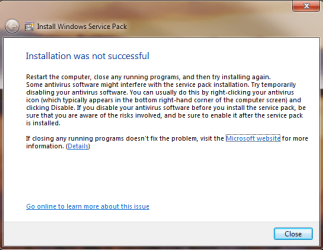
I tried some more troubleshooting since the last reply. I disabled all the Windows firewalls, tried to re-install SP1 and it failed to configure. Then I tried uninstalling my AV (Norton), same error again. Here are the most recent CBS and Windows Update files. I've also included a screenshot showing my firewall status (right after failure) and the error message that appears.
 

Attachments

  • WindowsUpdate as of 5-31.rar
    WindowsUpdate as of 5-31.rar
    166.2 KB · Views: 2
  • Firewall status - after Norton uninstall.PNG
    Firewall status - after Norton uninstall.PNG
    40 KB · Views: 2
  • Restart error screen.PNG
    Restart error screen.PNG
    20.4 KB · Views: 18
Last edited:

My Computer My Computer

At a glance

Microsoft Windows 7 Professional 64-bit 7600 ...Intel(R) Core(TM) i5-4690K CPU @ 3.50GHz8.00 GBNVIDIA GeForce GTX 970
Computer type
PC/Desktop
OS
Microsoft Windows 7 Professional 64-bit 7600 Multiprocessor Free
CPU
Intel(R) Core(TM) i5-4690K CPU @ 3.50GHz
Motherboard
ASUSTeK COMPUTER INC. MAXIMUS VI HERO
Memory
8.00 GB
Graphics Card(s)
NVIDIA GeForce GTX 970
Sound Card
(1) NVIDIA High Definition Audio (2) NVIDIA Virtual Audio
Screen Resolution
1920 x 1080 x 32 bits (4294967296 colors) @ 60 Hz
Hard Drives
Hitachi HDS721010CLA332 SCSI Disk Device
You probably need to run the McAfee cleanup tool - and certainly (if Norton is uninstalled now) need to run the Norton cleanup tool...

Download the McAfee removal tool from:

http://download.mcafee.com/products/licensed/cust_support_patches/MCPR.exe

Click Save, and save the file to a folder on your computer.
Navigate to the folder where you saved the file.
right-click on MCPR.exe and select 'Run as Administrator' to run the removal tool.

when complete, reboot.

Download the Norton Removal Tool from here https://www-secure.symantec.com/norton-support/jsp/help-solutions.jsp?lg=english&ct=united+states&docid=20080710133834EN&product=home&version=1&pvid=f-home

Close all other programs, then run the tool. When it's complete, reboot the machine whether it asks for it or not.

After the reboot, open an Elevated Command Prompt, and run the following command

NETSH WINSOCK RESET

You'll be advised to reboot - do so.
then post another MGADiag report.
 

My Computer My Computer

At a glance

Win 7 x64 Home Premium (and x86 VirtualBox VM...i3 370M/i7 6500U8GB - finally :)/8GBit's an i3, dude!/dual Intel&nVidia
Computer type
Laptop
Computer Manufacturer/Model Number
Asus K52F or Lenovo B51-80
OS
Win 7 x64 Home Premium (and x86 VirtualBox VM)/Win10
CPU
i3 370M/i7 6500U
Motherboard
Asus/Lenovo
Memory
8GB - finally :)/8GB
Graphics Card(s)
it's an i3, dude!/dual Intel&nVidia
Sound Card
onboard
Monitor(s) Displays
15.6" built-in
Screen Resolution
1366x768/1920x1080
Hard Drives
750GB Seagate internal
Sundry external drives attached to other computers on the local network
1TB SSD on the Lenovo
PSU
n/a
Internet Speed
as much as I can get - usually on a dongle/phone, so <1MB/s
Antivirus
MSE/Defender
Browser
IE11/12/Edge/Chrome/FF(if I must)
I used the Mcafee and Norton removal tools, disabled Windows firewalls and attempted to install the Service Pack again and the same error window appeared after failing to configure and reverting changes. Here is the MGADiag before the attempted install along with the most recent Windows update and CBS logs.

I really do not want to do this, but I'm wondering if I need to do a complete re-install of Windows.
 

Attachments

My Computer My Computer

At a glance

Microsoft Windows 7 Professional 64-bit 7600 ...Intel(R) Core(TM) i5-4690K CPU @ 3.50GHz8.00 GBNVIDIA GeForce GTX 970
Computer type
PC/Desktop
OS
Microsoft Windows 7 Professional 64-bit 7600 Multiprocessor Free
CPU
Intel(R) Core(TM) i5-4690K CPU @ 3.50GHz
Motherboard
ASUSTeK COMPUTER INC. MAXIMUS VI HERO
Memory
8.00 GB
Graphics Card(s)
NVIDIA GeForce GTX 970
Sound Card
(1) NVIDIA High Definition Audio (2) NVIDIA Virtual Audio
Screen Resolution
1920 x 1080 x 32 bits (4294967296 colors) @ 60 Hz
Hard Drives
Hitachi HDS721010CLA332 SCSI Disk Device
Anyone have any advice on this issue? I still have not found any solutions.
 

My Computer My Computer

At a glance

Microsoft Windows 7 Professional 64-bit 7600 ...Intel(R) Core(TM) i5-4690K CPU @ 3.50GHz8.00 GBNVIDIA GeForce GTX 970
Computer type
PC/Desktop
OS
Microsoft Windows 7 Professional 64-bit 7600 Multiprocessor Free
CPU
Intel(R) Core(TM) i5-4690K CPU @ 3.50GHz
Motherboard
ASUSTeK COMPUTER INC. MAXIMUS VI HERO
Memory
8.00 GB
Graphics Card(s)
NVIDIA GeForce GTX 970
Sound Card
(1) NVIDIA High Definition Audio (2) NVIDIA Virtual Audio
Screen Resolution
1920 x 1080 x 32 bits (4294967296 colors) @ 60 Hz
Hard Drives
Hitachi HDS721010CLA332 SCSI Disk Device
Sorry about that - it got past me!
This seems to bethe critical problem from the windowsupdate log...
Code:
2015-05-29 07:16:30:797  952 3c0 PT   + ServiceId = {9482F4B4-E343-43B6-B170-9A65BC822C77}, Server URL = [URL="https://www.update.microsoft.com/v6/ClientWebService/client.asmx"][COLOR=#0066cc]https://www.update.microsoft.com/v6/ClientWebService/client.asmx[/COLOR][/URL]
2015-05-29 07:16:31:795  952 3c0 Agent WARNING: Failed to evaluate Installed rule, updateId = {2A1234D0-3E2D-4D9E-AA5E-3430A20EDC11}.100, hr = 80242013

Have you tried running the SP1 install from the standalone package?
http://www.microsoft.com/en-in/download/details.aspx?id=5842
 

My Computer My Computer

At a glance

Win 7 x64 Home Premium (and x86 VirtualBox VM...i3 370M/i7 6500U8GB - finally :)/8GBit's an i3, dude!/dual Intel&nVidia
Computer type
Laptop
Computer Manufacturer/Model Number
Asus K52F or Lenovo B51-80
OS
Win 7 x64 Home Premium (and x86 VirtualBox VM)/Win10
CPU
i3 370M/i7 6500U
Motherboard
Asus/Lenovo
Memory
8GB - finally :)/8GB
Graphics Card(s)
it's an i3, dude!/dual Intel&nVidia
Sound Card
onboard
Monitor(s) Displays
15.6" built-in
Screen Resolution
1366x768/1920x1080
Hard Drives
750GB Seagate internal
Sundry external drives attached to other computers on the local network
1TB SSD on the Lenovo
PSU
n/a
Internet Speed
as much as I can get - usually on a dongle/phone, so <1MB/s
Antivirus
MSE/Defender
Browser
IE11/12/Edge/Chrome/FF(if I must)
Sorry about that - it got past me!
This seems to bethe critical problem from the windowsupdate log...
Code:
2015-05-29 07:16:30:797  952 3c0 PT   + ServiceId = {9482F4B4-E343-43B6-B170-9A65BC822C77}, Server URL = [URL="https://www.update.microsoft.com/v6/ClientWebService/client.asmx"][COLOR=#0066cc]https://www.update.microsoft.com/v6/ClientWebService/client.asmx[/COLOR][/URL]
2015-05-29 07:16:31:795  952 3c0 Agent WARNING: Failed to evaluate Installed rule, updateId = {2A1234D0-3E2D-4D9E-AA5E-3430A20EDC11}.100, hr = 80242013

Have you tried running the SP1 install from the standalone package?
http://www.microsoft.com/en-in/download/details.aspx?id=5842

I wasn't sure which files to download, but I did try downloading and installing these two files (both failed to install SP1).

  • windows6.1-KB976932-X64.exe
  • windows6.1-KB976932-X86.exe

Do I need to download all of those files? I'm a little confused about which one I should actually download.
 

My Computer My Computer

At a glance

Microsoft Windows 7 Professional 64-bit 7600 ...Intel(R) Core(TM) i5-4690K CPU @ 3.50GHz8.00 GBNVIDIA GeForce GTX 970
Computer type
PC/Desktop
OS
Microsoft Windows 7 Professional 64-bit 7600 Multiprocessor Free
CPU
Intel(R) Core(TM) i5-4690K CPU @ 3.50GHz
Motherboard
ASUSTeK COMPUTER INC. MAXIMUS VI HERO
Memory
8.00 GB
Graphics Card(s)
NVIDIA GeForce GTX 970
Sound Card
(1) NVIDIA High Definition Audio (2) NVIDIA Virtual Audio
Screen Resolution
1920 x 1080 x 32 bits (4294967296 colors) @ 60 Hz
Hard Drives
Hitachi HDS721010CLA332 SCSI Disk Device
Sorry about that - it got past me!
This seems to bethe critical problem from the windowsupdate log...
Code:
2015-05-29 07:16:30:797  952 3c0 PT   + ServiceId = {9482F4B4-E343-43B6-B170-9A65BC822C77}, Server URL = [URL="https://www.update.microsoft.com/v6/ClientWebService/client.asmx"][COLOR=#0066cc]https://www.update.microsoft.com/v6/ClientWebService/client.asmx[/COLOR][/URL]
2015-05-29 07:16:31:795  952 3c0 Agent WARNING: Failed to evaluate Installed rule, updateId = {2A1234D0-3E2D-4D9E-AA5E-3430A20EDC11}.100, hr = 80242013

Have you tried running the SP1 install from the standalone package?
http://www.microsoft.com/en-in/download/details.aspx?id=5842

I tried two of the files on that page, but neither worked. These were the ones that I tried.

  • windows6.1-KB976932-X64.exe
  • windows6.1-KB976932-X86.exe

Should I be downloading a different file from that link?
 

My Computer My Computer

At a glance

Microsoft Windows 7 Professional 64-bit 7600 ...Intel(R) Core(TM) i5-4690K CPU @ 3.50GHz8.00 GBNVIDIA GeForce GTX 970
Computer type
PC/Desktop
OS
Microsoft Windows 7 Professional 64-bit 7600 Multiprocessor Free
CPU
Intel(R) Core(TM) i5-4690K CPU @ 3.50GHz
Motherboard
ASUSTeK COMPUTER INC. MAXIMUS VI HERO
Memory
8.00 GB
Graphics Card(s)
NVIDIA GeForce GTX 970
Sound Card
(1) NVIDIA High Definition Audio (2) NVIDIA Virtual Audio
Screen Resolution
1920 x 1080 x 32 bits (4294967296 colors) @ 60 Hz
Hard Drives
Hitachi HDS721010CLA332 SCSI Disk Device
Do you have any registry cleaners/optimizers installed - any 'system tweakers'??
 

My Computer My Computer

At a glance

Win 7 x64 Home Premium (and x86 VirtualBox VM...i3 370M/i7 6500U8GB - finally :)/8GBit's an i3, dude!/dual Intel&nVidia
Computer type
Laptop
Computer Manufacturer/Model Number
Asus K52F or Lenovo B51-80
OS
Win 7 x64 Home Premium (and x86 VirtualBox VM)/Win10
CPU
i3 370M/i7 6500U
Motherboard
Asus/Lenovo
Memory
8GB - finally :)/8GB
Graphics Card(s)
it's an i3, dude!/dual Intel&nVidia
Sound Card
onboard
Monitor(s) Displays
15.6" built-in
Screen Resolution
1366x768/1920x1080
Hard Drives
750GB Seagate internal
Sundry external drives attached to other computers on the local network
1TB SSD on the Lenovo
PSU
n/a
Internet Speed
as much as I can get - usually on a dongle/phone, so <1MB/s
Antivirus
MSE/Defender
Browser
IE11/12/Edge/Chrome/FF(if I must)
Do you have any registry cleaners/optimizers installed - any 'system tweakers'??

I'm not sure what those type of programs are. Is there any way to find out if I do have them installed?
 

My Computer My Computer

At a glance

Microsoft Windows 7 Professional 64-bit 7600 ...Intel(R) Core(TM) i5-4690K CPU @ 3.50GHz8.00 GBNVIDIA GeForce GTX 970
Computer type
PC/Desktop
OS
Microsoft Windows 7 Professional 64-bit 7600 Multiprocessor Free
CPU
Intel(R) Core(TM) i5-4690K CPU @ 3.50GHz
Motherboard
ASUSTeK COMPUTER INC. MAXIMUS VI HERO
Memory
8.00 GB
Graphics Card(s)
NVIDIA GeForce GTX 970
Sound Card
(1) NVIDIA High Definition Audio (2) NVIDIA Virtual Audio
Screen Resolution
1920 x 1080 x 32 bits (4294967296 colors) @ 60 Hz
Hard Drives
Hitachi HDS721010CLA332 SCSI Disk Device
Any programs created by 'Iolo', 'IOBit', 'Wise', 'Uniblue' - or similar scareware manufacturer?


Please download and install Malwarebytes Anti-malware (free version) from http://www.malwarebytes.org/products/malwarebytes_free/ - UNtick 'Enable free trial of MBAM Premium' at the end of the installation - and update it, then run a full scan in your main account, and Quick scans in any other user accounts.

Quarantine everything it finds
 

My Computer My Computer

At a glance

Win 7 x64 Home Premium (and x86 VirtualBox VM...i3 370M/i7 6500U8GB - finally :)/8GBit's an i3, dude!/dual Intel&nVidia
Computer type
Laptop
Computer Manufacturer/Model Number
Asus K52F or Lenovo B51-80
OS
Win 7 x64 Home Premium (and x86 VirtualBox VM)/Win10
CPU
i3 370M/i7 6500U
Motherboard
Asus/Lenovo
Memory
8GB - finally :)/8GB
Graphics Card(s)
it's an i3, dude!/dual Intel&nVidia
Sound Card
onboard
Monitor(s) Displays
15.6" built-in
Screen Resolution
1366x768/1920x1080
Hard Drives
750GB Seagate internal
Sundry external drives attached to other computers on the local network
1TB SSD on the Lenovo
PSU
n/a
Internet Speed
as much as I can get - usually on a dongle/phone, so <1MB/s
Antivirus
MSE/Defender
Browser
IE11/12/Edge/Chrome/FF(if I must)
Any programs created by 'Iolo', 'IOBit', 'Wise', 'Uniblue' - or similar scareware manufacturer?


Please download and install Malwarebytes Anti-malware (free version) from http://www.malwarebytes.org/products/malwarebytes_free/ - UNtick 'Enable free trial of MBAM Premium' at the end of the installation - and update it, then run a full scan in your main account, and Quick scans in any other user accounts.

Quarantine everything it finds

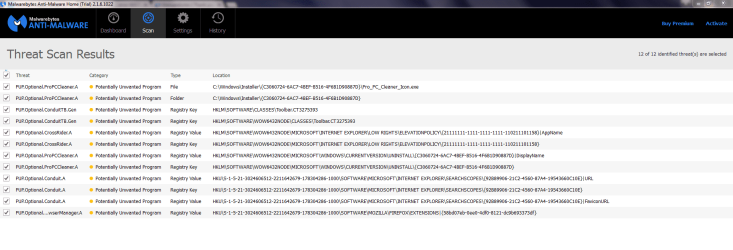
Thanks for your continued support on this issue. I don't have any of those type of programs installed. I downloaded and ran Malwarebytes. Below is a screenshot of the "threatened" files. After I quarantined the files, I attempted to download SP1 and it failed again. Attached is the most recent update log.
 

Attachments

  • Malwarebytes non-malware removed.PNG
    Malwarebytes non-malware removed.PNG
    51.9 KB · Views: 6
  • WindowsUpdate 6-8.rar
    WindowsUpdate 6-8.rar
    131.2 KB · Views: 1

My Computer My Computer

At a glance

Microsoft Windows 7 Professional 64-bit 7600 ...Intel(R) Core(TM) i5-4690K CPU @ 3.50GHz8.00 GBNVIDIA GeForce GTX 970
Computer type
PC/Desktop
OS
Microsoft Windows 7 Professional 64-bit 7600 Multiprocessor Free
CPU
Intel(R) Core(TM) i5-4690K CPU @ 3.50GHz
Motherboard
ASUSTeK COMPUTER INC. MAXIMUS VI HERO
Memory
8.00 GB
Graphics Card(s)
NVIDIA GeForce GTX 970
Sound Card
(1) NVIDIA High Definition Audio (2) NVIDIA Virtual Audio
Screen Resolution
1920 x 1080 x 32 bits (4294967296 colors) @ 60 Hz
Hard Drives
Hitachi HDS721010CLA332 SCSI Disk Device

My Computer My Computer

At a glance

Windows 10 Pro. 64/ version 1709 Windows 7 Pr...Intel i7-6800K @ 4.3Corsair Platinum 16 gig @2400EVGA GTX 1070 OC
Computer type
PC/Desktop
Computer Manufacturer/Model Number
Home made Desktop
OS
Windows 10 Pro. 64/ version 1709 Windows 7 Pro/64
CPU
Intel i7-6800K @ 4.3
Motherboard
ASUS X-99 Deluxe II
Memory
Corsair Platinum 16 gig @2400
Graphics Card(s)
EVGA GTX 1070 OC
Monitor(s) Displays
Asus 27" LED LCD/VE278Q
Screen Resolution
1920-1080 or 1280-720 HDMI
Hard Drives
INTEL SSD 730-240 Gb Sata 3.0/
PSU
EVGA Platium 1200W
Case
Phanteks Luxe Tempered Glass 8 fans/ one radiator
Cooling
XSPC/ Water Cooled CPU
Keyboard
Das 4 Professional
Mouse
Logitech M705/MX Anywhere 2-S
Internet Speed
100 mbits
Antivirus
Microsoft Security Essentials/ Malwarebytes Premium 3.0/ SAS
Browser
I.E. 11 default/Firefox/ ISP Time Warner Cable/Spectrum
Other Info
LG BluRay Burner/
Sound system-KLipsch-THX/
Icy Dock ssd Hot Swap bays.
I noticed the ProPCCLeaner stuff as well ;)
This is definitely scareware - and dangerous.

There's still no helpful data in the windowsupdate.log file :(
My problem is that the UID that windows update uses is only present in the errors - and not in the detections, so I have no idea which update it refers to.

I really have no idea where to go next, apart from a repair install or a clean install :(

I just noticed that your Specs say you have Windows 7 Pro SP1 installed - but this thread is about the failure to install SP1!
Wishful thinking, or different machine? ;)
 

My Computer My Computer

At a glance

Win 7 x64 Home Premium (and x86 VirtualBox VM...i3 370M/i7 6500U8GB - finally :)/8GBit's an i3, dude!/dual Intel&nVidia
Computer type
Laptop
Computer Manufacturer/Model Number
Asus K52F or Lenovo B51-80
OS
Win 7 x64 Home Premium (and x86 VirtualBox VM)/Win10
CPU
i3 370M/i7 6500U
Motherboard
Asus/Lenovo
Memory
8GB - finally :)/8GB
Graphics Card(s)
it's an i3, dude!/dual Intel&nVidia
Sound Card
onboard
Monitor(s) Displays
15.6" built-in
Screen Resolution
1366x768/1920x1080
Hard Drives
750GB Seagate internal
Sundry external drives attached to other computers on the local network
1TB SSD on the Lenovo
PSU
n/a
Internet Speed
as much as I can get - usually on a dongle/phone, so <1MB/s
Antivirus
MSE/Defender
Browser
IE11/12/Edge/Chrome/FF(if I must)
I noticed the ProPCCLeaner stuff as well ;)
This is definitely scareware - and dangerous.

There's still no helpful data in the windowsupdate.log file :(
My problem is that the UID that windows update uses is only present in the errors - and not in the detections, so I have no idea which update it refers to.

I really have no idea where to go next, apart from a repair install or a clean install :(

I just noticed that your Specs say you have Windows 7 Pro SP1 installed - but this thread is about the failure to install SP1!
Wishful thinking, or different machine? ;)

Interesting, thanks for looking into this. I updated my system specs using Layback Bear's advice. I didn't see anywhere that SP1 was installed and I just double checked my system information under my control panel, so I think that would just be wishful thinking.

How do I go about a repair install? Do I need the Windows disc? Unfortunately, I'm afraid I might not have the disc anymore.
 

My Computer My Computer

At a glance

Microsoft Windows 7 Professional 64-bit 7600 ...Intel(R) Core(TM) i5-4690K CPU @ 3.50GHz8.00 GBNVIDIA GeForce GTX 970
Computer type
PC/Desktop
OS
Microsoft Windows 7 Professional 64-bit 7600 Multiprocessor Free
CPU
Intel(R) Core(TM) i5-4690K CPU @ 3.50GHz
Motherboard
ASUSTeK COMPUTER INC. MAXIMUS VI HERO
Memory
8.00 GB
Graphics Card(s)
NVIDIA GeForce GTX 970
Sound Card
(1) NVIDIA High Definition Audio (2) NVIDIA Virtual Audio
Screen Resolution
1920 x 1080 x 32 bits (4294967296 colors) @ 60 Hz
Hard Drives
Hitachi HDS721010CLA332 SCSI Disk Device

My Computer My Computer

At a glance

Win 7 x64 Home Premium (and x86 VirtualBox VM...i3 370M/i7 6500U8GB - finally :)/8GBit's an i3, dude!/dual Intel&nVidia
Computer type
Laptop
Computer Manufacturer/Model Number
Asus K52F or Lenovo B51-80
OS
Win 7 x64 Home Premium (and x86 VirtualBox VM)/Win10
CPU
i3 370M/i7 6500U
Motherboard
Asus/Lenovo
Memory
8GB - finally :)/8GB
Graphics Card(s)
it's an i3, dude!/dual Intel&nVidia
Sound Card
onboard
Monitor(s) Displays
15.6" built-in
Screen Resolution
1366x768/1920x1080
Hard Drives
750GB Seagate internal
Sundry external drives attached to other computers on the local network
1TB SSD on the Lenovo
PSU
n/a
Internet Speed
as much as I can get - usually on a dongle/phone, so <1MB/s
Antivirus
MSE/Defender
Browser
IE11/12/Edge/Chrome/FF(if I must)
Back
Top