Services - Start or Disable

How to Start or Disable Services in Windows 7

   Information
Services are a computer program or process that runs in the background and provides support to other programs in Windows 7. This will show you how to start or disable a Windows 7 service of your choice.

For more information on each service, see: Standard Windows 7 Services Svchost.exe

You must be logged in as an administrator to start or disable Servces.

   Note
If you want to cut down the overhead of what is running in the background and speed Windows 7 up some, then only disable the services you do not use. If you disable a service that you need or use, then it could actually lower your computer's performance. The Services apply to all users on the computer.
   Warning
It is highly recommended that you create a restore point before making changes to the services. This way if you make a mistake that cripples your computer, you can do a System Restore using the restore point to undo the changes.


Adjusting service settings requires you to have a deep understanding of what the service is for, what it affects, and what your needs are. If you don't fully understand all of this, then playing with services can really mess up your Windows installation, and possibly your day.

If you disabled the wrong service and lost access to the computer, then try booting into Safe Mode from Advanced Boot Options to change the service back.


CONTENTS:
  • Option One: To Start, Stop, and Disable Services in "Services" Window
  • Option Two: To Start and Stop Services using "net" Commands
  • Option Three: To Start, Stop, and Disable Services using "Sc" Commands
  • Option Four: To Start, Stop, and Disable Services in Registry Editor


OPTION ONE

To Start, Stop, and Disable Services in "Services" Window

1. Open the Control Panel (icons view), click on the Administrative Tools icon, click on Services, and go to step 3 below.

OR

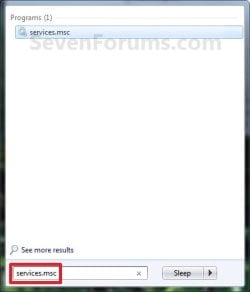
2. Open the Start Menu, type services.msc in the search box, press Enter, and go to step 3 below. (See screenshot below)Start_Menu.jpg

3. If prompted by UAC, then click on Yes.

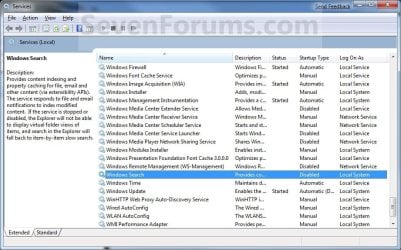
4. Right click on the service you want to disable or start and click on Properties. (See screenshot below)Services.jpg

5. To Disable a Service
NOTE: See the guide in the TIP box at the top of the tutorial to help decide.A) Click on the Stop button and wait a sec for the service to stop. (See screenshots below step 7)

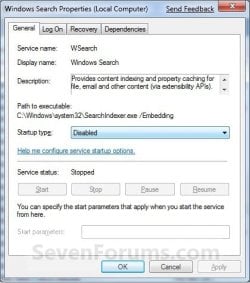
B) Next to Startup type, click on the drop down menu and select Disable. (See screenshots below step 7)

C) Click on the Apply button. (See screenshots below step 7)
NOTE: If the service will not stop and gives a error, then you will need to restart the computer to stop it after you set it to Disabled and clicked on OK.

D) Go to step 7.

6. To Start a Service
NOTE: See the guide in the TIP box at the top of the tutorial to help decide.A) Next to Startup type, click on the drop down menu and select Automatic or Manual and click Apply. (See screenshots below step 7)

B) Click on the Start button. (See screenshots below step 7)
NOTE: If the Start option is grayed out and will not start, then you will need to restart the computer to start it after you set it to Automatic and clicked OK.

7. Click on OK. (See screenshots below)Properties-1.jpgProperties-2.jpg

8. Close the Services window.
NOTE: You may need to restart the computer for the changes to the services to take affect.


OPTION TWO

To Start and Stop Services using "net" Commands

1. Open an elevated command prompt, and do step 2 or 3 below for what you would like to do.

2. To Stop a Service using "Net Stop" Command in Command Prompt

A) In the elevated command prompt, type the command below, press Enter, and go to step 4 below.
NOTE: The Display name of a service is the name displayed in the Services snap-in window, and in the service's properties.

net stop "service name"

OR

net stop "display name of service"
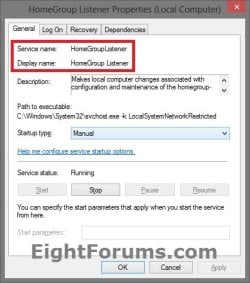

Name.jpg


For example:
If I wanted to stop the HomeGroup Listener (display name) or HomeGroupListener (service name) service, I would type either command below exactly in the command prompt, and press Enter.

net stop "HomeGroup Listener"

OR

net stop "HomeGroupListener"
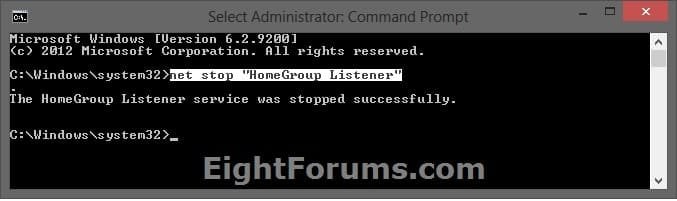

CMD_Stop.jpg


3. To Start a Service using "Net Start" Command in Command PromptA) In the elevated command prompt, type the command below, press Enter, and go to step 4 below.
NOTE: The Display name of a service is the name displayed in the Services snap-in window, and in the service's properties.

net start "service name"

OR

net start "display name of service"


For example:
If I wanted to start the HomeGroup Listener (display name) or HomeGroupListener (service name) service, I would type either command below exactly in the command prompt, and press Enter.

net start "HomeGroup Listener"

OR


net start "HomeGroupListener"
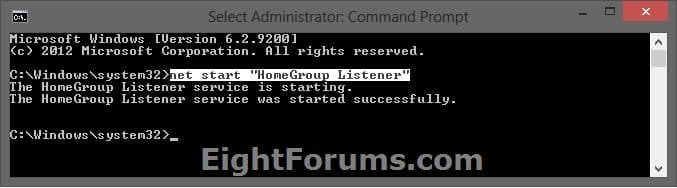

CMD_Start.jpg


4. When finished, you can close the elevated command prompt.


OPTION THREE

To Start, Stop, and Disable Services using "Sc" Commands

1. Open an elevated command prompt, and do step 2, 3, or 4 below for what you would like to do.

2. To Stop a Service using "Sc Stop" Command in Command Prompt

A) In the elevated command prompt, type the command below, press Enter, and go to step 5 below.
NOTE: The Service name of a service is displayed in the service's properties.

sc stop "service name"


Name.jpg


For example:
If I wanted to stop the HomeGroup Listener service, I would type the command below using the HomeGroupListener (service name) exactly in the command prompt, and press Enter.


sc stop "HomeGroupListener"
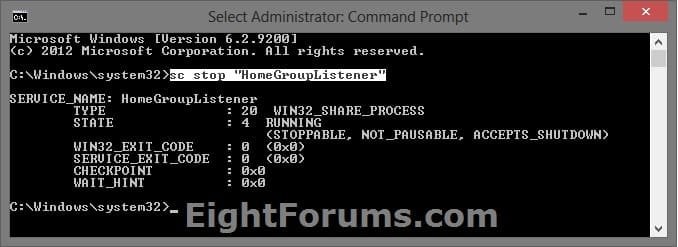

SC_Stop.jpg


3. To Disable a Service using "Sc Config" Command in Command Prompt

A) Do step 2 above to stop the service.

B) In the elevated command prompt, type the command below, press Enter, and go to step 5 below.
NOTE: The Service name of a service is displayed in the service's properties.

sc config "service name" start=disabled


For example:
If I wanted to disable the HomeGroup Listener service, I would type the command below using the HomeGroupListener (service name) exactly in the command prompt, and press Enter.


sc config "HomeGroupListener" start=disabled


SC_Disabled.jpg


4. To Start/Enable a Service using "Sc Start" & "Sc Config" Commands

A) If the Startup type of the service is set to Disabled, then in the elevated command prompt, type the command below using the startup type you want to set instead, and press Enter.
NOTE: The Service name of a service is displayed in the service's properties.

sc config "service name" start=demand

or

sc config "service name" start=auto

or

sc config "service name" start=delayed-auto


   Note
"Startup Type" for Service

  • Manual (demand) - Manual mode allows Windows to start a service when needed. However, very few services will start up when required in Manual mode. If you find you need a service, place it into Automatic.
  • Automatic (auto) - With a service in this state, it will start at boot time. Some services, when no longer required, will also automatically stop when not needed. If you find you do not need a service, place it into Manual or Disabled.
  • Automatic (Delayed Start) (delayed-auto) - With a service in this state, it will start just after boot time. Some services, when no longer required, will also automatically stop when not needed. If you find you do not need a service, place it into Manual or Disabled.


For example:
If I wanted to set the startup type for the HomeGroup Listener service to Manual, I would type the command below using the HomeGroupListener (service name) exactly in the command prompt, and press Enter.


sc config "HomeGroupListener" start=demand


SC_Config.jpg


B) In the elevated command prompt, type the command below using the same service name from step 4A above, press Enter, and go to step 5 below.

sc stop "service name"


For example:
If I wanted to start the HomeGroup Listener service, I would type the command below using the HomeGroupListener (service name) exactly in the command prompt, and press Enter.


sc start "HomeGroupListener"
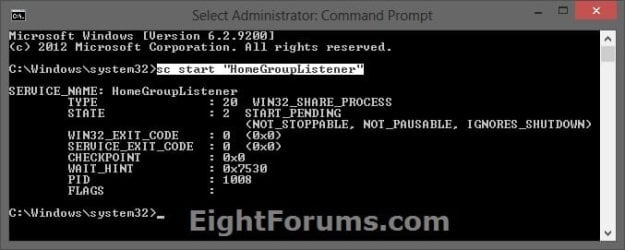

SC_Start.jpg


5. When finished, you can close the elevated command prompt.


OPTION FOUR

To Start, Stop, and Disable Services in Registry Editor

1. First, open services.msc and double click/tap on the service to see what the "Service name" is for the service. This will be the name of the registry key for the service in step 4 below.Name.jpg

2. Press the Windows + R keys to open the Run dialog, type regedit, and press Enter.

3. If prompted by UAC, then click/tap on Yes.

4. In Registry Editor, go to the location below: (see screenshot below)
NOTE: Substitute Service name in the location below with the actual service name from step 1 above.HKEY_LOCAL_MACHINE\SYSTEM\CurrentControlSet\Services\Service name


For example: The "Service name" for the HomeGroup Listener service is HomeGroupListener, so I would go to this location in the registry.

HKEY_LOCAL_MACHINE\SYSTEM\CurrentControlSet\Services\HomeGroupListener
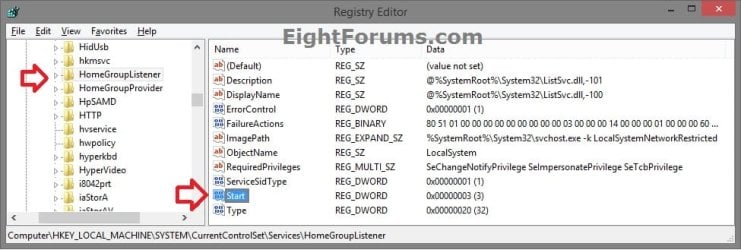

Services_Registry-1.jpg

5. In the left pane of the Service name (ex: HomeGroupListener), double click on the Start DWORD to modify it. (see screenshot below)

6. Type in a data value from the table below for what you would like to do, then click/tap on OK. (see screenshot below)Services_Registry-2.jpg

Startup TypeDWORD "Data" Value
Automatic (Delayed Start)DelayedAutostart = 1
Start = 2
AutomaticDelayedAutostart = 0
Start = 2
ManualDelayedAutostart = 0
Start = 3
DisabledDelayedAutostart = 0
Start = 4


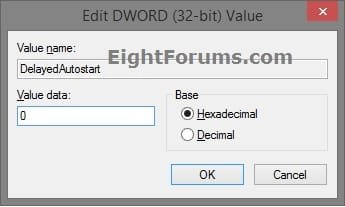
7. If needed, double click on the DelayedAutostart DWORD to modify it's data value (0 or 1) to what's in the table above for what you want set, and click/tap on OK. (see screenshot below)
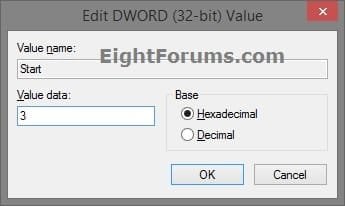
NOTE: If the DelatedAutostart DWORD is not there, then you can right click on an empty area in the right pane, click on New and DWORD (32-bit) Value, type DelatedAutostart, and press Enter to add it. If DelatedAutostart is not there, then it will be the same as it being set to 0 (zero).Services_Registry-3.jpg

8. When finished, close Registry Editor, and restart PC to apply.


That's it,
Shawn Brink


Last edited:
So now that we know the "How", here is a good guide IMO as to the "What" services to manipulate. The guy goes by the handle Black Viper, and he has shared the fruits of his labors, we just can confirm further as to its applicability.

The link is Windows 7 Service Configurations by Black Viper.

As I mentioned before on another site, my RAM usage went down by 100 MB after the "Tweaks" provided. Perhaps -100 MB is a good mod or is it negligible who can say? But anyway my great THANKS to the author.
 

My Computer

OS
Windows 2000
Thank you Pogi, but it was already included in the yellow TIP box at the top. ;)

Thank you for sharing and confirming your results with Black Viper's suggestions though. :)
 

My Computer

Computer type
PC/Desktop
Computer Manufacturer/Model Number
Self built custom
OS
64-bit Windows 11 Pro for Workstations
CPU
Intel i7-8700K OC'd to 5 GHz
Motherboard
ASUS ROG Maximus XI Formula Z390
Memory
64 GB (4x16GB) G.SKILL TridentZ RGB DDR4 3600 MHz
Graphics Card(s)
ASUS ROG-STRIX-GTX1080TI-O11G-GAMING
Sound Card
Integrated
Monitor(s) Displays
2 x Samsung Odyssey G7 27"
Screen Resolution
2560x1440
Hard Drives
1TB Samsung 990 PRO M.2,
4TB Samsung 990 PRO PRO M.2,
TerraMaster F8 SSD Plus NAS
PSU
Seasonic Prime Titanium 850W
Case
Thermaltake Core P3
Cooling
Corsair Hydro H115i
Keyboard
Logitech wireless K800
Mouse
Logitech MX Master 4
Internet Speed
2 Gb/s Download and 100 Mb/s Upload
Antivirus
Malwarebyte Anti-Malware Premium
Browser
Google Chrome
Other Info
Logitech Z625 speaker system,
Logitech BRIO 4K Pro webcam,
HP Color LaserJet Pro MFP M477fdn,
APC SMART-UPS RT 1000 XL - SURT1000XLI,
Galaxy S23 Plus phone
NOTE: You may need to restart the computer for the changes to the services to take affect.

I never had to restart for that.

But Disabling directly a service can be dangerous. A good step is the set it to "Manual" and Stop it with the "Stop" Buttons. If something need this service it allways can be loaded... only if it's needed.

Since win2k I prefere set to manual than Disable, it's safer and do the same thing for most of them.
Only a few service (like Adobe "Bonjour" or "Googleupdater", or firewall if you allready have one other) can be salfy disabled
 

My Computer

OS
Vista H.P. SP1 x32 Seven RC x64
CPU
Q6600 @ 3.4Ghz
Motherboard
GA-EP45-DS3L
Memory
4Go PC2-6400
Graphics Card(s)
8500GT @ 700/500
Sound Card
Audigy Platinium
Monitor(s) Displays
Mitsubishi Diamond Pro 920 + Mitsubishi Diamond Pro 720
Screen Resolution
1600x1200 twice
Hard Drives
Hitachi 160Go
Maxtor 160Go (system drive)
Maxtor 200Go in Antec MX-1 EC external box (eSATA-USB2.0)
PSU
Corsair VX550W
Case
Thermaltake Xaser III
Cooling
Watercooling (CPU, GPU, HDD, NB)
Keyboard
MS Wireless Multimedia 6000 V2.0
Mouse
IntellEye Explorer 3.0
Internet Speed
ADSL 18Mbit/s/1Mbit/s
Hi LePoilu,

That note is usually just for those services that will not start for whatever reason normally though, but setting them to Automatic and restarting the computer allows them to start again. :)
 

My Computer

Computer type
PC/Desktop
Computer Manufacturer/Model Number
Self built custom
OS
64-bit Windows 11 Pro for Workstations
CPU
Intel i7-8700K OC'd to 5 GHz
Motherboard
ASUS ROG Maximus XI Formula Z390
Memory
64 GB (4x16GB) G.SKILL TridentZ RGB DDR4 3600 MHz
Graphics Card(s)
ASUS ROG-STRIX-GTX1080TI-O11G-GAMING
Sound Card
Integrated
Monitor(s) Displays
2 x Samsung Odyssey G7 27"
Screen Resolution
2560x1440
Hard Drives
1TB Samsung 990 PRO M.2,
4TB Samsung 990 PRO PRO M.2,
TerraMaster F8 SSD Plus NAS
PSU
Seasonic Prime Titanium 850W
Case
Thermaltake Core P3
Cooling
Corsair Hydro H115i
Keyboard
Logitech wireless K800
Mouse
Logitech MX Master 4
Internet Speed
2 Gb/s Download and 100 Mb/s Upload
Antivirus
Malwarebyte Anti-Malware Premium
Browser
Google Chrome
Other Info
Logitech Z625 speaker system,
Logitech BRIO 4K Pro webcam,
HP Color LaserJet Pro MFP M477fdn,
APC SMART-UPS RT 1000 XL - SURT1000XLI,
Galaxy S23 Plus phone
Hi

That note is usually just for those services that will not start for whatever reason normally though


Ok, I tought it was for a "good stop" of the services ;)

Checking dependencies can sometimes explain why a service can not be stop or launch.
 

My Computer

OS
Vista H.P. SP1 x32 Seven RC x64
CPU
Q6600 @ 3.4Ghz
Motherboard
GA-EP45-DS3L
Memory
4Go PC2-6400
Graphics Card(s)
8500GT @ 700/500
Sound Card
Audigy Platinium
Monitor(s) Displays
Mitsubishi Diamond Pro 920 + Mitsubishi Diamond Pro 720
Screen Resolution
1600x1200 twice
Hard Drives
Hitachi 160Go
Maxtor 160Go (system drive)
Maxtor 200Go in Antec MX-1 EC external box (eSATA-USB2.0)
PSU
Corsair VX550W
Case
Thermaltake Xaser III
Cooling
Watercooling (CPU, GPU, HDD, NB)
Keyboard
MS Wireless Multimedia 6000 V2.0
Mouse
IntellEye Explorer 3.0
Internet Speed
ADSL 18Mbit/s/1Mbit/s
Thank you Pogi, but it was already included in the yellow TIP box at the top. ;)

Thank you for sharing and confirming your results with Black Viper's suggestions though. :)

I stand corrected!

I never had to restart for that.

But Disabling directly a service can be dangerous. A good step is the set it to "Manual" and Stop it with the "Stop" Buttons. If something need this service it allways can be loaded... only if it's needed.

I more than agree with this approach. Because now I cannot use the WiFi. Help!!!!
 
Last edited by a moderator:

My Computer

OS
Windows 2000
Always welcomed though guys. :)
 

My Computer

Computer type
PC/Desktop
Computer Manufacturer/Model Number
Self built custom
OS
64-bit Windows 11 Pro for Workstations
CPU
Intel i7-8700K OC'd to 5 GHz
Motherboard
ASUS ROG Maximus XI Formula Z390
Memory
64 GB (4x16GB) G.SKILL TridentZ RGB DDR4 3600 MHz
Graphics Card(s)
ASUS ROG-STRIX-GTX1080TI-O11G-GAMING
Sound Card
Integrated
Monitor(s) Displays
2 x Samsung Odyssey G7 27"
Screen Resolution
2560x1440
Hard Drives
1TB Samsung 990 PRO M.2,
4TB Samsung 990 PRO PRO M.2,
TerraMaster F8 SSD Plus NAS
PSU
Seasonic Prime Titanium 850W
Case
Thermaltake Core P3
Cooling
Corsair Hydro H115i
Keyboard
Logitech wireless K800
Mouse
Logitech MX Master 4
Internet Speed
2 Gb/s Download and 100 Mb/s Upload
Antivirus
Malwarebyte Anti-Malware Premium
Browser
Google Chrome
Other Info
Logitech Z625 speaker system,
Logitech BRIO 4K Pro webcam,
HP Color LaserJet Pro MFP M477fdn,
APC SMART-UPS RT 1000 XL - SURT1000XLI,
Galaxy S23 Plus phone
Thanks Shawn,
I had turned some of them off, but this info showed me even more. :)
 

My Computer

Computer Manufacturer/Model Number
Dilithium Computers/Engineering (Myself) Star date 42.739285.5432.9
OS
Win7 Ultimate x64 on Desktop / Win7 Ultimate x86 on laptop / Win7 x86 Starter on Netbook
CPU
AMD Phenom 965 X4 3.4Ghz cpu Black Edition
Motherboard
Gigabyte 790XT
Memory
12 Gb DDR3
Graphics Card(s)
Nvidea Gforce GTX 470
Sound Card
Onboard Realtek hi-fi
Monitor(s) Displays
Lg 3D led 23"
Screen Resolution
1920x1080
Hard Drives
Loads maxstore sata 1 & 2/ loads of partitions + 1Tb Hitachi sata 2. 256Gb Crucial ssd.
PSU
OCZ 700W GameXstream
Case
Artec 10000
Cooling
On board + many case fans
Keyboard
Logitech wireless K350
Mouse
Inferno gaming mouse
Internet Speed
Talk talk. 10Mb
Other Info
My PC was hand built with matchsticks. xbox 360 controller. Printers,fax.........
You're welcome Romulinx. :)
 

My Computer

Computer type
PC/Desktop
Computer Manufacturer/Model Number
Self built custom
OS
64-bit Windows 11 Pro for Workstations
CPU
Intel i7-8700K OC'd to 5 GHz
Motherboard
ASUS ROG Maximus XI Formula Z390
Memory
64 GB (4x16GB) G.SKILL TridentZ RGB DDR4 3600 MHz
Graphics Card(s)
ASUS ROG-STRIX-GTX1080TI-O11G-GAMING
Sound Card
Integrated
Monitor(s) Displays
2 x Samsung Odyssey G7 27"
Screen Resolution
2560x1440
Hard Drives
1TB Samsung 990 PRO M.2,
4TB Samsung 990 PRO PRO M.2,
TerraMaster F8 SSD Plus NAS
PSU
Seasonic Prime Titanium 850W
Case
Thermaltake Core P3
Cooling
Corsair Hydro H115i
Keyboard
Logitech wireless K800
Mouse
Logitech MX Master 4
Internet Speed
2 Gb/s Download and 100 Mb/s Upload
Antivirus
Malwarebyte Anti-Malware Premium
Browser
Google Chrome
Other Info
Logitech Z625 speaker system,
Logitech BRIO 4K Pro webcam,
HP Color LaserJet Pro MFP M477fdn,
APC SMART-UPS RT 1000 XL - SURT1000XLI,
Galaxy S23 Plus phone
Handy tip for those who forget what your original settings were, click Action > Export list. This will save a text file of your services.
 

My Computer

OS
Win 7
i must admit brink you are a genius sir ive tried 4 of these tuts the change logon,3dflip,desktop slideshow and opted fr the "safe" services and havent encountered one problem
 

My Computer

OS
windows7 7100 x64
CPU
amd athlon 64 3500+
Motherboard
asus a8n sli deluxe
Memory
2gb
Graphics Card(s)
nvidia 7800gt
Screen Resolution
1280x1024
Hello Murphy, and welcome to Seven Forums.

I'm happy to hear that. If you do encounter problems with one, then please let me know so that I can make any updates or add any suggestions that it may need to it. :)

Shawn
 

My Computer

Computer type
PC/Desktop
Computer Manufacturer/Model Number
Self built custom
OS
64-bit Windows 11 Pro for Workstations
CPU
Intel i7-8700K OC'd to 5 GHz
Motherboard
ASUS ROG Maximus XI Formula Z390
Memory
64 GB (4x16GB) G.SKILL TridentZ RGB DDR4 3600 MHz
Graphics Card(s)
ASUS ROG-STRIX-GTX1080TI-O11G-GAMING
Sound Card
Integrated
Monitor(s) Displays
2 x Samsung Odyssey G7 27"
Screen Resolution
2560x1440
Hard Drives
1TB Samsung 990 PRO M.2,
4TB Samsung 990 PRO PRO M.2,
TerraMaster F8 SSD Plus NAS
PSU
Seasonic Prime Titanium 850W
Case
Thermaltake Core P3
Cooling
Corsair Hydro H115i
Keyboard
Logitech wireless K800
Mouse
Logitech MX Master 4
Internet Speed
2 Gb/s Download and 100 Mb/s Upload
Antivirus
Malwarebyte Anti-Malware Premium
Browser
Google Chrome
Other Info
Logitech Z625 speaker system,
Logitech BRIO 4K Pro webcam,
HP Color LaserJet Pro MFP M477fdn,
APC SMART-UPS RT 1000 XL - SURT1000XLI,
Galaxy S23 Plus phone
Sweet! My boot time is better now :)
 

My Computer

Computer type
PC/Desktop
Computer Manufacturer/Model Number
Multirama PC Expert [Bulgaria]
OS
Windows 7 Home Premium [64-Bit]
CPU
Intel Core 2 Quad CPU Q8200 @ 2.33 GHz
Motherboard
GIGABYTE GA-G31M-S2C
Memory
4094 MB DDR2
Graphics Card(s)
SAPPHIRE Radeon HD 6970 (2 GB VRAM)
Sound Card
Realtek ALC883 @ Intel 82801GB ICH7 - High Definition Audio
Monitor(s) Displays
Samsung SyncMaster BX2235 [21.5" LCD with LED Backlight]
Screen Resolution
1920x1080
Hard Drives
Hitachi HDT721075SLA360 - 750 GB
PSU
Cooler Master GX750 - 750W
Case
Multirama (Black / 2010 Revision)
Cooling
Stock + Cooler Master
Keyboard
Logitech G510 (Gaming Keyboard)
Mouse
Razer Lachesis (4000 DPI, Blue Version)
Internet Speed
Vivacom Optical [100 Mbps]
Browser
Chrome [Windows]
I have posted a list of services for Windows 7 RTM Ultimate 64Bit with my own notes. Take a look and hopefully it is helpful: Jorge Orchilles
 

My Computer

OS
Windows 7 RTM Ultimate 64Bit
So now that we know the "How", here is a good guide IMO as to the "What" services to manipulate. The guy goes by the handle Black Viper, and he has shared the fruits of his labors, we just can confirm further as to its applicability.

The link is Windows 7 Service Configurations by Black Viper.

As I mentioned before on another site, my RAM usage went down by 100 MB after the "Tweaks" provided. Perhaps -100 MB is a good mod or is it negligible who can say? But anyway my great THANKS to the author.

Hi,
I'm trying to access this link but just keep getting 'page not available' anyone any ideas?:cry:
Cheers
 

My Computer

Computer Manufacturer/Model Number
Custom
OS
win 7
CPU
Phenom x3 720 (3.2)
Motherboard
ASRock M3A790GXH/128M
Memory
Corsair DHX 4 gig ddr3 1330
Graphics Card(s)
Radeon 4850x2 1gb
Sound Card
Onboard 7.1
PSU
Aztec 450
Hi,
I'm trying to access this link but just keep getting 'page not available' anyone any ideas?:cry:
Cheers


S

Its got to be your browser. Its up in mine.

Ken
 

My Computer

Computer Manufacturer/Model Number
HP Pavillion dv-7 1005 Tx
OS
Win 8 Release candidate 8400
CPU
[email protected]
Memory
4 gigs
Graphics Card(s)
Nvidia 9600M
Sound Card
HD built-in
Monitor(s) Displays
17" Wxga
Screen Resolution
1440x900
Cooling
none
Internet Speed
45Mb down 5Mb up
is it a country thing? i'm in uk
 

My Computer

Computer Manufacturer/Model Number
Custom
OS
win 7
CPU
Phenom x3 720 (3.2)
Motherboard
ASRock M3A790GXH/128M
Memory
Corsair DHX 4 gig ddr3 1330
Graphics Card(s)
Radeon 4850x2 1gb
Sound Card
Onboard 7.1
PSU
Aztec 450

My Computer

Computer Manufacturer/Model Number
mickey megabyte 1234
OS
ultimate 64 sp1
CPU
i5 2500K [email protected]
Motherboard
MSI P67A-GD53
Memory
8 gigs GSkill Ripjaws 1600
Graphics Card(s)
amd hd6950
Sound Card
creative x-fi gamer
Monitor(s) Displays
samsung 24"
Screen Resolution
1920x1080
Hard Drives
ocz vertex 2e 60 gig, samsung f3 1tb, buffalo 2tb ext
PSU
antec 550
Case
antec three hundred
Cooling
i'm a cooling fan
Keyboard
saitek eclipse ii
Mouse
logitech g3
Internet Speed
about 4 Mbps
Other Info
i love win7
bizarre, tried in ie too and no joy? ummmmm ... maybe coz i'm with (and I know!) AOL :-(
 

My Computer

Computer Manufacturer/Model Number
Custom
OS
win 7
CPU
Phenom x3 720 (3.2)
Motherboard
ASRock M3A790GXH/128M
Memory
Corsair DHX 4 gig ddr3 1330
Graphics Card(s)
Radeon 4850x2 1gb
Sound Card
Onboard 7.1
PSU
Aztec 450
Back
Top