Set affinity in task mgr as default

Newt

New member
Member
Local time
1:43 AM
Messages
70
Location
Kawartha Lakes
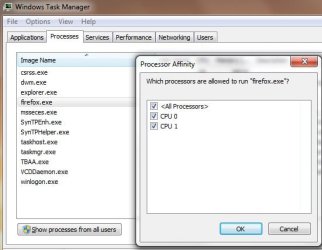
I run a screen magnifier/reader that I want to use both my cpu's but at the moment it is set to only use one.I can change it manually to two but it reverts back to one after reboot.

I do that in task manager.

How can I change it to both cpu's as default?
 

My Computer My Computer

At a glance

Windows 7 Home Premium 64 bitAthlon 64 x2 Dual Core 5200+Corsair 2 X 2048 DDR2NVIDIA GEForce 8400 GS
OS
Windows 7 Home Premium 64 bit
CPU
Athlon 64 x2 Dual Core 5200+
Motherboard
Gigabyte M61PME S2P
Memory
Corsair 2 X 2048 DDR2
Graphics Card(s)
NVIDIA GEForce 8400 GS
Screen Resolution
1080 x 1024
Hard Drives
WD Caviar Black Sata2 1TB - Internal
ITB-External
I run a screen magnifier/reader that I want to use both my cpu's but at the moment it is set to only use one.I can change it manually to two but it reverts back to one after reboot.

I do that in task manager.

How can I change it to both cpu's as default?

Hi newt and welcome

Unfortunately that is written into to the magnfier app. you can force it to use both but those change cant stick. Magnifier app isnt going to run any faster using both cpus than it does one one. Why do you need to ?

edit: unfortunately not all apps are written for mutli threading


Ken J+
 
Last edited:

My Computer My Computer

At a glance

Win 8 Release candidate 8400[email protected]4 gigsNvidia 9600M
Computer Manufacturer/Model Number
HP Pavillion dv-7 1005 Tx
OS
Win 8 Release candidate 8400
CPU
[email protected]
Memory
4 gigs
Graphics Card(s)
Nvidia 9600M
Sound Card
HD built-in
Monitor(s) Displays
17" Wxga
Screen Resolution
1440x900
Cooling
none
Internet Speed
45Mb down 5Mb up
Uhhh...all processes you start have no Affinity (which CPU it uses) set. It is setup to use all processors. There is no reason to change this...
 

Attachments

  • Untitled.jpg
    Untitled.jpg
    29.7 KB · Views: 59

My Computer My Computer

At a glance

Windows 10 Pro (x64)Intel Core i7-3930K (3.2GHz - 4.5GHz)4x Samsung 4GB PC3-12800 DDR3 (16GB 1600MHz)Nvidia Geforce GTX 690
Computer type
PC/Desktop
Computer Manufacturer/Model Number
Alienware Aurora ALX R4
OS
Windows 10 Pro (x64)
CPU
Intel Core i7-3930K (3.2GHz - 4.5GHz)
Motherboard
Alienware Aurora-R4 x79
Memory
4x Samsung 4GB PC3-12800 DDR3 (16GB 1600MHz)
Graphics Card(s)
Nvidia Geforce GTX 690
Sound Card
SteelSeries Siberia Elite
Monitor(s) Displays
Dell UltraSharp U3011
Screen Resolution
2560x1600
Hard Drives
Samsung 850 Pro 256 GB, Seagate 1TB Desktop Hybrid HDD, 2x Western Digital 4TB Green HDD
PSU
875W Some Dell PSU <.<
Case
Alienware Aurora ALX
Cooling
Custom Liquid Cooling (EK CPU & GPU blocks) dual EK 480RAD
Keyboard
Logitech G710+ Mechanical
Mouse
Logitech G700s
Internet Speed
Verizon Fios (50 mbps average)
Other Info
Server: Intel NUC D54250WYK: i5-4250U, 16GB, 256 GB mSATA, Windows Server 2012 R2
Mine is set to use one cpu for the mag. program.I want to use two because the font can deteriorate over time,gets jagged not sharp and bold,I have to shut off the mag. program and restart it to get clean fonts,can be as often as twice an hour.

I thought that maybe having it use the two cpu's that it might help.I was just experimenting,looking for a fix.
 

My Computer My Computer

At a glance

Windows 7 Home Premium 64 bitAthlon 64 x2 Dual Core 5200+Corsair 2 X 2048 DDR2NVIDIA GEForce 8400 GS
OS
Windows 7 Home Premium 64 bit
CPU
Athlon 64 x2 Dual Core 5200+
Motherboard
Gigabyte M61PME S2P
Memory
Corsair 2 X 2048 DDR2
Graphics Card(s)
NVIDIA GEForce 8400 GS
Screen Resolution
1080 x 1024
Hard Drives
WD Caviar Black Sata2 1TB - Internal
ITB-External
Back
Top