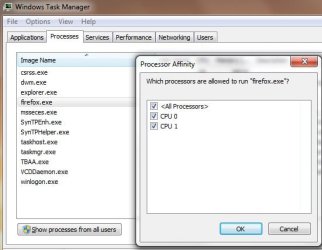
I run a screen magnifier/reader that I want to use both my cpu's but at the moment it is set to only use one.I can change it manually to two but it reverts back to one after reboot.
I do that in task manager.
How can I change it to both cpu's as default?
I do that in task manager.
How can I change it to both cpu's as default?
My Computer
At a glance
Windows 7 Home Premium 64 bitAthlon 64 x2 Dual Core 5200+Corsair 2 X 2048 DDR2NVIDIA GEForce 8400 GS
- OS
- Windows 7 Home Premium 64 bit
- CPU
- Athlon 64 x2 Dual Core 5200+
- Motherboard
- Gigabyte M61PME S2P
- Memory
- Corsair 2 X 2048 DDR2
- Graphics Card(s)
- NVIDIA GEForce 8400 GS
- Screen Resolution
- 1080 x 1024
- Hard Drives
- WD Caviar Black Sata2 1TB - Internal
ITB-External