
You are using an out of date browser. It may not display this or other websites correctly.
You should upgrade or use an alternative browser.
You should upgrade or use an alternative browser.
Set default menu size and font for new users?
- Thread starter erco61
- Start date

dunfiddlin
Banned
Is your aim to prevent new users changing these so that they remain uniform?
Whatever, it sounds like a job for group policy. Run gpedit.msc (not available in Home version) and see if that gives you what you need.
Whatever, it sounds like a job for group policy. Run gpedit.msc (not available in Home version) and see if that gives you what you need.
My Computer
- OS
- Windows 7
Load a specific theme not working in W7 Ultimate 64 bit
Under Group Policy Editor > User Configuration > Administrative Templates > Control Panel > Personalization, there is a policy called "Load a specific theme" and I have set this policy. Unfortunately, this policy doesn't seem to work on my Windows 7 Ultimate 64 bit OS I have verified that the theme I want to set as default is valid and, I have verified that the registry key is set at HKEY_CURRENT_USER\Software\Policies\Microsoft\Windows\Personalization\ThemeFile="C:\Windows\Resources\Themes\myTheme.theme"
I know the theme is good because it comes up as an installed theme if I right click on the desktop and select personalize. If I manually select this theme after creating a new user account, then my colors and wallpaper are correct. Why does the theme not come up as the default theme for a new user?
Can somebody at MSFT take a look at this?
Thank you,
erco
Under Group Policy Editor > User Configuration > Administrative Templates > Control Panel > Personalization, there is a policy called "Load a specific theme" and I have set this policy. Unfortunately, this policy doesn't seem to work on my Windows 7 Ultimate 64 bit OS
I have verified that the theme I want to set as default is valid and, I have verified that the registry key is set at HKEY_CURRENT_USER\Software\Policies\Microsoft\Windows\Personalization\ThemeFile="C:\Windows\Resources\Themes\myTheme.theme"I know the theme is good because it comes up as an installed theme if I right click on the desktop and select personalize. If I manually select this theme after creating a new user account, then my colors and wallpaper are correct. Why does the theme not come up as the default theme for a new user?
Can somebody at MSFT take a look at this?
Thank you,
erco
My Computer
- OS
- Windows
dunfiddlin
Banned
Under Group Policy Editor > User Configuration > Administrative Templates > Control Panel > Personalization, there is a policy called "Load a specific theme" and I have set this policy. Unfortunately, this policy doesn't seem to work on my Windows 7 Ultimate 64 bit OS
I know the theme is good because it comes up as an installed theme if I right click on the desktop and select personalize. If I manually select this theme after creating a new user account, then my colors and wallpaper are correct. Why does the theme not come up as the default theme for a new user?
Can somebody at MSFT take a look at this?
Thank you,
erco
Have you also configured the various "Prevent" settings? If not then I suspect that the theme is still essentially optional and therefore not forced as default.
My Computer
- OS
- Windows 7
Yes. I did enable and disable as many of the prevent settings as I thought applicable. The default theme specified in the group policy editor and in the registry keys is never the default theme for a new user. I think this is a bug in windows 7 64 bit OS and it is a real problem for my team.
We build HW platforms and develop proprietary applications that require specific settings for menu size, windows color, fonts etc and, we will be going to market soon with our new Windows 7 64 bit OS.
At this point, I can only hope that somebody from MSFT is monitoring this forum and can fix what is broken.
We build HW platforms and develop proprietary applications that require specific settings for menu size, windows color, fonts etc and, we will be going to market soon with our new Windows 7 64 bit OS.
At this point, I can only hope that somebody from MSFT is monitoring this forum and can fix what is broken.
My Computer
- OS
- Windows

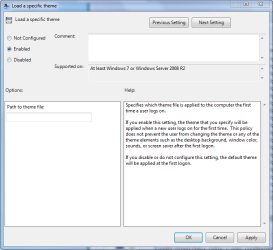
Seems to me that for this to work with gpedit you need to designate the file pathway to the actual theme.
The pictures below should give you an idea how to do this. You also will need to go to control panel then folder options and enable hidden files too see the application date file which is part of the file path to themes. So for me the path would be C:\Users\Rob\AppData\Local\Microsoft\Windows\Themes\Name of theme..
You may need to do this on both the Extended and Standard tabs.
If you scroll down a bit in gpedit you will also see a setting in the "prevent" section, which allows you to prevent the theme from being changed. Scrolling futher down the prevent section I'm seeing another setting that prevents users from using the Control Panel to change the glass color, system colors, or color scheme of the desktop and windows. Scrolling down to the "Prohibit" section you can indeed keep users from changing the visual style and font size.
The pictures below should give you an idea how to do this. You also will need to go to control panel then folder options and enable hidden files too see the application date file which is part of the file path to themes. So for me the path would be C:\Users\Rob\AppData\Local\Microsoft\Windows\Themes\Name of theme..
You may need to do this on both the Extended and Standard tabs.
If you scroll down a bit in gpedit you will also see a setting in the "prevent" section, which allows you to prevent the theme from being changed. Scrolling futher down the prevent section I'm seeing another setting that prevents users from using the Control Panel to change the glass color, system colors, or color scheme of the desktop and windows. Scrolling down to the "Prohibit" section you can indeed keep users from changing the visual style and font size.
Attachments

Last edited:
My Computer
- Computer type
- PC/Desktop
- Computer Manufacturer/Model Number
- Home built
- OS
- Windows 7 Ult, Windows 8.1 Pro,
- CPU
- Q9650-4.275GHz, E8600 4.5GHz, E6750-3.8GHz
- Motherboard
- Evga 780i FTW
- Memory
- G.Skill PC2 9600 1200Mhz 5 5 5 15 2T
- Graphics Card(s)
- GTX480
- Sound Card
- Asus Xonar D2
- Monitor(s) Displays
- HannsG
- Screen Resolution
- 1680X1050
- Hard Drives
- GSkill Phoenix Pro 120GB SSD
- PSU
- ThermalTake Toughpower 1000Watt modular
- Case
- ThermalTake XaserV
- Cooling
- Xigmatek S1283
- Keyboard
- Logitech G15
- Mouse
- Logitech G9
- Internet Speed
- T1
Thank you Chev65,
I saved my current theme to C:\Users\me\AppData\Local\Microsoft\Windows\Themes\my.theme
and then copied to to C:\Windows\Resources\Themes\my.theme
In the group policy editor, I then set the default theme policy and specified the path to the copied theme file. I have set and or unset all of the other group policy settings you describe but, the default theme I have specified is not coming up automatically for a new user.
Since I copied the theme file to its new location, it is now an "installed theme" and a new user can select it by right clicking on the desktop > Personalize and select the theme.
I know this process was working on a 32 bit OS build that I configured for another product. We need this policy to work correctly for our 64 bit OS build. I am increasingly inclined to believe that this is a 64 bit OS bug that needs to be fixed by MSFT.
Thank you for taking the time to look into this issue,
ERCO
I saved my current theme to C:\Users\me\AppData\Local\Microsoft\Windows\Themes\my.theme
and then copied to to C:\Windows\Resources\Themes\my.theme
In the group policy editor, I then set the default theme policy and specified the path to the copied theme file. I have set and or unset all of the other group policy settings you describe but, the default theme I have specified is not coming up automatically for a new user.
Since I copied the theme file to its new location, it is now an "installed theme" and a new user can select it by right clicking on the desktop > Personalize and select the theme.
I know this process was working on a 32 bit OS build that I configured for another product. We need this policy to work correctly for our 64 bit OS build. I am increasingly inclined to believe that this is a 64 bit OS bug that needs to be fixed by MSFT.
Thank you for taking the time to look into this issue,
ERCO
My Computer
- OS
- Windows
I'm assuming that you need this theme to be installed and working as soon as the new User signs in to a fresh installation? It even says there in gpedit that it should work for that. Have you tried setting it up on both tabs, extended and standard?
If you right click on "load a specific theme" there are also some filter and policy options that may need your attention. There is also an area for selected platforms where you can choose Explorer version. They might be worth a try.
If you right click on "load a specific theme" there are also some filter and policy options that may need your attention. There is also an area for selected platforms where you can choose Explorer version. They might be worth a try.
Last edited:
My Computer
- Computer type
- PC/Desktop
- Computer Manufacturer/Model Number
- Home built
- OS
- Windows 7 Ult, Windows 8.1 Pro,
- CPU
- Q9650-4.275GHz, E8600 4.5GHz, E6750-3.8GHz
- Motherboard
- Evga 780i FTW
- Memory
- G.Skill PC2 9600 1200Mhz 5 5 5 15 2T
- Graphics Card(s)
- GTX480
- Sound Card
- Asus Xonar D2
- Monitor(s) Displays
- HannsG
- Screen Resolution
- 1680X1050
- Hard Drives
- GSkill Phoenix Pro 120GB SSD
- PSU
- ThermalTake Toughpower 1000Watt modular
- Case
- ThermalTake XaserV
- Cooling
- Xigmatek S1283
- Keyboard
- Logitech G15
- Mouse
- Logitech G9
- Internet Speed
- T1
Yes, exactly. Any newly created user account needs to have menu size, font, and font size pre set to certain values on his/her first login in order for our applications to look right.
Your suggestion to check both extended and standard tabs was spot on. The 2 tabs had different (albeit valid) paths to viable .theme files. I set both paths to the theme under C:\Windows and then reset them both to the theme under C:\Users but, the default theme still does not present for a new user in either case.
I reviewed the filter and policy settings but, nothing make my theme come up as the default.
There must be a bug in windows 7 Ultimate 64 bit.
Is there an engineer at MSFT who is running Windows 7 Ultimate 64 bit OS and can check on this?
Your suggestion to check both extended and standard tabs was spot on. The 2 tabs had different (albeit valid) paths to viable .theme files. I set both paths to the theme under C:\Windows and then reset them both to the theme under C:\Users but, the default theme still does not present for a new user in either case.
I reviewed the filter and policy settings but, nothing make my theme come up as the default.
There must be a bug in windows 7 Ultimate 64 bit.
Is there an engineer at MSFT who is running Windows 7 Ultimate 64 bit OS and can check on this?
My Computer
- OS
- Windows
I'm sure they have someone more familior with GPE but they would probably charge you for the help. I still can't help to think we missed a step or something is blocking the GPE from doing it's job. It might only work using the default User theme file path, hard to say.
I havn't messed with GPE enough to really know the program yet. I'll do some searching tomorrow and see what I can find out.
I havn't messed with GPE enough to really know the program yet. I'll do some searching tomorrow and see what I can find out.
My Computer
- Computer type
- PC/Desktop
- Computer Manufacturer/Model Number
- Home built
- OS
- Windows 7 Ult, Windows 8.1 Pro,
- CPU
- Q9650-4.275GHz, E8600 4.5GHz, E6750-3.8GHz
- Motherboard
- Evga 780i FTW
- Memory
- G.Skill PC2 9600 1200Mhz 5 5 5 15 2T
- Graphics Card(s)
- GTX480
- Sound Card
- Asus Xonar D2
- Monitor(s) Displays
- HannsG
- Screen Resolution
- 1680X1050
- Hard Drives
- GSkill Phoenix Pro 120GB SSD
- PSU
- ThermalTake Toughpower 1000Watt modular
- Case
- ThermalTake XaserV
- Cooling
- Xigmatek S1283
- Keyboard
- Logitech G15
- Mouse
- Logitech G9
- Internet Speed
- T1
Thank you Chev, and the rest of the Forum community:
I apologize for taking so much of your time on this problem.
I decided to try a test using a 32 bit Windows 7 Pro OS on a similar, but different, HW platform. The default theme was easily set by the group policy editor. I then replaced the 32 bit OS with a fresh Windows 7 Ultimate 64 bit OS build, and voila, the default theme was easily set using the group policy editor.
Clearly, the OS is not to blame for the trouble, and I should have performed a more though test suite, including more than one target, before casting blame on MSFT
Humbly yours,
ERCO
I apologize for taking so much of your time on this problem.
I decided to try a test using a 32 bit Windows 7 Pro OS on a similar, but different, HW platform. The default theme was easily set by the group policy editor. I then replaced the 32 bit OS with a fresh Windows 7 Ultimate 64 bit OS build, and voila, the default theme was easily set using the group policy editor.
Clearly, the OS is not to blame for the trouble, and I should have performed a more though test suite, including more than one target, before casting blame on MSFT
Humbly yours,
ERCO
My Computer
- OS
- Windows
I knew it should work but it seemed like something was blocking it. When in doubt reinstall the Op system and try again. Always a good stradigy for these types of problems.
Did you need to set the path on both tabs? Glad you got it working.
Did you need to set the path on both tabs? Glad you got it working.
Last edited:
My Computer
- Computer type
- PC/Desktop
- Computer Manufacturer/Model Number
- Home built
- OS
- Windows 7 Ult, Windows 8.1 Pro,
- CPU
- Q9650-4.275GHz, E8600 4.5GHz, E6750-3.8GHz
- Motherboard
- Evga 780i FTW
- Memory
- G.Skill PC2 9600 1200Mhz 5 5 5 15 2T
- Graphics Card(s)
- GTX480
- Sound Card
- Asus Xonar D2
- Monitor(s) Displays
- HannsG
- Screen Resolution
- 1680X1050
- Hard Drives
- GSkill Phoenix Pro 120GB SSD
- PSU
- ThermalTake Toughpower 1000Watt modular
- Case
- ThermalTake XaserV
- Cooling
- Xigmatek S1283
- Keyboard
- Logitech G15
- Mouse
- Logitech G9
- Internet Speed
- T1
Similar threads

- Replies
- 0
- Views
- 1K
- Replies
- 49
- Views
- 7K

- Replies
- 0
- Views
- 3K
- Replies
- 10
- Views
- 2K