set network connection priority

lethargos

New member
Member
Local time
4:26 AM
Messages
36
Hi,

My windows computer is connected to two ISPs. I've changed priorities in order to make one of the connections my main one (network connections - advanced - advanced settings - and here I chose the one I wanted). The problem is that it simply isn't working. The computer is still set to be using the other connection.
If I try route print, the metrics of the connection I'd like to be the main one is 276, whereas the other, which the computer is still using now, is 266. Which I take it to mean that changing the priorities from the aforementioned menu simply isn't working. Any ideas how I can make the change stick?

Thank you.
 

My Computer

Computer type
PC/Desktop
OS
Windows 7 Pro
CPU
Intel Core 2 Duo T5800
Memory
3 GB
Hard Drives
Seagate 500GB
The easy way to do it is get a router with Dual Wan.

If you still want to play with the Metric setting I would spread them out farther say give one card a metric of 5 and the other a metric of 700
 

My Computer

Computer type
PC/Desktop
Computer Manufacturer/Model Number
Compac
OS
Microsoft Windows 7 Ultimate 32-bit 7601
CPU
Intel(R) Pentium(R) Dual CPU E2160 @ 1.80GHz
Motherboard
MSI Boston
Memory
4.00 GB
Graphics Card(s)
(1) VNC Mirror Driver (2) Intel(R) G33/G31 Express Chipset
Sound Card
Disabled
Monitor(s) Displays
Headless
Screen Resolution
1280 x 960 x 32 bits (4294967296 colors) @ 60 Hz
Hard Drives
ST3320820AS ATA Device
Keyboard
Headless
Mouse
Headless
Antivirus
Malwarebytes pro
Other Info
Also
Windows 8.1 Laptop and Desktop both Acer
i did eventually change the metric and the route does show a lower metric eventually. The problem, I think, is related to the persistent static route, which is shown in the next section. And that static route tells Windows to use 192.168.1.1 as default gateway (the metric is called "default" - I don't know what its value is exactly, probably the lowest, 0, whatever), instead of 192.168.100.1, which I want it to be.

Using another router to load-balance would have been the easy way out, but that's not an option, I'm afraid.
 

My Computer

Computer type
PC/Desktop
OS
Windows 7 Pro
CPU
Intel Core 2 Duo T5800
Memory
3 GB
Hard Drives
Seagate 500GB
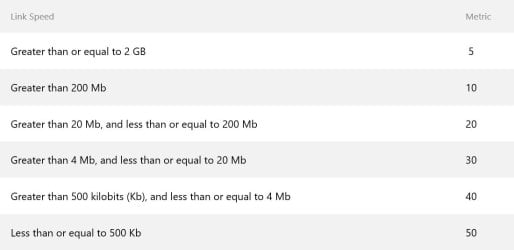
When you have a Lan or Wlan set to default it's metric is set to the speed of the connection.
metric.jpg

If you set one gateway to have a metric of 27 and then you add another new gateway, If you leave the new gateway set to default metric it will automatically be set to 27 also.

I don't believe using the metric setting's to control what gateway the computer uses it will give you consistent or persistent results.

If a gateway with a metric of 5 has a little hiccup the computer may switch to the gateway with a metric of 200 and stay there forever.

The only way to really be sure you are using the right gateway is to either unplug the lan cable or get a dual wan router.
 

My Computer

Computer type
PC/Desktop
Computer Manufacturer/Model Number
Compac
OS
Microsoft Windows 7 Ultimate 32-bit 7601
CPU
Intel(R) Pentium(R) Dual CPU E2160 @ 1.80GHz
Motherboard
MSI Boston
Memory
4.00 GB
Graphics Card(s)
(1) VNC Mirror Driver (2) Intel(R) G33/G31 Express Chipset
Sound Card
Disabled
Monitor(s) Displays
Headless
Screen Resolution
1280 x 960 x 32 bits (4294967296 colors) @ 60 Hz
Hard Drives
ST3320820AS ATA Device
Keyboard
Headless
Mouse
Headless
Antivirus
Malwarebytes pro
Other Info
Also
Windows 8.1 Laptop and Desktop both Acer
Back
Top