
Solved Setup was unable to create a new system partition

I asked you how exactlly you created the stick.

Set the IDEO Seagate hard drive as first boot device. Save changes and exit.

Now plug in the stick, reboot and tap the F12 key to get the Acer Boot Menu. If the stick is done correctly it should show up probably under USB HD Flash Stick, but may be listed under another HD requiring expanding the listing to see it, or be listed under USB or Removable. Normally the name of the stick also appears.

If the stick doesn't appear download a new ISO for your licensed version Win7 Home Premium x64 SP1 English Official ISO download and write the stick again using UltraISO Software To Create Bootable USB Flash Drive making sure to use the Format button before Write.

Then look for the stick again under the F12 Boot Menu.

If it doesn't show up then enter BIOS setup again and check settings for USB on all tabs - there will be multiple tabs across the top to click on.
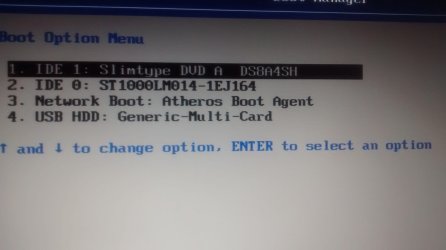
 
Is that IDE0 or IDE1? I have just tried both and then hit F12 repeatedly upon rebooting. it seems to do nothing. Are you sure it's F12 i should be hitting. F2 is what got up the menu I screenshot above.
 

My Computer My Computer

At a glance

Windows 7 Home premium 64bit
Computer type
Laptop
Computer Manufacturer/Model Number
Acer
OS
Windows 7 Home premium 64bit
IMG_20140712_020555630.jpg
Never mind I got F12 to work. Here is what it looks like. Does this mean my USB isn't done correctly so? I will try to do it again with the iso link you provided.
 

My Computer My Computer

At a glance

Windows 7 Home premium 64bit
Computer type
Laptop
Computer Manufacturer/Model Number
Acer
OS
Windows 7 Home premium 64bit
and sorry, I'm not up to speed with the language. Is the BIOS menu the one I posted in the first screenshot?? or if not, do you know how to access it on my machine? Acer aspire 5734z, thanks
 

My Computer My Computer

At a glance

Windows 7 Home premium 64bit
Computer type
Laptop
Computer Manufacturer/Model Number
Acer
OS
Windows 7 Home premium 64bit
Think its working now! Thanks so much. Lifesaver :) hope nothing goes wrong again!
 

My Computer My Computer

At a glance

Windows 7 Home premium 64bit
Computer type
Laptop
Computer Manufacturer/Model Number
Acer
OS
Windows 7 Home premium 64bit
Did it install? Be sure to follow the steps in Clean Reinstall - Factory OEM Windows 7
to set up and maintain your install.

The BIOS Boot Priority menu shown in your first screenshots should have the hard drive IDE0 set first to boot, then you should trigger the stick using F12 key to get a one-time BIOS Boot menu. This prevents the stick from auto starting over again during reboots during the install.

But if you must use the F2 menu to set the stick first because F12 is not working, then if it tries to start over during reboot just unplug the stick.
 
Yes it installed. Got a heap of new problems now but nothing I can't manage. Thanks again!
 

My Computer My Computer

At a glance

Windows 7 Home premium 64bit
Computer type
Laptop
Computer Manufacturer/Model Number
Acer
OS
Windows 7 Home premium 64bit
It seems to be okay now! Thanks :)
 

My Computer My Computer

At a glance

Windows 7 Home premium 64bit
Computer type
Laptop
Computer Manufacturer/Model Number
Acer
OS
Windows 7 Home premium 64bit
A friend of mine bought a Toshiba Satellite (im not sure of the model number) laptop, and asked me to help him format the currently installed Windows 8 and install Windows 7 Ultimate x64 on it. The disk size is 495 GB. The problem was that the laptop wasn't booting up from the dvd, so i tried installing Win 7 from the usb. The setup didn't boot from the usb either.
In order to boot the setup from either the usb or dvd, i disabled secureboot and changed uefi to mbr in bios.
After i did that, i booted the setup from the dvd. I followed everything hArLtRoN suggested , and now i have one partition, named C: , 495 GB in size which has the word "System" written in the type column. However, when i try to start installing Windows 7 on that partition, it says that there is no system partition found/it's missing.
Also, when i restarted the laptop, a " mbr missing press ctrl alt del " appeared, when i put the usb back into the laptop, the setup booted again. (I'm not sure if it booted because of the usb, but it seems that way). The same system partition missing problem is there again though. Any kind of help would be welcome, and sorry for the long text :).
 

My Computer My Computer

At a glance

Windows 7 Ultimate x64
Computer type
PC/Desktop
OS
Windows 7 Ultimate x64
Boot the installer not the hard drive.

Delete all partitions to create and format new during install.

If this fails follow the Overcomng Installation Failures tutorial below.
 
Would changing SATA from ACHI to IDE change anything?
 

My Computer My Computer

At a glance

Windows 7 Ultimate x64
Computer type
PC/Desktop
OS
Windows 7 Ultimate x64
Ok.

I have this issue. I have read through every post and tried every suggested thing and the error still occurs.

I have a samsung laptop which came with a System Recovery Disc (including windows 7 home premium sp1 and all their junk software i assume) so I put it all on a bootable USB stick and loaded it up.

The installer goes fine until I get to the part where you need to pick the partition to install on. No matter what process from here I follow, it always comes back with the same error.

It is an SSD drive so I even looked into the SSD stuff but nothing is working for me.
 

My Computer My Computer

At a glance

Windows 7 Home Premium 64bit
Computer type
Laptop
Computer Manufacturer/Model Number
Samsung
OS
Windows 7 Home Premium 64bit
Sounds like you might have a clean copy of Win7 with only the Samsung branding and activation but not the smothering bloatware - all of that would not fit on one DVD. So let's see if we can get it to work, but if not download Win7 Home Premium x64 SP1 English Official ISO download and use the Windows 7 USB-DVD Download Tool to burn to DVD or write to bootable flash stick to try that.

First work through these steps for Overcoming Windows 7 Installation Failures - Windows 7 Help Forums. Report back results.

In addition look over these steps for doing a perfect Clean Reinstall - Factory OEM Windows 7 because you will get and keep a perfect install to the exact extent you stick with the steps, tools and methods given.
 
I follow the failure steps and when it boots i get Bootmgr is missing, press ctrl alt del
 

My Computer My Computer

At a glance

Windows 7 Home Premium 64bit
Computer type
Laptop
Computer Manufacturer/Model Number
Samsung
OS
Windows 7 Home Premium 64bit
Sorry i was missing the bios one time boot menu option which I have now done.. and followed the other steps and when it came to installing it was saying something about missing drivers needed to continue? I'm trying the iso thing now and I'll let you know.
 

My Computer My Computer

At a glance

Windows 7 Home Premium 64bit
Computer type
Laptop
Computer Manufacturer/Model Number
Samsung
OS
Windows 7 Home Premium 64bit
Almost always means your installer is bad. Is the disk scratched or dirty? When was it last working?

Start over with the installer for your licensed version provided.
 
I will do that.. but my main worry is on my samsung box, and on this CD I can not find any sort of CD Key for the install... I assume that will be an issue soon.
 

My Computer My Computer

At a glance

Windows 7 Home Premium 64bit
Computer type
Laptop
Computer Manufacturer/Model Number
Samsung
OS
Windows 7 Home Premium 64bit
Read Clean Reinstall - Factory OEM Windows 7 as if you have a Samsung laptop which came with Win7 then it should have the COA sticker pictured in Step 6.

The disk would likely have activation baked in unless you bought it separately to upgrade.

What is your exact Samsung model number on the Samsung sticker? Put it in the specs in bottom right corner of posts.
 
Back
Top