SF Diagnostic Tool - Using for Troubleshooting

Using SF Diagnostic Tool v5 For Troubleshooting

   Information
The SF Diagnostic Tool and SF Debug Tool is used to collect diagnostic information from your computer required to analysis Blue Screen of Death (BSOD) and other troubleshooting purposes for Vista, Windows 7, and Windows 8.

You must be logged in as an administrator to be able to use either tool.

   Note
SF Diagnostic Tool created by Shyam (Capt.Jack Sparrow).

Changelog for 5.0.0.6
  • Fixed typo in button
  • Added DXDIAG log
  • Added System Info Log - Log will also contain product ID, I was told with product ID we could find if Windows is genuine or not.
  • Minor bug fixes
   Warning
Some antivirus or firewall programs may detect SF Diagnostic Tool as a Trojan. It's just a False positive because the publisher is unknown.

There is nothing to worry about as the SF Diagnostic Tool is 100% safe and will not harm your computer.


Here's How:

1. Click/tap on the Download button below to download SF Diagnostic Tool.
Download


2. Save the ZIP file to your desktop, open it, and extract (drag and drop) the SF_Diagnostic_Tool.exe file to your desktop.

3. Right click on or press and hold the extracted SF_Diagnostic_Tool.exe file, and click/tap on Run as administrator.

4. If prompted by UAC, then click/tap on Yes.

5. Click/tap on the Grab All button, and click/tap on OK for each notice dialog until it's finished.screenshot.png
Success.jpg
6. You will now have a folder saved on your Desktop with the name of SF_DD_MM_YYYY (SF_day_month_year) that includes the information from each button in the tool.

7. ZIP the SF_DD_MM_YYYY folder, then rename the ZIP folder to your user name here at Vista Forums, Seven Forums, or Eight Forums.

8. When you are finished, you can close the SF Diagnostic Tool.


FAQ

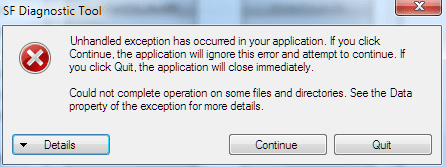
1, If you're getting this error below, then instead of clicking on Grab All, click the buttons one by one in order to see which one is giving you the error.

Code:
************* Exception Text **************
System.IO.DirectoryNotFoundException: Could not find a part of the path '\\Desktop\SF_19-04-2013'.
at System.IO.__Error.WinIOError(Int32 errorCode, String maybeFullPath)
at System.IO.Directory.InternalCreateDirectory(String fullPath, String path, DirectorySecurity dirSecurity)
at System.IO.Directory.CreateDirectory(String path, DirectorySecurity directorySecurity)
at System.IO.Directory.CreateDirectory(String path)
at SF_Diagnostic_Tool.Form1.Button1_Click(Object sender, EventArgs e)
at System.Windows.Forms.Control.OnClick(EventArgs e)
at System.Windows.Forms.Button.OnClick(EventArgs e)
at System.Windows.Forms.Button.OnMouseUp(MouseEventArgs mevent)
at System.Windows.Forms.Control.WmMouseUp(Message& m, MouseButtons button, Int32 clicks)
at System.Windows.Forms.Control.WndProc(Message& m)
at System.Windows.Forms.ButtonBase.WndProc(Message& m)
at System.Windows.Forms.Button.WndProc(Message& m)
at System.Windows.Forms.Control.ControlNativeWindow.OnMessage(Message& m)
at System.Windows.Forms.Control.ControlNativeWindow.WndProc(Message& m)
at System.Windows.Forms.NativeWindow.Callback(IntPtr hWnd, Int32 msg, IntPtr wparam, IntPtr lparam)
 
 
************** Loaded Assemblies **************
mscorlib
Assembly Version: 2.0.0.0
Win32 Version: 2.0.50727.5466 (Win7SP1GDR.050727-5400)
CodeBase: file:///C:/Windows/Microsoft.NET/Framework/v2.0.50727/mscorlib.dll
----------------------------------------
SF Diagnostic Tool
Assembly Version: 5.0.0.6
Win32 Version: 5.0.0.6
CodeBase: file:///C:/Users/dagbel/Desktop/SF_Diagnostic_Tool.exe
----------------------------------------
Microsoft.VisualBasic
Assembly Version: 8.0.0.0
Win32 Version: 8.0.50727.5420 (Win7SP1.050727-5400)
CodeBase: file:///C:/Windows/assembly/GAC_MSIL/Microsoft.VisualBasic/8.0.0.0__b03f5f7f11d50a3a/Microsoft.VisualBasic.dll
----------------------------------------
System.Windows.Forms
Assembly Version: 2.0.0.0
Win32 Version: 2.0.50727.5468 (Win7SP1GDR.050727-5400)
CodeBase: file:///C:/Windows/assembly/GAC_MSIL/System.Windows.Forms/2.0.0.0__b77a5c561934e089/System.Windows.Forms.dll
----------------------------------------
System
Assembly Version: 2.0.0.0
Win32 Version: 2.0.50727.5467 (Win7SP1GDR.050727-5400)
CodeBase: file:///C:/Windows/assembly/GAC_MSIL/System/2.0.0.0__b77a5c561934e089/System.dll
----------------------------------------
System.Drawing
Assembly Version: 2.0.0.0
Win32 Version: 2.0.50727.5467 (Win7SP1GDR.050727-5400)
CodeBase: file:///C:/Windows/assembly/GAC_MSIL/System.Drawing/2.0.0.0__b03f5f7f11d50a3a/System.Drawing.dll
----------------------------------------
System.Runtime.Remoting
Assembly Version: 2.0.0.0
Win32 Version: 2.0.50727.5420 (Win7SP1.050727-5400)
CodeBase: file:///C:/Windows/assembly/GAC_MSIL/System.Runtime.Remoting/2.0.0.0__b77a5c561934e089/System.Runtime.Remoting.dll
----------------------------------------
 
************** JIT Debugging **************
To enable just-in-time (JIT) debugging, the .config file for this
application or computer (machine.config) must have the
jitDebugging value set in the system.windows.forms section.
The application must also be compiled with debugging
enabled.
 
For example:
 
<configuration>
<system.windows.forms jitDebugging="true" />
</configuration>
 
When JIT debugging is enabled, any unhandled exception
will be sent to the JIT debugger registered on the computer
rather than be handled by this dialog box.
2, I have given the default location %userprofile%\Desktop as the default location. If it's not accessible then the tool will not work. If it's not getting created that means the default locations in the registry is messed up.


Attachments

Last edited by a moderator:
Possible bug?

This program works and all, but I had a slight issue.
When I run it, it generates the folder on my desktop. Afterwards, the folder is empty.
I ran it again to see if it would copy the files this time, and when it asked me about replacing files I found that it creates a Desktop folder on my main hard drive (C:/Desktop/SF_)
Just wondering if this was a bug, or just something that happened to me? Anyway, it worked. Thanks!
 

My Computer My Computer

Computer type
PC/Desktop
Computer Manufacturer/Model Number
Custom Build
OS
Windows 7 Professional x64
CPU
Intel Core i5-4690k @3.5GHz
Motherboard
ROG Maximus VII Ranger
Memory
8GB
Graphics Card(s)
MSI Gaming G4 GTX 970
Sound Card
Realtek High Definintion Audio
Monitor(s) Displays
ASUS VG248QE
Screen Resolution
1920x1080
Hard Drives
256GB Samsung 850 Pro SSD
1TB WD Black HDD
PSU
EVGA Hypernova G2 750W
Case
Phanteks Enthoo Luxe
Antivirus
SUPERAntiSpyware, MBAM
Browser
Google Chrome
Hello Stickman, and welcome to Seven Forums.

Did you by chance move your user profile folder to another drive from the default C: Windows drive location?

If so, then that would be why since the program only saves the folder to the C:\Users\(user-name)\Desktop location. There was some issue with it not being able to use the %UserProfile%\Desktop variable to have the folder saved to wherever you have your profile at.
 

My Computer My Computer

Computer type
PC/Desktop
Computer Manufacturer/Model Number
Self built custom
OS
64-bit Windows 11 Pro for Workstations
CPU
Intel i7-8700K OC'd to 5 GHz
Motherboard
ASUS ROG Maximus XI Formula Z390
Memory
64 GB (4x16GB) G.SKILL TridentZ RGB DDR4 3600 MHz
Graphics Card(s)
ASUS ROG-STRIX-GTX1080TI-O11G-GAMING
Sound Card
Integrated
Monitor(s) Displays
2 x Samsung Odyssey G7 27"
Screen Resolution
2560x1440
Hard Drives
1TB Samsung 990 PRO M.2,
4TB Samsung 990 PRO PRO M.2,
TerraMaster F8 SSD Plus NAS
PSU
Seasonic Prime Titanium 850W
Case
Thermaltake Core P3
Cooling
Corsair Hydro H115i
Keyboard
Logitech wireless K800
Mouse
Logitech MX Master 4
Internet Speed
2 Gb/s Download and 100 Mb/s Upload
Antivirus
Malwarebyte Anti-Malware Premium
Browser
Google Chrome
Other Info
Logitech Z625 speaker system,
Logitech BRIO 4K Pro webcam,
HP Color LaserJet Pro MFP M477fdn,
APC SMART-UPS RT 1000 XL - SURT1000XLI,
Galaxy S23 Plus phone
I just noticed a typo on the first post in this tutorial :D

4. Click/tap on the Grap All button, and click/tap on OK for each notice dialog until it's finished.
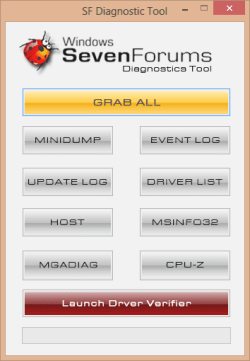

Grab is misspelled.
 

My Computer My Computer

Computer type
PC/Desktop
Computer Manufacturer/Model Number
Lenovo IdeaCenter 450
OS
Windows 10 Pro X64
CPU
Intel Quad Core i7-4770 @ 3.4Ghz
Memory
16.0GB PC3-12800 DDR3 SDRAM 1600 MHz
Graphics Card(s)
Intel Integrated HD Graphics
Sound Card
Realtek HD Audio
Monitor(s) Displays
HP 22" LCD
Screen Resolution
1680 x 1050
Hard Drives
250GB Samsung EVO SATA-3 SSD
2TB Seagate ST2000DM001 SATA-2
1.5TB Seagate ST3150041AS SATA
Keyboard
Dell USB
Mouse
Lenovo USB
Internet Speed
Cable via Road Runner 3MB Upload, 30MB Download
Antivirus
Windows Defender, MBAM Pro, MBAE
Browser
Seamonkey
Other Info
UEFI/GPT
PLDS DVD-RW DH16AERSH
LOL, good thing it wasn't a C instead of G. :)
 

My Computer My Computer

Computer type
PC/Desktop
Computer Manufacturer/Model Number
Self built custom
OS
64-bit Windows 11 Pro for Workstations
CPU
Intel i7-8700K OC'd to 5 GHz
Motherboard
ASUS ROG Maximus XI Formula Z390
Memory
64 GB (4x16GB) G.SKILL TridentZ RGB DDR4 3600 MHz
Graphics Card(s)
ASUS ROG-STRIX-GTX1080TI-O11G-GAMING
Sound Card
Integrated
Monitor(s) Displays
2 x Samsung Odyssey G7 27"
Screen Resolution
2560x1440
Hard Drives
1TB Samsung 990 PRO M.2,
4TB Samsung 990 PRO PRO M.2,
TerraMaster F8 SSD Plus NAS
PSU
Seasonic Prime Titanium 850W
Case
Thermaltake Core P3
Cooling
Corsair Hydro H115i
Keyboard
Logitech wireless K800
Mouse
Logitech MX Master 4
Internet Speed
2 Gb/s Download and 100 Mb/s Upload
Antivirus
Malwarebyte Anti-Malware Premium
Browser
Google Chrome
Other Info
Logitech Z625 speaker system,
Logitech BRIO 4K Pro webcam,
HP Color LaserJet Pro MFP M477fdn,
APC SMART-UPS RT 1000 XL - SURT1000XLI,
Galaxy S23 Plus phone
Hey, sorry for not replying earlier but haven't been feeling brilliant lately.

Anyway, my user folder is in the default location, and the tool finds it because it still creates the folder on my desktop, but puts the files the other folder.

So I'm not sure, but if it only affects me I'm sure it doesn't matter because I have the results anyway.
 

My Computer My Computer

Computer type
PC/Desktop
Computer Manufacturer/Model Number
Custom Build
OS
Windows 7 Professional x64
CPU
Intel Core i5-4690k @3.5GHz
Motherboard
ROG Maximus VII Ranger
Memory
8GB
Graphics Card(s)
MSI Gaming G4 GTX 970
Sound Card
Realtek High Definintion Audio
Monitor(s) Displays
ASUS VG248QE
Screen Resolution
1920x1080
Hard Drives
256GB Samsung 850 Pro SSD
1TB WD Black HDD
PSU
EVGA Hypernova G2 750W
Case
Phanteks Enthoo Luxe
Antivirus
SUPERAntiSpyware, MBAM
Browser
Google Chrome
Hello Stickman, and welcome to Seven Forums.

Did you by chance move your user profile folder to another drive from the default C: Windows drive location?

If so, then that would be why since the program only saves the folder to the C:\Users\(user-name)\Desktop location. There was some issue with it not being able to use the %UserProfile%\Desktop variable to have the folder saved to wherever you have your profile at.

Thanks for the help, but I have a couple of questions.
1. I ran the tool and it did save it to my destop, but I'm not sure how it did it. How do I set my user profile to:
C:\users\username\desktop?
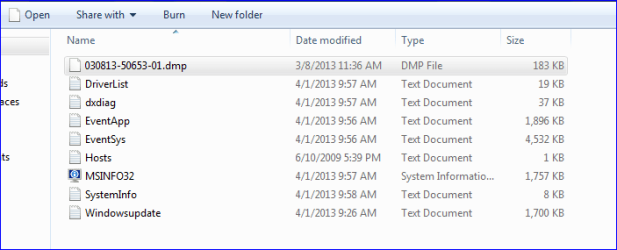
2. I've included a screen shot of the files that SF tool saved to my desktop. The dmp. file is at the top. Is that the file that I would load into bluescreenview or whocrashed?

Thanks
 

Attachments

  • SF diag tool files.PNG
    SF diag tool files.PNG
    9.1 KB · Views: 126

My Computer My Computer

Computer type
PC/Desktop
OS
win 7 XP

My Computer My Computer

Computer type
PC/Desktop
Computer Manufacturer/Model Number
Self built custom
OS
64-bit Windows 11 Pro for Workstations
CPU
Intel i7-8700K OC'd to 5 GHz
Motherboard
ASUS ROG Maximus XI Formula Z390
Memory
64 GB (4x16GB) G.SKILL TridentZ RGB DDR4 3600 MHz
Graphics Card(s)
ASUS ROG-STRIX-GTX1080TI-O11G-GAMING
Sound Card
Integrated
Monitor(s) Displays
2 x Samsung Odyssey G7 27"
Screen Resolution
2560x1440
Hard Drives
1TB Samsung 990 PRO M.2,
4TB Samsung 990 PRO PRO M.2,
TerraMaster F8 SSD Plus NAS
PSU
Seasonic Prime Titanium 850W
Case
Thermaltake Core P3
Cooling
Corsair Hydro H115i
Keyboard
Logitech wireless K800
Mouse
Logitech MX Master 4
Internet Speed
2 Gb/s Download and 100 Mb/s Upload
Antivirus
Malwarebyte Anti-Malware Premium
Browser
Google Chrome
Other Info
Logitech Z625 speaker system,
Logitech BRIO 4K Pro webcam,
HP Color LaserJet Pro MFP M477fdn,
APC SMART-UPS RT 1000 XL - SURT1000XLI,
Galaxy S23 Plus phone
SF Diagnostic Tool Stuck, cant get logs.

so i was going to make a thread to try to solve my bsod but i have been stopped by this.

spoiler/ See the end of this message for details on invoking
just-in-time (JIT) debugging instead of this dialog box.

************** Exception Text **************
System.IO.IOException: Could not complete operation on some files and directories. See the Data property of the exception for more details.
at Microsoft.VisualBasic.FileIO.FileSystem.FxCopyOrMoveDirectory(CopyOrMove operation, String sourceDirectoryPath, String targetDirectoryPath, Boolean overwrite)
at Microsoft.VisualBasic.FileIO.FileSystem.CopyOrMoveDirectory(CopyOrMove operation, String sourceDirectoryName, String destinationDirectoryName, Boolean overwrite, UIOptionInternal showUI, UICancelOption onUserCancel)
at Microsoft.VisualBasic.MyServices.FileSystemProxy.CopyDirectory(String sourceDirectoryName, String destinationDirectoryName, Boolean overwrite)
at SF_Diagnostic_Tool.Form1.Button1_Click(Object sender, EventArgs e)
at System.Windows.Forms.Control.OnClick(EventArgs e)
at System.Windows.Forms.Button.OnClick(EventArgs e)
at System.Windows.Forms.Button.OnMouseUp(MouseEventArgs mevent)
at System.Windows.Forms.Control.WmMouseUp(Message& m, MouseButtons button, Int32 clicks)
at System.Windows.Forms.Control.WndProc(Message& m)
at System.Windows.Forms.ButtonBase.WndProc(Message& m)
at System.Windows.Forms.Button.WndProc(Message& m)
at System.Windows.Forms.Control.ControlNativeWindow.OnMessage(Message& m)
at System.Windows.Forms.Control.ControlNativeWindow.WndProc(Message& m)
at System.Windows.Forms.NativeWindow.Callback(IntPtr hWnd, Int32 msg, IntPtr wparam, IntPtr lparam)


/spoiler


idk how to do spoilers sry

also tried to look in event viewer and got this.
 

Attachments

  • 2013-04-02 07_39_50-SF Diagnostic Tool.png
    2013-04-02 07_39_50-SF Diagnostic Tool.png
    9 KB · Views: 157
  • FBjAzbw.png
    FBjAzbw.png
    2.4 KB · Views: 156

My Computer My Computer

OS
windows 7 premium x64
so i was going to make a thread to try to solve my bsod but i have been stopped by this.

spoiler/ See the end of this message for details on invoking
just-in-time (JIT) debugging instead of this dialog box.

************** Exception Text **************
System.IO.IOException: Could not complete operation on some files and directories. See the Data property of the exception for more details.
at Microsoft.VisualBasic.FileIO.FileSystem.FxCopyOrMoveDirectory(CopyOrMove operation, String sourceDirectoryPath, String targetDirectoryPath, Boolean overwrite)
at Microsoft.VisualBasic.FileIO.FileSystem.CopyOrMoveDirectory(CopyOrMove operation, String sourceDirectoryName, String destinationDirectoryName, Boolean overwrite, UIOptionInternal showUI, UICancelOption onUserCancel)
at Microsoft.VisualBasic.MyServices.FileSystemProxy.CopyDirectory(String sourceDirectoryName, String destinationDirectoryName, Boolean overwrite)
at SF_Diagnostic_Tool.Form1.Button1_Click(Object sender, EventArgs e)
at System.Windows.Forms.Control.OnClick(EventArgs e)
at System.Windows.Forms.Button.OnClick(EventArgs e)
at System.Windows.Forms.Button.OnMouseUp(MouseEventArgs mevent)
at System.Windows.Forms.Control.WmMouseUp(Message& m, MouseButtons button, Int32 clicks)
at System.Windows.Forms.Control.WndProc(Message& m)
at System.Windows.Forms.ButtonBase.WndProc(Message& m)
at System.Windows.Forms.Button.WndProc(Message& m)
at System.Windows.Forms.Control.ControlNativeWindow.OnMessage(Message& m)
at System.Windows.Forms.Control.ControlNativeWindow.WndProc(Message& m)
at System.Windows.Forms.NativeWindow.Callback(IntPtr hWnd, Int32 msg, IntPtr wparam, IntPtr lparam)


/spoiler


idk how to do spoilers sry

also tried to look in event viewer and got this.

Seems like that's why it's not working. Instead of Grab All try to do it one by one.
 

My Computer My Computer

Computer Manufacturer/Model Number
Samsung NP550P5C-S02IN
OS
Windows 7 Ultimate - 64-bit | Windows 8 Pro - 64-bit
CPU
Intel® Core™ i7 Processor 3,610QM (2.30Hz, 6MB L3 Cach
Memory
8 GB
Graphics Card(s)
NVIDIA® GeForce® GT 650M 2GB Graphics, Optimus™ techno
Sound Card
SoundAlive™ JBL 3 Speakers (With sub-Woofer)
Monitor(s) Displays
39.62cm (15.6) SuperBright 300nit HD+ LED Display
Screen Resolution
1,600 x 900, Anti-Reflective
Hard Drives
1TB S-ATA II Hard Drive (5,400RPM)
You're welcome Ace. :)
 

My Computer My Computer

Computer type
PC/Desktop
Computer Manufacturer/Model Number
Self built custom
OS
64-bit Windows 11 Pro for Workstations
CPU
Intel i7-8700K OC'd to 5 GHz
Motherboard
ASUS ROG Maximus XI Formula Z390
Memory
64 GB (4x16GB) G.SKILL TridentZ RGB DDR4 3600 MHz
Graphics Card(s)
ASUS ROG-STRIX-GTX1080TI-O11G-GAMING
Sound Card
Integrated
Monitor(s) Displays
2 x Samsung Odyssey G7 27"
Screen Resolution
2560x1440
Hard Drives
1TB Samsung 990 PRO M.2,
4TB Samsung 990 PRO PRO M.2,
TerraMaster F8 SSD Plus NAS
PSU
Seasonic Prime Titanium 850W
Case
Thermaltake Core P3
Cooling
Corsair Hydro H115i
Keyboard
Logitech wireless K800
Mouse
Logitech MX Master 4
Internet Speed
2 Gb/s Download and 100 Mb/s Upload
Antivirus
Malwarebyte Anti-Malware Premium
Browser
Google Chrome
Other Info
Logitech Z625 speaker system,
Logitech BRIO 4K Pro webcam,
HP Color LaserJet Pro MFP M477fdn,
APC SMART-UPS RT 1000 XL - SURT1000XLI,
Galaxy S23 Plus phone
Greetings, I could use a little help here. Been having BSODs a lot lately. Tried running the diagnostics tool, but...

I get the following exception when I try to run the tool:

Code:
************* Exception Text **************
System.IO.DirectoryNotFoundException: Could not find a part of the path '\\Desktop\SF_19-04-2013'.
at System.IO.__Error.WinIOError(Int32 errorCode, String maybeFullPath)
at System.IO.Directory.InternalCreateDirectory(String fullPath, String path, DirectorySecurity dirSecurity)
at System.IO.Directory.CreateDirectory(String path, DirectorySecurity directorySecurity)
at System.IO.Directory.CreateDirectory(String path)
at SF_Diagnostic_Tool.Form1.Button1_Click(Object sender, EventArgs e)
at System.Windows.Forms.Control.OnClick(EventArgs e)
at System.Windows.Forms.Button.OnClick(EventArgs e)
at System.Windows.Forms.Button.OnMouseUp(MouseEventArgs mevent)
at System.Windows.Forms.Control.WmMouseUp(Message& m, MouseButtons button, Int32 clicks)
at System.Windows.Forms.Control.WndProc(Message& m)
at System.Windows.Forms.ButtonBase.WndProc(Message& m)
at System.Windows.Forms.Button.WndProc(Message& m)
at System.Windows.Forms.Control.ControlNativeWindow.OnMessage(Message& m)
at System.Windows.Forms.Control.ControlNativeWindow.WndProc(Message& m)
at System.Windows.Forms.NativeWindow.Callback(IntPtr hWnd, Int32 msg, IntPtr wparam, IntPtr lparam)
 
 
************** Loaded Assemblies **************
mscorlib
Assembly Version: 2.0.0.0
Win32 Version: 2.0.50727.5466 (Win7SP1GDR.050727-5400)
CodeBase: file:///C:/Windows/Microsoft.NET/Framework/v2.0.50727/mscorlib.dll
----------------------------------------
SF Diagnostic Tool
Assembly Version: 5.0.0.6
Win32 Version: 5.0.0.6
CodeBase: file:///C:/Users/dagbel/Desktop/SF_Diagnostic_Tool.exe
----------------------------------------
Microsoft.VisualBasic
Assembly Version: 8.0.0.0
Win32 Version: 8.0.50727.5420 (Win7SP1.050727-5400)
CodeBase: file:///C:/Windows/assembly/GAC_MSIL/Microsoft.VisualBasic/8.0.0.0__b03f5f7f11d50a3a/Microsoft.VisualBasic.dll
----------------------------------------
System.Windows.Forms
Assembly Version: 2.0.0.0
Win32 Version: 2.0.50727.5468 (Win7SP1GDR.050727-5400)
CodeBase: file:///C:/Windows/assembly/GAC_MSIL/System.Windows.Forms/2.0.0.0__b77a5c561934e089/System.Windows.Forms.dll
----------------------------------------
System
Assembly Version: 2.0.0.0
Win32 Version: 2.0.50727.5467 (Win7SP1GDR.050727-5400)
CodeBase: file:///C:/Windows/assembly/GAC_MSIL/System/2.0.0.0__b77a5c561934e089/System.dll
----------------------------------------
System.Drawing
Assembly Version: 2.0.0.0
Win32 Version: 2.0.50727.5467 (Win7SP1GDR.050727-5400)
CodeBase: file:///C:/Windows/assembly/GAC_MSIL/System.Drawing/2.0.0.0__b03f5f7f11d50a3a/System.Drawing.dll
----------------------------------------
System.Runtime.Remoting
Assembly Version: 2.0.0.0
Win32 Version: 2.0.50727.5420 (Win7SP1.050727-5400)
CodeBase: file:///C:/Windows/assembly/GAC_MSIL/System.Runtime.Remoting/2.0.0.0__b77a5c561934e089/System.Runtime.Remoting.dll
----------------------------------------
 
************** JIT Debugging **************
To enable just-in-time (JIT) debugging, the .config file for this
application or computer (machine.config) must have the
jitDebugging value set in the system.windows.forms section.
The application must also be compiled with debugging
enabled.
 
For example:
 
<configuration>
<system.windows.forms jitDebugging="true" />
</configuration>
 
When JIT debugging is enabled, any unhandled exception
will be sent to the JIT debugger registered on the computer
rather than be handled by this dialog box.
 
Last edited by a moderator:

My Computer My Computer

Computer type
Laptop
Computer Manufacturer/Model Number
Hp8760w
OS
Win7x64 Pro
CPU
Intel quad core
Memory
16GB
Graphics Card(s)
Nvidia quadro
Hard Drives
250gb
Antivirus
Mcafee enterprise
Browser
Ie/Firefox
Hi there!

Run the options in tools one by one and see if it works. Tell me which one is failing.
 

My Computer My Computer

Computer Manufacturer/Model Number
Samsung NP550P5C-S02IN
OS
Windows 7 Ultimate - 64-bit | Windows 8 Pro - 64-bit
CPU
Intel® Core™ i7 Processor 3,610QM (2.30Hz, 6MB L3 Cach
Memory
8 GB
Graphics Card(s)
NVIDIA® GeForce® GT 650M 2GB Graphics, Optimus™ techno
Sound Card
SoundAlive™ JBL 3 Speakers (With sub-Woofer)
Monitor(s) Displays
39.62cm (15.6) SuperBright 300nit HD+ LED Display
Screen Resolution
1,600 x 900, Anti-Reflective
Hard Drives
1TB S-ATA II Hard Drive (5,400RPM)
Just wanted to report a bug.
My primary partition is in the c:\ drive. I ran the SF diagnostic tool from G:\doc\sftool.exe.
I tried looking on my desktop for the folder, but couldn't find it.
Then I realized it said it created a folder in the g:\...\myusername\desktop directory, which is actually in a different partition than my windows c:\ partition.
 

My Computer My Computer

Computer type
PC/Desktop
OS
win 7 home 64, win vista 32, win xp pro 32, win 8 pro 64
I'll 2nd that bug. I just ran it and it put it in:

E:\Users\<myaccount>\Desktop\SF_28-04-2013

should have been

C:\Users\<myaccount>\Desktop\SF_28-04-2013

Might have been tough to find if I didn't have Everything installed. Note that the folder did not exist until I ran SF_Diagnostic_Tool.exe.
 

My Computer My Computer

Computer type
PC/Desktop
Computer Manufacturer/Model Number
Lenovo IdeaCenter 450
OS
Windows 10 Pro X64
CPU
Intel Quad Core i7-4770 @ 3.4Ghz
Memory
16.0GB PC3-12800 DDR3 SDRAM 1600 MHz
Graphics Card(s)
Intel Integrated HD Graphics
Sound Card
Realtek HD Audio
Monitor(s) Displays
HP 22" LCD
Screen Resolution
1680 x 1050
Hard Drives
250GB Samsung EVO SATA-3 SSD
2TB Seagate ST2000DM001 SATA-2
1.5TB Seagate ST3150041AS SATA
Keyboard
Dell USB
Mouse
Lenovo USB
Internet Speed
Cable via Road Runner 3MB Upload, 30MB Download
Antivirus
Windows Defender, MBAM Pro, MBAE
Browser
Seamonkey
Other Info
UEFI/GPT
PLDS DVD-RW DH16AERSH
Hi!

I can not use this program, I keep getting "Error code 0x800700oE" i.e. Not enough storage is available to complete this operation.

Tried both with virtual memory set to automatic and 6000 MB. And tried compability mode, am on Win 8 x64.

Any ideas?
 

My Computer My Computer

OS
Windows 7 Professional 32 bit
That's very strange. Check the MD5 checksum. It should be: 141550ba421755c1deac7541ef39a915
If not then the download is corrupted.
 

My Computer My Computer

Computer type
PC/Desktop
Computer Manufacturer/Model Number
Lenovo IdeaCenter 450
OS
Windows 10 Pro X64
CPU
Intel Quad Core i7-4770 @ 3.4Ghz
Memory
16.0GB PC3-12800 DDR3 SDRAM 1600 MHz
Graphics Card(s)
Intel Integrated HD Graphics
Sound Card
Realtek HD Audio
Monitor(s) Displays
HP 22" LCD
Screen Resolution
1680 x 1050
Hard Drives
250GB Samsung EVO SATA-3 SSD
2TB Seagate ST2000DM001 SATA-2
1.5TB Seagate ST3150041AS SATA
Keyboard
Dell USB
Mouse
Lenovo USB
Internet Speed
Cable via Road Runner 3MB Upload, 30MB Download
Antivirus
Windows Defender, MBAM Pro, MBAE
Browser
Seamonkey
Other Info
UEFI/GPT
PLDS DVD-RW DH16AERSH
Updated the OP with FAQ :)
 

My Computer My Computer

Computer Manufacturer/Model Number
Samsung NP550P5C-S02IN
OS
Windows 7 Ultimate - 64-bit | Windows 8 Pro - 64-bit
CPU
Intel® Core™ i7 Processor 3,610QM (2.30Hz, 6MB L3 Cach
Memory
8 GB
Graphics Card(s)
NVIDIA® GeForce® GT 650M 2GB Graphics, Optimus™ techno
Sound Card
SoundAlive™ JBL 3 Speakers (With sub-Woofer)
Monitor(s) Displays
39.62cm (15.6) SuperBright 300nit HD+ LED Display
Screen Resolution
1,600 x 900, Anti-Reflective
Hard Drives
1TB S-ATA II Hard Drive (5,400RPM)
That's very strange. Check the MD5 checksum. It should be: 141550ba421755c1deac7541ef39a915
If not then the download is corrupted.

I can confirm that the checksum is: 141550ba421755c1deac7541ef39a915

I can not think of anyway to make this program work on my computer. A bit wierd yeah.
 

My Computer My Computer

OS
Windows 7 Professional 32 bit
SF_Diagnostic_Tool not saving log

I've downloaded SF_Diagnostic_Tool.exe to my windows 7 machine and run it as administrator. I get the series of "ok" dialog boxes and a final one saying the logs were saved to my desktop. However, I don't see any zip file on my desktop. I'm running windows 7 as a parallels vm which shares desktop with the host machine (a mac), but even searching through c:\users\xxx\Desktop I don't see the log file there..
Suggestions?
 

My Computer My Computer

Computer type
PC/Desktop
Computer Manufacturer/Model Number
Parallels VM
OS
Vindows 7 Enterprise
Memory
4gb
Back
Top