Solved sfcdetails.txt

AddRAM

R.I.P.
Guru
Gold Member
VIP
Local time
4:16 AM
Messages
13,491
Location
New Jersey
sfcdetails.txt
 

Attachments

My Computer

Computer type
PC/Desktop
Computer Manufacturer/Model Number
Skylake Special #666
OS
Windows 10 Pro x64
CPU
Intel Core i7 6700K
Motherboard
Asus Sabertooth Z170 Mark 1
Memory
GSkill TridentZ RGB 16GB 3600 16-16-16-36
Graphics Card(s)
EVGA GTX 980 Ti SC x2
Sound Card
Realtek High Definition
Monitor(s) Displays
AOC G2460PG
Screen Resolution
1920 x 1080 144Hz
Hard Drives
Samsung 860 Pro 256GB, Seagate Barracuda 4TB x2
PSU
EVGA 1000 P2, EVGA White Custom Braided Cables
Case
Corsair Vengeance C70 Gunmetal Black
Cooling
Corsair H100i v2, Corsair ML120 x2, Thermal Grizzly Kryonaut
Keyboard
Logitech G910 Orion Spectrum
Mouse
Logitech G700s
Internet Speed
Verizon Fios Quantum Gateway 75/75
Antivirus
Windows Defender, Malwarebytes Free 3.8.3
Browser
Chrome
Other Info
Corsair SP120 x4, LG Blu-ray Drive, Durabrand HT-395 100 Watt Dolby Digital Amp, Corsair H2100 Wireless 7.1 Headset
This is what SFC is showing it cannot repair:

(In short, a few files from Windows Speech, and one from .NET Framework)

What issues are you having?


2016-08-11 22:29:13, Info CSI 000006c4 [SR] Cannot repair member file [l:18{9}]"l2057.ngr" of Microsoft-Windows-SpeechRecognizerENG.ale, Version = 6.1.7600.16385, pA = PROCESSOR_ARCHITECTURE_AMD64 (9), Culture = [l:10{5}]"en-GB", VersionScope = 1 nonSxS, PublicKeyToken = {l:8 b:31bf3856ad364e35}, Type neutral, TypeName neutral, PublicKey neutral in the store, hash mismatch


2016-08-11 22:29:13, Info CSI 000006c6 [SR] Cannot repair member file [l:48{24}]"System.Data.Services.dll" of System.Data.Services, Version = 6.1.7601.17933, pA = PROCESSOR_ARCHITECTURE_MSIL (8), Culture neutral, VersionScope = 1 nonSxS, PublicKeyToken = {l:8 b:b77a5c561934e089}, Type neutral, TypeName neutral, PublicKey neutral in the store, hash mismatch


2016-08-11 22:29:13, Info CSI 000006c8 [SR] Cannot repair member file [l:34{17}]"System.Design.dll" of System.Design, Version = 6.1.7601.18763, pA = PROCESSOR_ARCHITECTURE_MSIL (8), Culture neutral, VersionScope neutral, PublicKeyToken = {l:8 b:b03f5f7f11d50a3a}, Type neutral, TypeName neutral, PublicKey neutral in the store, hash mismatch


2016-08-11 22:29:13, Info CSI 000006ca [SR] Cannot repair member file [l:18{9}]"l2057.ngr" of Microsoft-Windows-SpeechRecognizerENG.ale, Version = 6.1.7600.16385, pA = PROCESSOR_ARCHITECTURE_AMD64 (9), Culture = [l:10{5}]"en-GB", VersionScope = 1 nonSxS, PublicKeyToken = {l:8 b:31bf3856ad364e35}, Type neutral, TypeName neutral, PublicKey neutral in the store, hash mismatch


2016-08-11 22:29:13, Info CSI 000006cb [SR] This component was referenced by [l:288{144}]"Microsoft-Windows-Client-Features-Package~31bf3856ad364e35~amd64~en-US~6.1.7601.17514.Microsoft-Windows-SpeechRecognizer-Deployment-LanguagePack"


2016-08-11 22:29:14, Info CSI 000006ce [SR] Could not reproject corrupted file [ml:520{260},l:76{38}]"\??\C:\Windows\Speech\Engines\SR\en-GB"\[l:18{9}]"l2057.ngr"; source file in store is also corrupted


2016-08-11 22:29:14, Info CSI 000006d0 [SR] Cannot repair member file [l:48{24}]"System.Data.Services.dll" of System.Data.Services, Version = 6.1.7601.17933, pA = PROCESSOR_ARCHITECTURE_MSIL (8), Culture neutral, VersionScope = 1 nonSxS, PublicKeyToken = {l:8 b:b77a5c561934e089}, Type neutral, TypeName neutral, PublicKey neutral in the store, hash mismatch


2016-08-11 22:29:14, Info CSI 000006d1 [SR] This component was referenced by [l:156{78}]"Package_2_for_KB2736422~31bf3856ad364e35~amd64~~6.1.1.0.2736422-10_neutral_GDR"


2016-08-11 22:29:14, Info CSI 000006d3 [SR] Cannot repair member file [l:34{17}]"System.Design.dll" of System.Design, Version = 6.1.7601.18763, pA = PROCESSOR_ARCHITECTURE_MSIL (8), Culture neutral, VersionScope neutral, PublicKeyToken = {l:8 b:b03f5f7f11d50a3a}, Type neutral, TypeName neutral, PublicKey neutral in the store, hash mismatch


2016-08-11 22:29:14, Info CSI 000006d4 [SR] This component was referenced by [l:156{78}]"Package_2_for_KB3023215~31bf3856ad364e35~amd64~~6.1.1.0.3023215-12_neutral_GDR"


2016-08-11 22:29:14, Info CSI 000006d7 [SR] Could not reproject corrupted file [ml:520{260},l:98{49}]"\??\C:\Windows\Microsoft.NET\Framework\v2.0.50727"\[l:34{17}]"System.Design.dll"; source file in store is also corrupted

 

My Computer

Computer type
PC/Desktop
Computer Manufacturer/Model Number
Self built custom
OS
64-bit Windows 11 Pro for Workstations
CPU
Intel i7-8700K OC'd to 5 GHz
Motherboard
ASUS ROG Maximus XI Formula Z390
Memory
64 GB (4x16GB) G.SKILL TridentZ RGB DDR4 3600 MHz
Graphics Card(s)
ASUS ROG-STRIX-GTX1080TI-O11G-GAMING
Sound Card
Integrated
Monitor(s) Displays
2 x Samsung Odyssey G7 27"
Screen Resolution
2560x1440
Hard Drives
1TB Samsung 990 PRO M.2,
4TB Samsung 990 PRO PRO M.2,
TerraMaster F8 SSD Plus NAS
PSU
Seasonic Prime Titanium 850W
Case
Thermaltake Core P3
Cooling
Corsair Hydro H115i
Keyboard
Logitech wireless K800
Mouse
Logitech MX Master 4
Internet Speed
2 Gb/s Download and 100 Mb/s Upload
Antivirus
Malwarebyte Anti-Malware Premium
Browser
Google Chrome
Other Info
Logitech Z625 speaker system,
Logitech BRIO 4K Pro webcam,
HP Color LaserJet Pro MFP M477fdn,
APC SMART-UPS RT 1000 XL - SURT1000XLI,
Galaxy S23 Plus phone
No issues other then the SFC is not perfect.

And I`ve never even used speech recognizer, whatever that is.

I`m pretty sure this happened after a windows update.
 

My Computer

Computer type
PC/Desktop
Computer Manufacturer/Model Number
Skylake Special #666
OS
Windows 10 Pro x64
CPU
Intel Core i7 6700K
Motherboard
Asus Sabertooth Z170 Mark 1
Memory
GSkill TridentZ RGB 16GB 3600 16-16-16-36
Graphics Card(s)
EVGA GTX 980 Ti SC x2
Sound Card
Realtek High Definition
Monitor(s) Displays
AOC G2460PG
Screen Resolution
1920 x 1080 144Hz
Hard Drives
Samsung 860 Pro 256GB, Seagate Barracuda 4TB x2
PSU
EVGA 1000 P2, EVGA White Custom Braided Cables
Case
Corsair Vengeance C70 Gunmetal Black
Cooling
Corsair H100i v2, Corsair ML120 x2, Thermal Grizzly Kryonaut
Keyboard
Logitech G910 Orion Spectrum
Mouse
Logitech G700s
Internet Speed
Verizon Fios Quantum Gateway 75/75
Antivirus
Windows Defender, Malwarebytes Free 3.8.3
Browser
Chrome
Other Info
Corsair SP120 x4, LG Blu-ray Drive, Durabrand HT-395 100 Watt Dolby Digital Amp, Corsair H2100 Wireless 7.1 Headset
I wouldn't worry about it then.
 

My Computer

Computer type
PC/Desktop
Computer Manufacturer/Model Number
Self built custom
OS
64-bit Windows 11 Pro for Workstations
CPU
Intel i7-8700K OC'd to 5 GHz
Motherboard
ASUS ROG Maximus XI Formula Z390
Memory
64 GB (4x16GB) G.SKILL TridentZ RGB DDR4 3600 MHz
Graphics Card(s)
ASUS ROG-STRIX-GTX1080TI-O11G-GAMING
Sound Card
Integrated
Monitor(s) Displays
2 x Samsung Odyssey G7 27"
Screen Resolution
2560x1440
Hard Drives
1TB Samsung 990 PRO M.2,
4TB Samsung 990 PRO PRO M.2,
TerraMaster F8 SSD Plus NAS
PSU
Seasonic Prime Titanium 850W
Case
Thermaltake Core P3
Cooling
Corsair Hydro H115i
Keyboard
Logitech wireless K800
Mouse
Logitech MX Master 4
Internet Speed
2 Gb/s Download and 100 Mb/s Upload
Antivirus
Malwarebyte Anti-Malware Premium
Browser
Google Chrome
Other Info
Logitech Z625 speaker system,
Logitech BRIO 4K Pro webcam,
HP Color LaserJet Pro MFP M477fdn,
APC SMART-UPS RT 1000 XL - SURT1000XLI,
Galaxy S23 Plus phone
Hi,
Just ran sfc on both machines all is good :/
Have you tried net framework fix program option ?
I'm on 4.5.2 version that did get a late update yesterday that was KB3135996
 

My Computer

Computer type
PC/Desktop
Computer Manufacturer/Model Number
Custom assembled by me :}
OS
Win-7-Pro64bit 7-H-Prem-64bit
CPU
i7-5930K 2nd i9-9940x both water blocked VRM's too
Motherboard
ASUS SABERTOOTH X99 2nd ASUS x299 Apex
Memory
Trident-z 3200C14 2nd Trident-z 3600C16
Graphics Card(s)
EVGA 1080ti ftw3 2nd Titan Xp both water blocked
Sound Card
Built-in Realtek
Monitor(s) Displays
1-AOC G2460PG 24"G-Sync 144Hz/ 2nd 1-ASUS VG248QE 24" 144Hz
Screen Resolution
1920 x 1080 144Hz
Hard Drives
2-Samsung M.2 Evo & Evo Plus
2-Samsung 850 EVO 500GB SSD's/ 3-2.5 W.D. Black 1tb-&3-1tb/3-3.5 WD Black 1tb hdd's
PSU
EVGA SuperNOVA 1000-P2 2nd 1200-P2
Case
2-Corsair Obsidian Series 450D Black ATX Mid Tower
Cooling
Custom water loops
Keyboard
Logitech G710+/ 2nd Logitech G910
Mouse
2-RedDragon M901 Perdition 16400 dpi Gaming mouse = wired
Internet Speed
Comcast Ping 19ms 89.31mbps download speed 6.12mbps upload
Antivirus
Malwarebytes Pro/ Superantispyware Pro
Browser
FireFox & Pale moon
Other Info
2nd ASUS X299 Apex/Intel i9-9940x with Custom water loop/7H-Prem-x64/Corsair 450D case/Ram Trident-z 3600C16 4x8gb / Samsung970Evo plus 500gb SSD/Dual ssd EZ swap evo/PSU EVGA SuperNova 1200w-P2 80+Platinum/GPU Titan Xp /8-ML-140 on push-pull on 2-280GTX rads

My Computer

Computer type
PC/Desktop
Computer Manufacturer/Model Number
Custom assembled by me :}
OS
Win-7-Pro64bit 7-H-Prem-64bit
CPU
i7-5930K 2nd i9-9940x both water blocked VRM's too
Motherboard
ASUS SABERTOOTH X99 2nd ASUS x299 Apex
Memory
Trident-z 3200C14 2nd Trident-z 3600C16
Graphics Card(s)
EVGA 1080ti ftw3 2nd Titan Xp both water blocked
Sound Card
Built-in Realtek
Monitor(s) Displays
1-AOC G2460PG 24"G-Sync 144Hz/ 2nd 1-ASUS VG248QE 24" 144Hz
Screen Resolution
1920 x 1080 144Hz
Hard Drives
2-Samsung M.2 Evo & Evo Plus
2-Samsung 850 EVO 500GB SSD's/ 3-2.5 W.D. Black 1tb-&3-1tb/3-3.5 WD Black 1tb hdd's
PSU
EVGA SuperNOVA 1000-P2 2nd 1200-P2
Case
2-Corsair Obsidian Series 450D Black ATX Mid Tower
Cooling
Custom water loops
Keyboard
Logitech G710+/ 2nd Logitech G910
Mouse
2-RedDragon M901 Perdition 16400 dpi Gaming mouse = wired
Internet Speed
Comcast Ping 19ms 89.31mbps download speed 6.12mbps upload
Antivirus
Malwarebytes Pro/ Superantispyware Pro
Browser
FireFox & Pale moon
Other Info
2nd ASUS X299 Apex/Intel i9-9940x with Custom water loop/7H-Prem-x64/Corsair 450D case/Ram Trident-z 3600C16 4x8gb / Samsung970Evo plus 500gb SSD/Dual ssd EZ swap evo/PSU EVGA SuperNova 1200w-P2 80+Platinum/GPU Titan Xp /8-ML-140 on push-pull on 2-280GTX rads
Hi

Lets fix these files.

Could you run SFC again, and post the full CBS log? Parsing the CBS log removes some important information needed for identifying the correct version and other information about the files

-CKing
 

My Computer

Computer type
Laptop
Computer Manufacturer/Model Number
HP Pavilion TS 14 Notebook PC
OS
Windows 10 x64
CPU
AMD A4-5000 APU
Motherboard
N/A
Memory
6GB DDR3 RAM
Graphics Card(s)
Integrated Radeon HD 8330 (in the APU)
Hard Drives
600GB Hard Disk
Antivirus
Windows Defender
Browser
Google Chrome
By your command :)

Yep, That`s all I wanna do :)
 

Attachments

My Computer

Computer type
PC/Desktop
Computer Manufacturer/Model Number
Skylake Special #666
OS
Windows 10 Pro x64
CPU
Intel Core i7 6700K
Motherboard
Asus Sabertooth Z170 Mark 1
Memory
GSkill TridentZ RGB 16GB 3600 16-16-16-36
Graphics Card(s)
EVGA GTX 980 Ti SC x2
Sound Card
Realtek High Definition
Monitor(s) Displays
AOC G2460PG
Screen Resolution
1920 x 1080 144Hz
Hard Drives
Samsung 860 Pro 256GB, Seagate Barracuda 4TB x2
PSU
EVGA 1000 P2, EVGA White Custom Braided Cables
Case
Corsair Vengeance C70 Gunmetal Black
Cooling
Corsair H100i v2, Corsair ML120 x2, Thermal Grizzly Kryonaut
Keyboard
Logitech G910 Orion Spectrum
Mouse
Logitech G700s
Internet Speed
Verizon Fios Quantum Gateway 75/75
Antivirus
Windows Defender, Malwarebytes Free 3.8.3
Browser
Chrome
Other Info
Corsair SP120 x4, LG Blu-ray Drive, Durabrand HT-395 100 Watt Dolby Digital Amp, Corsair H2100 Wireless 7.1 Headset
Sourced the files :) We will run a fix followed by another SFC scan to verify:

SFCFix Fix
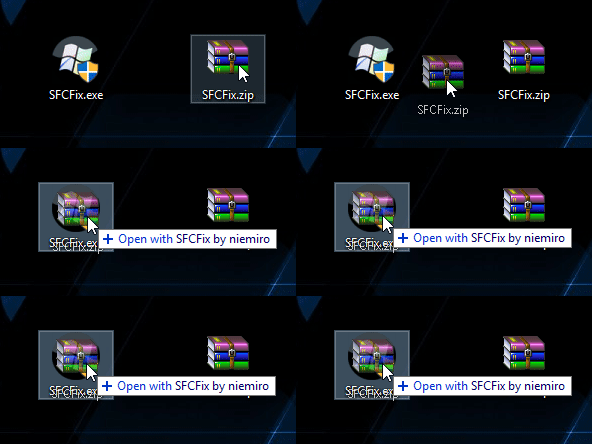
This fix is very specific for AddRAM's computer. Trying this fix on your own computer might damage your computer. If you are after assistance, create a new thread, and you will be assisted shortly.

Download SFCFix.exe (by niemiro) and move the executable on your Desktop.
Download SFCFix from here (It was too big to attach) and move the archive to your Desktop
Note: Make sure that the file is named SFCFix.zip, do not rename it.
Save any work you have open, and close every programs
Drag the SFCFix.zip file over the SFCFix.exe executable and release it
mMabJGT.gif
SFCFix will launch, let it complete
Once done, a file will appear on your Desktop, called SFCFix.txt
Open the file, then copy and paste its content in your next reply

Now we run the SFC scan

SFC Scan
1. Click on Start
startorb.gif
and type cmd. When Command Prompt appears, right-click on it, and click Run as Administrator
2. When command prompt opens, Copy (Ctrl+C) and Paste (Right-click > Paste) the following command into it, then press Enter
Code:
sfc /scannow
3. Once it finishes, copy and paste the following into the command-prompt window and press Enter.
Code:
copy %windir%\logs\cbs\cbs.log "%userprofile%\Desktop\cbs.txt"
4. Once this has completed please go to your Desktop and you will find CBS.txt => Right-click on this file and choose Send To...Compressed (zipped folder). Please upload this zipped file CBS.zip to this thread
Please Note:: if the file is too big to upload to your next post please upload via a service such as Dropbox or One Drive or SendSpace and just provide the link.

-CKing
 

My Computer

Computer type
Laptop
Computer Manufacturer/Model Number
HP Pavilion TS 14 Notebook PC
OS
Windows 10 x64
CPU
AMD A4-5000 APU
Motherboard
N/A
Memory
6GB DDR3 RAM
Graphics Card(s)
Integrated Radeon HD 8330 (in the APU)
Hard Drives
600GB Hard Disk
Antivirus
Windows Defender
Browser
Google Chrome
Seems it has fixed 1 of 2 corrupt files.

version 3.0.0.0 by niemiro.
Start time: 2016-08-14 01:06:58.094
Microsoft Windows 7 Service Pack 1 - amd64
Not using a script file.


AutoAnalysis::
FIXED: Corruption at C:\Windows\winsxs\msil_system.data.services_b77a5c561934e089_6.1.7601.17933_none_ffc84b63d3079743\System.Data.Services.dll has been successfully repaired from C:\Program Files (x86)\Reference Assemblies\Microsoft\Framework\v3.5\System.Data.Services.dll.


CORRUPT: C:\Windows\winsxs\msil_system.design_b03f5f7f11d50a3a_6.1.7601.18763_none_89ab76c7bfbe23e4\System.Design.dll


SUMMARY: Some corruptions could not be fixed automatically. Seek advice from helper or sysnative.com.
CBS & SFC total detected corruption count: 2
CBS & SFC total unimportant corruption count: 0
CBS & SFC total fixed corruption count: 1
SURT total detected corruption count: 0
SURT total unimportant corruption count: 0
SURT total fixed corruption count: 0
AutoAnalysis:: directive completed successfully.


Successfully processed all directives.
SFCFix version 3.0.0.0 by niemiro has completed.
Currently storing 1 datablocks.
Finish time: 2016-08-14 01:15:24.485
----------------------EOF-----------------------
 

My Computer

Computer type
PC/Desktop
Computer Manufacturer/Model Number
Skylake Special #666
OS
Windows 10 Pro x64
CPU
Intel Core i7 6700K
Motherboard
Asus Sabertooth Z170 Mark 1
Memory
GSkill TridentZ RGB 16GB 3600 16-16-16-36
Graphics Card(s)
EVGA GTX 980 Ti SC x2
Sound Card
Realtek High Definition
Monitor(s) Displays
AOC G2460PG
Screen Resolution
1920 x 1080 144Hz
Hard Drives
Samsung 860 Pro 256GB, Seagate Barracuda 4TB x2
PSU
EVGA 1000 P2, EVGA White Custom Braided Cables
Case
Corsair Vengeance C70 Gunmetal Black
Cooling
Corsair H100i v2, Corsair ML120 x2, Thermal Grizzly Kryonaut
Keyboard
Logitech G910 Orion Spectrum
Mouse
Logitech G700s
Internet Speed
Verizon Fios Quantum Gateway 75/75
Antivirus
Windows Defender, Malwarebytes Free 3.8.3
Browser
Chrome
Other Info
Corsair SP120 x4, LG Blu-ray Drive, Durabrand HT-395 100 Watt Dolby Digital Amp, Corsair H2100 Wireless 7.1 Headset
Running the other tasks now, will post when done :)
 

My Computer

Computer type
PC/Desktop
Computer Manufacturer/Model Number
Skylake Special #666
OS
Windows 10 Pro x64
CPU
Intel Core i7 6700K
Motherboard
Asus Sabertooth Z170 Mark 1
Memory
GSkill TridentZ RGB 16GB 3600 16-16-16-36
Graphics Card(s)
EVGA GTX 980 Ti SC x2
Sound Card
Realtek High Definition
Monitor(s) Displays
AOC G2460PG
Screen Resolution
1920 x 1080 144Hz
Hard Drives
Samsung 860 Pro 256GB, Seagate Barracuda 4TB x2
PSU
EVGA 1000 P2, EVGA White Custom Braided Cables
Case
Corsair Vengeance C70 Gunmetal Black
Cooling
Corsair H100i v2, Corsair ML120 x2, Thermal Grizzly Kryonaut
Keyboard
Logitech G910 Orion Spectrum
Mouse
Logitech G700s
Internet Speed
Verizon Fios Quantum Gateway 75/75
Antivirus
Windows Defender, Malwarebytes Free 3.8.3
Browser
Chrome
Other Info
Corsair SP120 x4, LG Blu-ray Drive, Durabrand HT-395 100 Watt Dolby Digital Amp, Corsair H2100 Wireless 7.1 Headset
And here it is :)
 

My Computer

Computer type
PC/Desktop
Computer Manufacturer/Model Number
Skylake Special #666
OS
Windows 10 Pro x64
CPU
Intel Core i7 6700K
Motherboard
Asus Sabertooth Z170 Mark 1
Memory
GSkill TridentZ RGB 16GB 3600 16-16-16-36
Graphics Card(s)
EVGA GTX 980 Ti SC x2
Sound Card
Realtek High Definition
Monitor(s) Displays
AOC G2460PG
Screen Resolution
1920 x 1080 144Hz
Hard Drives
Samsung 860 Pro 256GB, Seagate Barracuda 4TB x2
PSU
EVGA 1000 P2, EVGA White Custom Braided Cables
Case
Corsair Vengeance C70 Gunmetal Black
Cooling
Corsair H100i v2, Corsair ML120 x2, Thermal Grizzly Kryonaut
Keyboard
Logitech G910 Orion Spectrum
Mouse
Logitech G700s
Internet Speed
Verizon Fios Quantum Gateway 75/75
Antivirus
Windows Defender, Malwarebytes Free 3.8.3
Browser
Chrome
Other Info
Corsair SP120 x4, LG Blu-ray Drive, Durabrand HT-395 100 Watt Dolby Digital Amp, Corsair H2100 Wireless 7.1 Headset
Hi

You did not follow my instructions. Yes, SFCFix can repair some types of files on its own, but not all. That's why I sourced the files and created a fix script with those files

Sourced the files :) We will run a fix followed by another SFC scan to verify:

SFCFix Fix
This fix is very specific for AddRAM's computer. Trying this fix on your own computer might damage your computer. If you are after assistance, create a new thread, and you will be assisted shortly.

Download SFCFix.exe (by niemiro) and move the executable on your Desktop.
Download SFCFix from here (It was too big to attach) and move the archive to your Desktop
Note: Make sure that the file is named SFCFix.zip, do not rename it.
Save any work you have open, and close every programs
Drag the SFCFix.zip file over the SFCFix.exe executable and release it
mMabJGT.gif
SFCFix will launch, let it complete
Once done, a file will appear on your Desktop, called SFCFix.txt
Open the file, then copy and paste its content in your next reply

Now we run the SFC scan

SFC Scan
1. Click on Start
startorb.gif
and type cmd. When Command Prompt appears, right-click on it, and click Run as Administrator
2. When command prompt opens, Copy (Ctrl+C) and Paste (Right-click > Paste) the following command into it, then press Enter
Code:
sfc /scannow
3. Once it finishes, copy and paste the following into the command-prompt window and press Enter.
Code:
copy %windir%\logs\cbs\cbs.log "%userprofile%\Desktop\cbs.txt"
4. Once this has completed please go to your Desktop and you will find CBS.txt => Right-click on this file and choose Send To...Compressed (zipped folder). Please upload this zipped file CBS.zip to this thread
Please Note:: if the file is too big to upload to your next post please upload via a service such as Dropbox or One Drive or SendSpace and just provide the link.

-CKing
 

My Computer

Computer type
Laptop
Computer Manufacturer/Model Number
HP Pavilion TS 14 Notebook PC
OS
Windows 10 x64
CPU
AMD A4-5000 APU
Motherboard
N/A
Memory
6GB DDR3 RAM
Graphics Card(s)
Integrated Radeon HD 8330 (in the APU)
Hard Drives
600GB Hard Disk
Antivirus
Windows Defender
Browser
Google Chrome
Actually he DID,
1 of your files was incorrect
try the SXS one.

C:\Windows\winsxs\msil_system.design_b03f5f7f11d50a3a_6.1.7601.18763_none_89ab76c7bfbe23e4\System.De sign.dll

Roy
 

My Computer

Computer type
PC/Desktop
Computer Manufacturer/Model Number
medionl/Aspire 6930G/acer x55a
OS
W7 home premium 32bit/W7HP 64bit/w10 tp insider ring
CPU
E5300 dual core
Motherboard
medion MS7366
Memory
3gb
Graphics Card(s)
Nvidia Geforce 7100 Nforce 630i
Monitor(s) Displays
avixc
Internet Speed
n (isp resticted to 72)
Antivirus
mse/pands
Browser
palemoon
Other Info
Belkin Fd7050 n USB using Railink RT2870 drivers, more upto date
Looking at the SFCFix log:
Code:
version 3.0.0.0 by niemiro.
Start time: 2016-08-14 01:06:58.094
Microsoft Windows 7 Service Pack 1 - amd64
[B]Not using a script file.[/B]
AddRAM did not run the fix script

And, the OP had three files corrupt, and one of them was fixed by SFCFix. SFCFix can often detect corrupt files, but not all of them

-CKing
 

My Computer

Computer type
Laptop
Computer Manufacturer/Model Number
HP Pavilion TS 14 Notebook PC
OS
Windows 10 x64
CPU
AMD A4-5000 APU
Motherboard
N/A
Memory
6GB DDR3 RAM
Graphics Card(s)
Integrated Radeon HD 8330 (in the APU)
Hard Drives
600GB Hard Disk
Antivirus
Windows Defender
Browser
Google Chrome
Yes i know it didnt run correctly,
but
the file you sourced for >> MSIL system design<<
WAS NOT the right one.
yours
C:\Windows\msil_system.design_b03f5f7f11d50a3a_6.1.7601.18763_none_89ab76c7bfbe23e4\System.De sign.dll
CORRECT version
C:\Windows\winsxs\msil_system.design_b03f5f7f11d50a3a_6.1.7601.18763_none_89ab76c7bfbe23e4\System.De sign.dll

Roy
 

My Computer

Computer type
PC/Desktop
Computer Manufacturer/Model Number
medionl/Aspire 6930G/acer x55a
OS
W7 home premium 32bit/W7HP 64bit/w10 tp insider ring
CPU
E5300 dual core
Motherboard
medion MS7366
Memory
3gb
Graphics Card(s)
Nvidia Geforce 7100 Nforce 630i
Monitor(s) Displays
avixc
Internet Speed
n (isp resticted to 72)
Antivirus
mse/pands
Browser
palemoon
Other Info
Belkin Fd7050 n USB using Railink RT2870 drivers, more upto date
Have you downloaded and checked the script?

It copies all of these to the correct folders in the WinSxS folder

-CKing
 

My Computer

Computer type
Laptop
Computer Manufacturer/Model Number
HP Pavilion TS 14 Notebook PC
OS
Windows 10 x64
CPU
AMD A4-5000 APU
Motherboard
N/A
Memory
6GB DDR3 RAM
Graphics Card(s)
Integrated Radeon HD 8330 (in the APU)
Hard Drives
600GB Hard Disk
Antivirus
Windows Defender
Browser
Google Chrome
Yep looked at the ZIP you created thats where i picked up the file name error
Actually it works the other way round, WINSXS updates the lower files, non sxs

Roy
 

My Computer

Computer type
PC/Desktop
Computer Manufacturer/Model Number
medionl/Aspire 6930G/acer x55a
OS
W7 home premium 32bit/W7HP 64bit/w10 tp insider ring
CPU
E5300 dual core
Motherboard
medion MS7366
Memory
3gb
Graphics Card(s)
Nvidia Geforce 7100 Nforce 630i
Monitor(s) Displays
avixc
Internet Speed
n (isp resticted to 72)
Antivirus
mse/pands
Browser
palemoon
Other Info
Belkin Fd7050 n USB using Railink RT2870 drivers, more upto date
I think there is some confusion about WinSxS and system files or you are confused on the way SFCFix works. Essentially, files that in the system32 or any other location are hardlinked to the files in WinSxS. That's how SFC repairs the files.

As for the SFCFix script, it correctly copies the files to the subfolders inside the WinSxS folder.

Could you explain to me (using the script) where the file system mistake is?

-CKing
 

My Computer

Computer type
Laptop
Computer Manufacturer/Model Number
HP Pavilion TS 14 Notebook PC
OS
Windows 10 x64
CPU
AMD A4-5000 APU
Motherboard
N/A
Memory
6GB DDR3 RAM
Graphics Card(s)
Integrated Radeon HD 8330 (in the APU)
Hard Drives
600GB Hard Disk
Antivirus
Windows Defender
Browser
Google Chrome
in my post 16.
Your fix file does not include the >> winsxs << part of the drilldown, which is where the error is, not the operational file.

Maybe it is me, but your saying the SFCFix script is replacing a valid NON winsxs file, and then performs a second operation
QUOTE
As for the SFCFix script, it correctly copies the files to the subfolders inside the WinSxS folder.

though i'v never seen this being reported in any SFCfix output report.

If thats the case its my miss-understanding of the way SFCexe works,

Roy
 

My Computer

Computer type
PC/Desktop
Computer Manufacturer/Model Number
medionl/Aspire 6930G/acer x55a
OS
W7 home premium 32bit/W7HP 64bit/w10 tp insider ring
CPU
E5300 dual core
Motherboard
medion MS7366
Memory
3gb
Graphics Card(s)
Nvidia Geforce 7100 Nforce 630i
Monitor(s) Displays
avixc
Internet Speed
n (isp resticted to 72)
Antivirus
mse/pands
Browser
palemoon
Other Info
Belkin Fd7050 n USB using Railink RT2870 drivers, more upto date
Back
Top