
Shadow storage size

t-4-2

Banned
Local time
10:11 PM
Messages
997
Acer Aspire 7741Z
Win 7 Home Premium. SP1.
4 GB ram memeory ( 3.68 usable ).

This tutorial says :
http://www.sevenforums.com/tutorials/335-system-protection-change-disk-space-usage.html
By default, Windows 7 will allocate 10% of your total C: drive/partition size to be used to store system restore points in this allocated disk space. This allocated space will no longer be available as free space.

This will show you how to adjust the maximum disk space used for system protection in Windows 7.

My computer was bought May 25th this year. I have not touched the storage size limit.
Just found out the size limit is set at 2%.
No problem so far. Restore points go as far back as May 25th.
Apparently 2 % is enough. Still, just wonder if it is a tad low ?
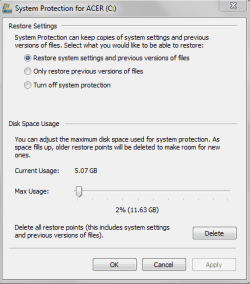
disk spce usage for system protection.png
 

My Computer

Computer Manufacturer/Model Number
Acer Aspire 7741Z
OS
Windows 7 Home Premium 64-bit, SP1
CPU
Intel Pentium P6200, Cores 2, 2.13 GHz
Memory
4 GB
Graphics Card(s)
Intel HD
Sound Card
unknown
Monitor(s) Displays
17.3 inches
Screen Resolution
1600 x 900
Hard Drives
640 GB, 5400 PRM
I'd say it's fine. It may only be 2%, but it's still a huge 11.63 GB.

You could push it to 5%, which will then give you 25 GB for shadow storage, more than enough I'd say. 10% may be Microsoft's norm, but with today's huge hard drives, it does seem rather excessive.
 

My Computer

Computer Manufacturer/Model Number
HP Pavilion Elite 495UK
OS
Windows 7 Ultimate SP1 64-Bit
CPU
Intel Core i7 870 @ 2.93GHz
Motherboard
MSI 2A9C (CPU1)
Memory
8Gb Dual-Channel DDR3 @ 664MHz
Graphics Card(s)
nVidia GeForce GTX 460 1024MB dedicated RAM
Sound Card
Realtek HD Audio
Monitor(s) Displays
HP2310i
Screen Resolution
1920 x 1080
Hard Drives
1x1954GB Hitachi HDS22020ALA 330 (RAID), 1x1954GB Hitachi External for backup and storage
PSU
460W
Case
HP Elite
Cooling
Air cooled
Keyboard
Logitech K750 solar-powered keyboard
Mouse
Logitech Wireless M180 mouse
Internet Speed
2Mb
Other Info
Pure Avanti Flow Internet Radio with iPod Dock, 64Gb iPod, HP USB Speakers, Sony MDR-V500 Headphones, Sony Vaio F-Series Laptop
You can use CCleaner or system restore manager (both 3rd party tools) to view individual restore points, then decide.

(Option Three) http://www.sevenforums.com/tutorials/336-system-protection-restore-points-delete.html

How much space depends on how reliant one is on SR. Many people dont use SR at all, relying on images to restore to working condition, should something go wrong. Also like any other tool, SR may fail occasionally. I would say you can keep the current space if you think its low and supplement it with imaging.
 

My Computer

Computer Manufacturer/Model Number
Too many to describe...
OS
Windows 7 x64 pro/ Windows 7 x86 Pro/ XP SP3 x86
I'd say it's fine. It may only be 2%, but it's still a huge 11.63 GB.

You could push it to 5%, which will then give you 25 GB for shadow storage, more than enough I'd say. 10% may be Microsoft's norm, but with today's huge hard drives, it does seem rather excessive.

You can use CCleaner or system restore manager (both 3rd party tools) to view individual restore points, then decide.

(Option Three) System Protection Restore Points - Delete

How much space depends on how reliant one is on SR. Many people dont use SR at all, relying on images to restore to working condition, should something go wrong. Also like any other tool, SR may fail occasionally. I would say you can keep the current space if you think its low and supplement it with imaging.


Thank you to both repliers.

Sorry Bill12,
I just gave rep points to the 15th person. Need 16th before you can have my rep points.
You don't need rep points anymore, anyway. You are past that point.
ha ha ha
 

My Computer

Computer Manufacturer/Model Number
Acer Aspire 7741Z
OS
Windows 7 Home Premium 64-bit, SP1
CPU
Intel Pentium P6200, Cores 2, 2.13 GHz
Memory
4 GB
Graphics Card(s)
Intel HD
Sound Card
unknown
Monitor(s) Displays
17.3 inches
Screen Resolution
1600 x 900
Hard Drives
640 GB, 5400 PRM
Back
Top