share media with devices is not available

win7Smo

New member
Local time
5:26 PM
Messages
2
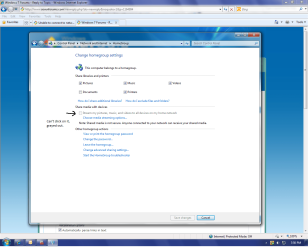
I can't figure out what happened either. I was proceeding to play Call of Duty black Ops when I noticed under music and pictures that my USERNAME-PC icon was not there. I went to check and make sure the computer was on, and it was. I was like that is weird. I don't remember deleting my homegroup or anything like that. I rebooted the PC and PS3 and nothing helped. I went into network properties->change homegroup properties, to find out that the share media with devices is not available. It is shaded out and you cannot click on the box to enable it. But, the kicker is, it says that media streaming is turned on. This sucks and I hope Microsoft does something to fix this issue. I loved the fact that I could stream all my music and pictures to my PS3 on my home WIRED network. Does anyone know of a FIX? Thanks
 

My Computer My Computer

At a glance

Win 7 Home Premium 64bitAMD phenom II x4 955 Black ed8gb Kingston hyperX 1600none as of yet
Computer Manufacturer/Model Number
Asus
OS
Win 7 Home Premium 64bit
CPU
AMD phenom II x4 955 Black ed
Motherboard
Asus
Memory
8gb Kingston hyperX 1600
Graphics Card(s)
none as of yet
Sound Card
on-board
Monitor(s) Displays
Samsung 19" LCD
Hard Drives
1 750GB western digital
PSU
550 watt Cooler Master
Case
Cooler Master
I can't figure out what happened either. I was proceeding to play Call of Duty black Ops when I noticed under music and pictures that my USERNAME-PC icon was not there. I went to check and make sure the computer was on, and it was. I was like that is weird. I don't remember deleting my homegroup or anything like that. I rebooted the PC and PS3 and nothing helped. I went into network properties->change homegroup properties, to find out that the share media with devices is not available. It is shaded out and you cannot click on the box to enable it. But, the kicker is, it says that media streaming is turned on. This sucks and I hope Microsoft does something to fix this issue. I loved the fact that I could stream all my music and pictures to my PS3 on my home WIRED network. Does anyone know of a FIX? Thanks


Have you re-booted all the device on the network at the same time?

Is windows streaming network service turned on?


Do you have a backup from before the problem started?


Ken J
 

My Computer My Computer

At a glance

Win 8 Release candidate 8400[email protected]4 gigsNvidia 9600M
Computer Manufacturer/Model Number
HP Pavillion dv-7 1005 Tx
OS
Win 8 Release candidate 8400
CPU
[email protected]
Memory
4 gigs
Graphics Card(s)
Nvidia 9600M
Sound Card
HD built-in
Monitor(s) Displays
17" Wxga
Screen Resolution
1440x900
Cooling
none
Internet Speed
45Mb down 5Mb up
Ken J-
I rebooted the PC first then PS3, nothing changed. Tried PS3 then PC, nothing changed.
Yes, windows streaming is turned on.
I imagine that win 7 created a restore point. But a phyiscal back up, no...
Here is a screen shot of what I am talking about:1st screen shot.
Can't click on the box, grayed out
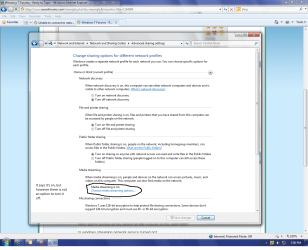
Screen shot #2:
it says it's on, but you can't disable it.
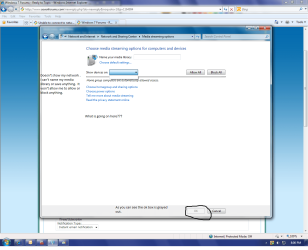
Screen shot #3
doesn't show my network, can't name my media library and the OK box is grayed out.
Please help!!
Thanks
 

Attachments

  • homegroupscreenshot.png
    homegroupscreenshot.png
    90.8 KB · Views: 91
  • homegroupscreenshot2.png
    homegroupscreenshot2.png
    88.9 KB · Views: 92
  • homegroupscreenshot3.png
    homegroupscreenshot3.png
    88.6 KB · Views: 59

My Computer My Computer

At a glance

Win 7 Home Premium 64bitAMD phenom II x4 955 Black ed8gb Kingston hyperX 1600none as of yet
Computer Manufacturer/Model Number
Asus
OS
Win 7 Home Premium 64bit
CPU
AMD phenom II x4 955 Black ed
Motherboard
Asus
Memory
8gb Kingston hyperX 1600
Graphics Card(s)
none as of yet
Sound Card
on-board
Monitor(s) Displays
Samsung 19" LCD
Hard Drives
1 750GB western digital
PSU
550 watt Cooler Master
Case
Cooler Master
Back
Top