
Share Network Resources via VPN

yuuioploi

New member
Local time
12:45 PM
Messages
3
I've seen a ton of tutorials and help threads, a lot on this site, on how to set up a VPN connection in Windows 7. I got that going a few days ago with no problem, now my pain in the ass however is accessing the network itself. I have Win 7 on the client and server end, I can connect to the VPN, but I cannot access the files on my network. The files that I'm trying to access are all shared on my computer so I have no idea whats up. Any help would be much appreciated, thanks!
 
Last edited:

My Computer

OS
Windows 7 Professional 64 bit and Windows 7 Home Premium 64 bit
Under the Windows 7 Cilent Server application make you are enabling that you can share files. You would need to check the box that allows you to share files such as documents, pictures, etc.
 

My Computer

OS
Windows 7 Ultimate 32-bit
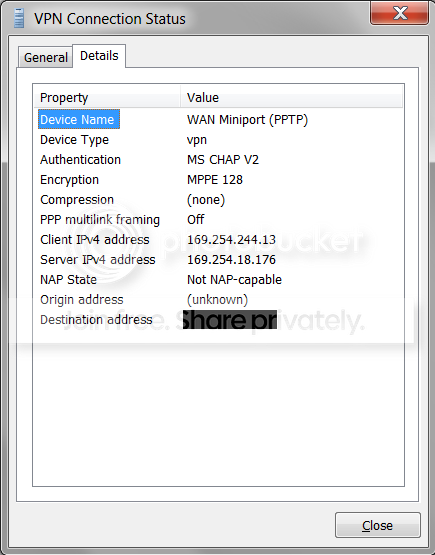
I'm just using the tools from Windows 7, no third party apps. On the server side under the ipv4 settings of the VPN connection I have the option "Allow callers to access my local area network" selected. Then this is what I have on the client side...
VPNStats.png

Shouldn't I just be able to put \\169.254.18.176 (in this case) in the run box on my client then be able to view my VPN?

***EDIT***
Ok so I just noticed this, this pic is from my client side, and on the "General" tab it says that ipv4 has network access and ipv6 has no access. On the server side however in this same window, under the "General" tab it says that ipv4 and ipv6 are not connected and under the details tab there is no information at all. It does say on my server side thought that there is a connection established under my network connections.
 
Last edited:

My Computer

OS
Windows 7 Professional 64 bit and Windows 7 Home Premium 64 bit
I don't know if this matters either, but on the server side I have selected the option to "Allow users to specify their own IP address"
 

My Computer

OS
Windows 7 Professional 64 bit and Windows 7 Home Premium 64 bit
Back
Top