Share with - Restore when Missing in Context Menu

How to Add or Remove "Share with" Context Menu Item in Windows 7 and Windows 8

   Information
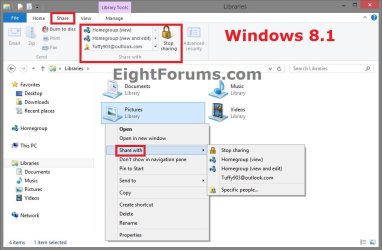
This tutorial will show you how to add or remove the Share with context menu item when you right click on a file, folder, drive, or library in Windows 7 and Windows 8.


EXAMPLE: "Share with" in the Context Menu
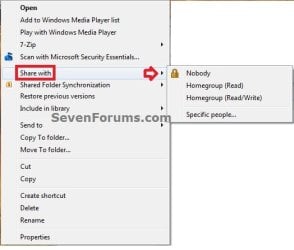
Share_with.jpg

Windows_8_Share-with.jpg


OPTION ONE

To Restore "Share with" Context Menu Item


NOTE: This is the default setting.
1. Open Folder Options in Windows 7 or Windows 8, check the Use Sharing Wizard box, and click/tap on OK. (see screenshot below)
NOTE: This option has to be checked to have Share with in the context menu for files.
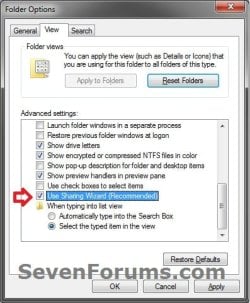
Folder_Options.jpg
2. If the above doesn't help, then click/tap on the Download button below to download the REG file below.
NOTE: You must be logged in as an administrator to be able to do this step.
Restore_Share_with_to_Context_Menu.reg


Download


A) Save the .reg file to your desktop.

B) Double click/tap on the downloaded .reg file to merge it.

C) If prompted, click/tap on Run, Yes (UAC), Yes, and OK to approve the merge.

D) When finished, you can delete the downloaded .reg file if you like.
3. The missing Share with context menu item should now be restored.


OPTION TWO

To Remove "Share with" Context Menu Item


1. Open Folder Options in Windows 7 or Windows 8, uncheck the Use Sharing Wizard box, and click/tap on OK. (see screenshot below)
Folder_Options.jpg
2. If the above doesn't help, then click on the Download button below to download the REG file below.
NOTE: You must be logged in as an administrator to be able to do this step.
Remove_Share_with_to_Context_Menu.reg


Download


A) Save the .reg file to your desktop.

B) Double click/tap on the downloaded .reg file to merge it.

C) If prompted, click/tap on Run, Yes (UAC), Yes, and OK to approve the merge.

D) When finished, you can delete the downloaded .reg file if you like.
3. The Share with context menu item should now be removed.
That's it,
Shawn


Attachments

Last edited:
Thank you Kyle. :)
 

My Computer

Computer type
PC/Desktop
Computer Manufacturer/Model Number
Self built custom
OS
64-bit Windows 11 Pro for Workstations
CPU
Intel i7-8700K OC'd to 5 GHz
Motherboard
ASUS ROG Maximus XI Formula Z390
Memory
64 GB (4x16GB) G.SKILL TridentZ RGB DDR4 3600 MHz
Graphics Card(s)
ASUS ROG-STRIX-GTX1080TI-O11G-GAMING
Sound Card
Integrated
Monitor(s) Displays
2 x Samsung Odyssey G7 27"
Screen Resolution
2560x1440
Hard Drives
1TB Samsung 990 PRO M.2,
4TB Samsung 990 PRO PRO M.2,
TerraMaster F8 SSD Plus NAS
PSU
Seasonic Prime Titanium 850W
Case
Thermaltake Core P3
Cooling
Corsair Hydro H115i
Keyboard
Logitech wireless K800
Mouse
Logitech MX Master 4
Internet Speed
2 Gb/s Download and 100 Mb/s Upload
Antivirus
Malwarebyte Anti-Malware Premium
Browser
Google Chrome
Other Info
Logitech Z625 speaker system,
Logitech BRIO 4K Pro webcam,
HP Color LaserJet Pro MFP M477fdn,
APC SMART-UPS RT 1000 XL - SURT1000XLI,
Galaxy S23 Plus phone
Title - How to Romove or Restore "Share with" Context Menu Item in Windows 7

;) Remove.
 

My Computer

Computer type
PC/Desktop
Computer Manufacturer/Model Number
Novatech iRush Pro
OS
Windows 7 Ultimate SP1 - 64 Bit
CPU
Intel Core i5 2500k
Motherboard
Foxconn H67M-S/H67M-V/H67
Memory
2x4GB DDR3 1333Hz
Graphics Card(s)
Ati Radeon 6770
Sound Card
None
Monitor(s) Displays
Samsung S22B150
Screen Resolution
1920x1080
Hard Drives
2x500GB
PSU
500W
Cooling
Fan
Keyboard
HP KU0316
Mouse
Wireless Logitech M185
Internet Speed
20MB/s
Antivirus
Avast Free
Browser
Google Chrome
Other Info
Logitech M185 Mouse
KU-M316 Keyboard
LOL, oops. Must be that new type of remove. Fixed :o
 

My Computer

Computer type
PC/Desktop
Computer Manufacturer/Model Number
Self built custom
OS
64-bit Windows 11 Pro for Workstations
CPU
Intel i7-8700K OC'd to 5 GHz
Motherboard
ASUS ROG Maximus XI Formula Z390
Memory
64 GB (4x16GB) G.SKILL TridentZ RGB DDR4 3600 MHz
Graphics Card(s)
ASUS ROG-STRIX-GTX1080TI-O11G-GAMING
Sound Card
Integrated
Monitor(s) Displays
2 x Samsung Odyssey G7 27"
Screen Resolution
2560x1440
Hard Drives
1TB Samsung 990 PRO M.2,
4TB Samsung 990 PRO PRO M.2,
TerraMaster F8 SSD Plus NAS
PSU
Seasonic Prime Titanium 850W
Case
Thermaltake Core P3
Cooling
Corsair Hydro H115i
Keyboard
Logitech wireless K800
Mouse
Logitech MX Master 4
Internet Speed
2 Gb/s Download and 100 Mb/s Upload
Antivirus
Malwarebyte Anti-Malware Premium
Browser
Google Chrome
Other Info
Logitech Z625 speaker system,
Logitech BRIO 4K Pro webcam,
HP Color LaserJet Pro MFP M477fdn,
APC SMART-UPS RT 1000 XL - SURT1000XLI,
Galaxy S23 Plus phone
Brink....you're a bloody genius. It's taken me two weeks to find this solution, but it works! Yeahhhhh!!!!
 

My Computer

OS
Win 7 Home Prem 64
That's great news Chris. I'm happy that it was able to help. :)
 

My Computer

Computer type
PC/Desktop
Computer Manufacturer/Model Number
Self built custom
OS
64-bit Windows 11 Pro for Workstations
CPU
Intel i7-8700K OC'd to 5 GHz
Motherboard
ASUS ROG Maximus XI Formula Z390
Memory
64 GB (4x16GB) G.SKILL TridentZ RGB DDR4 3600 MHz
Graphics Card(s)
ASUS ROG-STRIX-GTX1080TI-O11G-GAMING
Sound Card
Integrated
Monitor(s) Displays
2 x Samsung Odyssey G7 27"
Screen Resolution
2560x1440
Hard Drives
1TB Samsung 990 PRO M.2,
4TB Samsung 990 PRO PRO M.2,
TerraMaster F8 SSD Plus NAS
PSU
Seasonic Prime Titanium 850W
Case
Thermaltake Core P3
Cooling
Corsair Hydro H115i
Keyboard
Logitech wireless K800
Mouse
Logitech MX Master 4
Internet Speed
2 Gb/s Download and 100 Mb/s Upload
Antivirus
Malwarebyte Anti-Malware Premium
Browser
Google Chrome
Other Info
Logitech Z625 speaker system,
Logitech BRIO 4K Pro webcam,
HP Color LaserJet Pro MFP M477fdn,
APC SMART-UPS RT 1000 XL - SURT1000XLI,
Galaxy S23 Plus phone
Hi, I've looked everywhere and redirected here.

I followed instructions to remove the "Share with" option from windows command(menu) bar (next to organize, and burn, and new folder...)

After taking ownership of HKEY_LOCAL_MACHINE\SOFTWARE\Microsoft\Windows\CurrentVersion\Explorer\CommandStore\shell\Windows.Share, I changed 'Canonical Name' Value from

{E39543A3-079B-4BFB-A498-4777984155CA}
to
"" (empty)

restart removed the (Share With) button (I don't use homegroup, I use old school network shares on the sharing tab)

I also lost my sharing tab (right click folder, properties, there's usually a sharing tab, where you can create hidden network shares)

I restored the reg backup, and the share with button is back.. but the sharing tab isn't. Makes me think it was already missing, but I don't know how to get it back

Can anyone help? I've checked and the protected ntshrui.dll is in system32

HELP!!?
 

My Computer

Computer type
Laptop
Computer Manufacturer/Model Number
Dell
OS
Windows 7 Ultimate 64bit
CPU
2.2
Memory
8Gb
Graphics Card(s)
NVIDIA
Screen Resolution
1280/762
Mouse
built in pad || iphone || MS wireless
Internet Speed
100MB
Antivirus
Avast
Browser
Chrome, Chrome portable
Fixed! Shellexview had the sharing context menu option disabled. Previously this only disabled the "share with" context menu, but after enabling it, the sharing tab is restored (along with the unwanted share with context menu item, and still the original offender, the share with button on the nav bar).

Tempted to give up! Quitting while .. no longer behind
 

My Computer

Computer type
Laptop
Computer Manufacturer/Model Number
Dell
OS
Windows 7 Ultimate 64bit
CPU
2.2
Memory
8Gb
Graphics Card(s)
NVIDIA
Screen Resolution
1280/762
Mouse
built in pad || iphone || MS wireless
Internet Speed
100MB
Antivirus
Avast
Browser
Chrome, Chrome portable
Thank you, Brink! One less useless thing cluttering my context menu... I used your .reg file to delete share with instead of bring it back.... lolol :)
 

My Computer

Computer type
PC/Desktop
OS
Windows 7 Pro x64 SP1
I'm glad it could help thebunnyrules. :)
 

My Computer

Computer type
PC/Desktop
Computer Manufacturer/Model Number
Self built custom
OS
64-bit Windows 11 Pro for Workstations
CPU
Intel i7-8700K OC'd to 5 GHz
Motherboard
ASUS ROG Maximus XI Formula Z390
Memory
64 GB (4x16GB) G.SKILL TridentZ RGB DDR4 3600 MHz
Graphics Card(s)
ASUS ROG-STRIX-GTX1080TI-O11G-GAMING
Sound Card
Integrated
Monitor(s) Displays
2 x Samsung Odyssey G7 27"
Screen Resolution
2560x1440
Hard Drives
1TB Samsung 990 PRO M.2,
4TB Samsung 990 PRO PRO M.2,
TerraMaster F8 SSD Plus NAS
PSU
Seasonic Prime Titanium 850W
Case
Thermaltake Core P3
Cooling
Corsair Hydro H115i
Keyboard
Logitech wireless K800
Mouse
Logitech MX Master 4
Internet Speed
2 Gb/s Download and 100 Mb/s Upload
Antivirus
Malwarebyte Anti-Malware Premium
Browser
Google Chrome
Other Info
Logitech Z625 speaker system,
Logitech BRIO 4K Pro webcam,
HP Color LaserJet Pro MFP M477fdn,
APC SMART-UPS RT 1000 XL - SURT1000XLI,
Galaxy S23 Plus phone
Back
Top