Sharing issues on win7 /iphone port 445

prukeyhi

New member
Power User
VIP
Local time
5:24 PM
Messages
224
Location
Haifa-IL
Sharing issues on win7

Hi all
Here is my work ground :
-2 win7 ultimate machine one is laptop.
-"WORKGROUP" is setting on both(not homegroup).
-I'm the admin. on both machine.
-computer names are different (Amirst, Amirs)
-user account name for both and password are the same (Amir)
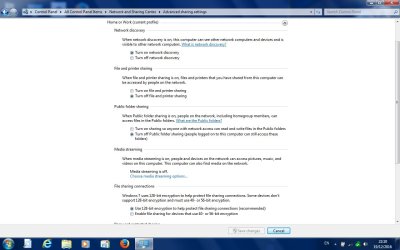
-sharing settings as in the photo for both (password is disabled).
-both run the same network of course.
-the issue happens on wifi as well .
-Hotbox appear in the network has no role, its just my modem/router.
-both machine use windows firewall and MSE antivirus

Now :
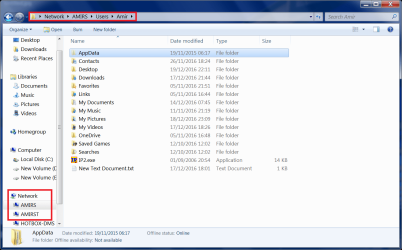
-on the Amirst machine i can see all Amirs machine users folder/sub-folders (as in photo 3) -why is it so when sharing stetting disabled?
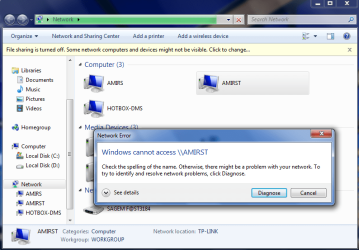
-on the Amirs machine i can see all Amirst machine (photo4 ), but cannot open to view shared files which is fine according to sharing settings .

Can somebody tell me whats going on, why i can see all files on Amirst machine (from Amirs machine) though they are not sharing?
And why the issue is only on Amirst machine, when settings are all the same for both machine

Thanks!
This part was fixed, please go to #2 and #3
 

Attachments
  • Unted.jpg
    Unted.jpg
    59.8 KB · Views: 1
  • net.jpg
    net.jpg
    79.9 KB · Views: 2
  • 3_amirst.png
    3_amirst.png
    66.9 KB · Views: 2
  • 4_amirs.png
    4_amirs.png
    44.6 KB · Views: 1
Last edited:

My Computer My Computer

Computer type
PC/Desktop
OS
98SE/XP/windows7 32bit/ win10
ok.....
the answer- is that port 445 was open continuously on
Amirs machine , and overcame sharing settings.
it was enough to allow sharing.

why was port 445 open?- because i made a new rule a month ago (and forgot about it until now...)in firewall to enable my iphone cellular network(4G) connect from "outside " to my home network (
Amirs machine).

now i disabled the inbound 445 rule i made and set all
sharing settings as they should be and sharing between pc's is fine.

STILL i've 2 more questions
1-after i disabled the inbound 445 rule, how can i connect with my iphone cellular network from "outside " to my home network ?
in my XP machine i did it successfully-on firewall settings i had to select scope>any which is
the equivalent to a public network.
Firewall troubleshooting: How to modify the scope of Windows XP and Vista firewall rules.
How can i do it on win7 firewall ?
This part was fixed

2-why all computer Entire Users (public,default, user) Directories, folder/sub-folders can be seen both way if i didn't select to share them( photo 3 above) ?
how to fix that?
THANKS!
 
Last edited:

My Computer My Computer

Computer type
PC/Desktop
OS
98SE/XP/windows7 32bit/ win10
I'm answering question1:

On Windows 7 computers, follow these steps:
1.

In the Control Panel, open the Windows Firewall applet.

2.
Click the ‘Allow a program or feature through Windows Firewall’ link.
a.

In the next screen, click Change Settings.
b.
In the Allowed Programs list, find ‘File and Printer Sharing’ and select the ‘Home/Work
(Private)’ check box.
c.
Click OK to return to the main Windows Firewall screen.
3.
Click the ‘Advanced settings’ link.
a.

In the Advanced Security screen, select Inbound Rules in the left-hand pane.
b.
In the middle pane, find the ‘File and Printer Sharing (SMB-In)’ rules. There are three
rules, differentiated by their Profile. (The Profile column is set to Public, Private and
Domain respectively.)
Note that rules are not listed alphabetically in this list.
c.

Right-click the ‘File and Printer Sharing (SMB-In)’ rule with a Private Profile and click
Properties.
d.

In the Properties dialog, go to the Scope tab.
e.

In the Remote IP Address section, select ‘Any IP address’ and click OK.

_____________________________________________________________________________

can somebody please answer my 2 question?
2-why all computer Entire Users (public,default, user) Directories, folder/sub-folders can be seen both way if i didn't select to share them( photo 3 above) ?
how to fix that?
THANKS!

 
Last edited:

My Computer My Computer

Computer type
PC/Desktop
OS
98SE/XP/windows7 32bit/ win10
i think this may explain/answer my question:
"
I suggest navigating to the Users folder and adjusting the sharing settings to resolve this issue.
You can right-click on the folder and click Properties, then click the Sharing tab, then click the Advanced Sharing button.
Remove the check mark from Share this folder and click OK.
That should un-share the folder."
But after Remove the check mark, it'll come back upon simple sharing folder.
it'll not come back upon advanced sharing folder
what's going on?
"Users" folder shared without restrictions? - Microsoft Community
Windows 7 File Sharing: Fixing the “Entire User Directory Shared” Problem | Scottie's Tech.Info
The C:\Users folder is shared when any sub folders from C:\Users\<username>\ is shared

what do you think ?
 
Last edited:

My Computer My Computer

Computer type
PC/Desktop
OS
98SE/XP/windows7 32bit/ win10
Back
Top