
Sharing LAN internet to a specific other network

rhlsg

New member
Local time
3:08 AM
Messages
5
Hello Forum,
I want to share my one computer's internet connection with another connection.
In Win 8 Laptop, when i try to share the Wifi internet that i get - on the share tab under the "Allow other networks to share this connection" I see a drop down menu to select a particular network - to which I want to share the internet.
On my work PC however, which is connected to a internet via LAN through a domain network - I do not see any drop down menu, to share my net connection to a particular other network.
Anything I can do to get such a drop down menu, or Win 7 Enterprise does not support such a feature ?
Thanks !
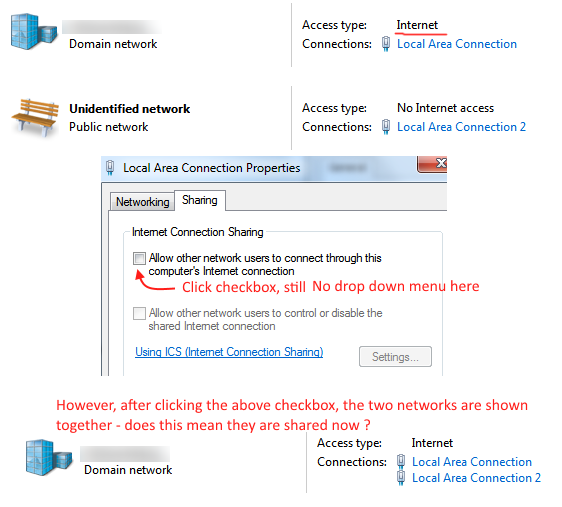
Gs5YiUm.png
 

My Computer My Computer

Computer type
PC/Desktop
Computer Manufacturer/Model Number
Dell
OS
Windows 7, 32 bit

My Computer My Computer

Computer Manufacturer/Model Number
Self Build
OS
Windows 7 Ultimate 64Bit (SP 1)
CPU
Intel Core i7 4770K OC
Motherboard
ASUS Maximus VII Ranger
Memory
32GB 1600Mhz DDR3
Graphics Card(s)
MSI GTX580 Twin Frozr II/OC and NVIDIA GTX 970
Sound Card
On-Board and Soundblaster Recon 3 D headset
Monitor(s) Displays
x2 Flat screen 21" LG displays + x1 LG W2363D (3D)
Hard Drives
5 internal Hard Drives:
1 x WD 120GB Solid State
4 x WD 1TB (CAVIAR BLACK 1TB 32MB 7200 SATA) as Raid 5 array
PSU
Dark Power Pro 10 1200W
Case
CoolerMaster HAF 932 Case - Black
Cooling
Thermaltake Contac21 cooler
Keyboard
Cyborg
Mouse
Razor Mamba
Internet Speed
0.5 Mb - (Benefits of rural location!) & 24 MB Sat
Antivirus
MSE
Other Info
Teaming 2 GB network connection to Wired 1GB switch.
Connected to 37TB (Raid 5) of network storage on a wired 1GB lan.
(Mixture of internal hard drives, 1TB, 2TB, 4TB & 16TB Terastations)
You have a work computer with Enterprise installed.
I would suggest not changing anything on the work computer.
The I.T. Department at work should be consulted first.
I.T. Departments don't like when people change things on computers under their control.

On my work PC however, which is connected to a internet via LAN through a domain network - I do not see any drop down menu, to share my net connection to a particular other network.
Anything I can do to get such a drop down menu, or Win 7 Enterprise does not support such a feature ?
 

My Computer My Computer

Computer type
PC/Desktop
Computer Manufacturer/Model Number
Home made Desktop
OS
Windows 10 Pro. 64/ version 1709 Windows 7 Pro/64
CPU
Intel i7-6800K @ 4.3
Motherboard
ASUS X-99 Deluxe II
Memory
Corsair Platinum 16 gig @2400
Graphics Card(s)
EVGA GTX 1070 OC
Monitor(s) Displays
Asus 27" LED LCD/VE278Q
Screen Resolution
1920-1080 or 1280-720 HDMI
Hard Drives
INTEL SSD 730-240 Gb Sata 3.0/
PSU
EVGA Platium 1200W
Case
Phanteks Luxe Tempered Glass 8 fans/ one radiator
Cooling
XSPC/ Water Cooled CPU
Keyboard
Das 4 Professional
Mouse
Logitech M705/MX Anywhere 2-S
Internet Speed
100 mbits
Antivirus
Microsoft Security Essentials/ Malwarebytes Premium 3.0/ SAS
Browser
I.E. 11 default/Firefox/ ISP Time Warner Cable/Spectrum
Other Info
LG BluRay Burner/
Sound system-KLipsch-THX/
Icy Dock ssd Hot Swap bays.
skip - double post!
 

My Computer My Computer

Computer type
PC/Desktop
Computer Manufacturer/Model Number
Dell
OS
Windows 7, 32 bit
Do you have a wireless router or are you wanting your laptop to act as the bridge between Internet access and your other devices?
If the former, try working through these instructions: Using ICS (Internet Connection Sharing) - Windows Help
Windows 7 Enterprise does support ICS.
Regards
UKMedia

When I use my Win8 Laptop, which gets internet through WiFi - then internet sharing shows a drop down menu.
What I wanted to know is - why does my PC with Win 7, getting internet through LAN, does not show a drop down menu when sharing its internet connection?

You have a work computer with Enterprise installed.
I would suggest not changing anything on the work computer.
The I.T. Department at work should be consulted first.
I.T. Departments don't like when people change things on computers under their control.

I will keep that in mind Layback, I dont want to create troubles for our IT guys and myself. :p
If you have any other suggestions, I would like to hear.
 

My Computer My Computer

Computer type
PC/Desktop
Computer Manufacturer/Model Number
Dell
OS
Windows 7, 32 bit
Back
Top