Shift keys not working with certain letters

dwilbank

New member
Local time
6:27 AM
Messages
8
Hi. I browsed some other threads concerning this problem, but none of those solutions has worked for me. The problem affects only the letters z,x,c,v, and the numbers 1,2,3,4,7,8,9,0. I can't make an uppercase version of those characters. When i launched the on-screen keyboard, I see the shift keys lighting up when I touch them, so it isn't a matter of physical damage to the keys... I went into the device manager and uninstalled all the keyboard drivers there - at least I think I did... and they just came back with the same problem... And i plugged in a Logitech keyboard and its drivers worked just fine. So short of wiping the entire drive with a fresh install of Win7, what can i do? I had to use the onscreen keyboard just to type the question mark. Thank
 

My Computer

OS
Windows 7 Premium 64 bit
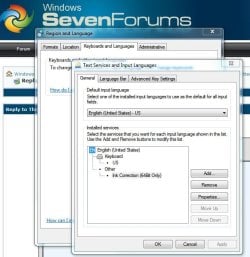
What language is your keyboard layout set to?
 

Attachments

  • Keyboard-Language.JPG
    Keyboard-Language.JPG
    61.7 KB · Views: 287

My Computer

Computer Manufacturer/Model Number
Self
OS
Main - Windows 7 Pro SP1 64-Bit; 2nd - Windows Server 2008 R2
CPU
Main - Core i7 2600K; 2nd - Core i7 920
Motherboard
Main - Asus P8Z68-V Pro/Gen3; 2nd - Gigabyte GA-EX58-UDR3
Memory
Main - 16GB Corsair Vengeance; 2nd - 12GB Corsair Vengeance
Graphics Card(s)
Main - XFX Radeon 6870 1GB; 2nd - XFX Radeon 4870 1GB
Sound Card
Both: Onboard Realtek Azalia
Monitor(s) Displays
Main - Hann 25" + I-INC 25" + Acer 23"; 2nd - Upgrading Soon
Screen Resolution
Main - 1920x1080 (All Three Monitors); 2nd - Upgrading Soon
Hard Drives
Main - (1) Crucial M4 128GB (Boot)
Main - (1) Seagate 2TB 64MB Cache (Data)
Main - (1) Seagate 2TB 64MB Cache (Data Backup)
2nd - (1) Intel X25-M SSD 80GB (Boot)
2nd - (3) Seagate 1TB 32MB Cache (Data Backup)
2nd - (1) Seagate 320GB (Because)
PSU
Main - OCZ 600W Modular; 2nd - OCZ 600W
Case
Main - Thermaltake Element G; 2nd - NZXT something or other
Cooling
Main - Corsair H80; 2nd - Prolimatech Megahalems
Keyboard
Main - Razer Reclusa; 2nd - Old MS Keyboard
Mouse
Main - Logitech MX Revolution; 2nd - Old MS Mouse
Internet Speed
20Mbps Time-Warner Cable
English. I tried French just to see what would happen. But definitely English.
 

My Computer

OS
Windows 7 Premium 64 bit
Does your keyboard have a Function (often labeled Fn) key to toggle certain keys for use by something like a multimedia program?
 

My Computer

Computer Manufacturer/Model Number
Self
OS
Main - Windows 7 Pro SP1 64-Bit; 2nd - Windows Server 2008 R2
CPU
Main - Core i7 2600K; 2nd - Core i7 920
Motherboard
Main - Asus P8Z68-V Pro/Gen3; 2nd - Gigabyte GA-EX58-UDR3
Memory
Main - 16GB Corsair Vengeance; 2nd - 12GB Corsair Vengeance
Graphics Card(s)
Main - XFX Radeon 6870 1GB; 2nd - XFX Radeon 4870 1GB
Sound Card
Both: Onboard Realtek Azalia
Monitor(s) Displays
Main - Hann 25" + I-INC 25" + Acer 23"; 2nd - Upgrading Soon
Screen Resolution
Main - 1920x1080 (All Three Monitors); 2nd - Upgrading Soon
Hard Drives
Main - (1) Crucial M4 128GB (Boot)
Main - (1) Seagate 2TB 64MB Cache (Data)
Main - (1) Seagate 2TB 64MB Cache (Data Backup)
2nd - (1) Intel X25-M SSD 80GB (Boot)
2nd - (3) Seagate 1TB 32MB Cache (Data Backup)
2nd - (1) Seagate 320GB (Because)
PSU
Main - OCZ 600W Modular; 2nd - OCZ 600W
Case
Main - Thermaltake Element G; 2nd - NZXT something or other
Cooling
Main - Corsair H80; 2nd - Prolimatech Megahalems
Keyboard
Main - Razer Reclusa; 2nd - Old MS Keyboard
Mouse
Main - Logitech MX Revolution; 2nd - Old MS Mouse
Internet Speed
20Mbps Time-Warner Cable
indeed it does I'll fool with that a while and see what happens. But did you have a specific idea how it could be involved ?
 

My Computer

OS
Windows 7 Premium 64 bit
I looked over all the extra functions on top of the keys and can't imagine what I did to screw things up. Hope you have something up your sleeve!
 

My Computer

OS
Windows 7 Premium 64 bit
I had this exact same problem and the cause were the Play/Pause, Stop, Rewind, Fast Forward buttons where the multimedia functions are (volume, mute buttons etc) . I have a Logitech Media Elite keyboard.

After i cleaned the keyboard using my own special technique everything was fine, then i tried to reproduce the problem and held in some of the media keys that don't have any apparent effects (for example, if the Mute key was stuck i would have noticed it) like the Play/Pause, Stop and Fast Forward/Rewind buttons and tried to use the Shift + letters that didn't work last time and the same thing happened. So unstick the button and clean your keyboard.
 
Last edited:

My Computer

Computer Manufacturer/Model Number
Custom Built
OS
Windows 7 64
CPU
AMD Phenom x4 955 BE
Motherboard
Asus M4A87TD/USB3
Memory
2GB Kingston HyperX Blu DDR3 1600
Graphics Card(s)
MSI Cyclone NVIDIA GTX 460OC 768MB
Sound Card
On Board
Hard Drives
500GB Samsung F3 Spinpoint
PSU
Hiper Type-M 580W
You try to help someone out and you don't get any replies, meh.
 

My Computer

Computer Manufacturer/Model Number
Custom Built
OS
Windows 7 64
CPU
AMD Phenom x4 955 BE
Motherboard
Asus M4A87TD/USB3
Memory
2GB Kingston HyperX Blu DDR3 1600
Graphics Card(s)
MSI Cyclone NVIDIA GTX 460OC 768MB
Sound Card
On Board
Hard Drives
500GB Samsung F3 Spinpoint
PSU
Hiper Type-M 580W
yeh I know - happens to me all the time in other forums. I got a "new message" notification this morning, but none for your other message and none for a lot of earlier messages in the thread. Woops. Thx though. Turned out to be a broken keyboard after all. 15$ replacement. I used evas computer parts on ebay. Santa Ana. Drove to their warehouse to pick the part up. I can recommend them.
 

My Computer

OS
Windows 7 Premium 64 bit
Thank You

Hey, Solinari.

Just wanted you to know that your post helped me solve this problem before I even had to sign up to ask the question.

Don't know if you will see this but I signed up so I could thank you.

Batlaxe
 

My Computer

OS
Windows 7 64bit
Had the same problem and I found the solution

In my case, the on screen keyboard showed all is good.

The problem was one of the media keys that was stuck (not visible or noticeable).

After freeing it all returned to normal.
 

My Computer

OS
xp
I signed up to say thank you as well. All the solutions I was finding before I got here were ridiculously complicated - I knew it had to be something simple. Thanks so much, and sorry to bump an old thread, but gratitude is due to you for your assistance!

Cheers,
Michelle
 

My Computer

OS
Windows 7 Pro, 64 Bit
Solution

I had this exact same problem and the cause were the Play/Pause, Stop, Rewind, Fast Forward buttons where the multimedia functions are (volume, mute buttons etc) . I have a Logitech Media Elite keyboard.

After i cleaned the keyboard using my own special technique everything was fine, then i tried to reproduce the problem and held in some of the media keys that don't have any apparent effects (for example, if the Mute key was stuck i would have noticed it) like the Play/Pause, Stop and Fast Forward/Rewind buttons and tried to use the Shift + letters that didn't work last time and the same thing happened. So unstick the button and clean your keyboard.


This one worked for me. Thanks so much Solinari. You saved me from buying a new keyboard! Cheers
:)
 

My Computer

OS
Windows 7 Ultimate 32bit
CPU
Intel Pentium Dual Core E5200 2.5ghz./2mb/45nm
Motherboard
Gigabyte GA-G31M-S2L
Memory
Kingston 2+1Gb DDR2 800
Graphics Card(s)
ATI Radeon HD5770
Monitor(s) Displays
Samsung SyncMaster 943BWX
Screen Resolution
1440x900
Hard Drives
160Gb Seagate Barracuda 7200 Sata II
500Gb Western Digital Green
I have a similar problem with a new Logitech MK320. At times it goes into a mode where, with the shift key held down, certain keys don't print at all (not just don't go to caps): FGHKUR etc. In their support forum, someone else had the exact same problem (even the same keys) a year ago on an MK300.

Once in the mode, it acts like that consistently for hours. When I swapped to a brand new keyboard (same model) it had the same problem. I emailed Logitech support, who replied promptly, but their first set of suggestions is all things like wireless connection, that would affect all keys or none.

I think your answer may be the key. I use Mute, Vol+ and Vol- a lot, and I'm sure that I sometimes his the nearby Play buttons by mistake. The Mute key acts flaky: it always turns sound off, but often it won't turn it back on (I have to do it with software).

I'll play with these 6 keys and see if doing so puts it into the strange mode, and gets it back out again.
 

My Computer

OS
Windows 7 Home Premium 64bit
problem

I have the same problem : Shift + t,b,y,b,n and / (i can't type question mark) , but i dont have any extra buttons like mute pause or play... just a regular standard keyboard and since while i had this problem once before... it just fixed by itself first time but i want to know what is the solution :/
Please someone share an experience and help me thanks.
 

My Computer

Computer type
PC/Desktop
Computer Manufacturer/Model Number
Asus
OS
Windows 7 Ultymate x64
CPU
Intel Core i5
Motherboard
Asus
Memory
8 Gb
Graphics Card(s)
GeForce640 2Gb
Hard Drives
500
Antivirus
/
Browser
Chrome
olinari, I did not undertand hat your procedure i. You didnt clean the keyboard phyically, did you? Can you pleae eplain hat you did. I have 4 key that no longer ork (the econd diagonal ra) but I alo ha a little probelm ith the hift key at the beginning a ell. but no it eem okay.
Thank you, I appreciate your time,
ENM
 

My Computer

Computer type
Laptop
Computer Manufacturer/Model Number
Mini HP 210-2100
OS
Windows 7 Starter 32bit Service pack 1
Antivirus
Windows Defender
Browser
Mozilla usually but I used Explorer as well
I had this exact same problem and the cause were the Play/Pause, Stop, Rewind, Fast Forward buttons where the multimedia functions are (volume, mute buttons etc) . I have a Logitech Media Elite keyboard.

After i cleaned the keyboard using my own special technique everything was fine, then i tried to reproduce the problem and held in some of the media keys that don't have any apparent effects (for example, if the Mute key was stuck i would have noticed it) like the Play/Pause, Stop and Fast Forward/Rewind buttons and tried to use the Shift + letters that didn't work last time and the same thing happened. So unstick the button and clean your keyboard.

6 years later... you are still helping someone Solinari. I just signed up to thank you... I spent weeks! trying to fix this!!.. and what do you know... a simple press on a few multimedia keys on my keyboard (as you suggested) fix it!!... I was seriously thinking of returning this keyboard as defective... lol!..

Thanks for the help.
 

My Computer

Computer type
PC/Desktop
OS
Windows 10 64 bit
Back
Top