
Shortcut Arrow - Change, Remove, or Restore

How to Change, Remove, or Restore the Shortcut Arrow Overlay Icon in Windows


   Information
This tutorial will show you how to change, remove, or restore the default shortcut arrow overlay on all shortcut icons in Vista, Windows 7, and Windows 8.

You must be logged in as an administrator to be able to do the steps in this tutorial.

   Warning
Removing the shortcut arrow will make it harder to tell which files are shortcuts or not.

You can still tell by right clicking or press and hold on the file, and click/tap on Properties to see if you have a Shortcut tab or not.


OPTION ONE

Change Shortcut Arrow using "Vista Shortcut Overlay Remover"


1. If you have not already, click/tap on the Download button below to download the Vista Shortcut Overlay Remover (Vista Shortcut Overlay Manager) program below for the 32-bit or 64-bit Windows you have installed. Save the .msi file to your desktop, and install it.
32-bit (x86) Windows

Download


64-bit (x64) Windows

Download


2. Double click/tap on the program's shortcut to run the program.

3. To Change, Restore, or Remove the Arrow for All Shortcuts
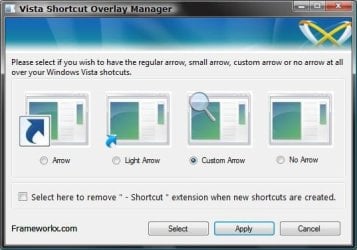
A) Select (dot) the arrow option you want for the shortcut arrow. (See screenshot below)
NOTE: If you selected Custom Arrow to change the shortcut arrow, then click on Select and navigate to and choose a ICO (icon) file you have downloaded to use as the shortcut arrow.
4. To Remove the "Shortcut" Name from All Shortcuts
NOTE: See also: http://www.sevenforums.com/tutorials/804-shortcut-extension-remove-restore.html
A) Check the box to also remove the - Shortcut name extension for new shortcuts that are created.
5. Click/tap on Apply.
Frameworkx.jpg
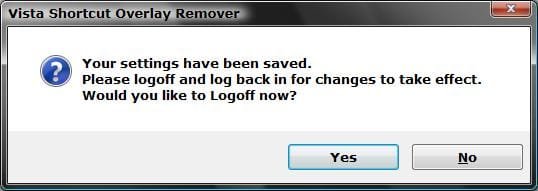
6. Click/tap on Yes to log off to apply the changes. (See screenshot below)
NOTE: If you like, you could also just restart explorer instead to apply your changes.
Logoff_Confirmation.jpg
7. Log back on and your done.


   Warning
If you used the Light Arrow or No Arrow option and uninstall "Vista Shortcut Overlay Remover", then they will be undone the next time you log off/on or restart the computer/explorer.

The Arrow (default) and Custom Arrow options will not be undone if you uninstall "Vista Shortcut Overlay Remover".


OPTION TWO

To Change Shortcut Arrow Overlay Icon in Registry Editor


1. Press the Windows + R keys to open the Run dialog, type regedit, and press Enter.

2. In regedit, navigate to the location below:
NOTE: If Shell Icons it is not in the left pane under Explorer, right click on Explorer, and click on New and Key. Type Shell Icons for the new keys's name, and press Enter.

Code:
HKEY_LOCAL_MACHINE\SOFTWARE\Microsoft\Windows\CurrentVersion\Explorer\Shell Icons

3. In the right pane of Shell Icons, right click on an empty area, and click/tap on New and String Value, and name it 29.

4. Double click/tap on the 29 sting value to modify it.

5. Type in the full path of your custom .ico file within quotes, OR copy and paste the path below for what overlay icon you would like to use, and click/tap on OK.
   Tip
If you like, you can download a transparent.ico file here to use instead.


(No arrow - Transparent) %windir%\System32\shell32.dll,-50

XP_Arrow.png (Classic) %windir%\System32\shell32.dll,-30

Arrow.png (Default) %windir%\System32\shell32.dll,-16769
6. Log off and on, or restart the computer to apply.


OPTION THREE

To Change Shortcut Arrow Overlay Icon using a REG File


NOTE: This option does the same thing as OPTION TWO above, but automatically for you using a .reg file.
1. Do step 2, 3, or 4 below for what you would like to do.

2. To Restore Default Shortcut Arrow Overlay Icon
NOTE: This is the default setting.
A) Click/tap on the Download button below to download the .reg file below, and go to step 5 below.

Arrow.png Default_Shortcut_Arrow.reg


Download


3. To Use Classic Shortcut Arrow Overlay Icon
A) Click/tap on the Download button below to download the .reg file below, and go to step 5 below.

XP_Arrow.png Classic_Shortcut_Arrow.reg


Download


4. To Have No Shortcut Arrow Overlay Icon
A) Click/tap on the Download button below to download the .reg file below, and go to step 5 below.

No_Shortcut_Arrow.reg


Download


5. Log off and log on, or restart the computer to apply.

6. You can now delete the downloaded .reg file if you like.
That's it,
Shawn


Attachments

Last edited:
OK, perhaps this is because I didn't 'undo' Option 3 before. I've now done that, and removed Blank.ico. I've also uninstalled VSM, which perhaps I also should have done before, and have re-applied Option 2, which, after a reboot, seems to have worked. All that remains to be seen is whether it will 'stick' this time.
 

My Computer My Computer

At a glance

Windows 7 Home Premium 32bit
Computer type
PC/Desktop
OS
Windows 7 Home Premium 32bit
I hope so. Please let us know how it goes.
 

My Computer My Computer

At a glance

64-bit Windows 11 Pro for WorkstationsIntel i7-8700K OC'd to 5 GHz64 GB (4x16GB) G.SKILL TridentZ RGB DDR4 3600...ASUS ROG-STRIX-GTX1080TI-O11G-GAMING
Computer type
PC/Desktop
Computer Manufacturer/Model Number
Self built custom
OS
64-bit Windows 11 Pro for Workstations
CPU
Intel i7-8700K OC'd to 5 GHz
Motherboard
ASUS ROG Maximus XI Formula Z390
Memory
64 GB (4x16GB) G.SKILL TridentZ RGB DDR4 3600 MHz
Graphics Card(s)
ASUS ROG-STRIX-GTX1080TI-O11G-GAMING
Sound Card
Integrated
Monitor(s) Displays
2 x Samsung Odyssey G7 27"
Screen Resolution
2560x1440
Hard Drives
1TB Samsung 990 PRO M.2,
4TB Samsung 990 PRO PRO M.2,
TerraMaster F8 SSD Plus NAS
PSU
Seasonic Prime Titanium 850W
Case
Thermaltake Core P3
Cooling
Corsair Hydro H115i
Keyboard
Logitech wireless K800
Mouse
Logitech MX Master 4
Internet Speed
2 Gb/s Download and 100 Mb/s Upload
Antivirus
Malwarebyte Anti-Malware Premium
Browser
Google Chrome
Other Info
Logitech Z625 speaker system,
Logitech BRIO 4K Pro webcam,
HP Color LaserJet Pro MFP M477fdn,
APC SMART-UPS RT 1000 XL - SURT1000XLI,
Galaxy S23 Plus phone
I can understand that. Do you have a restore point dated before you had these issues available?

VSM was one of the first things I installed, which was when I first installed the OS, so System Restore may not go back that far, but I did take a registry backup the other night, before I started fiddling with this. But that would have included whatever VSM did.
 

My Computer My Computer

At a glance

Windows 7 Home Premium 32bit
Computer type
PC/Desktop
OS
Windows 7 Home Premium 32bit
Well, Option 2 has survived a second reboot, so hopefully, the fix will stick this time.

Thanks again for your support. :)
 

My Computer My Computer

At a glance

Windows 7 Home Premium 32bit
Computer type
PC/Desktop
OS
Windows 7 Home Premium 32bit
You're most welcome. Sounds good so far. :)
 

My Computer My Computer

At a glance

64-bit Windows 11 Pro for WorkstationsIntel i7-8700K OC'd to 5 GHz64 GB (4x16GB) G.SKILL TridentZ RGB DDR4 3600...ASUS ROG-STRIX-GTX1080TI-O11G-GAMING
Computer type
PC/Desktop
Computer Manufacturer/Model Number
Self built custom
OS
64-bit Windows 11 Pro for Workstations
CPU
Intel i7-8700K OC'd to 5 GHz
Motherboard
ASUS ROG Maximus XI Formula Z390
Memory
64 GB (4x16GB) G.SKILL TridentZ RGB DDR4 3600 MHz
Graphics Card(s)
ASUS ROG-STRIX-GTX1080TI-O11G-GAMING
Sound Card
Integrated
Monitor(s) Displays
2 x Samsung Odyssey G7 27"
Screen Resolution
2560x1440
Hard Drives
1TB Samsung 990 PRO M.2,
4TB Samsung 990 PRO PRO M.2,
TerraMaster F8 SSD Plus NAS
PSU
Seasonic Prime Titanium 850W
Case
Thermaltake Core P3
Cooling
Corsair Hydro H115i
Keyboard
Logitech wireless K800
Mouse
Logitech MX Master 4
Internet Speed
2 Gb/s Download and 100 Mb/s Upload
Antivirus
Malwarebyte Anti-Malware Premium
Browser
Google Chrome
Other Info
Logitech Z625 speaker system,
Logitech BRIO 4K Pro webcam,
HP Color LaserJet Pro MFP M477fdn,
APC SMART-UPS RT 1000 XL - SURT1000XLI,
Galaxy S23 Plus phone
That's what I thought this morning! ;)
 

My Computer My Computer

At a glance

Windows 7 Home Premium 32bit
Computer type
PC/Desktop
OS
Windows 7 Home Premium 32bit
:roflmao:
 

My Computer My Computer

At a glance

64-bit Windows 11 Pro for WorkstationsIntel i7-8700K OC'd to 5 GHz64 GB (4x16GB) G.SKILL TridentZ RGB DDR4 3600...ASUS ROG-STRIX-GTX1080TI-O11G-GAMING
Computer type
PC/Desktop
Computer Manufacturer/Model Number
Self built custom
OS
64-bit Windows 11 Pro for Workstations
CPU
Intel i7-8700K OC'd to 5 GHz
Motherboard
ASUS ROG Maximus XI Formula Z390
Memory
64 GB (4x16GB) G.SKILL TridentZ RGB DDR4 3600 MHz
Graphics Card(s)
ASUS ROG-STRIX-GTX1080TI-O11G-GAMING
Sound Card
Integrated
Monitor(s) Displays
2 x Samsung Odyssey G7 27"
Screen Resolution
2560x1440
Hard Drives
1TB Samsung 990 PRO M.2,
4TB Samsung 990 PRO PRO M.2,
TerraMaster F8 SSD Plus NAS
PSU
Seasonic Prime Titanium 850W
Case
Thermaltake Core P3
Cooling
Corsair Hydro H115i
Keyboard
Logitech wireless K800
Mouse
Logitech MX Master 4
Internet Speed
2 Gb/s Download and 100 Mb/s Upload
Antivirus
Malwarebyte Anti-Malware Premium
Browser
Google Chrome
Other Info
Logitech Z625 speaker system,
Logitech BRIO 4K Pro webcam,
HP Color LaserJet Pro MFP M477fdn,
APC SMART-UPS RT 1000 XL - SURT1000XLI,
Galaxy S23 Plus phone
aarrgh.gif


After a whole day of being fine, I started my PC again this evening, and the black boxes have returned to the Desktop icons!! I really don't understand what could be happening, but I've observed two things:

1. I observed last night that when I Rebuild_Icon_Cache (with the Reg thing), the icons revert to being as they should, without the arrows. Before I used Option 2, the arrows came back after an icon cache flush, so obviously something there is working right.

2. This evening, I didn't flush the icon cache, but reverted to the 'normal' text size in Personalize > Display. After the forced log out / in cycle, the icons appeared as they should. I then reverted to my custom 110% display, and the icons stuck as they should (no black boxes). Something weird there?

So, it does appear to be something to do with using a custom text size, even though the icons are the same size using the custom and default text sizes. Having said that, using the default (100%) text size produced a space, vertically, for one more icon in a column on my Desktop, but I assume that's because of the reduced text size, and possibly different icon spacing?

What I've done now is, left the text size in Personalize > Display at the default 100%, and adjusted some of the font sizes in the advanced settings, so I'll see how that goes.

One quick question, slightly off topic - how can I make the system tray display just the time, and not the time with the date underneath? Increasing the text size in Personalize > Display achieves this, but I can't find any adjustment for the system tray font anywhere else.
 

My Computer My Computer

At a glance

Windows 7 Home Premium 32bit
Computer type
PC/Desktop
OS
Windows 7 Home Premium 32bit
Well, that hasn't worked either. It seems to hold until I completely shutdown the machine, then on restarting, the black boxes appear again.
 

My Computer My Computer

At a glance

Windows 7 Home Premium 32bit
Computer type
PC/Desktop
OS
Windows 7 Home Premium 32bit
Simon,

You might see if running a sfc /scannow command may be able to help if you have any corruption responsible for this.
 

My Computer My Computer

At a glance

64-bit Windows 11 Pro for WorkstationsIntel i7-8700K OC'd to 5 GHz64 GB (4x16GB) G.SKILL TridentZ RGB DDR4 3600...ASUS ROG-STRIX-GTX1080TI-O11G-GAMING
Computer type
PC/Desktop
Computer Manufacturer/Model Number
Self built custom
OS
64-bit Windows 11 Pro for Workstations
CPU
Intel i7-8700K OC'd to 5 GHz
Motherboard
ASUS ROG Maximus XI Formula Z390
Memory
64 GB (4x16GB) G.SKILL TridentZ RGB DDR4 3600 MHz
Graphics Card(s)
ASUS ROG-STRIX-GTX1080TI-O11G-GAMING
Sound Card
Integrated
Monitor(s) Displays
2 x Samsung Odyssey G7 27"
Screen Resolution
2560x1440
Hard Drives
1TB Samsung 990 PRO M.2,
4TB Samsung 990 PRO PRO M.2,
TerraMaster F8 SSD Plus NAS
PSU
Seasonic Prime Titanium 850W
Case
Thermaltake Core P3
Cooling
Corsair Hydro H115i
Keyboard
Logitech wireless K800
Mouse
Logitech MX Master 4
Internet Speed
2 Gb/s Download and 100 Mb/s Upload
Antivirus
Malwarebyte Anti-Malware Premium
Browser
Google Chrome
Other Info
Logitech Z625 speaker system,
Logitech BRIO 4K Pro webcam,
HP Color LaserJet Pro MFP M477fdn,
APC SMART-UPS RT 1000 XL - SURT1000XLI,
Galaxy S23 Plus phone
OK, thanks, I'll try that in the morning.

What I did next was to copy the Blank.ico file from Option 3(?), and placed it in C:\Windows, then used Option 2, but with the icon path instead of the %windir% thing. I then got the "Folder" icons over the desktop icons again, but after an icon cache flush, I have desktop icons with no arrows, and this has survived two cold boots.

The really odd thing is, it seems to be fine during the day, but when I start the PC up in the evenings, I'm back to square one with the black boxes. It's almost like something is resetting to a time, but I can't see how that's possible.
 

My Computer My Computer

At a glance

Windows 7 Home Premium 32bit
Computer type
PC/Desktop
OS
Windows 7 Home Premium 32bit
I can't think of what may be resetting them either. Do you happen to have some sort of other utility program installed with a setting that may be affecting this?
 

My Computer My Computer

At a glance

64-bit Windows 11 Pro for WorkstationsIntel i7-8700K OC'd to 5 GHz64 GB (4x16GB) G.SKILL TridentZ RGB DDR4 3600...ASUS ROG-STRIX-GTX1080TI-O11G-GAMING
Computer type
PC/Desktop
Computer Manufacturer/Model Number
Self built custom
OS
64-bit Windows 11 Pro for Workstations
CPU
Intel i7-8700K OC'd to 5 GHz
Motherboard
ASUS ROG Maximus XI Formula Z390
Memory
64 GB (4x16GB) G.SKILL TridentZ RGB DDR4 3600 MHz
Graphics Card(s)
ASUS ROG-STRIX-GTX1080TI-O11G-GAMING
Sound Card
Integrated
Monitor(s) Displays
2 x Samsung Odyssey G7 27"
Screen Resolution
2560x1440
Hard Drives
1TB Samsung 990 PRO M.2,
4TB Samsung 990 PRO PRO M.2,
TerraMaster F8 SSD Plus NAS
PSU
Seasonic Prime Titanium 850W
Case
Thermaltake Core P3
Cooling
Corsair Hydro H115i
Keyboard
Logitech wireless K800
Mouse
Logitech MX Master 4
Internet Speed
2 Gb/s Download and 100 Mb/s Upload
Antivirus
Malwarebyte Anti-Malware Premium
Browser
Google Chrome
Other Info
Logitech Z625 speaker system,
Logitech BRIO 4K Pro webcam,
HP Color LaserJet Pro MFP M477fdn,
APC SMART-UPS RT 1000 XL - SURT1000XLI,
Galaxy S23 Plus phone
Not that I can think of. The only thing that runs at a particular time is Windows Defender, which is scheduled to do a quick scan at 9pm each night. But the black boxes appear as soon as the computer boots up, so before the scan even starts. It never used to affect it on XP anyway. My security suite is F-Secure, but I've tried all the methods with and without it running. I also have CCkeaner, but that's dormant until I use it on demand. The only other software I have is MS Office, Adobe Elements, a couple of sound editors, Mailwasher and uTorrent, none of which I can see affecting it, and all of which I had on XP and this wasn't a problem then.

I have to go out this morning but will do the system scan later.
 

My Computer My Computer

At a glance

Windows 7 Home Premium 32bit
Computer type
PC/Desktop
OS
Windows 7 Home Premium 32bit
I've just started the machine for the first time today, and it's started perfectly, with all icons present and correct. I just ran CCleaner on the registry, and it found a leftover from FXVisor, so I've removed that, but I'll see what happens tonight before I run the scan disk check.
 

My Computer My Computer

At a glance

Windows 7 Home Premium 32bit
Computer type
PC/Desktop
OS
Windows 7 Home Premium 32bit
Well, this evening, no black boxes! :party:
 

My Computer My Computer

At a glance

Windows 7 Home Premium 32bit
Computer type
PC/Desktop
OS
Windows 7 Home Premium 32bit
Perfect. :party:
 

My Computer My Computer

At a glance

64-bit Windows 11 Pro for WorkstationsIntel i7-8700K OC'd to 5 GHz64 GB (4x16GB) G.SKILL TridentZ RGB DDR4 3600...ASUS ROG-STRIX-GTX1080TI-O11G-GAMING
Computer type
PC/Desktop
Computer Manufacturer/Model Number
Self built custom
OS
64-bit Windows 11 Pro for Workstations
CPU
Intel i7-8700K OC'd to 5 GHz
Motherboard
ASUS ROG Maximus XI Formula Z390
Memory
64 GB (4x16GB) G.SKILL TridentZ RGB DDR4 3600 MHz
Graphics Card(s)
ASUS ROG-STRIX-GTX1080TI-O11G-GAMING
Sound Card
Integrated
Monitor(s) Displays
2 x Samsung Odyssey G7 27"
Screen Resolution
2560x1440
Hard Drives
1TB Samsung 990 PRO M.2,
4TB Samsung 990 PRO PRO M.2,
TerraMaster F8 SSD Plus NAS
PSU
Seasonic Prime Titanium 850W
Case
Thermaltake Core P3
Cooling
Corsair Hydro H115i
Keyboard
Logitech wireless K800
Mouse
Logitech MX Master 4
Internet Speed
2 Gb/s Download and 100 Mb/s Upload
Antivirus
Malwarebyte Anti-Malware Premium
Browser
Google Chrome
Other Info
Logitech Z625 speaker system,
Logitech BRIO 4K Pro webcam,
HP Color LaserJet Pro MFP M477fdn,
APC SMART-UPS RT 1000 XL - SURT1000XLI,
Galaxy S23 Plus phone
Hello Yoyodude,

This usually happens when the icon you selected to used is no longer at it's target location.

You might see if using OPTION TWO may help. :)
 

My Computer My Computer

At a glance

64-bit Windows 11 Pro for WorkstationsIntel i7-8700K OC'd to 5 GHz64 GB (4x16GB) G.SKILL TridentZ RGB DDR4 3600...ASUS ROG-STRIX-GTX1080TI-O11G-GAMING
Computer type
PC/Desktop
Computer Manufacturer/Model Number
Self built custom
OS
64-bit Windows 11 Pro for Workstations
CPU
Intel i7-8700K OC'd to 5 GHz
Motherboard
ASUS ROG Maximus XI Formula Z390
Memory
64 GB (4x16GB) G.SKILL TridentZ RGB DDR4 3600 MHz
Graphics Card(s)
ASUS ROG-STRIX-GTX1080TI-O11G-GAMING
Sound Card
Integrated
Monitor(s) Displays
2 x Samsung Odyssey G7 27"
Screen Resolution
2560x1440
Hard Drives
1TB Samsung 990 PRO M.2,
4TB Samsung 990 PRO PRO M.2,
TerraMaster F8 SSD Plus NAS
PSU
Seasonic Prime Titanium 850W
Case
Thermaltake Core P3
Cooling
Corsair Hydro H115i
Keyboard
Logitech wireless K800
Mouse
Logitech MX Master 4
Internet Speed
2 Gb/s Download and 100 Mb/s Upload
Antivirus
Malwarebyte Anti-Malware Premium
Browser
Google Chrome
Other Info
Logitech Z625 speaker system,
Logitech BRIO 4K Pro webcam,
HP Color LaserJet Pro MFP M477fdn,
APC SMART-UPS RT 1000 XL - SURT1000XLI,
Galaxy S23 Plus phone
Hello Yoyodude,

This usually happens when the icon you selected to used is no longer at it's target location.

You might see if using OPTION TWO may help. :)

I got it fixed using the Blank.ico file, nevermind my post
 

My Computer My Computer

At a glance

Windows 7 Ultimate 64-bit
OS
Windows 7 Ultimate 64-bit
Great news. :)
 

My Computer My Computer

At a glance

64-bit Windows 11 Pro for WorkstationsIntel i7-8700K OC'd to 5 GHz64 GB (4x16GB) G.SKILL TridentZ RGB DDR4 3600...ASUS ROG-STRIX-GTX1080TI-O11G-GAMING
Computer type
PC/Desktop
Computer Manufacturer/Model Number
Self built custom
OS
64-bit Windows 11 Pro for Workstations
CPU
Intel i7-8700K OC'd to 5 GHz
Motherboard
ASUS ROG Maximus XI Formula Z390
Memory
64 GB (4x16GB) G.SKILL TridentZ RGB DDR4 3600 MHz
Graphics Card(s)
ASUS ROG-STRIX-GTX1080TI-O11G-GAMING
Sound Card
Integrated
Monitor(s) Displays
2 x Samsung Odyssey G7 27"
Screen Resolution
2560x1440
Hard Drives
1TB Samsung 990 PRO M.2,
4TB Samsung 990 PRO PRO M.2,
TerraMaster F8 SSD Plus NAS
PSU
Seasonic Prime Titanium 850W
Case
Thermaltake Core P3
Cooling
Corsair Hydro H115i
Keyboard
Logitech wireless K800
Mouse
Logitech MX Master 4
Internet Speed
2 Gb/s Download and 100 Mb/s Upload
Antivirus
Malwarebyte Anti-Malware Premium
Browser
Google Chrome
Other Info
Logitech Z625 speaker system,
Logitech BRIO 4K Pro webcam,
HP Color LaserJet Pro MFP M477fdn,
APC SMART-UPS RT 1000 XL - SURT1000XLI,
Galaxy S23 Plus phone
Back
Top