
Shortcut Arrow - Change, Remove, or Restore

How to Change, Remove, or Restore the Shortcut Arrow Overlay Icon in Windows


   Information
This tutorial will show you how to change, remove, or restore the default shortcut arrow overlay on all shortcut icons in Vista, Windows 7, and Windows 8.

You must be logged in as an administrator to be able to do the steps in this tutorial.

   Warning
Removing the shortcut arrow will make it harder to tell which files are shortcuts or not.

You can still tell by right clicking or press and hold on the file, and click/tap on Properties to see if you have a Shortcut tab or not.


OPTION ONE

Change Shortcut Arrow using "Vista Shortcut Overlay Remover"


1. If you have not already, click/tap on the Download button below to download the Vista Shortcut Overlay Remover (Vista Shortcut Overlay Manager) program below for the 32-bit or 64-bit Windows you have installed. Save the .msi file to your desktop, and install it.
32-bit (x86) Windows

Download


64-bit (x64) Windows

Download


2. Double click/tap on the program's shortcut to run the program.

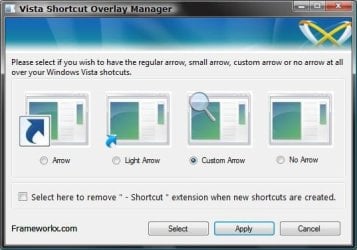
3. To Change, Restore, or Remove the Arrow for All Shortcuts
A) Select (dot) the arrow option you want for the shortcut arrow. (See screenshot below)
NOTE: If you selected Custom Arrow to change the shortcut arrow, then click on Select and navigate to and choose a ICO (icon) file you have downloaded to use as the shortcut arrow.
4. To Remove the "Shortcut" Name from All Shortcuts
NOTE: See also: http://www.sevenforums.com/tutorials/804-shortcut-extension-remove-restore.html
A) Check the box to also remove the - Shortcut name extension for new shortcuts that are created.
5. Click/tap on Apply.
Frameworkx.jpg
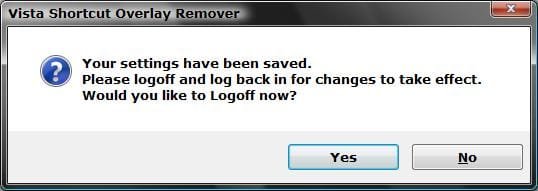
6. Click/tap on Yes to log off to apply the changes. (See screenshot below)
NOTE: If you like, you could also just restart explorer instead to apply your changes.
Logoff_Confirmation.jpg
7. Log back on and your done.


   Warning
If you used the Light Arrow or No Arrow option and uninstall "Vista Shortcut Overlay Remover", then they will be undone the next time you log off/on or restart the computer/explorer.

The Arrow (default) and Custom Arrow options will not be undone if you uninstall "Vista Shortcut Overlay Remover".


OPTION TWO

To Change Shortcut Arrow Overlay Icon in Registry Editor


1. Press the Windows + R keys to open the Run dialog, type regedit, and press Enter.

2. In regedit, navigate to the location below:
NOTE: If Shell Icons it is not in the left pane under Explorer, right click on Explorer, and click on New and Key. Type Shell Icons for the new keys's name, and press Enter.

Code:
HKEY_LOCAL_MACHINE\SOFTWARE\Microsoft\Windows\CurrentVersion\Explorer\Shell Icons

3. In the right pane of Shell Icons, right click on an empty area, and click/tap on New and String Value, and name it 29.

4. Double click/tap on the 29 sting value to modify it.

5. Type in the full path of your custom .ico file within quotes, OR copy and paste the path below for what overlay icon you would like to use, and click/tap on OK.
   Tip
If you like, you can download a transparent.ico file here to use instead.


(No arrow - Transparent) %windir%\System32\shell32.dll,-50

XP_Arrow.png (Classic) %windir%\System32\shell32.dll,-30

Arrow.png (Default) %windir%\System32\shell32.dll,-16769
6. Log off and on, or restart the computer to apply.


OPTION THREE

To Change Shortcut Arrow Overlay Icon using a REG File


NOTE: This option does the same thing as OPTION TWO above, but automatically for you using a .reg file.
1. Do step 2, 3, or 4 below for what you would like to do.

2. To Restore Default Shortcut Arrow Overlay Icon
NOTE: This is the default setting.
A) Click/tap on the Download button below to download the .reg file below, and go to step 5 below.

Arrow.png Default_Shortcut_Arrow.reg


Download


3. To Use Classic Shortcut Arrow Overlay Icon
A) Click/tap on the Download button below to download the .reg file below, and go to step 5 below.

XP_Arrow.png Classic_Shortcut_Arrow.reg


Download


4. To Have No Shortcut Arrow Overlay Icon
A) Click/tap on the Download button below to download the .reg file below, and go to step 5 below.

No_Shortcut_Arrow.reg


Download


5. Log off and log on, or restart the computer to apply.

6. You can now delete the downloaded .reg file if you like.
That's it,
Shawn


Attachments

Last edited:
Outstanding Post!

What more is there to say? Simple and straightforward and it works.
Thanks.
 

My Computer My Computer

At a glance

Windows 7 Enterprise 64-bit
Computer type
PC/Desktop
Computer Manufacturer/Model Number
Citrix XenDesktop 5.6. Attaching via HP t510 Thin Clients
OS
Windows 7 Enterprise 64-bit
Hooray! This miniscule detail was the first reason I registered here :p
Since I didn't want to stick my paws in the registry for such a tiny thing,
I used Option One and it worked without a hitch.
 
Last edited:

My Computer My Computer

At a glance

Windows 7 Ultimate x64Intel Pentium D, 2.80GHz2.00 GB RAMIntegrated
Computer type
PC/Desktop
Computer Manufacturer/Model Number
Dell Optiplex GX520
OS
Windows 7 Ultimate x64
CPU
Intel Pentium D, 2.80GHz
Motherboard
[manufacturer Dell]
Memory
2.00 GB RAM
Graphics Card(s)
Integrated
Sound Card
SoundMax Integrated Digital Audio
Monitor(s) Displays
'Generic' PnP
Screen Resolution
1280x1024
Hard Drives
Samsung HD080HJ/P ATA, 80GB
Keyboard
Microsoft USB Internet Keyboard Pro
Mouse
Logitec Marble Mouse - ambidextrous
Internet Speed
"juuuust fast enough to operate YouTube decently, heh"
Antivirus
AVAST! 2014.9.0.2008
Browser
Palemoon 24.1.1(x64); IE8.0.7600.16385
Other Info
Dell does not support W7 on this rig, truth be told.
Ok, this is driving me crazy. Option 2 has failed.

Option 1 also has failed on my two machines for different reasons:
On Win 7 64-bit machine, I ran it but see no change.
On Win 7 32-bit machine, I can't install the software. I get "Error reading from file C:\*******. Verify that the file exists and that you can access it." Of course it exists.

What gives?
 

My Computer My Computer

At a glance

Windows 7 64bit
Computer type
PC/Desktop
OS
Windows 7 64bit
Ok, this is driving me crazy. Option 2 has failed.

Option 1 also has failed on my two machines for different reasons:
On Win 7 64-bit machine, I ran it but see no change.
On Win 7 32-bit machine, I can't install the software. I get "Error reading from file C:\*******. Verify that the file exists and that you can access it." Of course it exists.

What gives?

Ok. my bad..
Option 1 works fine.

I was able to install the 32-bit program by moving the installation file to the desktop.
Also, I didn't see any effects from these programs because a utility that I use - Fences - hides shortcut arrows on its own.
 

My Computer My Computer

At a glance

Windows 7 64bit
Computer type
PC/Desktop
OS
Windows 7 64bit
Hello New Daddy, and welcome to Seven Forums.

Thank you for posting back with your findings. :)
 

My Computer My Computer

At a glance

64-bit Windows 11 Pro for WorkstationsIntel i7-8700K OC'd to 5 GHz64 GB (4x16GB) G.SKILL TridentZ RGB DDR4 3600...ASUS ROG-STRIX-GTX1080TI-O11G-GAMING
Computer type
PC/Desktop
Computer Manufacturer/Model Number
Self built custom
OS
64-bit Windows 11 Pro for Workstations
CPU
Intel i7-8700K OC'd to 5 GHz
Motherboard
ASUS ROG Maximus XI Formula Z390
Memory
64 GB (4x16GB) G.SKILL TridentZ RGB DDR4 3600 MHz
Graphics Card(s)
ASUS ROG-STRIX-GTX1080TI-O11G-GAMING
Sound Card
Integrated
Monitor(s) Displays
2 x Samsung Odyssey G7 27"
Screen Resolution
2560x1440
Hard Drives
1TB Samsung 990 PRO M.2,
4TB Samsung 990 PRO PRO M.2,
TerraMaster F8 SSD Plus NAS
PSU
Seasonic Prime Titanium 850W
Case
Thermaltake Core P3
Cooling
Corsair Hydro H115i
Keyboard
Logitech wireless K800
Mouse
Logitech MX Master 4
Internet Speed
2 Gb/s Download and 100 Mb/s Upload
Antivirus
Malwarebyte Anti-Malware Premium
Browser
Google Chrome
Other Info
Logitech Z625 speaker system,
Logitech BRIO 4K Pro webcam,
HP Color LaserJet Pro MFP M477fdn,
APC SMART-UPS RT 1000 XL - SURT1000XLI,
Galaxy S23 Plus phone
:eek:

Glad to see New Daddy got that fixed up :cool:
 

My Computer My Computer

At a glance

Windows 7 Ultimate x64Intel Pentium D, 2.80GHz2.00 GB RAMIntegrated
Computer type
PC/Desktop
Computer Manufacturer/Model Number
Dell Optiplex GX520
OS
Windows 7 Ultimate x64
CPU
Intel Pentium D, 2.80GHz
Motherboard
[manufacturer Dell]
Memory
2.00 GB RAM
Graphics Card(s)
Integrated
Sound Card
SoundMax Integrated Digital Audio
Monitor(s) Displays
'Generic' PnP
Screen Resolution
1280x1024
Hard Drives
Samsung HD080HJ/P ATA, 80GB
Keyboard
Microsoft USB Internet Keyboard Pro
Mouse
Logitec Marble Mouse - ambidextrous
Internet Speed
"juuuust fast enough to operate YouTube decently, heh"
Antivirus
AVAST! 2014.9.0.2008
Browser
Palemoon 24.1.1(x64); IE8.0.7600.16385
Other Info
Dell does not support W7 on this rig, truth be told.
Thank You

Cheers for this :)

Option one failed, but I have a known problem with .net which no-one, including MS can fix :mad:
I try to avoid editing the reg manually if at all possible - mess that up and you're f****d! :eek:

Option three worked a treat, using the 'no short-cut arrow' sub option - Brill !! :D

I have my icons back, see-able and working - fantastic !!


Best Regards
Greg
 

My Computer My Computer

At a glance

Windows 7AMD Sempron LE-11004 GB (OCZ DDR2 800MHz)On Board (ATI Radeon HD4200 Chip Set)
Computer Manufacturer/Model Number
Self Built (PC Build # 5)
OS
Windows 7
CPU
AMD Sempron LE-1100
Motherboard
ASUS M4A785D-M (AMD 785 Chip Set)
Memory
4 GB (OCZ DDR2 800MHz)
Graphics Card(s)
On Board (ATI Radeon HD4200 Chip Set)
Sound Card
On Board
Monitor(s) Displays
Neovo (Generic PnP)
Hard Drives
1 x Sata 500GB Seagate ST3500418AS
PSU
Arctic 700W
Case
Ares Jean Tech
Cooling
CPU Fan = Gigabyte Neon 8 Pro // Case Fan = Generic Fan
Glad it could help Greg, and congrats on your first post. :)
 

My Computer My Computer

At a glance

64-bit Windows 11 Pro for WorkstationsIntel i7-8700K OC'd to 5 GHz64 GB (4x16GB) G.SKILL TridentZ RGB DDR4 3600...ASUS ROG-STRIX-GTX1080TI-O11G-GAMING
Computer type
PC/Desktop
Computer Manufacturer/Model Number
Self built custom
OS
64-bit Windows 11 Pro for Workstations
CPU
Intel i7-8700K OC'd to 5 GHz
Motherboard
ASUS ROG Maximus XI Formula Z390
Memory
64 GB (4x16GB) G.SKILL TridentZ RGB DDR4 3600 MHz
Graphics Card(s)
ASUS ROG-STRIX-GTX1080TI-O11G-GAMING
Sound Card
Integrated
Monitor(s) Displays
2 x Samsung Odyssey G7 27"
Screen Resolution
2560x1440
Hard Drives
1TB Samsung 990 PRO M.2,
4TB Samsung 990 PRO PRO M.2,
TerraMaster F8 SSD Plus NAS
PSU
Seasonic Prime Titanium 850W
Case
Thermaltake Core P3
Cooling
Corsair Hydro H115i
Keyboard
Logitech wireless K800
Mouse
Logitech MX Master 4
Internet Speed
2 Gb/s Download and 100 Mb/s Upload
Antivirus
Malwarebyte Anti-Malware Premium
Browser
Google Chrome
Other Info
Logitech Z625 speaker system,
Logitech BRIO 4K Pro webcam,
HP Color LaserJet Pro MFP M477fdn,
APC SMART-UPS RT 1000 XL - SURT1000XLI,
Galaxy S23 Plus phone
Hhmmmm ... it would seem I spoke too soon :(

It worked fine for 2 days, now all the icons on the desktop have disappeared altogether, that is to say they have all turned to black squares, the title is still there under the icons - very strange.
Tried running your option three again, but no luck this time.

Any tips or solutions for this, any links?
They would be greatly appreciated.
 

My Computer My Computer

At a glance

Windows 7AMD Sempron LE-11004 GB (OCZ DDR2 800MHz)On Board (ATI Radeon HD4200 Chip Set)
Computer Manufacturer/Model Number
Self Built (PC Build # 5)
OS
Windows 7
CPU
AMD Sempron LE-1100
Motherboard
ASUS M4A785D-M (AMD 785 Chip Set)
Memory
4 GB (OCZ DDR2 800MHz)
Graphics Card(s)
On Board (ATI Radeon HD4200 Chip Set)
Sound Card
On Board
Monitor(s) Displays
Neovo (Generic PnP)
Hard Drives
1 x Sata 500GB Seagate ST3500418AS
PSU
Arctic 700W
Case
Ares Jean Tech
Cooling
CPU Fan = Gigabyte Neon 8 Pro // Case Fan = Generic Fan
Sorry to hear that Rory.

See if rebuilding the icon cache may help if it's just corrupted.

If not, then see if using OPTION TWO to specify the shortcut arrow may.

If that doesn't help, then see if running a sfc /scannow command to see if it may if the system file that contains the icon may be corrupted or modified.
 

My Computer My Computer

At a glance

64-bit Windows 11 Pro for WorkstationsIntel i7-8700K OC'd to 5 GHz64 GB (4x16GB) G.SKILL TridentZ RGB DDR4 3600...ASUS ROG-STRIX-GTX1080TI-O11G-GAMING
Computer type
PC/Desktop
Computer Manufacturer/Model Number
Self built custom
OS
64-bit Windows 11 Pro for Workstations
CPU
Intel i7-8700K OC'd to 5 GHz
Motherboard
ASUS ROG Maximus XI Formula Z390
Memory
64 GB (4x16GB) G.SKILL TridentZ RGB DDR4 3600 MHz
Graphics Card(s)
ASUS ROG-STRIX-GTX1080TI-O11G-GAMING
Sound Card
Integrated
Monitor(s) Displays
2 x Samsung Odyssey G7 27"
Screen Resolution
2560x1440
Hard Drives
1TB Samsung 990 PRO M.2,
4TB Samsung 990 PRO PRO M.2,
TerraMaster F8 SSD Plus NAS
PSU
Seasonic Prime Titanium 850W
Case
Thermaltake Core P3
Cooling
Corsair Hydro H115i
Keyboard
Logitech wireless K800
Mouse
Logitech MX Master 4
Internet Speed
2 Gb/s Download and 100 Mb/s Upload
Antivirus
Malwarebyte Anti-Malware Premium
Browser
Google Chrome
Other Info
Logitech Z625 speaker system,
Logitech BRIO 4K Pro webcam,
HP Color LaserJet Pro MFP M477fdn,
APC SMART-UPS RT 1000 XL - SURT1000XLI,
Galaxy S23 Plus phone
Well, partial success ... I ran "Rebuild_Icon_Cache.bat" which worked fine, all the icons were restored ... until ... I restarted my PC and all except for the few actual .docx and true folders went back to black squares. ie this seems to be a problem associated solely with programs, not files or folders that I've placed on my desktop.

I guess I'll live with it for now and run "Rebuild_Icon_Cache.bat" at start-up, it's not that much of a hassle as it only takes a minute or two.

The option sfc \scannow also seemed to report that some files were indeed corrupted and it states where the CBS log can be found, unfortunately that log has a "Access Denied" tag on it even after trying to open it under administrators rights.

Thanks for your help.
 

My Computer My Computer

At a glance

Windows 7AMD Sempron LE-11004 GB (OCZ DDR2 800MHz)On Board (ATI Radeon HD4200 Chip Set)
Computer Manufacturer/Model Number
Self Built (PC Build # 5)
OS
Windows 7
CPU
AMD Sempron LE-1100
Motherboard
ASUS M4A785D-M (AMD 785 Chip Set)
Memory
4 GB (OCZ DDR2 800MHz)
Graphics Card(s)
On Board (ATI Radeon HD4200 Chip Set)
Sound Card
On Board
Monitor(s) Displays
Neovo (Generic PnP)
Hard Drives
1 x Sata 500GB Seagate ST3500418AS
PSU
Arctic 700W
Case
Ares Jean Tech
Cooling
CPU Fan = Gigabyte Neon 8 Pro // Case Fan = Generic Fan

My Computer My Computer

At a glance

64-bit Windows 11 Pro for WorkstationsIntel i7-8700K OC'd to 5 GHz64 GB (4x16GB) G.SKILL TridentZ RGB DDR4 3600...ASUS ROG-STRIX-GTX1080TI-O11G-GAMING
Computer type
PC/Desktop
Computer Manufacturer/Model Number
Self built custom
OS
64-bit Windows 11 Pro for Workstations
CPU
Intel i7-8700K OC'd to 5 GHz
Motherboard
ASUS ROG Maximus XI Formula Z390
Memory
64 GB (4x16GB) G.SKILL TridentZ RGB DDR4 3600 MHz
Graphics Card(s)
ASUS ROG-STRIX-GTX1080TI-O11G-GAMING
Sound Card
Integrated
Monitor(s) Displays
2 x Samsung Odyssey G7 27"
Screen Resolution
2560x1440
Hard Drives
1TB Samsung 990 PRO M.2,
4TB Samsung 990 PRO PRO M.2,
TerraMaster F8 SSD Plus NAS
PSU
Seasonic Prime Titanium 850W
Case
Thermaltake Core P3
Cooling
Corsair Hydro H115i
Keyboard
Logitech wireless K800
Mouse
Logitech MX Master 4
Internet Speed
2 Gb/s Download and 100 Mb/s Upload
Antivirus
Malwarebyte Anti-Malware Premium
Browser
Google Chrome
Other Info
Logitech Z625 speaker system,
Logitech BRIO 4K Pro webcam,
HP Color LaserJet Pro MFP M477fdn,
APC SMART-UPS RT 1000 XL - SURT1000XLI,
Galaxy S23 Plus phone
Hi Brink, - ( did I read somewhere your name is "Sean"?)

Well mixed results again this time. Firstly I had another go at reading the CBS.log file by going back into its properties and allowing myself ("Greg" - as opposed to "administrator", which I am) to read write etc to the file. It worked I was able to open it, it's huge, 6.045KB! And means absolutely nothing to me - lol - no surprise there, I'm a Control Engineer not a Software Engineer.

So I then tried your Option Three in the SFC /SCANNOW Command - System File Checker and that also worked but the file it created was empty!

Although all options worked, I'm no nearer figuring out what's wrong.

I'm next going to try your step 4 in OPTION TWO, later, and I'll get back to you when that's done but it will be a while.

Thanks again for your continued help in this matter
Greg
 

My Computer My Computer

At a glance

Windows 7AMD Sempron LE-11004 GB (OCZ DDR2 800MHz)On Board (ATI Radeon HD4200 Chip Set)
Computer Manufacturer/Model Number
Self Built (PC Build # 5)
OS
Windows 7
CPU
AMD Sempron LE-1100
Motherboard
ASUS M4A785D-M (AMD 785 Chip Set)
Memory
4 GB (OCZ DDR2 800MHz)
Graphics Card(s)
On Board (ATI Radeon HD4200 Chip Set)
Sound Card
On Board
Monitor(s) Displays
Neovo (Generic PnP)
Hard Drives
1 x Sata 500GB Seagate ST3500418AS
PSU
Arctic 700W
Case
Ares Jean Tech
Cooling
CPU Fan = Gigabyte Neon 8 Pro // Case Fan = Generic Fan
thanks!! worked like a charm
 

My Computer My Computer

At a glance

Windows 7 Professional 64 bit (German)Intel® Core™ i3-2350M Prozessor6 GBIntel® HD Graphics 3000 AMD Radeon® HD 6470M
Computer type
PC/Desktop
Computer Manufacturer/Model Number
Sony Vaio VPCSB4M9E
OS
Windows 7 Professional 64 bit (German)
CPU
Intel® Core™ i3-2350M Prozessor
Memory
6 GB
Graphics Card(s)
Intel® HD Graphics 3000 AMD Radeon® HD 6470M
Antivirus
Avast! Free
Browser
Torch
Thank you!

I have always done the steps to manually remove the shortcut icons but never bothered on this last installation of Win7. Finally, tonight after needing to keep several shortcuts on my desktop i decided to get rid of the ugly arrows.

I tried Option 4 (no arrow version) and it did not work. Win7 64bit. I wonder why? If it is just a registry script, the same as manual, it should have worked. I both logged off and rebooted but the arrows were still there.

Option 1 worked fine. I usually prefer not to run .exe files when avoidable but of course I trust you and your forum. I'm just curious if anyone else had problems with Option 4.
 

My Computer My Computer

At a glance

Win 7 32bit
OS
Win 7 32bit
Hello gvstn,

Yep, Option 4 does the exact same thing as in Option 3, but automatically with the .reg file.

I'm not sure why the .reg file doesn't work for you, but doing it manually did.
 

My Computer My Computer

At a glance

64-bit Windows 11 Pro for WorkstationsIntel i7-8700K OC'd to 5 GHz64 GB (4x16GB) G.SKILL TridentZ RGB DDR4 3600...ASUS ROG-STRIX-GTX1080TI-O11G-GAMING
Computer type
PC/Desktop
Computer Manufacturer/Model Number
Self built custom
OS
64-bit Windows 11 Pro for Workstations
CPU
Intel i7-8700K OC'd to 5 GHz
Motherboard
ASUS ROG Maximus XI Formula Z390
Memory
64 GB (4x16GB) G.SKILL TridentZ RGB DDR4 3600 MHz
Graphics Card(s)
ASUS ROG-STRIX-GTX1080TI-O11G-GAMING
Sound Card
Integrated
Monitor(s) Displays
2 x Samsung Odyssey G7 27"
Screen Resolution
2560x1440
Hard Drives
1TB Samsung 990 PRO M.2,
4TB Samsung 990 PRO PRO M.2,
TerraMaster F8 SSD Plus NAS
PSU
Seasonic Prime Titanium 850W
Case
Thermaltake Core P3
Cooling
Corsair Hydro H115i
Keyboard
Logitech wireless K800
Mouse
Logitech MX Master 4
Internet Speed
2 Gb/s Download and 100 Mb/s Upload
Antivirus
Malwarebyte Anti-Malware Premium
Browser
Google Chrome
Other Info
Logitech Z625 speaker system,
Logitech BRIO 4K Pro webcam,
HP Color LaserJet Pro MFP M477fdn,
APC SMART-UPS RT 1000 XL - SURT1000XLI,
Galaxy S23 Plus phone
Hello gvstn,

Yep, Option 4 does the exact same thing as in Option 3, but automatically with the .reg file.

I'm not sure why the .reg file doesn't work for you, but doing it manually did.

Hi,

Just wanted to clarify that this time I did not do it manually but tried the easy fix of the registry script in Option 4 which didn't work. Instead of then doing it manually in regedit using Option 3, I did a System Restore and tried Option 1 which I had never tried before. This worked perfectly.

I'm just wondering if the registry script in Option 4 is really exactly the same as doing it manually in Option 3. I know I have used Option 3 before and it worked. I can't tell whether Option 3 would now work without actually going back and doing a System Restore and then doing Option 3 which I would only do if you needed confirmation. I only wanted to let you know that Option 4 didn't work for me this time.

Thanks again for being a reliable and trusted source for not only setting things back to default options but helping customize our systems. :)
 

My Computer My Computer

At a glance

Win 7 32bit
OS
Win 7 32bit
Yeah, that's what I meant that the manual method had worked for you when you used it last, and the .reg files do the same thing as the manual method.

Thank you for letting me know, but I'm not sure why the .reg file is not working for you when I'm not having any issue with it testing it in a few VMs.

Either way, I'm glad Option 1 worked for you. :)
 

My Computer My Computer

At a glance

64-bit Windows 11 Pro for WorkstationsIntel i7-8700K OC'd to 5 GHz64 GB (4x16GB) G.SKILL TridentZ RGB DDR4 3600...ASUS ROG-STRIX-GTX1080TI-O11G-GAMING
Computer type
PC/Desktop
Computer Manufacturer/Model Number
Self built custom
OS
64-bit Windows 11 Pro for Workstations
CPU
Intel i7-8700K OC'd to 5 GHz
Motherboard
ASUS ROG Maximus XI Formula Z390
Memory
64 GB (4x16GB) G.SKILL TridentZ RGB DDR4 3600 MHz
Graphics Card(s)
ASUS ROG-STRIX-GTX1080TI-O11G-GAMING
Sound Card
Integrated
Monitor(s) Displays
2 x Samsung Odyssey G7 27"
Screen Resolution
2560x1440
Hard Drives
1TB Samsung 990 PRO M.2,
4TB Samsung 990 PRO PRO M.2,
TerraMaster F8 SSD Plus NAS
PSU
Seasonic Prime Titanium 850W
Case
Thermaltake Core P3
Cooling
Corsair Hydro H115i
Keyboard
Logitech wireless K800
Mouse
Logitech MX Master 4
Internet Speed
2 Gb/s Download and 100 Mb/s Upload
Antivirus
Malwarebyte Anti-Malware Premium
Browser
Google Chrome
Other Info
Logitech Z625 speaker system,
Logitech BRIO 4K Pro webcam,
HP Color LaserJet Pro MFP M477fdn,
APC SMART-UPS RT 1000 XL - SURT1000XLI,
Galaxy S23 Plus phone
I’m having the same issue as the user above.

I manually changed my short arrows to invisible via regedit about 2 years ago. Occasionally they would show up as black boxes, but just recently it happens every time I start up. I have no idea what’s triggering it. When I run the rebuild icon cache bat it works until I restart. I’ve checked the reg and the icon shell never changes its always set to (-50) invisible. Are they any other known reg entries that point to the shortcut arrow icon? There must be another one somewhere.

If there is no known solution, can some help me write a start up script to run rebuild icon cache that also refreshes the desktop? When I run the bat file my desktop and task bar are empty. I have to log off and log back on for that fix to work. So I’d like to combine both tasks into one if possible.
 

My Computer My Computer

At a glance

Windows 7
Computer type
PC/Desktop
OS
Windows 7
Hello Chad, and welcome to Seven Forums.

If you like, using Option One would be a good choice for this. :)
 

My Computer My Computer

At a glance

64-bit Windows 11 Pro for WorkstationsIntel i7-8700K OC'd to 5 GHz64 GB (4x16GB) G.SKILL TridentZ RGB DDR4 3600...ASUS ROG-STRIX-GTX1080TI-O11G-GAMING
Computer type
PC/Desktop
Computer Manufacturer/Model Number
Self built custom
OS
64-bit Windows 11 Pro for Workstations
CPU
Intel i7-8700K OC'd to 5 GHz
Motherboard
ASUS ROG Maximus XI Formula Z390
Memory
64 GB (4x16GB) G.SKILL TridentZ RGB DDR4 3600 MHz
Graphics Card(s)
ASUS ROG-STRIX-GTX1080TI-O11G-GAMING
Sound Card
Integrated
Monitor(s) Displays
2 x Samsung Odyssey G7 27"
Screen Resolution
2560x1440
Hard Drives
1TB Samsung 990 PRO M.2,
4TB Samsung 990 PRO PRO M.2,
TerraMaster F8 SSD Plus NAS
PSU
Seasonic Prime Titanium 850W
Case
Thermaltake Core P3
Cooling
Corsair Hydro H115i
Keyboard
Logitech wireless K800
Mouse
Logitech MX Master 4
Internet Speed
2 Gb/s Download and 100 Mb/s Upload
Antivirus
Malwarebyte Anti-Malware Premium
Browser
Google Chrome
Other Info
Logitech Z625 speaker system,
Logitech BRIO 4K Pro webcam,
HP Color LaserJet Pro MFP M477fdn,
APC SMART-UPS RT 1000 XL - SURT1000XLI,
Galaxy S23 Plus phone
Back
Top