Shortcut - Change Icon

How to Change the Icon of a Shortcut in Vista, Windows 7, and Windows 8

   Information
This will show you how to change the icon of any file, folder, or drive shortcut to have a custom icon of your choice instead.
   Tip
To change a shortcut icon that is pinned to the taskbar, you will need to first unpin the shortcut from the taskbar, change the shortcut's icon using the instructions below, then pin the shortcut back to the taskbar.

EXAMPLE: Before and After Shortcut Icon Change Shortcut_Before.jpgShortcut_After.jpg

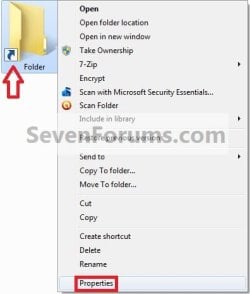
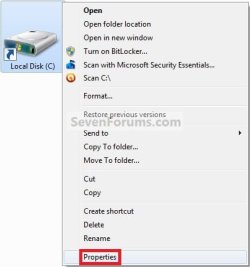
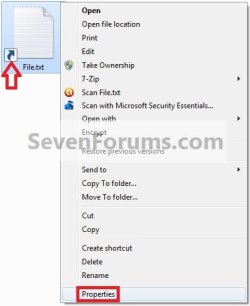
Here's How: 1. Right click or press and hold on the shortcut of a file, folder, or drive, and click/tap on Properties. (see screenshots below) File.jpgFolder.jpg
Drive.jpg

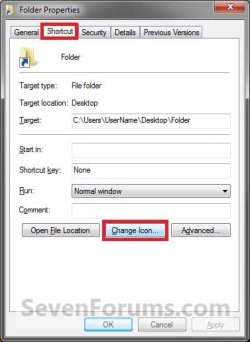
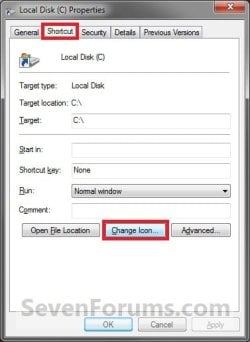
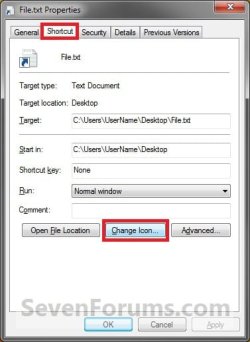
2. Click/tap on the Shortcut tab, click/tap on the Change Icon button, and do step 3, 4, or 5 below for what you would like to do. (see screenshots below) File_Properties.jpgFolder_Properties.jpg
Drive_Properties.jpg

3. To Just Select from another Available Icon A) Select an available icon, click/tap on OK, and go to step 6 below. (see screenshot below) Change_Icon.jpg
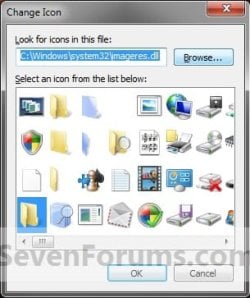
4. To Select Another Windows Icon A) Click/tap on the Browse button. (see screenshot below step 3A)

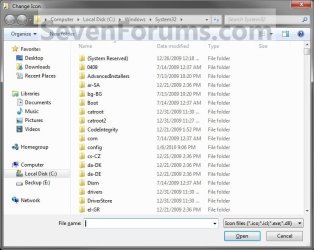
B) Navigate to and select a .dll or .exe system file in Windows that contains a icon library to select from, then click/tap on the Open button. (see screenshot below)

   Note
Two most common locations of default Windows icons are located at:
  • C:\Windows\System32\imageres.dll
  • C:\Windows\System32\shell32.dll
Browse.jpg
C) Select an available icon, click/tap on OK, and go to step 6 below. (see screenshot below step 3A)
5. To Select a Custom Icon of Your Own A) Click/tap on the Browse button. (see screenshot below step 3A)

B) Navigate to and select a 256x256 pixel .ico file that you want to use for the shortcut's icon, then click on the Open button. (see screenshot below 4B)

C) Select the icon, click/tap on OK, and go to step 6 below. (see screenshot below step 3A)
6. Click/tap on OK. (see screenshots below step 2)
That's it,
Shawn


Last edited:
And if the Change Icon button is grayed out (like mine) then what?????
 

My Computer

Computer type
PC/Desktop
Computer Manufacturer/Model Number
Self Built
OS
Windows 7 x64 bit Home Premium
CPU
AND FX8150
Motherboard
Asus Crosshair V Formula/Thunderbolt
Memory
16GB DDR3
Graphics Card(s)
GeForce GTX 1070
Monitor(s) Displays
Asus VK228 , LG34UM66, Asus VS228
Screen Resolution
6000 x 2560
Hard Drives
A great many. 3 are SSD, including the Win7 OS Drive, and one for FSX. All SATA
PSU
Cooler Master Silent Pro M 1000W
Case
Cooler Master Cosmos II Ultra Tower
Cooling
Corsair Hydro H100 Extreme Performance Liquid Cooling
Keyboard
Logitech G510s
Mouse
Logitech Trackball M571
Internet Speed
Spectrum Broadband
Antivirus
ME Security Essentials, Malwarebytes AntiMalware
Browser
Chrome
Other Info
Ableconn 10 port SATA PSI Card. Of these 10 and the 6 SATA Ports on the mobo, 14 of them are in use.
Hello Zoandar,

What is it a shortcut of?

As a test, create a new shortcut directly from the program's exe file to see if you may be able to change this shortcut's icon.

The default MS Office shortcuts are like this, and you will have to create a new shortcut like above to be able to.
 

My Computer

Computer type
PC/Desktop
Computer Manufacturer/Model Number
Self built custom
OS
64-bit Windows 11 Pro for Workstations
CPU
Intel i7-8700K OC'd to 5 GHz
Motherboard
ASUS ROG Maximus XI Formula Z390
Memory
64 GB (4x16GB) G.SKILL TridentZ RGB DDR4 3600 MHz
Graphics Card(s)
ASUS ROG-STRIX-GTX1080TI-O11G-GAMING
Sound Card
Integrated
Monitor(s) Displays
2 x Samsung Odyssey G7 27"
Screen Resolution
2560x1440
Hard Drives
1TB Samsung 990 PRO M.2,
4TB Samsung 990 PRO PRO M.2,
TerraMaster F8 SSD Plus NAS
PSU
Seasonic Prime Titanium 850W
Case
Thermaltake Core P3
Cooling
Corsair Hydro H115i
Keyboard
Logitech wireless K800
Mouse
Logitech MX Master 4
Internet Speed
2 Gb/s Download and 100 Mb/s Upload
Antivirus
Malwarebyte Anti-Malware Premium
Browser
Google Chrome
Other Info
Logitech Z625 speaker system,
Logitech BRIO 4K Pro webcam,
HP Color LaserJet Pro MFP M477fdn,
APC SMART-UPS RT 1000 XL - SURT1000XLI,
Galaxy S23 Plus phone
After I posted the above I got an idea and tried doing as you said, but also moved to the Public folder under my user account to create the shortcut from the exe file of the program. That allowed me to change the icon, and then move the changed icon back to the desktop and eventually pin it to the task bar. I'll try creating another one on the desktop by going directly to the executable and see if that also works.

One of the frustrations I get out of all of Win7's "permissions" crap is that such work-arounds ALLOW me to actually end up with the thing they were "preventing". So why not just LET me do it in the first place!?

It's silly.
 

My Computer

Computer type
PC/Desktop
Computer Manufacturer/Model Number
Self Built
OS
Windows 7 x64 bit Home Premium
CPU
AND FX8150
Motherboard
Asus Crosshair V Formula/Thunderbolt
Memory
16GB DDR3
Graphics Card(s)
GeForce GTX 1070
Monitor(s) Displays
Asus VK228 , LG34UM66, Asus VS228
Screen Resolution
6000 x 2560
Hard Drives
A great many. 3 are SSD, including the Win7 OS Drive, and one for FSX. All SATA
PSU
Cooler Master Silent Pro M 1000W
Case
Cooler Master Cosmos II Ultra Tower
Cooling
Corsair Hydro H100 Extreme Performance Liquid Cooling
Keyboard
Logitech G510s
Mouse
Logitech Trackball M571
Internet Speed
Spectrum Broadband
Antivirus
ME Security Essentials, Malwarebytes AntiMalware
Browser
Chrome
Other Info
Ableconn 10 port SATA PSI Card. Of these 10 and the 6 SATA Ports on the mobo, 14 of them are in use.
That's great news Zoandar. :)

This would most likely be from how the program created the original shortcut that wouldn't allow you to change the icon instead. This way their progam's logo/icon will always be displayed for it instead. By using Windows method to create a new shortcut is what allowed you to be able to change it though.
 

My Computer

Computer type
PC/Desktop
Computer Manufacturer/Model Number
Self built custom
OS
64-bit Windows 11 Pro for Workstations
CPU
Intel i7-8700K OC'd to 5 GHz
Motherboard
ASUS ROG Maximus XI Formula Z390
Memory
64 GB (4x16GB) G.SKILL TridentZ RGB DDR4 3600 MHz
Graphics Card(s)
ASUS ROG-STRIX-GTX1080TI-O11G-GAMING
Sound Card
Integrated
Monitor(s) Displays
2 x Samsung Odyssey G7 27"
Screen Resolution
2560x1440
Hard Drives
1TB Samsung 990 PRO M.2,
4TB Samsung 990 PRO PRO M.2,
TerraMaster F8 SSD Plus NAS
PSU
Seasonic Prime Titanium 850W
Case
Thermaltake Core P3
Cooling
Corsair Hydro H115i
Keyboard
Logitech wireless K800
Mouse
Logitech MX Master 4
Internet Speed
2 Gb/s Download and 100 Mb/s Upload
Antivirus
Malwarebyte Anti-Malware Premium
Browser
Google Chrome
Other Info
Logitech Z625 speaker system,
Logitech BRIO 4K Pro webcam,
HP Color LaserJet Pro MFP M477fdn,
APC SMART-UPS RT 1000 XL - SURT1000XLI,
Galaxy S23 Plus phone
It was never this big an issue with WinXP, but I guess it's just one of the new things I had to learn with Win7. The one saving grace about Windows is that there has always been multiple ways to reach the same goal.

Thanks!

Zoandar
 

My Computer

Computer type
PC/Desktop
Computer Manufacturer/Model Number
Self Built
OS
Windows 7 x64 bit Home Premium
CPU
AND FX8150
Motherboard
Asus Crosshair V Formula/Thunderbolt
Memory
16GB DDR3
Graphics Card(s)
GeForce GTX 1070
Monitor(s) Displays
Asus VK228 , LG34UM66, Asus VS228
Screen Resolution
6000 x 2560
Hard Drives
A great many. 3 are SSD, including the Win7 OS Drive, and one for FSX. All SATA
PSU
Cooler Master Silent Pro M 1000W
Case
Cooler Master Cosmos II Ultra Tower
Cooling
Corsair Hydro H100 Extreme Performance Liquid Cooling
Keyboard
Logitech G510s
Mouse
Logitech Trackball M571
Internet Speed
Spectrum Broadband
Antivirus
ME Security Essentials, Malwarebytes AntiMalware
Browser
Chrome
Other Info
Ableconn 10 port SATA PSI Card. Of these 10 and the 6 SATA Ports on the mobo, 14 of them are in use.
You're most welcome Zoandar. :)
 

My Computer

Computer type
PC/Desktop
Computer Manufacturer/Model Number
Self built custom
OS
64-bit Windows 11 Pro for Workstations
CPU
Intel i7-8700K OC'd to 5 GHz
Motherboard
ASUS ROG Maximus XI Formula Z390
Memory
64 GB (4x16GB) G.SKILL TridentZ RGB DDR4 3600 MHz
Graphics Card(s)
ASUS ROG-STRIX-GTX1080TI-O11G-GAMING
Sound Card
Integrated
Monitor(s) Displays
2 x Samsung Odyssey G7 27"
Screen Resolution
2560x1440
Hard Drives
1TB Samsung 990 PRO M.2,
4TB Samsung 990 PRO PRO M.2,
TerraMaster F8 SSD Plus NAS
PSU
Seasonic Prime Titanium 850W
Case
Thermaltake Core P3
Cooling
Corsair Hydro H115i
Keyboard
Logitech wireless K800
Mouse
Logitech MX Master 4
Internet Speed
2 Gb/s Download and 100 Mb/s Upload
Antivirus
Malwarebyte Anti-Malware Premium
Browser
Google Chrome
Other Info
Logitech Z625 speaker system,
Logitech BRIO 4K Pro webcam,
HP Color LaserJet Pro MFP M477fdn,
APC SMART-UPS RT 1000 XL - SURT1000XLI,
Galaxy S23 Plus phone
This didn't work for me, since there is no "Shortcut" tab or any other button under "Properties" that will allow me to change the icons. I had to restore my computer from a backup, but because of the PITA permissions in Win 7, I had to select the entire C drive and take over ownership of every file (otherwise I would have to go through and do them one by one- a task I'd be working on until I died) and then also reset permissions so that I would have access to them.

Once that was done, about half of my icons are messed up. All Office programs, Adobe reader, etc etc... I seem to have absolutely no option to change them back. Now what?
 

My Computer

Computer type
Laptop
Computer Manufacturer/Model Number
Dell
OS
Windows 7 Professional 64 bit
CPU
Intel i7-2720QM 2.20 GHz
Motherboard
Dell Latitude L702X
Memory
8GB
Hard Drives
Samsung 840 250 GB SSD SATA III
Antivirus
Norton
Browser
Chrome, IE
Hello VTX,

Yep, it's not recommended to take ownership of the entire C: drive for just that very reason. It will almost always cause issues. :(

If you do not have a "Shortcut" tab, then are you sure that the file is actually a shortcut (.lnk) file with an arrow overlay on the bottom left of the icon?
 

My Computer

Computer type
PC/Desktop
Computer Manufacturer/Model Number
Self built custom
OS
64-bit Windows 11 Pro for Workstations
CPU
Intel i7-8700K OC'd to 5 GHz
Motherboard
ASUS ROG Maximus XI Formula Z390
Memory
64 GB (4x16GB) G.SKILL TridentZ RGB DDR4 3600 MHz
Graphics Card(s)
ASUS ROG-STRIX-GTX1080TI-O11G-GAMING
Sound Card
Integrated
Monitor(s) Displays
2 x Samsung Odyssey G7 27"
Screen Resolution
2560x1440
Hard Drives
1TB Samsung 990 PRO M.2,
4TB Samsung 990 PRO PRO M.2,
TerraMaster F8 SSD Plus NAS
PSU
Seasonic Prime Titanium 850W
Case
Thermaltake Core P3
Cooling
Corsair Hydro H115i
Keyboard
Logitech wireless K800
Mouse
Logitech MX Master 4
Internet Speed
2 Gb/s Download and 100 Mb/s Upload
Antivirus
Malwarebyte Anti-Malware Premium
Browser
Google Chrome
Other Info
Logitech Z625 speaker system,
Logitech BRIO 4K Pro webcam,
HP Color LaserJet Pro MFP M477fdn,
APC SMART-UPS RT 1000 XL - SURT1000XLI,
Galaxy S23 Plus phone
Unfortunately, because of the way Win7 treats permissions, it was the only way to regain access to all my files. The icons aren't missing from shortcuts, they are missing from the actual files. Last night I uninstalled Adobe Reader and reinstalled it and all of those files had their icons restored. I guess I'll have to do the same for Office and the other programs with missing icons. I don't feel like formatting the drive and starting all over. I'd be right back here again anyway because of Windows Permissions.
 

My Computer

Computer type
Laptop
Computer Manufacturer/Model Number
Dell
OS
Windows 7 Professional 64 bit
CPU
Intel i7-2720QM 2.20 GHz
Motherboard
Dell Latitude L702X
Memory
8GB
Hard Drives
Samsung 840 250 GB SSD SATA III
Antivirus
Norton
Browser
Chrome, IE
If it is due to a permissions issue, a new install would have them set as they should be.

To reiterate Brink, never, ever take ownership of the C:\ drive, you may have other issues down the road.

You may want to start a thread here for better exposure to File Icons issues.
Performance & Maintenance - Windows 7 Help Forums
 

My Computer

Computer type
PC/Desktop
Computer Manufacturer/Model Number
Home Built Desktop By DataTech
OS
Windows 7 Ultimate X64 SP1
CPU
Intel i5-2550K, Differing ~4.4-4.8GHz No built in GPU
Motherboard
ASUS P8Z68-V PRO/GEN3
Memory
16GB G.Skill Sniper 1866MHz @ 2133MHz 2x8GB
Graphics Card(s)
ASUS GTX650TIB-DC2OC-2GD5, (650TI Boost)
Sound Card
Onboard Realtek 5-1
Monitor(s) Displays
Samsung P2570HD
Screen Resolution
1920x1080
Hard Drives
Samsung 840 Pro 256GB SSD for OS, 500GB Seagate Constellation (Enterprise drive) for Data
PSU
Corsair HX650W
Case
Inwin Dragon Rider
Cooling
Hyper 212 EVO w/two Noctua fans, push-pull, @1300 RPM
Keyboard
E-Z Eyes, bright yellow keys with large characters
Mouse
steelseries SENSEI Laser Pro Gaming
Internet Speed
48-51Mbs Mbs down, 11 Mbs up Xfinity Cable
Antivirus
Norton Internet Security 2013
Browser
IE 10, Opera, Pale Moon if needed
Other Info
4 case fans, LG BluRay-RE, ASUS DVD-RW, Mr. Fusion power supply, 1.21 gigawatts.
Well, here is the problem. I'm caught in a catch-22. If I wipe the hard drive and start all over again, I will end up right back here. I have my files backed up on a WD Passport 2TB drive. I recently had to wipe my hard drive and I restored my files from that backup. Because of the way Win7 handles file permissions, none of my backed up files were accessible to me when they were restored. It required me to first take ownership of the restored files, and then also change the permissions. On some folders, I could do the entire folder and all child objects with a couple clicks. On other folders, like the pictures folder, there was no option to do that. That left me having to do the above steps for each and every file. I'd be here for years trying to get that done.

The problem is, if I wipe the drive and start all over again, I'll be in the exact same situation as I am now. Either no access to my restored files, or I'll have to take ownership of the entire C drive in order to get permission to use my own files. The problem here is Win7 permissions. I'm getting completely screwed by them.

Is there no way to reset all Windows permissions (or at least the system files) to their defaults? I've seen other problems now. Device manager takes about 2 minutes to open. It does open eventually, but this is just a PITA. Thanks Microsoft...
 

My Computer

Computer type
Laptop
Computer Manufacturer/Model Number
Dell
OS
Windows 7 Professional 64 bit
CPU
Intel i7-2720QM 2.20 GHz
Motherboard
Dell Latitude L702X
Memory
8GB
Hard Drives
Samsung 840 250 GB SSD SATA III
Antivirus
Norton
Browser
Chrome, IE
I'm following the instructions here right now: How to reset all user permissions to default? - Microsoft Community

Hopefully that gets it. Even though I told it to install in the Windows/System 32 folder, it didn't. I had to find it in the SystemWow64 folder (or something like that) and move it. What a PITA, Microsoft... It's running but also reporting failures, so who knows...
 

My Computer

Computer type
Laptop
Computer Manufacturer/Model Number
Dell
OS
Windows 7 Professional 64 bit
CPU
Intel i7-2720QM 2.20 GHz
Motherboard
Dell Latitude L702X
Memory
8GB
Hard Drives
Samsung 840 250 GB SSD SATA III
Antivirus
Norton
Browser
Chrome, IE
The above didn't work either. No surprise. Device manager still takes forever to load, and icons are still FUBAR'd.

I guess I'm back to formatting and reinstalling everything. What good to file backups do if Win7 won't let you have access to them later after they are restored to your hard drive?

Not only do I have the above problem, but I'm stuck in an update loop too. Two windows updates run each and every time I shut my computer off. Microsoft has a LONG way to go before they have a stable product. You would think with how long they have been in business they would have figured this out by now. Not so much.
 
Last edited by a moderator:

My Computer

Computer type
Laptop
Computer Manufacturer/Model Number
Dell
OS
Windows 7 Professional 64 bit
CPU
Intel i7-2720QM 2.20 GHz
Motherboard
Dell Latitude L702X
Memory
8GB
Hard Drives
Samsung 840 250 GB SSD SATA III
Antivirus
Norton
Browser
Chrome, IE
You have done something wrong somewhere, somehow.
I've done many reinstalls and copied backed up files to it from external drives, USB sticks, and CD/DVDs and have full access.
This issue isn't due to something MS has done but may lie in the way you copied to the external drive, or with the way the drive handles data. Did you by chance encrypt the external?
 

My Computer

Computer type
PC/Desktop
Computer Manufacturer/Model Number
Home Built Desktop By DataTech
OS
Windows 7 Ultimate X64 SP1
CPU
Intel i5-2550K, Differing ~4.4-4.8GHz No built in GPU
Motherboard
ASUS P8Z68-V PRO/GEN3
Memory
16GB G.Skill Sniper 1866MHz @ 2133MHz 2x8GB
Graphics Card(s)
ASUS GTX650TIB-DC2OC-2GD5, (650TI Boost)
Sound Card
Onboard Realtek 5-1
Monitor(s) Displays
Samsung P2570HD
Screen Resolution
1920x1080
Hard Drives
Samsung 840 Pro 256GB SSD for OS, 500GB Seagate Constellation (Enterprise drive) for Data
PSU
Corsair HX650W
Case
Inwin Dragon Rider
Cooling
Hyper 212 EVO w/two Noctua fans, push-pull, @1300 RPM
Keyboard
E-Z Eyes, bright yellow keys with large characters
Mouse
steelseries SENSEI Laser Pro Gaming
Internet Speed
48-51Mbs Mbs down, 11 Mbs up Xfinity Cable
Antivirus
Norton Internet Security 2013
Browser
IE 10, Opera, Pale Moon if needed
Other Info
4 case fans, LG BluRay-RE, ASUS DVD-RW, Mr. Fusion power supply, 1.21 gigawatts.
No encryption on the external, nor on the files when they were on my laptop. WD uses their software to automatically back up the files whenever the drive is plugged in. There is another option for retrieving the files after a system recovery. It puts the files back in the folders they were in (and creates them as necessary). None of my restored files were accessible due to permissions. This was the only way to get all my permissions set to allow me access to my files. Otherwise, I would have to do it file by file and it would take forever....

As is, I'm going to be forced to wipe and reinstall yet again. Fun.
 

My Computer

Computer type
Laptop
Computer Manufacturer/Model Number
Dell
OS
Windows 7 Professional 64 bit
CPU
Intel i7-2720QM 2.20 GHz
Motherboard
Dell Latitude L702X
Memory
8GB
Hard Drives
Samsung 840 250 GB SSD SATA III
Antivirus
Norton
Browser
Chrome, IE
Back
Top