Show Hidden Files and Folders in Cascading Menu

Polite Master

New member
Local time
1:25 PM
Messages
3
Hi Seven Forums,

I am looking for a solution to the following. Some of my files and folders are hidden (and I would like to keep them hidden). I can view these in Explorer windows/Navigation Panes because I have elected to Show Hidden Files and Folders through Windows. However, I cannot see these files in my cascading Classic Shell Start Menu, nor in any other types of cascading menus, including stock Windows taskbar toolbars (e.g. right click taskbar > Toolbars > Desktop).

How can I view hidden files and folders in fly-out menus in addition to Explorer windows?


Thank you for your kind support!

- Polite Master
OS: Windows 7 Home Premium 64-Bit
 

My Computer My Computer

Computer type
PC/Desktop
OS
-
I think thst is a price you will pay for using the Classic shell options. That is just obeying the hidden file instruction. If you want to show the files that are now hidden then you will have to "un hide" them. I don't think you will be able to pick and choose where they should appear! Who are you trying to hide them from anyway?
 

My Computer My Computer

Computer type
PC/Desktop
OS
Microsoft Windows 7 Home Premium 64-bit 7601 Multiprocessor Free Service Pack 1
CPU
Intel(R) Core(TM) i7-3770 CPU @ 3.40GHz
Motherboard
ASUSTeK COMPUTER INC. P8H77-M
Memory
8.00 GB
Graphics Card(s)
Intel(R) HD Graphics 4000
Sound Card
On Board
Monitor(s) Displays
Dell 24"
Screen Resolution
1920 x 1080
Hard Drives
(1) INTEL SSDSC2CT180A3 ATA Device (2) ST500DM002-1BD142 ATA Device (3) WDC WD3200AAKS-75L9A0 ATA Device (4) Generic- Compact Flash USB Device (5) Generic- MS/MS-Pro USB Device (6) Generic- SD/MMC USB Device (7) Generic- SM/xD-Picture USB
PSU
500w Corsair
Case
Cooler Master
Cooling
3 Fans
Keyboard
Logitech MK300
Mouse
Logitech WOM
Internet Speed
75Mb
Antivirus
Norton 360
Browser
Firefox, Opera, IE
Hi Mitchell,

Thank you for your kind response.

I should clarify a couple of things. The first is this is a non-Classic Shell issue, as hidden files and folders are not appearing in regular Windows 7 fly-out menus. Second, the goal is to view system folders hidden via Windows by default (e.g. Root:\User\AppData) without having to change the status of all these folders. I am not trying to tag additional files/folders as hidden.

I hope to have hidden files and folders appear both in Explorer and in fly-out menus. I continue to look forward to everyone's thoughts and experiences.


- Polite Master
OS: Windows 7 Home Premium 64-Bit
 

My Computer My Computer

Computer type
PC/Desktop
OS
-
You say:
Hi Mitchell,
Second, the goal is to view system folders hidden via Windows by default (e.g. Root:\User\AppData) without having to change the status of all these folders.

But earlier you said:
Some of my files and folders are hidden (and I would like to keep them hidden).
Don't understand you either want to view them or you don't!:confused:
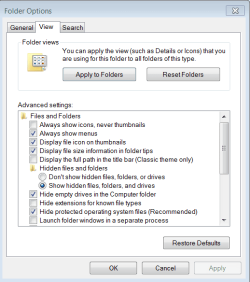
Surely if you go to Folder options and do this the folders will show:

Hidden folders.PNG
 

My Computer My Computer

Computer type
PC/Desktop
OS
Microsoft Windows 7 Home Premium 64-bit 7601 Multiprocessor Free Service Pack 1
CPU
Intel(R) Core(TM) i7-3770 CPU @ 3.40GHz
Motherboard
ASUSTeK COMPUTER INC. P8H77-M
Memory
8.00 GB
Graphics Card(s)
Intel(R) HD Graphics 4000
Sound Card
On Board
Monitor(s) Displays
Dell 24"
Screen Resolution
1920 x 1080
Hard Drives
(1) INTEL SSDSC2CT180A3 ATA Device (2) ST500DM002-1BD142 ATA Device (3) WDC WD3200AAKS-75L9A0 ATA Device (4) Generic- Compact Flash USB Device (5) Generic- MS/MS-Pro USB Device (6) Generic- SD/MMC USB Device (7) Generic- SM/xD-Picture USB
PSU
500w Corsair
Case
Cooler Master
Cooling
3 Fans
Keyboard
Logitech MK300
Mouse
Logitech WOM
Internet Speed
75Mb
Antivirus
Norton 360
Browser
Firefox, Opera, IE
By "I would like to keep them hidden," I want the item's status to remain hidden (such as Root:\User\AppData by default), but to be able to see them. As you noted, ticking "Show hidden files, folders, and drives" allows you to see hidden items in Explorer windows.

However, hidden items are not shown in cascading menus, even with this turned on. I am looking to see hidden items in cascading menus.

Thanks for checking in again, Mitchell.

- Polite Master
 

My Computer My Computer

Computer type
PC/Desktop
OS
-
Back
Top