Show us your hard drive performance

ciphernemo,

I have quite a bit of experience with RAID configurations. I'm a systems engineer for a living and have been building servers and running SAN/NAS devices (EMC and NetApp) with RAID 1, 5, 10, and 50 for a number of years. In fact, in the past month I have been troubleshooting a significant RAID performance issue on a VMWare ESXi 3.5 update 4 server on a HP Proliant DL360 Gen 5 server with 15,000 RPM 2.5" SAS Drives. Turned out to be an issue with the HP Smart Array P410i RAID controller and it's BBWC (battery backed write cache module)..or in this case...it's lack thereof. Thus, VMWare would not utilize any write caching whatsoever on the drive and instead held until the data was on the platters.

At home, prior to having SSD's and simply using the onboard RAID controllers on mobos (mostly software RAID), the benchmarks always returned higher numbers and straight up large file copies indeed verified in the increased performance....but the actual time differences noticed when booting my operating system or launching a game (games I tested at the time were BattleField 2, Half Life 2, and Doom 3) came back negligible. And as you noted, I was doing this with 1 single monitor at a smallish resolution of 1280x1024. Now, with file copies...the difference was very significant. You really saw it when you copied a 20GB virtual machine file from 1 folder to another for backup purposes. So, I've always maintained that I think for most PC users and even gaming enthusiasts, that RAID0 configs of the entire OS just hasn't been a wise choice. Especially in the last few years where drive capacities (of mechanical drives) seems to have increased rapidly, but with failure rates among manufacturers going up as well.

Again, I'm not criticizing, but looking for feedback on where things stand these days. Like I said, I wanted to see numbers. If your game load times went from 5 seconds to less than 1 second...that's significant.

Also, I'm certain you are aware but with some of the newer SSD's out there, like the Intel and OCZ...the stuttering problem with the original controllers has pretty much been solved. Unfortunately, the cost of these drives is quite a bit higher...naturally.

Again, sorry if it seemed like I was criticizing your choices. But to assume that I have no real-world experience with RAID and am otherwise misinformed, is simply not the case. And like I noted, you aren't running your OS's and such on the RAID 0 and that really helps in the event of a failure. Plus, you have unique monitor layouts that provide additional necessity for what you are running.

Thanks for taking the time and sharing your performance numbers.
 

My Computer My Computer

Computer Manufacturer/Model Number
Self-Built in July 2009
OS
Windows 7 Ultimate x64
CPU
Intel Q9550 2.83Ghz OC'd to 3.40Ghz
Motherboard
Gigabyte GA-EP45-UD3R rev. 1.1, F12 BIOS
Memory
8GB G.Skill PI DDR2-800, 4-4-4-12 timings
Graphics Card(s)
EVGA 1280MB Nvidia GeForce GTX570
Sound Card
Realtek ALC899A 8 channel onboard audio
Monitor(s) Displays
23" Acer x233H
Screen Resolution
1920x1080
Hard Drives
Intel X25-M 80GB Gen 2 SSD
Western Digital 1TB Caviar Black, 32MB cache. WD1001FALS
PSU
Corsair 620HX modular
Case
Antec P182
Cooling
stock
Keyboard
ABS M1 Mechanical
Mouse
Logitech G9 Laser Mouse
Internet Speed
15/2 cable modem
Other Info
Windows and Linux enthusiast. Logitech G35 Headset.
Intel X25-M
 

Attachments

  • HDD.jpg
    HDD.jpg
    30.7 KB · Views: 16

My Computer My Computer

OS
Windows 7 Ultimate x64
CPU
Intel Core i7-2600
Memory
16Gb DDR3-1600
Graphics Card(s)
ATI Radeon 7950
Sound Card
Creative X-Fi Extreme Gamer
Monitor(s) Displays
(2) 22" LG WideScreens
Screen Resolution
1920 x 1080
Hard Drives
(1) Samsung 840 Pro 256GB
(1) WD RE4 1Tb SATA3 Drive
PSU
Antec TruPower 750W
Internet Speed
50Mbps
G.Skill
 

Attachments

  • HT-Tune-Pro-Benchmark.jpg
    HT-Tune-Pro-Benchmark.jpg
    51.4 KB · Views: 15

My Computer My Computer

OS
Windows 7
CPU
Intel Q9400
Motherboard
Ausus P5Q Pro
Memory
4GB DDR2 800Mhz
Graphics Card(s)
Basic 1 GB
Hard Drives
64 GB G.Skill Falcon SSD
Also, I'm certain you are aware but with some of the newer SSD's out there, like the Intel and OCZ...the stuttering problem with the original controllers has pretty much been solved. Unfortunately, the cost of these drives is quite a bit higher...naturally.

I have OCZ Vertex drives, each with the latest 1.30 Firmware. These drives are supposed to take care of stuttering (along with the Summit and Vertex Turbo series). But I can tell you than SSD stuttering is still a problem if an OS is installed on SSDs or a RAID array of SSDs.

With my OS installed on a RAID array of WDC Black HDDs and my software installed on a RAID array of SSDs, the stuttering problem is gone. Even on the latest drives with big buffers and fast I/O processors, the stuttering is still there if you install an OS on them. People won't notice the stuttering on these new drives until they peak the throughput (read or write, but happens faster with writing). That gets peaked with some games still, using high resolutions and high-res textures.

So the problem will never be "solved" for SSDs, but the problem can always be pushed a little further out of range for most computing. The problem is when the drives' buffers are full and the drives need to clear their buffers to read or write. When this happens, the SATA bus pauses until the data is fully transferred. That will never go away until the next generation technology that either refines or replaces SATA.
 

My Computer My Computer

Computer Manufacturer/Model Number
custom build
OS
Windows 7 Ultimate 64-bit RTM
CPU
Intel Core i7 920 (D0), overclocked @ 3.6GHz (4.2GHz stable)
Motherboard
EVGA X58 A1
Memory
6GB of OCZ DDR3-1600 triple channel @ 7-7-7-20
Graphics Card(s)
EVGA GTX 295 Co-Op
Sound Card
Auzentech X Meridian 7.1
Monitor(s) Displays
(3x) Samsung 943BX, (1x) Samsung 2333HD, (1x) BenQ FP202W
Screen Resolution
3840x1024 + 1920x1080 + 1680x1050
Hard Drives
(4x) OCZ Vertex 30GB SATA2 SSDs on RAID 0 for 120GB total
(2x) Western Digital Black 1TB SATA2 on RAID 0
(1x) Lite-on DVD Burner and Blu-Ray player
PSU
PC Power & Cooling Super-quiet Silencer 910
Case
(modified) Tagan Black Pearl full tower, WCR edition
Cooling
Scythe Mugen2 CPU cooler, (5x) Scythe SFF21F, Zalaman cntrl.
Keyboard
Logitech G19
Mouse
Logitech G9x
Internet Speed
Comcast Cable, 22Mbps down and 5Mbps up
Other Info
Logitech Z-5500 Digital speaker system
I have OCZ Vertex drives, each with the latest 1.30 Firmware. These drives are supposed to take care of stuttering (along with the Summit and Vertex Turbo series). But I can tell you than SSD stuttering is still a problem if an OS is installed on SSDs or a RAID array of SSDs.
Well, that is truly a disappointment. I had been reading that the problems were all but gone with the new samsung controllers and what not. I think I would really want the SSD for the performance of the OS..but I certainly wouldn't want the associated stuttering. Guess it's still mechanical drives for me for the forseeable future.
 

My Computer My Computer

Computer Manufacturer/Model Number
Self-Built in July 2009
OS
Windows 7 Ultimate x64
CPU
Intel Q9550 2.83Ghz OC'd to 3.40Ghz
Motherboard
Gigabyte GA-EP45-UD3R rev. 1.1, F12 BIOS
Memory
8GB G.Skill PI DDR2-800, 4-4-4-12 timings
Graphics Card(s)
EVGA 1280MB Nvidia GeForce GTX570
Sound Card
Realtek ALC899A 8 channel onboard audio
Monitor(s) Displays
23" Acer x233H
Screen Resolution
1920x1080
Hard Drives
Intel X25-M 80GB Gen 2 SSD
Western Digital 1TB Caviar Black, 32MB cache. WD1001FALS
PSU
Corsair 620HX modular
Case
Antec P182
Cooling
stock
Keyboard
ABS M1 Mechanical
Mouse
Logitech G9 Laser Mouse
Internet Speed
15/2 cable modem
Other Info
Windows and Linux enthusiast. Logitech G35 Headset.
Well, that is truly a disappointment. I had been reading that the problems were all but gone with the new samsung controllers and what not. I think I would really want the SSD for the performance of the OS..but I certainly wouldn't want the associated stuttering. Guess it's still mechanical drives for me for the forseeable future.

Even though they end up being a lil more pricey I stuck with Intel since they have been getting excellent reviews all over the place.
 

My Computer My Computer

OS
Windows 7 Ultimate x64
CPU
Intel Core i7-2600
Memory
16Gb DDR3-1600
Graphics Card(s)
ATI Radeon 7950
Sound Card
Creative X-Fi Extreme Gamer
Monitor(s) Displays
(2) 22" LG WideScreens
Screen Resolution
1920 x 1080
Hard Drives
(1) Samsung 840 Pro 256GB
(1) WD RE4 1Tb SATA3 Drive
PSU
Antec TruPower 750W
Internet Speed
50Mbps
My drive benchmarks

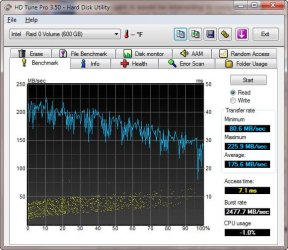
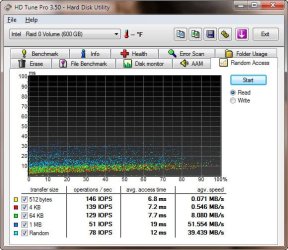
Here are my benchmarks. RAID 0 with two VelociRaptors. W7 RTM X64. Although the performance feels good, I am upset that the Windows rating only gives disk performance a 6.1. Everything else is 7.4 to 7.6. Any idea why it reports so low in the Windows Experience Index?

Am I concerned about nothing?:cry:
Charlie
 

Attachments

  • Benchmark_RAID0_W7RTM_X64.jpg
    Benchmark_RAID0_W7RTM_X64.jpg
    57.5 KB · Views: 14
  • RAID0_W7RTMX64_Random_access.jpg
    RAID0_W7RTMX64_Random_access.jpg
    60.3 KB · Views: 10

My Computer My Computer

OS
7 rtm
Well, that is truly a disappointment. I had been reading that the problems were all but gone with the new samsung controllers and what not. I think I would really want the SSD for the performance of the OS..but I certainly wouldn't want the associated stuttering. Guess it's still mechanical drives for me for the forseeable future.

It is unfortunate.

The Vertex line has Indilinx IDX110 processors (Arm processor design). These are far superior to the crappy JMicron controller chips as the IDX110 can perform exponentially more operations per second. The Samsung chip is supposed to be even better, but still doesn't compete with the IDX110 for raw I/O ops/second.

But the fundamental problem still exists with SSDs. People who install an O/S on these will find out soon enough about stuttering, regardless of what the manufacturers promise. All they can really do is increase the buffer size enough so that stuttering is so infrequent that it is almost unnoticeable.
 

My Computer My Computer

Computer Manufacturer/Model Number
custom build
OS
Windows 7 Ultimate 64-bit RTM
CPU
Intel Core i7 920 (D0), overclocked @ 3.6GHz (4.2GHz stable)
Motherboard
EVGA X58 A1
Memory
6GB of OCZ DDR3-1600 triple channel @ 7-7-7-20
Graphics Card(s)
EVGA GTX 295 Co-Op
Sound Card
Auzentech X Meridian 7.1
Monitor(s) Displays
(3x) Samsung 943BX, (1x) Samsung 2333HD, (1x) BenQ FP202W
Screen Resolution
3840x1024 + 1920x1080 + 1680x1050
Hard Drives
(4x) OCZ Vertex 30GB SATA2 SSDs on RAID 0 for 120GB total
(2x) Western Digital Black 1TB SATA2 on RAID 0
(1x) Lite-on DVD Burner and Blu-Ray player
PSU
PC Power & Cooling Super-quiet Silencer 910
Case
(modified) Tagan Black Pearl full tower, WCR edition
Cooling
Scythe Mugen2 CPU cooler, (5x) Scythe SFF21F, Zalaman cntrl.
Keyboard
Logitech G19
Mouse
Logitech G9x
Internet Speed
Comcast Cable, 22Mbps down and 5Mbps up
Other Info
Logitech Z-5500 Digital speaker system
Here are my benchmarks. RAID 0 with two VelociRaptors. W7 RTM X64. Although the performance feels good, I am upset that the Windows rating only gives disk performance a 6.1. Everything else is 7.4 to 7.6. Any idea why it reports so low in the Windows Experience Index?

Am I concerned about nothing?:cry:
Charlie

Charlie....Yes, you are concerned about nothing. From everything that I have read and seen, SATA drives seem to top out at 5.9....even some RAID 0 arrays have topped out at 5.9. The only people who are scoring higher than this are using solid state drives. And they certainly have their pros and cons...so it's not yet a no-brainer to switch for the average joe.
 

My Computer My Computer

Computer Manufacturer/Model Number
Self-Built in July 2009
OS
Windows 7 Ultimate x64
CPU
Intel Q9550 2.83Ghz OC'd to 3.40Ghz
Motherboard
Gigabyte GA-EP45-UD3R rev. 1.1, F12 BIOS
Memory
8GB G.Skill PI DDR2-800, 4-4-4-12 timings
Graphics Card(s)
EVGA 1280MB Nvidia GeForce GTX570
Sound Card
Realtek ALC899A 8 channel onboard audio
Monitor(s) Displays
23" Acer x233H
Screen Resolution
1920x1080
Hard Drives
Intel X25-M 80GB Gen 2 SSD
Western Digital 1TB Caviar Black, 32MB cache. WD1001FALS
PSU
Corsair 620HX modular
Case
Antec P182
Cooling
stock
Keyboard
ABS M1 Mechanical
Mouse
Logitech G9 Laser Mouse
Internet Speed
15/2 cable modem
Other Info
Windows and Linux enthusiast. Logitech G35 Headset.
Thank you pparks1. I specialize in worrying about nothing!

Do my numbers look good for a RAID 0?

Charlie

ps. It was easy to change the score anyway..... I gave myself a 7.9 :D
 

My Computer My Computer

OS
7 rtm
Here are my benchmarks. RAID 0 with two VelociRaptors. W7 RTM X64. Although the performance feels good, I am upset that the Windows rating only gives disk performance a 6.1. Everything else is 7.4 to 7.6. Any idea why it reports so low in the Windows Experience Index?

Am I concerned about nothing?:cry:
Charlie

I have been watching this and the "Show us your WEI" thread religiously.

Single SATA drives top out with a WEI score of 5.9. RAID configurations do not fare much better. The high WEI HDD scores are there for SSD performance comparisons.

You are in good company. SSD $$$/GB ratio still has a long way to drop before being competitive for all but the serious enthusiasts.
 

My Computer My Computer

OS
XP Pro & Vista Home Premium (x86); Windows Ultimate 7600 x64 Retail
Ciphernemo I have been running SSD since OCZ came out with them and they have came a long way I am running VERTEX 120GB X3 in raid 0 and with no problems OCZ stands behind there products and as far as FW the latest is 1.41B and with W7 and trim with GC it cleans the drive up nicely with out the long log off...
 

My Computer My Computer

Computer Manufacturer/Model Number
CUSTOM BUILT AMD PLATFORM 4.3GHz 24/7 STABLE
OS
WINDOWS 7 ULTIMATE X64
CPU
PHENOM II 1090T
Motherboard
MSI 890FXA-GD70
Memory
4 GHz DOMINATOR GT
Graphics Card(s)
2X5970 CROSSFIRE
Sound Card
CREATIVE X-fi TITANIUM FATAL1TY
Monitor(s) Displays
ACER G-24
Hard Drives
6 VERTEX2 RAID 0 EACH DRIVE 120GB
PSU
1600 WATT ULTRA
Case
THERMALTAKE XASER VI
Cooling
CUSTOM WATER COOLING
Other Info
LSI 9260-8i Raid Card
Ciphernemo I have been running SSD since OCZ came out with them and they have came a long way I am running VERTEX 120GB X3 in raid 0 and with no problems OCZ stands behind there products and as far as FW the latest is 1.41B and with W7 and trim with GC it cleans the drive up nicely with out the long log off...

They may have come a long way, but Ciphernemo told me earlier than even with the newest OCZ drives with the latest firmwares...that running an OS on an SSD still results in stuttering. Without solid performance across the board, I simply cannot invest in this technology yet. I'd rather get a little less performance and consistency, while having far more disk space for less cash with mechanical drives.
 

My Computer My Computer

Computer Manufacturer/Model Number
Self-Built in July 2009
OS
Windows 7 Ultimate x64
CPU
Intel Q9550 2.83Ghz OC'd to 3.40Ghz
Motherboard
Gigabyte GA-EP45-UD3R rev. 1.1, F12 BIOS
Memory
8GB G.Skill PI DDR2-800, 4-4-4-12 timings
Graphics Card(s)
EVGA 1280MB Nvidia GeForce GTX570
Sound Card
Realtek ALC899A 8 channel onboard audio
Monitor(s) Displays
23" Acer x233H
Screen Resolution
1920x1080
Hard Drives
Intel X25-M 80GB Gen 2 SSD
Western Digital 1TB Caviar Black, 32MB cache. WD1001FALS
PSU
Corsair 620HX modular
Case
Antec P182
Cooling
stock
Keyboard
ABS M1 Mechanical
Mouse
Logitech G9 Laser Mouse
Internet Speed
15/2 cable modem
Other Info
Windows and Linux enthusiast. Logitech G35 Headset.
For me the benefits of SSD's outweigh the inconvenience of having to do a secure erase on the SSD to bring it back to optimum performance every now and then ;-)

I'll probably keep my SSD at 60% capacity anyway so i don't expect stuttering to happen any time soon. Time will tell.
 

My Computer My Computer

OS
Windows 7
CPU
Intel Q9400
Motherboard
Ausus P5Q Pro
Memory
4GB DDR2 800Mhz
Graphics Card(s)
Basic 1 GB
Hard Drives
64 GB G.Skill Falcon SSD
In the above case, Simply clone the SSD to another SSD and your problems are solved. Then do that every year.
 

My Computer My Computer

OS
Windows 7
CPU
Intel Q9400
Motherboard
Ausus P5Q Pro
Memory
4GB DDR2 800Mhz
Graphics Card(s)
Basic 1 GB
Hard Drives
64 GB G.Skill Falcon SSD
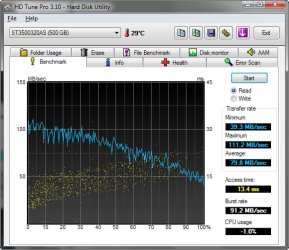
Here's my score :)

Windows 7 HDD, 7200rpm 32mb cache
 

Attachments

  • Zrzut 013.jpg
    Zrzut 013.jpg
    53.1 KB · Views: 32

My Computer My Computer

Computer Manufacturer/Model Number
My Own Build
OS
Windows 7 Ultimate x64
CPU
Intel Core 2 Duo E8200 @ 3.73 GHz
Motherboard
ASUS P5E
Memory
Kingston DDR2 HyperX PC2-8500 4x1GB CL5 @ 1117MHz
Graphics Card(s)
OC'ed Gainward GeForce 8800GT 512MB Golden Sample
Sound Card
SoundBlaster X-Fi Platinum Fatal1ty Edition
Monitor(s) Displays
LG Flatron W2252TQ 22"
Screen Resolution
1680x1050
Hard Drives
Seagate Barracuda 11 500GB & 750GB,
Total Capacity: 1.2TB
PSU
Corsair HX520W PSU
Case
AeroCool S9 Pro with 40cm Side Fan
Cooling
Scythe Mugen (Infinity) CPU Cooler, 4x Noctua NF-P12-1300
Keyboard
Logitech Media Keyboard 600
Mouse
Logitech MX1000
Internet Speed
ADSL Broadband - 1 Mbit Down / 256 Kbit Up
Other Info
Genius SW-HF5.1 5000 Speakers,
Roland RH-50 Headphones
Ciphernemo I have been running SSD since OCZ came out with them and they have came a long way I am running VERTEX 120GB X3 in raid 0 and with no problems OCZ stands behind there products and as far as FW the latest is 1.41B and with W7 and trim with GC it cleans the drive up nicely with out the long log off...

Sorry, that's wrong. The latest released version is still 1.30 for Vertex. Perhaps you're using one of the lower-end models with different firmware versioning? Or otherwise you're confusing beta versions of the firmware with stable, release versions. Since you stated 1.41B, that B in there leads me to believe it's beta.

http://www.ocztechnology.com/ssd_tools/OCZ_Vertex_Series_SSDs/

As for the OCZ products, I fully agree, I love my Vertex SSDs and stand behind them.

But all MLC SSD technology will still have stuttering issues when pushed to the limit. If you slap even an insanely larger 1GB cache on them, you'll still fill the buffer since the maximum burst rate on a SATA 2 channel is 3GB/sec. But you'll experience stuttering far and fewer in-between to the point where you may not notice it. Picture it as a bell curve that gets exponentially closer to 0 at each end, but never reaches it.

The problem is when you couple super fast transfers with an over-saturated bus. That's an SLC and MLC SSD problem. True, the majority of "stuttering" issues noticeable to users are those with MLC type SSDs when the write buffer is filled and the drive has to flush it slowly while erasing entire cells before writing data. Once this is correct (with larger cache, faster I/O processors, etc.), you still have the SATA bus saturation problem.

It will be nice when Windows 7 RTM or future service pack supports TRIM by default for SSDs (RC-1 does not).

SATA bus saturation is part of the reason why they'll soon be pushing a 6GB/sec SATA bus: SATA 3.0 Released Paving The Way To 6Gb/sec SATA Devices and http://arstechnica.com/hardware/new...d-released-6gbps-isochronous-sata-inbound.ars
 

My Computer My Computer

Computer Manufacturer/Model Number
custom build
OS
Windows 7 Ultimate 64-bit RTM
CPU
Intel Core i7 920 (D0), overclocked @ 3.6GHz (4.2GHz stable)
Motherboard
EVGA X58 A1
Memory
6GB of OCZ DDR3-1600 triple channel @ 7-7-7-20
Graphics Card(s)
EVGA GTX 295 Co-Op
Sound Card
Auzentech X Meridian 7.1
Monitor(s) Displays
(3x) Samsung 943BX, (1x) Samsung 2333HD, (1x) BenQ FP202W
Screen Resolution
3840x1024 + 1920x1080 + 1680x1050
Hard Drives
(4x) OCZ Vertex 30GB SATA2 SSDs on RAID 0 for 120GB total
(2x) Western Digital Black 1TB SATA2 on RAID 0
(1x) Lite-on DVD Burner and Blu-Ray player
PSU
PC Power & Cooling Super-quiet Silencer 910
Case
(modified) Tagan Black Pearl full tower, WCR edition
Cooling
Scythe Mugen2 CPU cooler, (5x) Scythe SFF21F, Zalaman cntrl.
Keyboard
Logitech G19
Mouse
Logitech G9x
Internet Speed
Comcast Cable, 22Mbps down and 5Mbps up
Other Info
Logitech Z-5500 Digital speaker system
SORRY I THINK YOU ARE WRONG!
Discussion FW1.40 available for download here VERTEX ONLY...I am already testing 1.41b which has less aggressive GC - OCZ Forum
This is no bata version it is the NEW FW. Buy the way I am running 4x 120GB VERTEX'S ON 1 RIG AND 3X TURBO 120GB ON THE OTHER RIG. I don't know what you consider low end? As far as stutter I have not had that problem since core series. Tony has worked hard to get us low end guys running with out that problem.
It must be your set-up if you have that problem. Do some research on that forum and I am sure us low end guys can get you up and running with out strutting.
 

My Computer My Computer

Computer Manufacturer/Model Number
CUSTOM BUILT AMD PLATFORM 4.3GHz 24/7 STABLE
OS
WINDOWS 7 ULTIMATE X64
CPU
PHENOM II 1090T
Motherboard
MSI 890FXA-GD70
Memory
4 GHz DOMINATOR GT
Graphics Card(s)
2X5970 CROSSFIRE
Sound Card
CREATIVE X-fi TITANIUM FATAL1TY
Monitor(s) Displays
ACER G-24
Hard Drives
6 VERTEX2 RAID 0 EACH DRIVE 120GB
PSU
1600 WATT ULTRA
Case
THERMALTAKE XASER VI
Cooling
CUSTOM WATER COOLING
Other Info
LSI 9260-8i Raid Card
SORRY I THINK YOU ARE WRONG!
Discussion FW1.40 available for download here VERTEX ONLY...I am already testing 1.41b which has less aggressive GC - OCZ Forum
This is no bata version it is the NEW FW. Buy the way I am running 4x 120GB VERTEX'S ON 1 RIG AND 3X TURBO 120GB ON THE OTHER RIG. I don't know what you consider low end?

Please don't fight with me, you are only going to end up losing. Didn't you read what you linked?

Here's a quote from "Tony" who posted the 1.40. The 1.30 version is the only one officially supported by OCZ. The 1.40 is released as a test only, but will become the latest. So this is more of a "release candidate" than a "beta":

Tony said:
The flasher is just like 1.30 except it is just 1 file now. VTX30_14.exe means 30GB Vertex FW 1.4.

When flashed the FW on your drives will show as BETA...this is because we may have to tweak things still, but its solid enough right now for you to flash and test.

UPDATE: Guys you need to make your minds up if you want to test this or not and stay on it if you do...we are seeing quite a few of you now back flashing and killing drives thru badflashing....if you update to 1.40/1.41 stay on 1.40/1.41 and wait for the next beta or final.

As far as stutter I have not had that problem since core series. Tony has worked hard to get us low end guys running with out that problem.
It must be your set-up if you have that problem. Do some research on that forum and I am sure us low end guys can get you up and running with out strutting.

You just might not be stressing your system as much as I do. Just because you don't experience it doesn't mean your system is perfect and everyone else has issues.
 

My Computer My Computer

Computer Manufacturer/Model Number
custom build
OS
Windows 7 Ultimate 64-bit RTM
CPU
Intel Core i7 920 (D0), overclocked @ 3.6GHz (4.2GHz stable)
Motherboard
EVGA X58 A1
Memory
6GB of OCZ DDR3-1600 triple channel @ 7-7-7-20
Graphics Card(s)
EVGA GTX 295 Co-Op
Sound Card
Auzentech X Meridian 7.1
Monitor(s) Displays
(3x) Samsung 943BX, (1x) Samsung 2333HD, (1x) BenQ FP202W
Screen Resolution
3840x1024 + 1920x1080 + 1680x1050
Hard Drives
(4x) OCZ Vertex 30GB SATA2 SSDs on RAID 0 for 120GB total
(2x) Western Digital Black 1TB SATA2 on RAID 0
(1x) Lite-on DVD Burner and Blu-Ray player
PSU
PC Power & Cooling Super-quiet Silencer 910
Case
(modified) Tagan Black Pearl full tower, WCR edition
Cooling
Scythe Mugen2 CPU cooler, (5x) Scythe SFF21F, Zalaman cntrl.
Keyboard
Logitech G19
Mouse
Logitech G9x
Internet Speed
Comcast Cable, 22Mbps down and 5Mbps up
Other Info
Logitech Z-5500 Digital speaker system
Well, this is a waste of my time trying to change your thinking and I don't wont to.
As stress systems go's I do everyday lots of benchmarks and test for my company and had very good results from FW 1.41BETA it is getting faster all the time.
But all this arguing is not helping know one. You run what makes you happy!!
BTW I wound recommend FW 1.41B it is faster in a raid array than 1.30 because of GC it takes a lot less time. But you can log off for 19-24 hours to clean your nands or the 1.41B that less Min. to get your drive back to 95% of it's virgin state.
HAVE A NICE DAY!
 

My Computer My Computer

Computer Manufacturer/Model Number
CUSTOM BUILT AMD PLATFORM 4.3GHz 24/7 STABLE
OS
WINDOWS 7 ULTIMATE X64
CPU
PHENOM II 1090T
Motherboard
MSI 890FXA-GD70
Memory
4 GHz DOMINATOR GT
Graphics Card(s)
2X5970 CROSSFIRE
Sound Card
CREATIVE X-fi TITANIUM FATAL1TY
Monitor(s) Displays
ACER G-24
Hard Drives
6 VERTEX2 RAID 0 EACH DRIVE 120GB
PSU
1600 WATT ULTRA
Case
THERMALTAKE XASER VI
Cooling
CUSTOM WATER COOLING
Other Info
LSI 9260-8i Raid Card
Back
Top